
1. تعارف
This manual provides essential information for setting up, operating, maintaining, and troubleshooting your VIBOX IX-556 PC Gamer. Please read these instructions carefully before using your new computer to ensure optimal performance and longevity.

Image 1.1: The VIBOX IX-556 PC Gamer, showcasing its white chassis and illuminated internal components.
2. سیٹ اپ
2.1 پیک کھولنا
Carefully remove the PC from its packaging. Inspect for any visible damage. Retain all packaging materials for future transport or warranty claims.
2.2 کنیکٹنگ پیری فیرلز
Connect your monitor, keyboard, mouse, and other peripherals to the appropriate ports on the rear and front of the PC. Ensure all connections are secure.
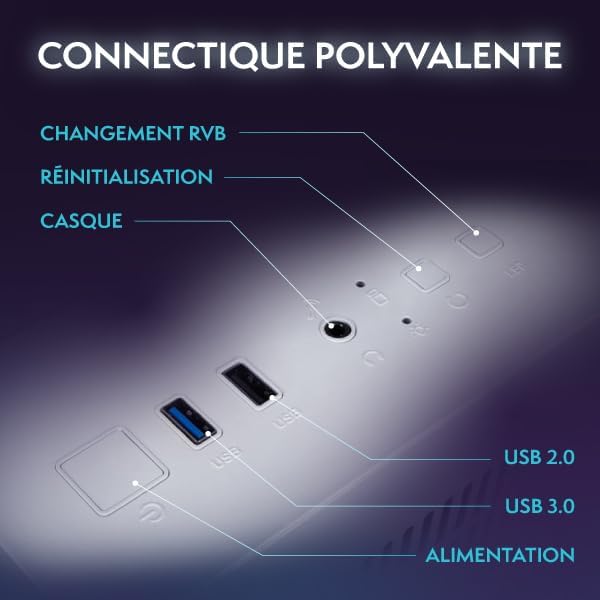
Image 2.1: Front panel connectivity, including USB 2.0, USB 3.0, headphone jack, reset button, and RGB change button.
- مانیٹر: Use an HDMI or DisplayPort cable to connect your monitor to the graphics card ports (usually located lower on the rear panel).
- کی بورڈ اور ماؤس: کسی بھی دستیاب USB پورٹس سے جڑیں۔
- طاقت: پاور کیبل کو پی سی کے پاور سپلائی یونٹ (PSU) سے اور پھر وال آؤٹ لیٹ سے جوڑیں۔
- نیٹ ورک: For wired internet, connect an Ethernet cable to the LAN port. For wireless, the included Wi-Fi adapter provides connectivity.
2.3 ابتدائی پاور آن
Press the power button on the front of the PC. The system will boot up, and you will be guided through the Windows 11 Home initial setup process.
3. آپریٹنگ ہدایات
3.1 پاور آن/آف
- پاور آن کرنے کے لیے: پاور بٹن کو ایک بار دبائیں۔
- بند کرنے کے لیے: ونڈوز میں اسٹارٹ بٹن پر کلک کریں، پھر پاور> شٹ ڈاؤن کو منتخب کریں۔
- دوبارہ شروع کرنے کے لیے: ونڈوز میں اسٹارٹ بٹن پر کلک کریں، پھر پاور> ری اسٹارٹ کو منتخب کریں۔
3.2 Windows 11 Home Features
Your VIBOX IX-556 comes pre-installed with Windows 11 Home, optimized for gaming. Key features include:
- ڈائریکٹ اسٹوریج: For faster game loading times.
- آٹو HDR: Enhances visuals for supported games.
- ایکس بکس گیم پاس انٹیگریشن: Seamless access to a library of games.
- آپٹمائزڈ CPU کارکردگی: Enhanced processing for demanding applications.
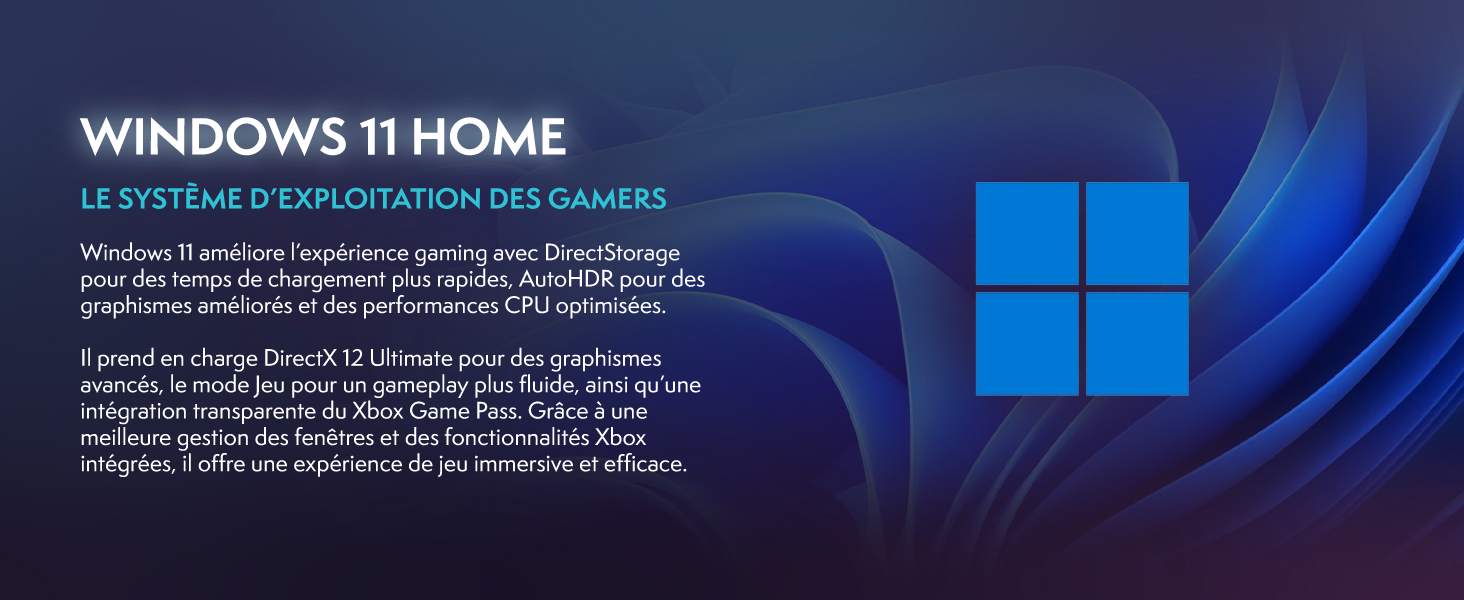
Image 3.1: Windows 11 Home, highlighting features like DirectStorage and Auto HDR for an enhanced gaming experience.
3.3 گیمنگ پرفارمنس
The VIBOX IX-556 is equipped with high-performance components for a fluid gaming experience:
- AMD Ryzen 7 9800X3D Processor: Provides exceptional gaming performance and low latency.
- AMD Radeon RX 9070 XT Graphics Card: Delivers stunning visuals and supports advanced features like Raytracing.
- 32GB DDR5 RAM: Ensures smooth multitasking and efficient system performance.

Image 3.2: Performance comparison chart demonstrating FPS improvements with AMD HYPR-RX and Fluid Motion Frames 2.1 in various games.

Image 3.3: Visual comparison illustrating the enhanced lighting and reflections when Raytracing is enabled.
4 دیکھ بھال
4.1 صفائی
باقاعدگی سے صفائی کارکردگی کو برقرار رکھنے اور آپ کے کمپیوٹر کی عمر کو بڑھانے میں مدد کرتی ہے۔
- بیرونی: ایک نرم استعمال کریں، ڈیamp بیرونی سطحوں کو صاف کرنے کے لیے کپڑا۔ سخت کیمیکلز سے پرہیز کریں۔
- دھول: Periodically use compressed air to clear dust from fan vents and internal components. Ensure the PC is powered off and unplugged before cleaning.
4.2 سافٹ ویئر اپ ڈیٹس
Keep your operating system and drivers updated to ensure stability and optimal performance.
- ونڈوز اپ ڈیٹس: Windows 11 will automatically check for and install updates. You can manually check via Settings > Windows Update.
- ڈرائیور اپڈیٹس: Regularly check the AMD website for the latest graphics card drivers. Motherboard and other component drivers can be found on the respective manufacturer's webسائٹس
4.3 کولنگ سسٹم
The VIBOX IX-556 features water cooling and multiple RGB fans for efficient thermal management.

Image 4.1: The VIBOX AIO 120mm liquid cooler, designed for compact and efficient CPU temperature management.

Image 4.2: Inverse airflow diagram, showing how the system optimizes air circulation to reduce heat accumulation.

Image 4.3: VIBOX Hex RGB Infinity 120mm fans, offering multiple colors and RGB modes for customization.
Ensure proper airflow by keeping the PC in a well-ventilated area. Avoid blocking air vents. The water cooling system is maintenance-free for typical use, but monitor temperatures using system monitoring software if you notice performance degradation.
5 خرابیوں کا سراغ لگانا
5.1 عام مسائل
- کوئی ڈسپلے نہیں: Ensure the monitor is connected to the graphics card (not the motherboard) and is powered on. Try a different cable or monitor if possible.
- PC Not Powering On: Check all power connections, including the wall outlet and the PSU cable. Ensure the PSU switch is in the 'On' position.
- سسٹم منجمد/کریش: Ensure all drivers are up to date. Check system temperatures. If issues persist, consider a clean installation of Windows or contact support.
- سست کارکردگی: Check for background applications consuming resources. Ensure sufficient free space on the SSD. Run a malware scan.
5.2 سپورٹ سے رابطہ کرنا
If you encounter issues that cannot be resolved using the troubleshooting steps above, please contact VIBOX Gaming customer support. Provide your product model (IX-556) and a detailed description of the problem.
6. وضاحتیں

Image 6.1: Dimensions of the VIBOX IX-556 PC case: 42cm (height) x 28cm (width) x 43.5cm (depth).
| جزو | تفصیل |
|---|---|
| ماڈل کا نام | VIBOX IX-556 (VTX-7 White) |
| پروسیسر | AMD Ryzen 7 9800X3D (8 Cores, up to 5.2 GHz Max Boost) |
| گرافکس کارڈ | AMD Radeon RX 9070 XT (16GB GDDR6) |
| رام | 32GB DDR5 5600MHz (Dual Channel) |
| ذخیرہ | 1TB SSD |
| آپریٹنگ سسٹم | ونڈوز 11 ہوم |
| کنیکٹوٹی | Wi-Fi (300 Mbps adapter included), Ethernet, USB, HDMI, DisplayPort |
| کولنگ | Water Cooling, RGB Lighting |
| کیس کی قسم | Tower (Tempered Glass 3-Panel Design) |
| طول و عرض (L x W x H) | 42 x 28 x 43.5 سینٹی میٹر |
| ویڈیو آؤٹ پٹ | HDMI, DisplayPort (Max Resolution: 3840x2160) |
| USB پورٹس | Multiple (USB 2.0, USB 3.0) |
| پاور پلگ کی قسم | Type C/EF (2-pin European/Hybrid FR-DE) |
| ہم آہنگ آلات | Headset, Keyboard, Printer, Monitor, Mouse |
| مخصوص استعمال | گیمنگ، فوٹو ایڈیٹنگ، ویڈیو ایڈیٹنگ |
7. وارنٹی اور سپورٹ
7.1 وارنٹی کی معلومات
Your VIBOX IX-556 PC Gamer comes with a comprehensive warranty:
- حصے: 2 سال
- محنت: زندگی بھر
وارنٹی کے دعووں کے لیے براہ کرم اپنی خریداری کا ثبوت اپنے پاس رکھیں۔
7.2 کسٹمر سپورٹ
For technical assistance, warranty service, or any questions regarding your VIBOX IX-556 PC Gamer, please contact VIBOX Gaming customer support. Refer to the contact information provided with your purchase or visit the official VIBOX Gaming webسائٹ