
1. تعارف
This manual provides detailed instructions for the setup, operation, and maintenance of your SMSL AS400 Power Ampلائفئر ڈی اے سی ہیڈ فون۔ Amp. Please read this manual thoroughly before using the product to ensure proper function and longevity.
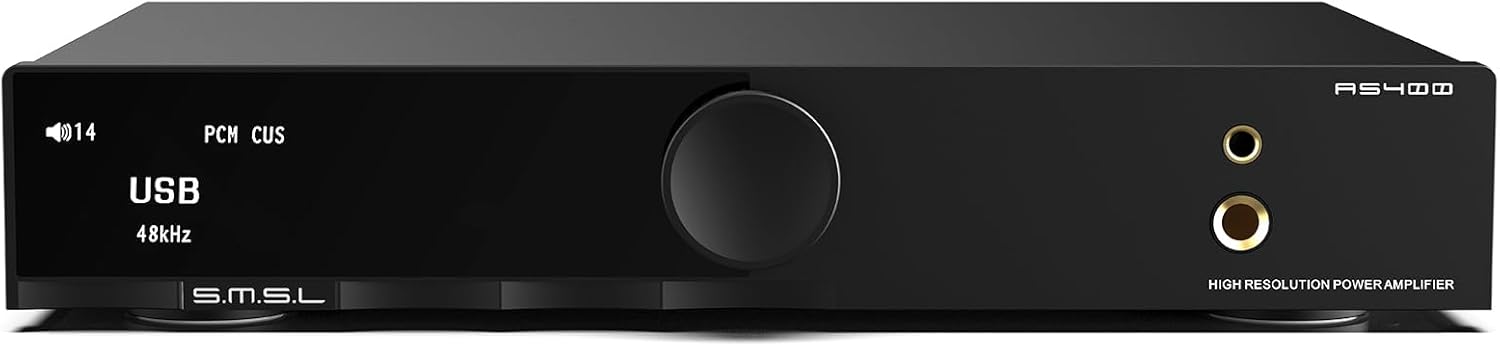
شکل 1: سامنے view of the SMSL AS400 unit.
2. مصنوعات کی خصوصیات
- طاقتور آؤٹ پٹ: Integrates Cirrus Logic CS43131 DAC, Infineon MA5332MS digital amplifier, and XMOS XU-316. Supports PCM up to 32-bit/768kHz and DSD up to DSD256. Delivers 165W x 165W output (4Ω) with 0.003% THD+N distortion.
- 2.1 Subwoofer System: Features a dedicated subwoofer output for easy integration into a 2.1 channel audio system, providing enhanced bass.
- HDMI ARC TV Connection: Equipped with an HDMI (ARC) port for direct connection to compatible TVs, enabling synchronized audio and video.
- ایم ایم فونو پریampزندہ: Built-in low-noise MM phono stage for turntables, ensuring high-quality vinyl playback.
- آڈیو حسب ضرورت: Offers 8 EQ settings (Direct, Tone, SDB, Bass, Super Bass, Rock, Soft, Clear) and 5 digital filters (Fast, Phase Compensation, Slow and Low Latency, Slow and Phase Compensation, Non-Oversampلنگ)۔
- جامع رابطہ: Multiple input options including HDMI (ARC), Bluetooth, USB, Optical, Coaxial, Phono, and I2S. Features 4.4mm and 6.35mm headphone outputs.

شکل 2: ختمview of SMSL AS400 key features.
3. پیکیج کے مشمولات
تصدیق کریں کہ تمام اشیاء پیکیج میں موجود ہیں:
- SMSL AS400 Unit
- AC پاور کیبل۔
- USB کیبل
- HDMI کیبل
- بلوٹوتھ اینٹینا
- ریموٹ کنٹرول
- صارف دستی (یہ دستاویز)
- سروس کارڈ
4. پروڈکٹ ختمview
4.1 فرنٹ پینل
شکل 3: فرنٹ پینل لے آؤٹ۔
- ڈسپلے سکرین: موجودہ ان پٹ دکھاتا ہے، sample rate, volume, and menu options.
- فنکشن نوب: Press to enter the menu, hold to exit the menu, rotate to change values or volume.
- 4.4 ملی میٹر ہیڈ فون جیک: متوازن ہیڈ فون آؤٹ پٹ۔
- 6.35 ملی میٹر ہیڈ فون آؤٹ پٹ: Standard headphone output.
4.2 پیچھے والا پینل

Figure 4: Rear panel layout with input/output labels.
- PHONO Input (L/R): For connecting turntables with MM cartridges. Includes a grounding terminal.
- AUX Input (L/R): Standard analog RCA input.
- SW OUT (Subwoofer Output): ایک فعال سب ووفر کو جوڑنے کے لیے۔
- کواکسیل ان پٹ: ڈیجیٹل سماکشی آڈیو ان پٹ۔
- HDMI (ARC) ان پٹ: For connecting to a TV's Audio Return Channel port.
- USB ان پٹ: For connecting to a computer or other USB audio source.
- آپٹیکل ان پٹ: ڈیجیٹل آپٹیکل آڈیو ان پٹ۔
- بلوٹوتھ اینٹینا: For wireless Bluetooth audio reception.
- SPEAKERS OUT (L/R): Speaker terminals for passive speakers.
- AC پاور ان پٹ: پاور کیبل کو جوڑنے کے لیے۔
5. سیٹ اپ
5.1 مربوط اسپیکرز
- Ensure the AS400 is powered off.
- اپنے غیر فعال اسپیکر کو سے مربوط کریں۔ مقررین باہر terminals on the rear panel. Ensure correct polarity (+ to + and - to -) for both left and right channels.
5.2 مربوط ہیڈ فون
- Connect your headphones to either the 4.4 ملی میٹر ہیڈ فون جیک یا 6.35 ملی میٹر ہیڈ فون آؤٹ پٹ سامنے والے پینل پر
5.3 آڈیو ذرائع کو جوڑنا
Connect your desired audio sources to the corresponding input ports on the rear panel:
- USB: Connect to a computer using the provided USB cable.
- بلوٹوتھ: Attach the Bluetooth antenna. Select Bluetooth input on the device and pair with your source device.
- نظری/ سماکشی: Connect digital audio sources like CD players or media streamers.
- RCA (AUX): Connect analog audio sources like CD players or other audio devices.
- فونو: Connect a turntable with an MM cartridge. Ensure the turntable's ground wire is connected to the AS400's grounding terminal.
- ایچ ڈی ایم آئی (اے آر سی): Connect to your TV's HDMI ARC port using a compatible HDMI cable.
5.3.1 HDMI ARC Connection Details

Figure 5: HDMI ARC connection setup.
To connect an ARC compatible TV:
- Connect an HDMI cable (19-pin, with HDMI logo indicating ARC compatibility) from your TV's HDMI (ARC) port to the AS400's HDMI (ARC) input.
- Ensure the TV's HDMI IN port is labeled "ARC" or "eARC/ARC". If the port does not support ARC, this function cannot be used.
- You may need to adjust TV settings for ARC. Refer to your TV's user manual.
- This product supports digital audio input via HDMI ARC, not video input.
- If your TV does not support ARC, connect the TV's audio output (Optical, Coaxial, or AUX) to the corresponding input on the AS400.
- Due to ARC input protocol, the AS400's volume cannot be adjusted by the TV remote, nor does it support synchronous power on/off.
- When using HDMI ARC, confirm the TV's audio output format is PCM.
Video 1: Demonstration of HDMI ARC connection to a TV.
6. آپریٹنگ ہدایات
6.1 بنیادی آپریشن
- پاور آن/آف: Use the power switch on the rear panel or the remote control.
- حجم کنٹرول: Rotate the function knob on the front panel or use the volume buttons on the remote.
- ان پٹ انتخاب: Press the function knob to enter the menu, then rotate to select 'Input'. Alternatively, use the input selection buttons on the remote.
6.2 مینو نیویگیشن
The function knob is used for menu navigation:
- دبائیں: Enter the menu or confirm a selection.
- پکڑو: موجودہ مینو سے باہر نکلیں۔
- گھمائیں: Scroll through menu options or adjust values.
6.3 EQ and Filter Settings

Figure 6: Menu options for EQ and tone control.
Access the 'SETUP MENU' by pressing the function knob. Navigate to 'EQ', 'Treble', 'Bass', or 'Filter' to customize your audio experience:
- EQ موڈز: Select from Direct, Tone, SDB, Bass, Super Bass, Rock, Soft, and Clear.
- فلٹرز: Choose from Fast, Phase Compensation, Slow and Low Latency, Slow and Phase Compensation, and Non-Oversampجنس
6.4 MQA Playback

Figure 7: MQA and MQA-CD support.
The AS400 supports full MQA and MQA-CD decoding, allowing for native playback of MQA streams/files and MQA-CDs. Connect your MQA-enabled source via USB, Optical, or Coaxial inputs for high-resolution audio.
ویڈیو 2: ختمview of the SMSL AS400's features and functionality.
7. وضاحتیں

شکل 8: مصنوعات کی تفصیلی وضاحتیں۔
| فیچر | تفصیلات |
|---|---|
| ان پٹ | RCA / BT / USB / Optical / Coaxial / Phono / I2S |
| THD+N | 0.003% |
| Output Power (RMS) STEREO | 4Ω: 165W x 2, 8Ω: 85W x 2 |
| Input Sensitivity/Input Impedance | 280mV/22kΩ |
| USB مطابقت | ونڈوز 7/8/8.1/10/11، میک او ایس ایکس، لینکس |
| بٹ کی گہرائی | USB: 1bit, 16-32bit; Optical/Coaxial: 1bit, 16-32bit |
| ایس این آر | 107dB |
| چینل کی علیحدگی | 98dB |
| USB ٹرانسمیشن | غیر مطابقت پذیر منتقلی۔ |
| بجلی کی کھپت | 40W (عام حجم) |
| ایم کیو اے ڈیکوڈر | USB / آپٹیکل / سماکشی |
| MQA-CD ڈیکوڈر | آپٹیکل / سماکشیی |
| Sampلنگ ریٹ | PCM: 44.1-768kHz (USB), 44.1-192kHz (Optical/Coaxial); DSD: 2.8224-11.2896MHz (USB), DSD64(DoP) (Optical/Coaxial) |
| سائز (WxHxD) | 210.4 x 46 x 254 ملی میٹر |
| شے کا وزن | 1.568 کلوگرام / 3.46 پونڈ |
| مواد | ایلومینیم کھوٹ |
| والیومtage | 220 وولٹ |
8 خرابیوں کا سراغ لگانا
8.1 HDMI ARC Function
- Q1: The ARC input is connected to the TV, but the TV does not recognize the device or there is no sound.
A1: The ARC input needs to be connected to the HDMI ARC interface of the TV. The output mode of the TV should be set to "ARC/ARC+TV speakers". - Q2: Can the TV remote control adjust the volume of this product?
A2: سہولت مہیا نہیں. - Q3: Will the product synchronize on/off after turning on/off the TV?
A3: Not supported. When using HDMI ARC input, this product needs to be restarted when the TV is turned off and then turned on again. - Q4: What should I do if there is no sound after connecting the TV to the product?
A4: When using this product, please confirm that the audio output format of the TV is PCM. - Q5: Does it support connecting to a TV set-top box?
A5: سہولت مہیا نہیں.
8.2 عمومی ٹربل شوٹنگ
- کوئی طاقت نہیں: Ensure the AC power cable is securely connected to both the AS400 and a working power outlet. Check the power switch on the rear panel.
- No Sound from Speakers/Headphones: Verify the correct input source is selected. Check all cable connections. Ensure volume is not muted or set too low. Confirm speakers/headphones are properly connected.
- مسخ شدہ آواز: Check cable connections for looseness or damage. Ensure the audio source is not overdriving the input. Try a different audio source or cable.
- بلوٹوتھ کنکشن کے مسائل: Ensure the Bluetooth antenna is attached. Confirm the AS400 is in Bluetooth pairing mode and your device's Bluetooth is enabled and searching. Try unpairing and re-pairing the device.
9 دیکھ بھال
- صفائی: Use a soft, dry cloth to clean the unit. Avoid using liquid cleaners or solvents.
- جگہ کا تعین: Place the unit on a stable, level surface with adequate ventilation. Avoid direct sunlight, heat sources, and excessive moisture.
- طاقت: اگر یونٹ طویل مدت تک استعمال نہیں کیا جائے گا تو پاور کیبل کو وال آؤٹ لیٹ سے منقطع کریں۔
10. وارنٹی اور سپورٹ
For warranty information and technical support, please refer to the service card included in your package or contact the manufacturer directly. Keep your purchase receipt as proof of purchase for warranty claims.