
1. تعارف
This manual provides comprehensive instructions for the safe and effective use of the AMPBANK H128 Handheld Thermal Camera. The H128 is designed for precise temperature measurement and thermal imaging, suitable for various applications including electrical inspections, HVAC diagnostics, building energy audits, and automotive maintenance. Please read this manual thoroughly before operating the device and retain it for future reference.

چترا 1.1: The AMPBANK H128 Handheld Thermal Camera, showcasing its ergonomic design and integrated display.
2. حفاظتی معلومات
آلے کو چوٹ اور نقصان سے بچنے کے لیے ہمیشہ درج ذیل حفاظتی احتیاطی تدابیر پر عمل کریں۔
- Do not point the camera directly at extremely high-intensity energy sources, such as the sun or lasers, as this may damage the infrared detector.
- Avoid dropping the device or subjecting it to severe impact, despite its robust design.
- Do not immerse the device in water or other liquids. While it has an IP65 rating for dust and water jet protection, it is not designed for submersion.
- Use only the specified charging cable (USB-C) and power adapter to charge the device.
- Do not attempt to disassemble or modify the camera. Repairs should only be performed by authorized service personnel.
- Keep the lens clean and free from dust and debris. Use a soft, lint-free cloth for cleaning.
- آلہ کو مخصوص ماحولیاتی حالات (درجہ حرارت اور نمی) کے اندر چلائیں۔
3. پروڈکٹ ختمview
3.1. اجزاء
دی AMPBANK H128 thermal camera includes the following main components:
- اورکت لینس: تھرمل تابکاری کو پکڑتا ہے۔
- ڈسپلے سکرین: Shows thermal images, temperature readings, and menu options.
- کنٹرول بٹن: For navigation and selection (OK, Up, Down, Return/Power).
- ٹرگر بٹن: To capture images.
- USB-C پورٹ: چارج کرنے اور ڈیٹا کی منتقلی کے لیے۔
- تپائی پہاڑ: Standard 1/4-inch thread for stable positioning.
3.2. کلیدی خصوصیات
The H128 thermal camera offers a range of advanced features for efficient and accurate thermal inspections:
- Enhanced Clarity with TISR Resolution: The camera utilizes TISR (Thermal Image Super Resolution) technology to achieve an effective display resolution of 240x240 pixels from a 128x128 infrared sensor, providing clearer thermal images.
- توسیع شدہ 24 گھنٹے بیٹری لائف: Equipped with a built-in 2900mAh rechargeable battery, the H128 provides up to 24 hours of continuous operation, minimizing downtime during extended inspections.
- Precise Temperature Measurement: The device offers high accuracy with a temperature resolution of 0.1°C and readings within ±3%, covering a wide temperature range from -4°F to 842°F (-20°C to 450°C). Users can adjust emissivity for various materials to improve accuracy.
- Temperature Alarm for Anomaly Detection: A built-in alarm system quickly identifies abnormal heat sources, automatically tracking and displaying maximum, minimum, and center temperatures on the screen.
- پائیدار اور مضبوط ڈیزائن: The H128 is built to withstand demanding environments, featuring a 6.56-foot (2-meter) drop protection and an IP65 ingress protection rating against dust and water jets.
- اعلی فریم کی شرح: A 25Hz frame rate ensures smooth, real-time thermal imagery, crucial for dynamic inspections.
- Multiple Thermal Palettes: Choose from 5 different color palettes (Iron Red, Black Hot, Rainbow, White Hot, Red Hot) to best visualize temperature differences for specific applications.

Figure 3.1: Comparison of thermal image clarity with and without TISR technology, demonstrating the enhanced 240x240 resolution.

Figure 3.2: Illustration of the H128's long-lasting 24-hour battery life and Type-C charging port.

Figure 3.3: The H128 in use, demonstrating its capability for accurate temperature measurement in an electrical panel.

Figure 3.4: The H128 display highlighting hot, center, and cold spots with an integrated high/low temperature alarm.
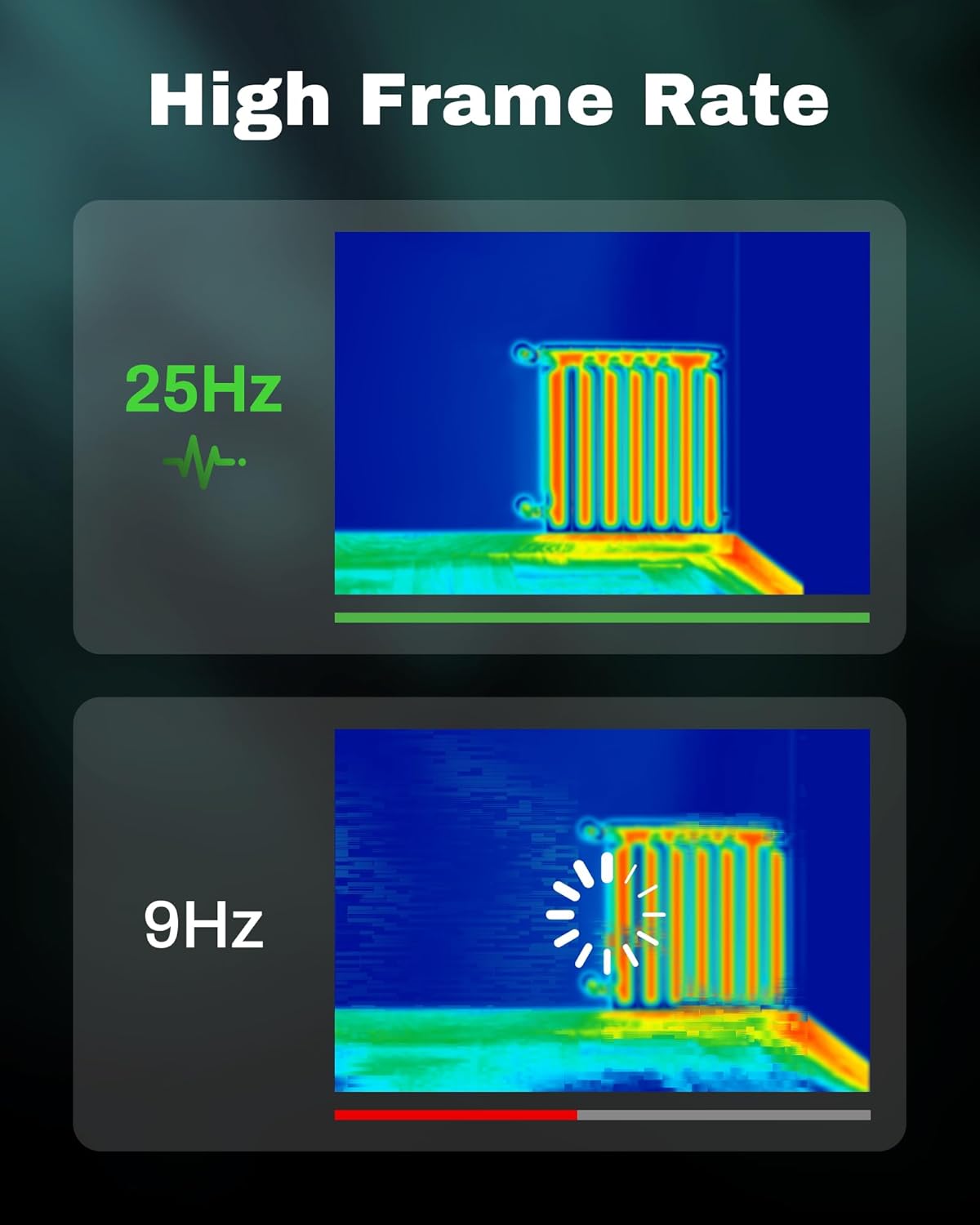
Figure 3.5: Visual comparison of thermal image fluidity at 25Hz versus 9Hz frame rates.

Figure 3.6: Display of the five available thermal color palettes for varied visualization of heat signatures.
4. سیٹ اپ
4.1 پیک کھولنا
احتیاط سے پیکیجنگ سے تمام اشیاء کو ہٹا دیں. باکس پر مشتمل ہونا چاہئے:
- AMPBANK H128 Thermal Imaging Camera
- USB-C کیبل
Inspect the camera for any signs of damage. If any components are missing or damaged, contact customer support immediately.
4.2. بیٹری چارج کرنا
Before first use, fully charge the camera's built-in battery.
- Connect the supplied USB-C cable to the USB-C port on the top of the camera.
- USB-C کیبل کے دوسرے سرے کو ایک ہم آہنگ USB پاور اڈاپٹر (شامل نہیں) یا کمپیوٹر کے USB پورٹ سے مربوط کریں۔
- The charging indicator on the screen will show the charging status. A full charge typically takes several hours.
- مکمل چارج ہونے کے بعد، کیبل کو منقطع کریں۔
4.3. ابتدائی پاور آن اور بنیادی سیٹنگز
- پاور آن: Press and hold the power button (often integrated with the Return button) for approximately 8 seconds until the screen illuminates.
- زبان کا انتخاب: Upon first power-on, you may be prompted to select your preferred language. Use the Up/Down buttons to navigate and the OK button to confirm.
- تاریخ اور وقت: درست وقت کے لیے صحیح تاریخ اور وقت مقرر کریں۔amping of captured images. Navigate to the settings menu using the OK button, then find the Date/Time option.
5. آپریشن
5.1. بنیادی آپریشن
- پاور آن/آف: Press and hold the power button for 8 seconds to turn on. Press and release the power button to turn off or enter sleep mode.
- نیویگیٹنگ مینو: استعمال کریں۔ OK button to enter the menu. Use the Up اور نیچے arrow buttons to scroll through options. Press OK to select an option. Press the واپسی button to exit a menu or go back.
- تصاویر کیپچر کرنا: Aim the camera at the target. Press the trigger button (located on the handle) to capture a thermal image. Images are saved internally.
5.2. Measurement Modes and Settings
- Temperature Spot Measurement: The H128 automatically displays the maximum, minimum, and center temperatures on the screen.
- اخراج ایڈجسٹمنٹ: For accurate temperature readings, adjust the emissivity setting based on the material being inspected. Access this setting through the menu. Common emissivity values can be found in reference tables.
- فاصلے کی ترتیب: Inputting the approximate distance to the target can further refine temperature accuracy.
- Thermal Palettes: Change the color scheme of the thermal image to highlight temperature differences more effectively. Navigate to the palette settings in the menu and choose from Iron Red, Black Hot, Rainbow, White Hot, or Red Hot.
5.3. ڈیٹا مینجمنٹ
The H128 can store over 8000 images internally. To transfer images to a computer:
- Connect the camera to your computer using the supplied USB-C cable.
- کیمرا ایک ہٹنے کے قابل اسٹوریج ڈیوائس کے طور پر ظاہر ہوگا۔
- Browse to the image folder and copy the desired files آپ کے کمپیوٹر پر۔

Figure 5.1: Connecting the H128 thermal camera to a laptop via USB-C for image transfer.
6 دیکھ بھال
6.1. صفائی
- کیمرہ باڈی: کیمرہ باڈی کو نرم سے صاف کریں، ڈیamp کپڑا کھرچنے والے کلینر یا سالوینٹس کا استعمال نہ کریں۔
- اورکت لینس: The infrared lens is a delicate optical component. Use a lens cleaning cloth or a soft, lint-free cloth specifically designed for optics. Gently wipe the lens to remove dust or smudges. Do not apply excessive pressure or use harsh chemicals.
6.2. ذخیرہ
When not in use, store the H128 in a cool, dry place, away from direct sunlight and extreme temperatures. Ensure the battery is partially charged (around 50%) before long-term storage to preserve battery health.
6.3. بیٹری کی دیکھ بھال
بیٹری کی عمر کو زیادہ سے زیادہ کرنے کے لیے:
- بیٹری کو بار بار مکمل طور پر خارج کرنے سے گریز کریں۔
- لمبے عرصے تک بیٹری کو مکمل چارج ہونے سے گریز کریں۔
- بیٹری کو کمرے کے درجہ حرارت پر چارج کریں۔
7 خرابیوں کا سراغ لگانا
| مسئلہ | ممکنہ وجہ | حل |
|---|---|---|
| کیمرہ آن نہیں ہوتا ہے۔ | بیٹری ختم ہو گئی ہے۔ | USB-C کیبل کا استعمال کرتے ہوئے بیٹری کو چارج کریں۔ |
| تصویر دھندلی یا غیر واضح ہے۔ | Lens is dirty. / Incorrect focus (if applicable). | Clean the infrared lens with a soft, lint-free cloth. The H128 has fixed focus, ensure you are within the optimal measurement distance. |
| درجہ حرارت کی ریڈنگ غلط معلوم ہوتی ہے۔ | Incorrect emissivity setting. / Distance to target is too far. | Adjust the emissivity setting in the menu to match the material being measured. Ensure you are within the recommended measurement distance. |
| تصاویر کو کمپیوٹر پر منتقل نہیں کیا جا سکتا۔ | Loose USB-C connection. / Driver issue. | Ensure the USB-C cable is securely connected to both the camera and the computer. Try a different USB port or cable. Restart both devices. |
| بیٹری کی زندگی توقع سے کم ہے۔ | Frequent use of high-brightness settings. / Battery degradation over time. | Reduce screen brightness if possible. Ensure proper charging and storage practices. If battery life significantly degrades, contact support. |
اگر ان حلوں کو آزمانے کے بعد بھی مسئلہ برقرار رہتا ہے تو براہ کرم رابطہ کریں۔ AMPBANK customer support.
8. وضاحتیں
| پیرامیٹر | قدر |
|---|---|
| ماڈل | H128 |
| انفراریڈ ریزولوشن | 128x128 پکسلز |
| TISR Display Resolution | 240x240 پکسلز |
| درجہ حرارت کی حد | -4 ° F سے 842 ° F (-20 ° C سے 450 ° C) |
| درستگی | ±3% or ±3°C (whichever is greater) |
| حرارتی حساسیت (NETD) | 40mk |
| فریم ریٹ | 25Hz |
| بیٹری کی قسم | Built-in Rechargeable Lithium Ion (2900mAh) |
| بیٹری کی زندگی | 24 گھنٹے تک مسلسل استعمال |
| چارجنگ پورٹ | USB-C |
| ڈراپ پروٹیکشن | 6.56 فٹ (2 میٹر) |
| آئی پی کی درجہ بندی | آئی پی 65 |
| ذخیرہ کرنے کی صلاحیت | 8000+ images |
| طول و عرض | 9.33 x 4.76 x 3.86 انچ (تقریبا) |
| وزن | 1.06 پاؤنڈز (تقریبا) |
9. وارنٹی اور سپورٹ
وارنٹی کی تفصیلی معلومات کے لیے، براہ کرم اپنے پروڈکٹ کے ساتھ شامل وارنٹی کارڈ سے رجوع کریں یا آفیشل سے ملیں۔ AMPبینک webسائٹ وارنٹی کی شرائط و ضوابط خطے اور مصنوعات کے لحاظ سے مختلف ہو سکتے ہیں۔
اگر آپ کو تکنیکی مدد کی ضرورت ہے، آپ کے پروڈکٹ کے بارے میں سوالات ہیں، یا وارنٹی کا دعویٰ شروع کرنے کی ضرورت ہے، تو براہ کرم رابطہ کریں AMPBANK customer support through their official channels:
- مینوفیکچرر: AMPبینک
- آن لائن سٹور: کا دورہ کریں۔ AMPBANK Store on Amazon
- براہ کرم اہلکار سے رجوع کریں۔ AMPبینک website or product packaging for the most current contact information (email, phone, service centers).