
waveshare ESP32-S3 1.8inch Knob Display Development Board
waveshare ESP32-S3 1.8 انچ نوب ڈسپلے ڈویلپمنٹ بورڈ صارف دستی
Model: ESP32-S3 1.8inch Knob Display Development Board
1. تعارف
This manual provides detailed instructions for the setup, operation, and maintenance of the waveshare ESP32-S3 1.8inch Knob Display Development Board. This high-performance, highly integrated MCU board is designed for various interactive applications, featuring an ESP32-S3 dual-core processor, a 1.8-inch capacitive touch display, and extensive wireless connectivity options.

تصویر 1.1: سامنے view of the waveshare ESP32-S3 1.8inch Knob Display Development Board, showcasing its circular display and blue textured knob.
2. پیکیج کے مشمولات
تصدیق کریں کہ نیچے دی گئی تمام اشیاء آپ کے پیکج میں شامل ہیں۔ اگر کوئی اشیاء غائب یا خراب ہیں، تو براہ کرم کسٹمر سپورٹ سے رابطہ کریں۔
- ESP32-S3-Knob-Touch-LCD-1.8-EN × 1
- پیچھے کا احاطہ × 1
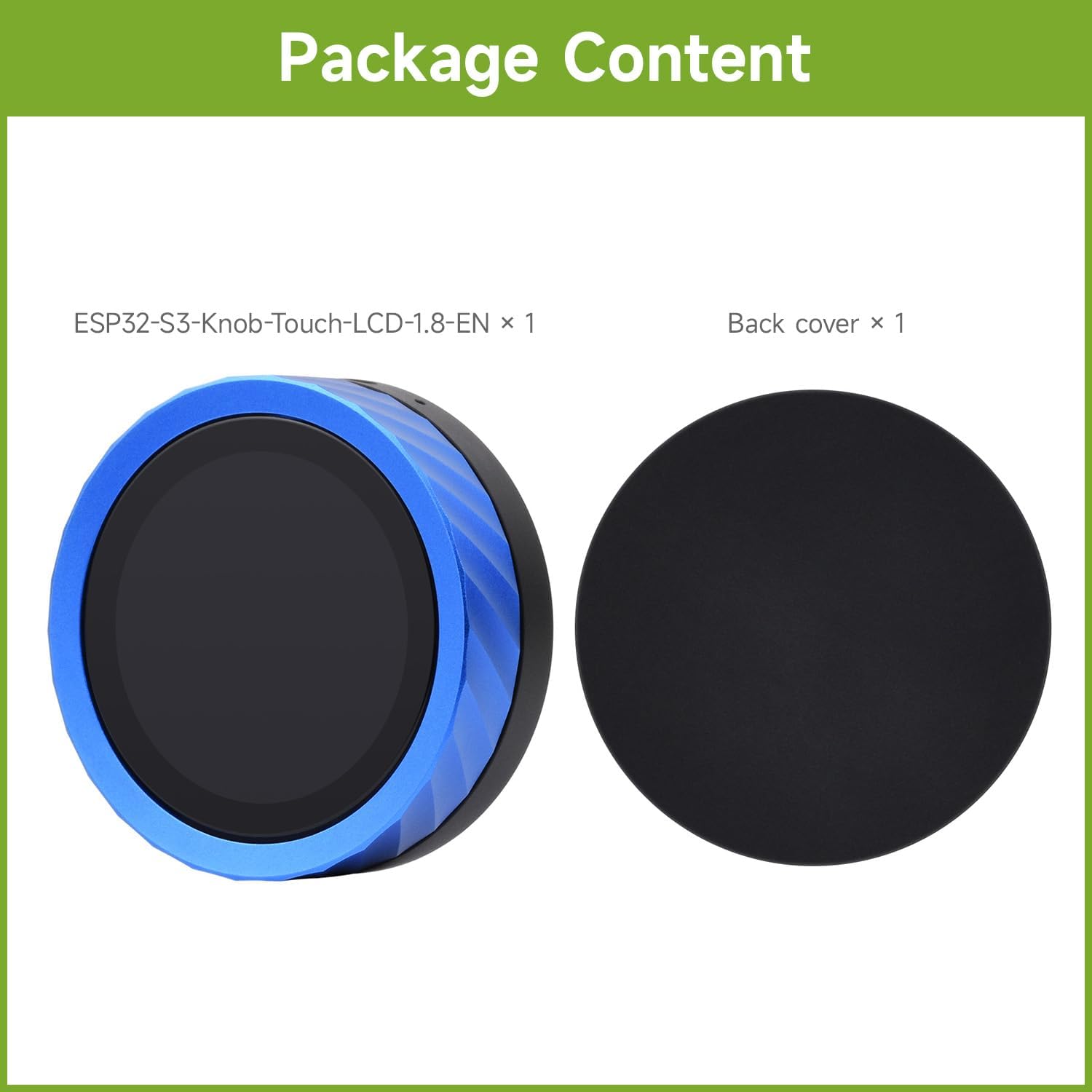
Image 2.1: The package includes the ESP32-S3 Knob Display Development Board and a separate back cover.
3. کلیدی خصوصیات
The waveshare ESP32-S3 1.8inch Knob Display Development Board offers a range of advanced features:
- 1.8 انچ کیپسیٹیو ٹچ اسکرین: Provides excellent touch sensitivity for interactive applications.
- ESP32-S3 Chip: High-performance dual-core processing with hardware support for AI and machine learning tasks.
- دوہری وائرلیس کنیکٹیویٹی: Integrated Wi-Fi and Bluetooth 5.0 for seamless IoT and remote control applications.
- Audio and Voice Integration: Equipped with an audio decoder and microphone for voice recognition and audio playback.
- لچکدار بجلی کی فراہمی: Can be powered via USB Type-C or a 3.7V lithium battery.
- CNC Process Metal Case: پائیدار اور جمالیاتی لحاظ سےasing enclosure.

Image 3.1: Visual representation of the board highlighting its multi-functional knob screen, wireless connection, and CNC metal case, along with icons for Pomodoro Timer, Bluetooth, Volume Control, Video Playback, Digital Photo Frame, AIDA64 Wireless Aux Display, Audio Spectrum, E-book, and CNC Process.
4. تکنیکی تفصیلات
Detailed technical specifications for the ESP32-S3 1.8inch Knob Display Development Board:
| فیچر | تفصیل |
|---|---|
| ڈسپلے پینل | آئی پی ایس |
| ڈسپلے سائز | 1.8 انچ |
| قرارداد | 360 × 360 |
| ڈسپلے کا رنگ | 262K |
| چمک | 600cd/m² |
| کنٹراسٹ ریشو | 1200:1 |
| مواصلاتی انٹرفیس | کیو ایس پی آئی |
| ڈرائیور آایسی | ST77916 |
| ٹچ کی قسم | Capacitive |
| آئی سی ٹچ کریں | سی ایس ٹی 816 |
| وائرلیس کنیکٹیویٹی | 2.4GHz Wi-Fi (802.11 b/g/n) and Bluetooth 5 (LE) |
| فلیش میموری | 16MB |
| PSRAM | 8MB |
| آڈیو | Audio decoder chip, microphone |
| بجلی کی فراہمی | USB Type-C or 3.7V Lithium Battery |

Image 4.1: A visual table detailing the LCD specifications and examples of application scenarios for the development board.
5. درخواست کے منظرنامے۔
The versatility of the ESP32-S3 Knob Display Development Board allows for a wide range of applications:
- متعدد آؤٹ پٹ: Can function as an information output unit for both display and audio, enabling rich interaction in image and sound.
- انسانی مشین انٹرفیس (HMI): Serves as a medium for interaction and information exchange between the system and the user.
- ایک سے زیادہ آدانوں: Supports touch and voice recognition, allowing for custom equipment control projects.
- LVGL GUI ترقی: Utilizes the LVGL open-source graphics library for creating embedded GUIs with visual effects and low memory requirements.
6. ابتدائی سیٹ اپ
To begin using your waveshare ESP32-S3 1.8inch Knob Display Development Board, follow these general steps:
- پاور کنکشن: Connect the board to a power source using a USB Type-C cable. Alternatively, if using a 3.7V lithium battery, ensure it is properly connected to the battery header.
- سافٹ ویئر ماحولیات: Set up your development environment. This typically involves installing the ESP-IDF (Espressif IoT Development Framework) or Arduino IDE with ESP32 board support.
- ڈرائیور کی تنصیب: Install necessary USB-to-UART drivers for your operating system to enable communication with the board.
- فرم ویئر اپ لوڈ: Upload your desired firmware or example code to the board via the USB Type-C port. Refer to the official Waveshare Wiki for detailed programming guides and examples
- ابتدائی ٹیسٹ: After uploading, the display should power on and show the programmed interface. Test the knob and touch functionalities.
For detailed programming instructions and resources, please visit the ویو شیئر وکی.
7. آپریٹنگ ہدایات
The ESP32-S3 Knob Display Development Board is designed for intuitive interaction. Its primary control mechanisms include the rotary knob and the capacitive touchscreen.
7.1. Smart Rotary Knob and Touch Display
The integrated rotary knob and touch display allow for versatile control and interaction:
- بدیہی کنٹرول: Rotate the knob to navigate menus, adjust values, or scroll through content. The capacitive touch screen allows for direct interaction with on-screen elements.
- Pomodoro Timer Themes: Supports various Pomodoro Timer themes for productivity and playful applications.

Image 7.1: Demonstrates the smart rotary knob display in use, showing different interface themes and intuitive control with fingertips.
7.2. Media Playback and Display Functions
- Smartphone Bluetooth Connection for Music Playback: Connect your smartphone via Bluetooth to play music. The board supports audio output via a 3.5mm jack. You can upload lyrics and covers, and control volume by sliding the knob.
Note: The product does not have a built-in speaker. An external speaker must be connected via the 3.5mm audio jack for music playback.
- Seamless Left-Right Swipe: Utilize swipe gestures to switch between photos or videos, functioning as a digital photo frame or video player.
- ای بک پڑھنا: Supports TXT file reading, allowing you to swipe through stories directly on the display.
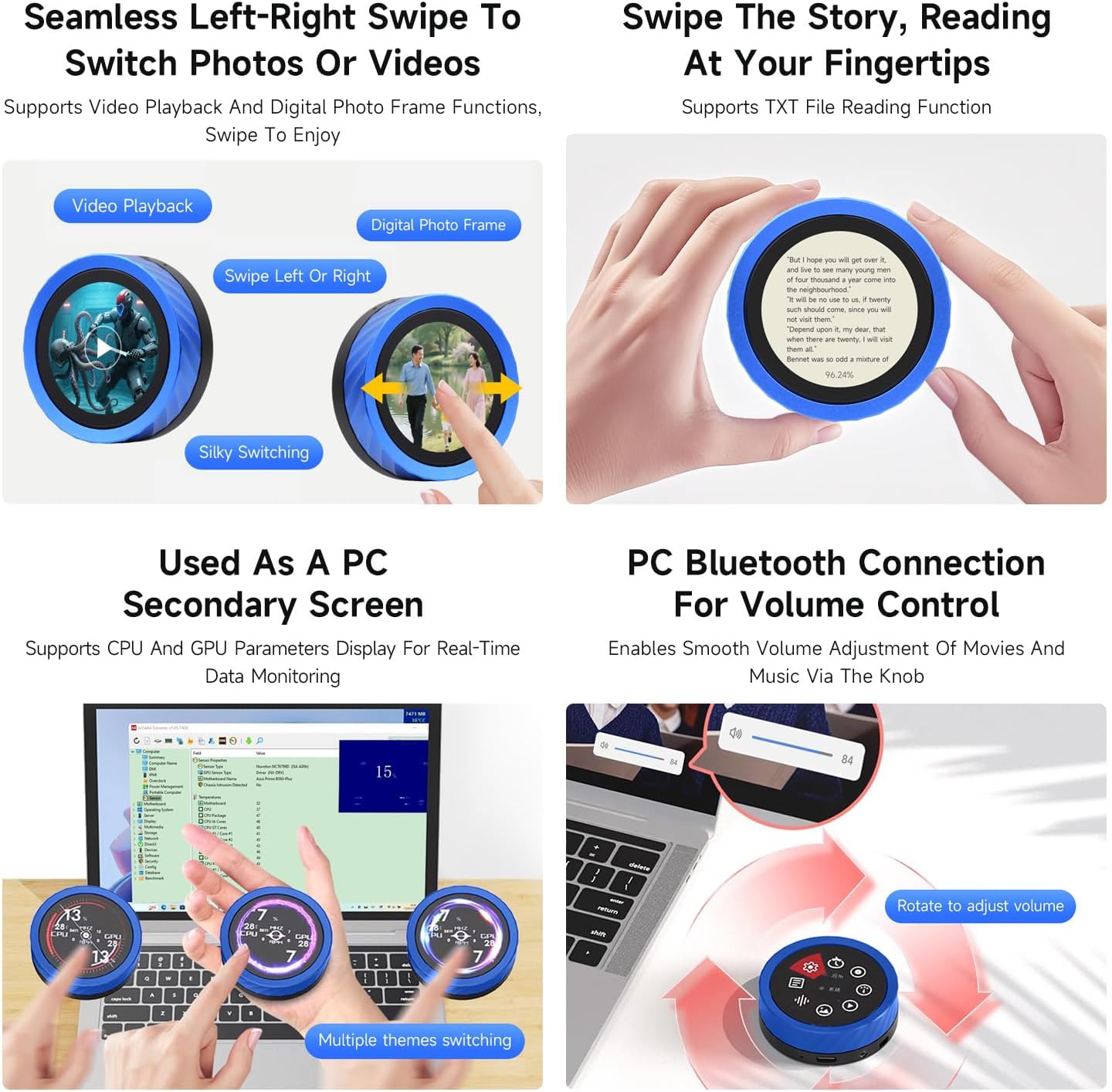
Image 7.2: Illustrates the precision-machined CNC metal case and the board's capability to connect to a smartphone via Bluetooth for music playback, requiring an external speaker.
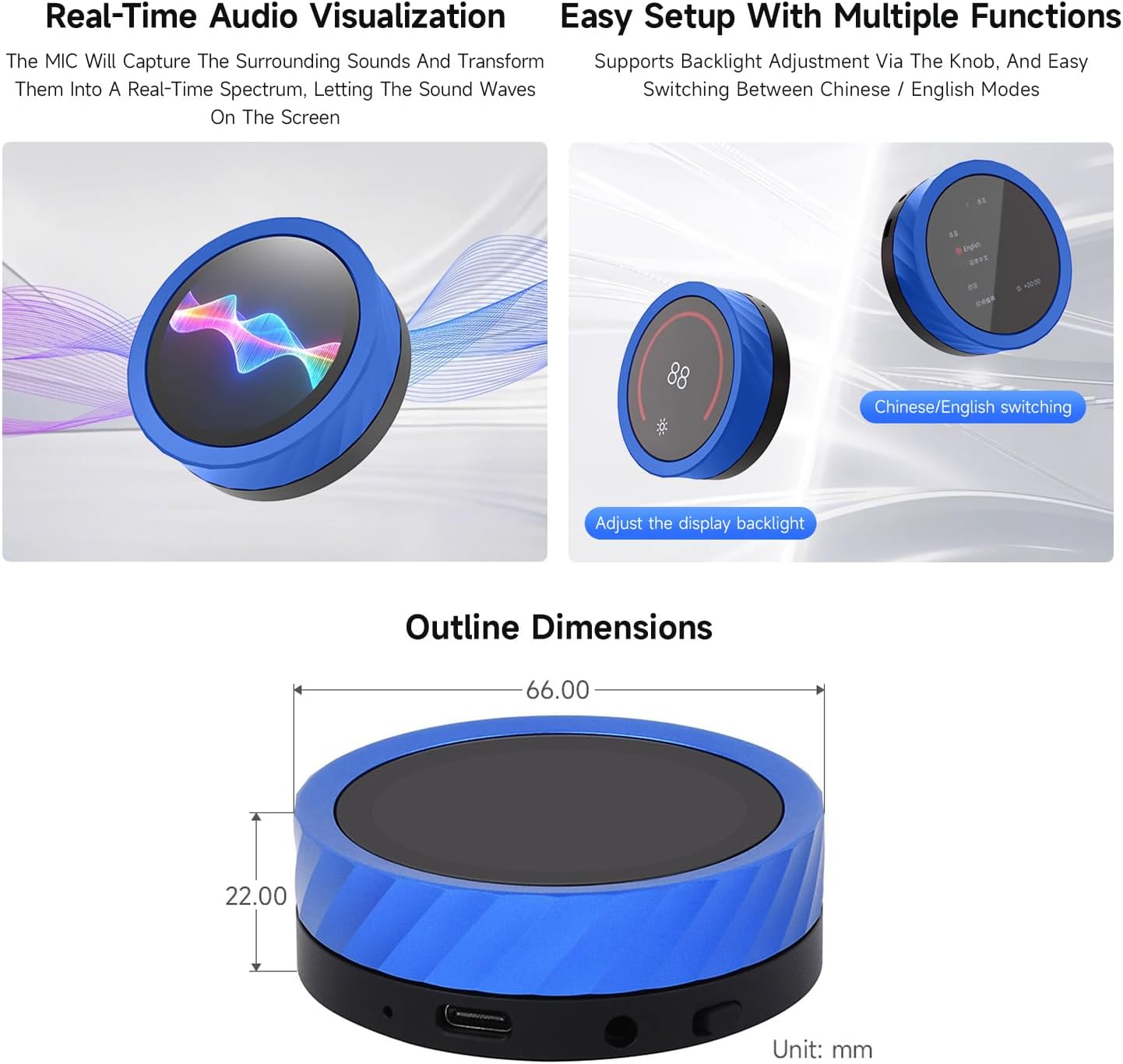
Image 7.3: Shows the left-right swipe functionality for switching between video playback and digital photo frames, and the display reading a text file.
7.3. PC Integration
- PC Secondary Screen: Can be used to display CPU and GPU parameters for real-time data monitoring.
- پی سی بلوٹوتھ والیوم کنٹرول: Connect to your PC via Bluetooth to smoothly adjust movie and music volume using the rotary knob.
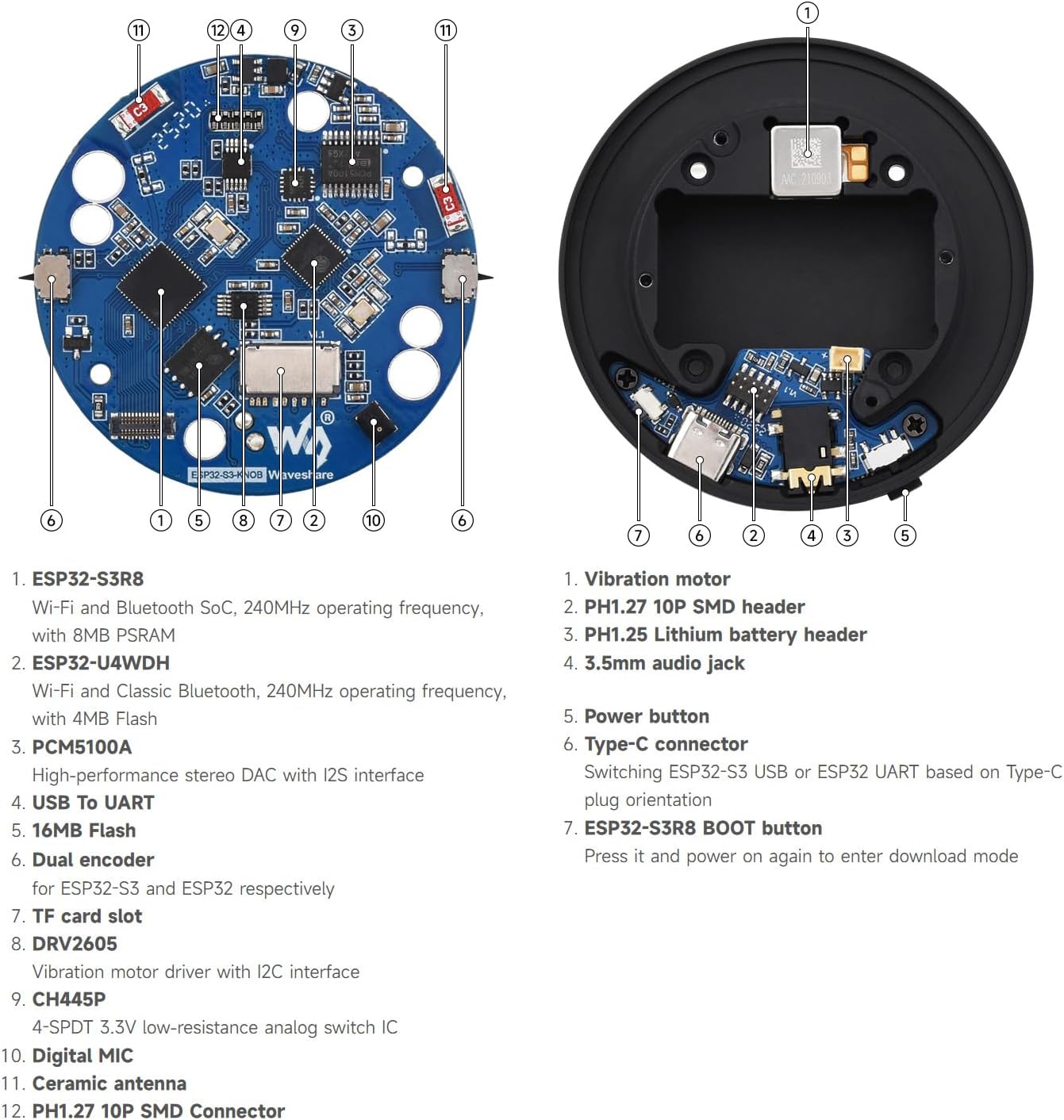
Image 7.4: Depicts the board functioning as a secondary PC screen for monitoring system parameters and controlling PC volume via Bluetooth.
7.4. Audio Visualization and Setup
- Real-Time Audio Visualization: The built-in microphone captures surrounding sounds and transforms them into a real-time spectrum displayed on the screen.
- Easy Setup with Multiple Functions: Supports backlight adjustment via the knob and easy switching between Chinese and English display modes.

Image 7.5: Shows the real-time audio spectrum visualization feature and the ease of adjusting backlight and switching languages using the knob.
8. Board Components Overview
Understanding the components of the development board is crucial for advanced usage and troubleshooting.

Image 8.1: An annotated diagram showing the internal components of the board, including the ESP32-S3R8, ESP32-U4WDH, PCM5100A, USB to UART, 16MB Flash, Dual encoder, TF card slot, DRV2605, CH445P, Digital MIC, Ceramic antenna, and PH1.27 10P SMD Connector.
اہم اجزاء اور ان کے افعال:
- کمپن موٹر: ہیپٹک فیڈ بیک فراہم کرتا ہے۔
- PH1.27 10P SMD ہیڈر: Connector for external components.
- PH1.25 لیتھیم بیٹری ہیڈر: 3.7V لتیم بیٹری کو جوڑنے کے لیے۔
- 3.5 ملی میٹر آڈیو جیک: بیرونی اسپیکر یا ہیڈ فون کو جوڑنے کے لیے۔
- پاور بٹن: Controls power on/off.
- ٹائپ سی کنیکٹر: Used for power supply, data transfer (USB to UART), and firmware uploading. Supports switching between ESP32-S3 USB or ESP32 UART based on Type-C plug orientation.
- ESP32-S3R8 بوٹ بٹن: Press and power on again to enter download mode for firmware updates.
- ESP32-S3R8: Wi-Fi اور بلوٹوتھ SoC، 240MHz آپریٹنگ فریکوئنسی، 8MB PSRAM کے ساتھ۔
- ESP32-U4WDH: Wi-Fi اور کلاسک بلوٹوتھ، 240MHz آپریٹنگ فریکوئنسی، 4MB فلیش کے ساتھ۔
- PCM5100A: I2S انٹرفیس کے ساتھ اعلیٰ کارکردگی والا سٹیریو DAC۔
- USB سے UART: سیریل مواصلات کے لیے۔
- 16MB فلیش: Storage for firmware and data.
- دوہری انکوڈر: For ESP32-S3 and ESP32 respectively, likely referring to the rotary knob's encoder.
- TF کارڈ سلاٹ: قابل توسیع اسٹوریج کے لیے۔
- DRV2605: I2C انٹرفیس کے ساتھ کمپن موٹر ڈرائیور۔
- CH445P: 4-SPDT 3.3V کم مزاحمتی اینالاگ سوئچ IC۔
- ڈیجیٹل MIC: For audio input and voice recognition.
- سرامک اینٹینا: وائرلیس مواصلات کے لیے۔
9. خاکہ کے طول و عرض
The physical dimensions of the waveshare ESP32-S3 1.8inch Knob Display Development Board are as follows:

Image 9.1: Technical drawing showing the top and side view dimensions of the board, with a diameter of 66.00 mm and a height of 22.00 mm.
- قطر: 66.00 ملی میٹر
- اونچائی: 22.00 ملی میٹر
10 دیکھ بھال
Proper maintenance ensures the longevity and optimal performance of your development board:
- صفائی: ڈسپلے کو صاف کرنے کے لیے نرم، خشک کپڑا استعمال کریں اور casinجی کھرچنے والے کلینر یا سالوینٹس سے پرہیز کریں۔
- ذخیرہ: بورڈ کو ٹھنڈے، خشک ماحول میں، براہ راست سورج کی روشنی اور انتہائی درجہ حرارت سے دور رکھیں۔
- ہینڈلنگ: Handle the board with care to avoid physical damage to components or the display.
- فرم ویئر اپ ڈیٹس: Regularly check the Waveshare Wiki for firmware updates to ensure you have the latest features and bug fixes.
11 خرابیوں کا سراغ لگانا
If you encounter issues with your ESP32-S3 Knob Display Development Board, refer to the following common problems and solutions:
| مسئلہ | ممکنہ وجہ/حل |
|---|---|
| بورڈ آن نہیں ہے۔ |
|
| ڈسپلے خالی یا غیر جوابی ہے۔ |
|
| Cannot upload firmware. |
|
| Bluetooth or Wi-Fi not connecting. |
|
| Knob or touch input not working. |
|
For more advanced troubleshooting and community support, please refer to the official ویو شیئر وکی or contact Waveshare technical support.
12. وارنٹی اور سپورٹ
Waveshare products typically come with a standard manufacturer's warranty. For specific warranty terms and conditions, please refer to the documentation included with your purchase or visit the official Waveshare webسائٹ
For technical support, additional resources, and community forums, please visit the official Waveshare Wiki:
https://www.waveshare.com/wiki/ESP32-S3-Knob-Touch-LCD-1.8-EN
You can also contact Waveshare customer service directly through their official webمدد کے لئے سائٹ.
Ask a question about this manual
Ask about setup, troubleshooting, compatibility, parts, safety, or missing instructions. Manuals+ will review the question and use this page’s manual context to help answer it.