
1. تعارف اور اوورview
Thank you for choosing the Ninkear L12Pro Gaming Mini PC. This compact yet powerful desktop computer is designed to deliver exceptional performance for a wide range of applications, from demanding gaming and 4K video editing to business productivity and multi-display setups. Featuring an Intel Core i9-12900HK processor, 32GB of RAM, and a 1TB NVMe SSD, the L12Pro offers a seamless and responsive computing experience. This manual provides essential information for setting up, operating, maintaining, and troubleshooting your new Mini PC.
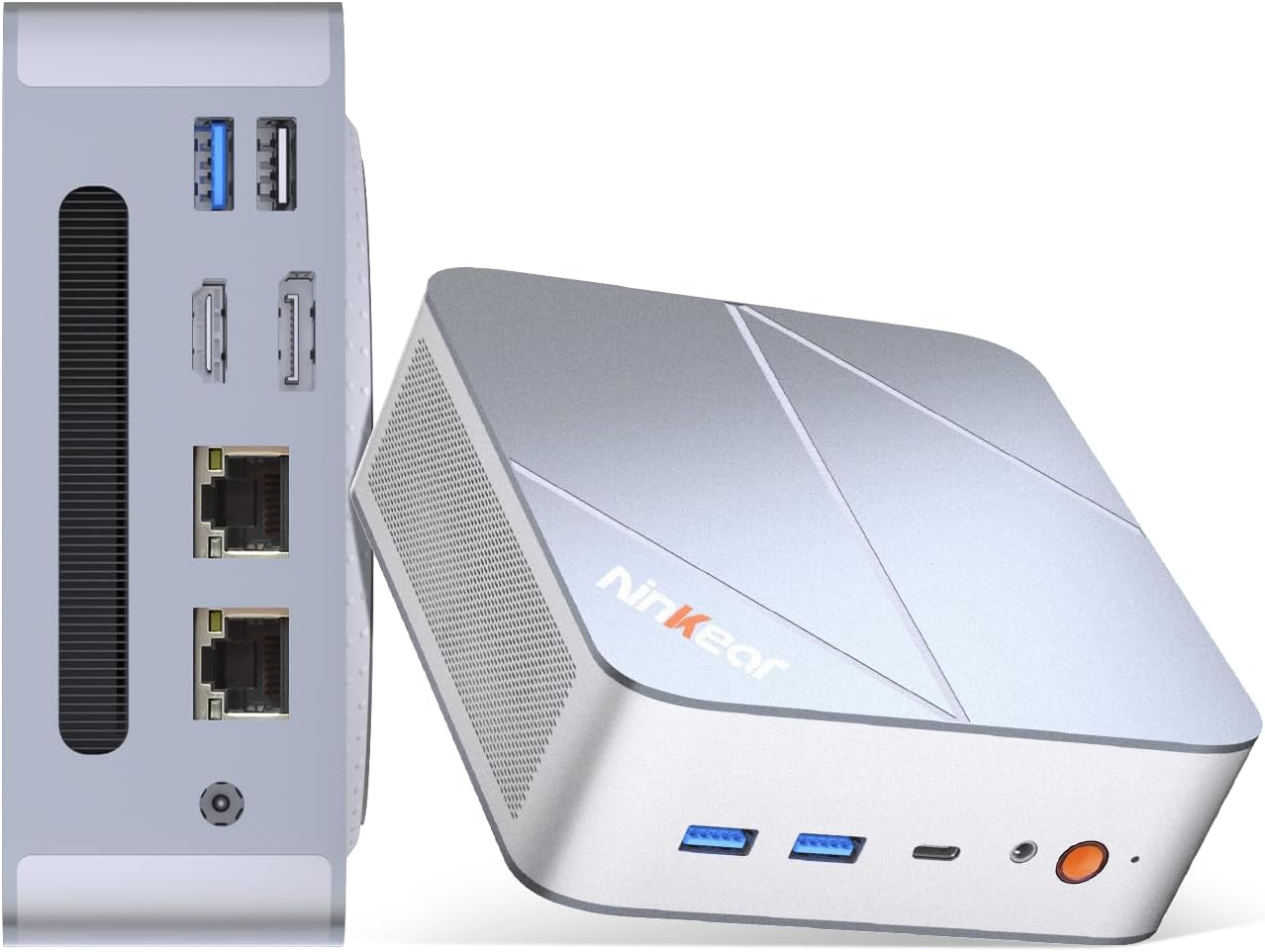
Figure 1.1: Ninkear L12Pro Mini PC - Front and Side View بندرگاہوں کے ساتھ.
2. مصنوعات کی خصوصیات
- Lightning-Fast Performance: Powered by Intel’s 12th Gen i9-12900HK processor (14 cores, 20 threads, up to 5.0GHz), capable of handling 4K video editing, coding, and intensive multitasking.
- High-Speed Memory & Storage: Equipped with 32GB DDR4 RAM and an ultra-fast 1TB NVMe SSD for instant file access, smooth application performance, and rapid boot times.
- Triple 8K UHD Display Support: Create an immersive multi-screen setup with HDMI 2.0 (up to 4K@60Hz), DisplayPort 1.4 (up to 8K@60Hz), and USB4/Thunderbolt 4 (up to 8K@60Hz) outputs.
- کمپیکٹ اور لچکدار ڈیزائن: Small form factor allows for versatile placement behind monitors, under desks, or in backpacks, offering powerful desktop capabilities in a portable size.
- ایڈوانس کنیکٹیویٹی: Features USB4.0, USB-C, WiFi 6, Bluetooth 5.2, dual 2.5G LAN ports, and multiple USB 3.2 Gen 2 and USB 2.0 ports for comprehensive peripheral support and high-speed data transfer.
- موثر کولنگ سسٹم: Designed with an all-metal cooling system for quiet and efficient operation, ensuring stable performance even under heavy loads.
- قابل توسیع ذخیرہ: Supports additional M.2 NVMe PCIe SSD (up to 4TB) and an optional 2.5-inch HDD for expanded storage capacity.

شکل 2.1: کلیدی خصوصیات اور وضاحتیں ختمview.

Figure 2.2: Triple 8K Display Setup for Enhanced Productivity.

Figure 2.3: Comprehensive Connectivity Options.
3. باکس میں کیا ہے۔
پیکج کھولنے پر، براہ کرم یقینی بنائیں کہ درج ذیل تمام اشیاء موجود ہیں:
- Ninkear L12Pro Mini PC
- HDMI کیبل
- پاور اڈاپٹر
- صارف دستی (یہ دستاویز)
4. سیٹ اپ گائیڈ
Follow these steps to set up your Ninkear L12Pro Mini PC:
- Unpack the Mini PC: پیکیجنگ سے منی پی سی اور تمام لوازمات کو احتیاط سے ہٹا دیں۔
- ڈسپلے سے جڑیں:
- Connect one end of the HDMI cable (included) to the HDMI port on the Mini PC and the other end to an available HDMI input on your monitor or TV.
- For DisplayPort or USB4/Thunderbolt 4 connections, use appropriate cables (not included) to connect to compatible displays.
- For triple display setup, connect additional monitors using the available DisplayPort, USB4/Thunderbolt 4, or a USB-C to HDMI/DP adapter (not included).
- پیری فیرلز کو جوڑیں:
- Plug your USB keyboard and mouse into any available USB ports on the Mini PC.
- If using wireless peripherals, ensure their receivers are plugged into a USB port.
- پاور سے جڑیں: Plug the power adapter into the DC-in port on the Mini PC, then plug the other end into a power outlet.
- نیٹ ورک کنکشن (اختیاری):
- For a wired connection, connect an Ethernet cable from your router or modem to one of the 2.5G LAN ports on the Mini PC.
- For a wireless connection, the Mini PC supports WiFi 6. You will configure this after the initial boot.
- ابتدائی بوٹ: Press the power button on the front of the Mini PC. The system will power on and begin the initial setup process for Windows 11 Pro. Follow the on-screen instructions to complete the operating system setup.
5. آپریٹنگ ہدایات
5.1 پاور آن/آف
- پاور آن: پاور بٹن کو ایک بار دبائیں۔
- بند کریں: ونڈوز میں اسٹارٹ بٹن پر کلک کریں، پھر پاور> شٹ ڈاؤن کو منتخب کریں۔
- دوبارہ شروع کریں: ونڈوز میں اسٹارٹ بٹن پر کلک کریں، پھر پاور> ری اسٹارٹ کو منتخب کریں۔
- Force Shut Down: If the system is unresponsive, press and hold the power button for approximately 5-7 seconds until the unit powers off. Use this only as a last resort.
5.2 ڈسپلے کنفیگریشن
The Ninkear L12Pro supports up to three independent displays simultaneously. After connecting your monitors, Windows will typically detect them automatically. If not, or to configure display settings:
- Right-click on an empty area of your desktop.
- Select "Display settings".
- From here, you can detect displays, arrange them, change resolution, and set display modes (Extend, Duplicate, Second screen only).
5.3 نیٹ ورک کنیکٹیویٹی
- وائرڈ (ایتھرنیٹ): Ensure an Ethernet cable is connected to one of the 2.5G LAN ports. Windows will automatically establish a connection.
- وائرلیس (وائی فائی):
- Click the Wi-Fi icon in the system tray (bottom right of the taskbar).
- فہرست سے اپنا مطلوبہ Wi-Fi نیٹ ورک منتخب کریں۔
- اگر اشارہ کیا جائے تو نیٹ ورک پاس ورڈ درج کریں اور "کنیکٹ" پر کلک کریں۔
5.4 بیرونی آلات کو جوڑنا
The Mini PC offers a variety of ports for connecting external devices:
- USB پورٹس: Use USB 3.2 Gen 2 ports for high-speed devices like external hard drives or SSDs, and USB 2.0 for standard peripherals like keyboards, mice, or printers.
- USB4/Thunderbolt 4: This versatile port supports high-speed data transfer (40Gbps), video output, and power delivery (with compatible devices).
- آڈیو جیک: ہیڈ فون یا بیرونی اسپیکرز کو 3.5 ملی میٹر آڈیو جیک سے جوڑیں۔
6 دیکھ بھال
Proper maintenance ensures the longevity and optimal performance of your Ninkear L12Pro Mini PC:
- وینٹوں کو صاف رکھیں: Ensure the ventilation openings on the Mini PC are not obstructed. Blocked vents can lead to overheating and reduced performance.
- باقاعدگی سے صفائی: Use a soft, dry cloth to clean the exterior of the Mini PC. For dust in vents, use compressed air. Do not use liquid cleaners directly on the device.
- سافٹ ویئر اپ ڈیٹس: Regularly update your Windows operating system, drivers, and applications to ensure security, stability, and performance.
- محفوظ شٹ ڈاؤن: Always shut down the Mini PC properly through the operating system to prevent data corruption.
- ماحولیاتی حالات: Operate the Mini PC in a clean, dry environment, away from direct sunlight, excessive heat, and humidity.

Figure 6.1: Smart Cooling System for Quiet Operation.
7 خرابیوں کا سراغ لگانا
If you encounter issues with your Ninkear L12Pro Mini PC, refer to the following common problems and solutions:
| مسئلہ | ممکنہ وجہ | حل |
|---|---|---|
| کوئی طاقت نہیں۔ | Power adapter not connected; Power outlet issue; Faulty power adapter. | Ensure power adapter is securely connected to the Mini PC and a working power outlet. Try a different outlet. |
| کوئی ڈسپلے نہیں۔ | Monitor not connected; Incorrect input selected on monitor; Faulty cable; Display driver issue. | Check display cable connections. Ensure monitor is on and set to the correct input source (HDMI, DP, USB-C). Try a different cable or monitor. Update display drivers in Windows. |
| کوئی انٹرنیٹ کنکشن نہیں (وائرڈ) | Ethernet cable disconnected; Router/modem issue; Network driver issue. | Check Ethernet cable connection. Restart your router/modem. Check network adapter settings in Windows Device Manager. |
| کوئی انٹرنیٹ کنکشن نہیں (وائی فائی) | Wi-Fi disabled; Incorrect password; Router too far; Driver issue. | Ensure Wi-Fi is enabled in Windows. Re-enter Wi-Fi password. Move closer to the router. Update Wi-Fi drivers. |
| سست کارکردگی | Too many applications running; Overheating; Low disk space; Malware. | Close unnecessary applications. Ensure vents are clear. Free up disk space. Run a malware scan. |
8. وضاحتیں
Detailed technical specifications for the Ninkear L12Pro Mini PC:
| فیچر | تفصیل |
|---|---|
| برانڈ | ننکیر |
| ماڈل نمبر | L12Pro |
| پروسیسر | Intel Core i9-12900HK (14 Cores, 20 Threads, up to 5.0GHz) |
| رام | 32GB DDR4 (64GB تک قابل توسیع) |
| ذخیرہ | 1TB NVMe SSD (M.2 PCIe 3.0, Expandable up to 4TB) |
| گرافکس کا پروسیسر | Intel Iris Xe Graphics (96EU) |
| زیادہ سے زیادہ سکرین ریزولوشن | 8K (7680x4320) via DisplayPort/USB4, 4K (4096x2160) via HDMI |
| ویڈیو آؤٹ پٹس | 1x HDMI 2.0, 1x DisplayPort 1.4, 1x USB4/Thunderbolt 4 |
| USB پورٹس | 3x USB 3.2 Gen 2, 1x USB 2.0, 1x USB4/Thunderbolt 4 (Type-C) |
| نیٹ ورک | Dual 2.5G LAN (RJ45), WiFi 6 (802.11ax) |
| بلوٹوتھ | بلوٹوتھ 5.2 |
| آپریٹنگ سسٹم | ونڈوز 11 پرو |
| شے کا وزن | 2.51 پاؤنڈ (تقریباً 1.14 کلوگرام) |
| طول و عرض | 10.44 x 6.73 x 2.79 انچ (پیکیج کے طول و عرض) |
| رنگ | Premium Brushed Silver |
9. وارنٹی اور سپورٹ
The Ninkear L12Pro Mini PC comes with a standard manufacturer's warranty. For specific warranty terms and conditions, please refer to the documentation included with your purchase or visit the official Ninkear webسائٹ
For technical support, troubleshooting assistance, or any inquiries regarding your product, please contact Ninkear customer service through their official channels.
آن لائن مدد: کا دورہ کریں۔ Ninkear Store on Amazon اکثر پوچھے گئے سوالات اور رابطے کے اختیارات کے لیے۔