
AFK B0FDQN2HTM
AFK Wireless Charging Station with Bluetooth Speaker and Alarm Clock User Manual
Model: B0FDQN2HTM
1. تعارف
The AFK Wireless Charging Station is a versatile device designed to simplify your daily routine. It integrates a wireless phone charger, a Bluetooth speaker for audio playback, a digital alarm clock, and hands-free calling capabilities into a single compact unit. This manual provides detailed instructions for setup, operation, and maintenance to ensure optimal performance.

Image 1.1: The AFK Wireless Charging Station in use, showing a smartphone charging and the time displayed on the clock.
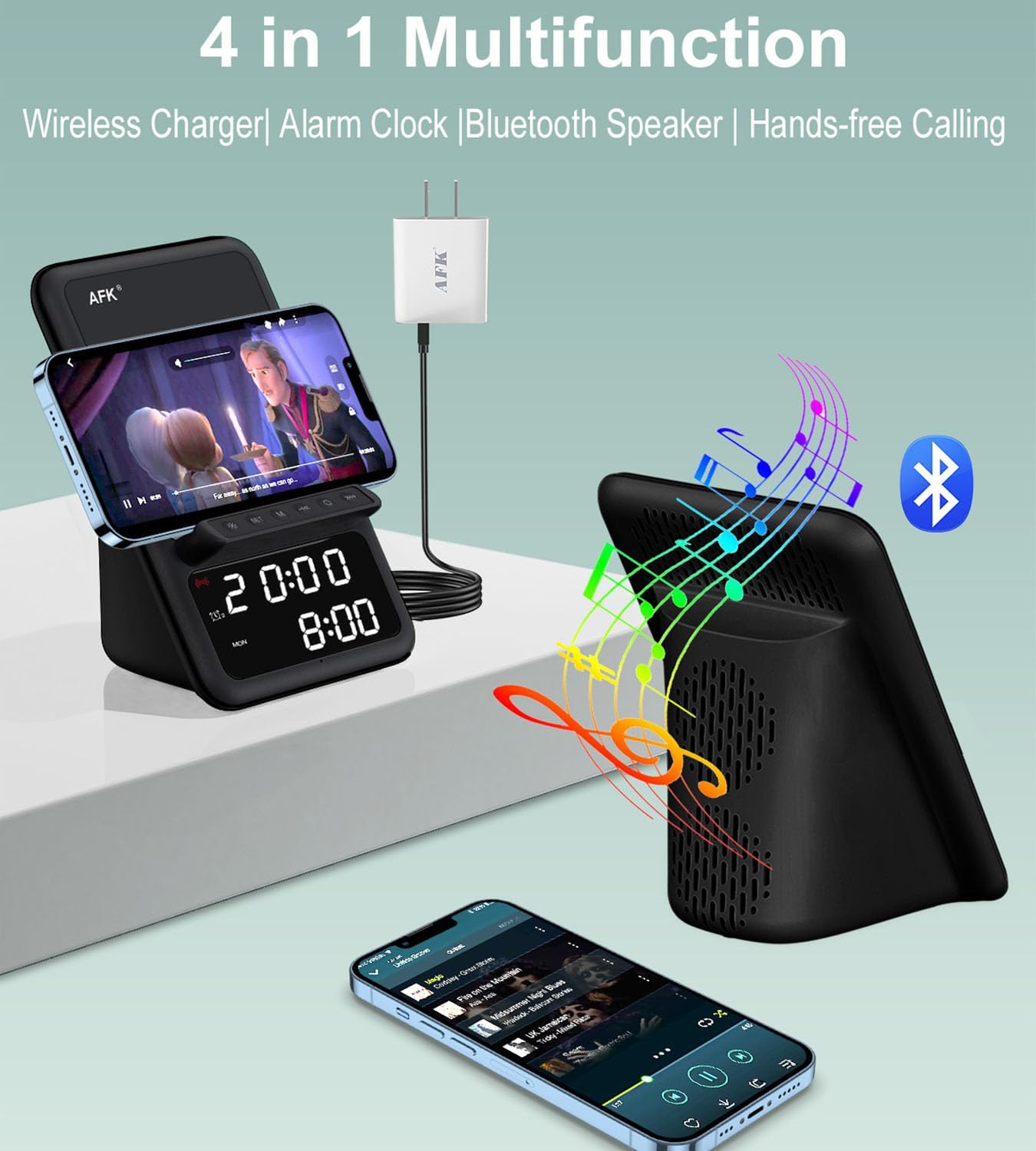
تصویر 1.2: ختمview of the product's four main functions: wireless charging, alarm clock, Bluetooth speaker, and hands-free calling.
2. حفاظتی معلومات
- ڈیوائس کو انتہائی درجہ حرارت، براہ راست سورج کی روشنی، یا زیادہ نمی کے سامنے نہ رکھیں۔
- آلے کو گرانے یا اسے سخت اثرات کے تابع کرنے سے گریز کریں۔
- آلے کو پانی یا دیگر مائعات سے دور رکھیں۔
- آلہ کو خود سے جدا کرنے یا مرمت کرنے کی کوشش نہ کریں۔ اہل سروس کے اہلکاروں سے رابطہ کریں۔
- صرف فراہم کردہ پاور اڈاپٹر یا تصدیق شدہ مساوی استعمال کریں۔
- آپریشن کے دوران آلہ کے ارد گرد مناسب وینٹیلیشن کو یقینی بنائیں۔
3. پیکیج کے مشمولات
براہ کرم درج ذیل اشیاء کے لیے پیکج چیک کریں:
- AFK Wireless Charging Station
- پاور اڈاپٹر
4. پروڈکٹ ختمview
Familiarize yourself with the various components of your AFK Wireless Charging Station.
فرنٹ پینل
- ڈیجیٹل ڈسپلے: وقت، الارم کی حیثیت، اور دیگر اشارے دکھاتا ہے۔
- کنٹرول بٹن: For setting time, alarms, and controlling speaker functions.
ٹاپ پینل
- وائرلیس چارجنگ پیڈ: Place your compatible smartphone here for wireless charging.
پیچھے والا پینل
- پاور ان پٹ پورٹ: فراہم کردہ پاور اڈاپٹر کو جوڑیں۔
- اسپیکر گرل: آڈیو آؤٹ پٹ کے لیے۔
5. سیٹ اپ
5.1 پاور کنکشن
- Connect the USB Type-C end of the power adapter cable to the Power Input Port on the back of the charging station.
- پاور اڈاپٹر کے دوسرے سرے کو ایک معیاری وال آؤٹ لیٹ میں لگائیں۔
- ڈیجیٹل ڈسپلے روشن ہو جائے گا، یہ بتاتا ہے کہ ڈیوائس آن ہے۔
5.2 ابتدائی وقت کی ترتیب
Upon first power-up, you may need to set the correct time.
- Press and hold the 'Time Set' button (refer to product diagram for exact button location).
- Use the '+' and '-' buttons to adjust the hour. Press 'Time Set' again to confirm.
- Use the '+' and '-' buttons to adjust the minute. Press 'Time Set' again to confirm.
- اب وقت مقرر ہے۔
6. آپریٹنگ ہدایات
6.1 وائرلیس چارجنگ
The charging station supports wireless charging for compatible smartphones.
- Ensure your smartphone supports wireless charging.
- Place your smartphone directly onto the wireless charging pad on the top of the station.
- The charging indicator on your phone or the station (if available) will confirm charging has begun.
- نوٹ: The charging station can charge through phone cases up to 5mm thick. Magnetic, metal accessories, or other foreign objects on the back of your phone may interfere with charging and should be removed.
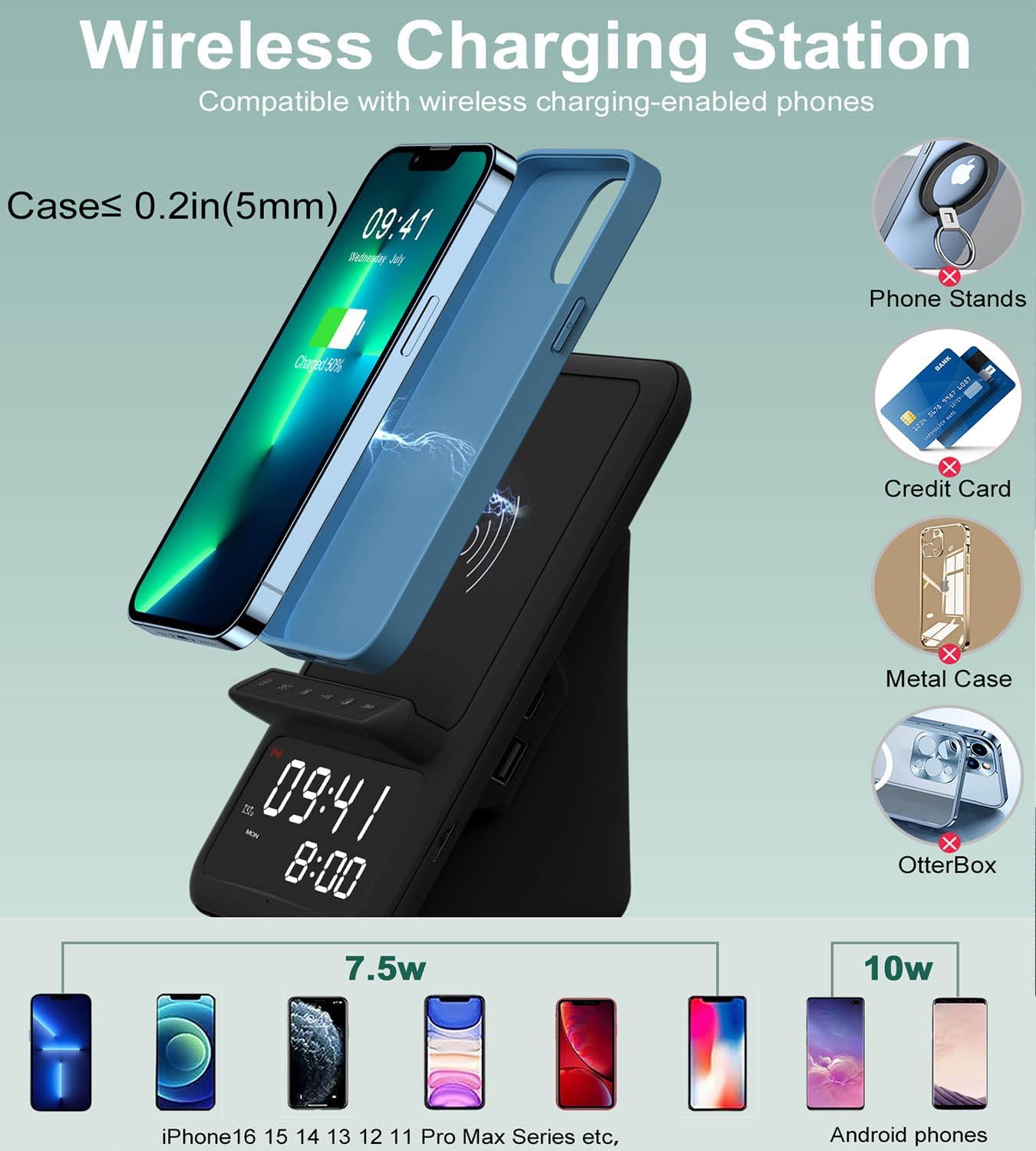
Image 6.1: Illustration of wireless charging, indicating compatibility with various phone models and the maximum case thickness for effective charging.
6.2 بلوٹوت اسپیکر
Connect your device via Bluetooth to play audio through the integrated speaker.
- Press the 'Bluetooth' button on the charging station to enter pairing mode. The Bluetooth indicator will flash.
- اپنے اسمارٹ فون، ٹیبلیٹ یا لیپ ٹاپ پر، بلوٹوتھ کو فعال کریں اور دستیاب آلات تلاش کریں۔
- Select "AFK Charging Station" (or similar name) from the list of devices to pair.
- Once paired, the Bluetooth indicator will become solid, and you can now play audio through the speaker.
- Use the volume buttons on the charging station or your connected device to adjust the sound level.

Image 6.2: The AFK Charging Station functioning as a Bluetooth speaker, connected to a laptop for audio playback.
6.3 الارم گھڑی۔
Set up to two independent alarms.
- الارم 1 ترتیب دینا: Press and hold the 'Alarm 1' button. Use '+' and '-' to set the hour, then press 'Alarm 1' to confirm. Use '+' and '-' to set the minute, then press 'Alarm 1' to confirm.
- الارم 2 ترتیب دینا: Repeat the process using the 'Alarm 2' button.
- الارم کو چالو/غیر فعال کرنا: Briefly press the 'Alarm 1' or 'Alarm 2' button to toggle the respective alarm on or off. An icon on the display will indicate active alarms.
- اسنوز فنکشن: When an alarm sounds, press any button (except 'Off') to activate snooze. The alarm will sound again after a set interval (e.g., 9 minutes).
- الارم روکنا: To turn off an alarm completely, press the designated 'Alarm Off' button (refer to product diagram).

Image 6.3: The charging station positioned on a bedside table, illustrating the dual alarm functionality with two distinct alarm times displayed.
6.4 ہینڈز فری کالنگ۔
Utilize the built-in microphone for hands-free communication when connected via Bluetooth.
- Ensure your phone is paired with the charging station via Bluetooth.
- When a call comes in, the speaker will ring. Press the 'Call Answer' button (refer to product diagram) to answer the call.
- Speak towards the device's microphone for clear communication.
- To end a call, press the 'Call End' button.

Image 6.4: The charging station facilitating a hands-free video conference call, showcasing its integrated microphone and speaker capabilities.
7. وضاحتیں
| فیچر | تفصیل |
|---|---|
| برانڈ | اے ایف کے |
| کنیکٹر کی قسم | USB قسم C |
| ہم آہنگ آلات | Phones that support wireless charging |
| خصوصی خصوصیت | Wireless Charger, Bluetooth Speaker, Alarm Clock, Hands-Free Calling |
| رنگ | سیاہ |
| مواد | ایکریلونائٹریل بوٹاڈیئن اسٹیرن |
| طاقت کا منبع | یو ایس بی |
8 دیکھ بھال
To ensure the longevity and optimal performance of your AFK Wireless Charging Station, follow these maintenance guidelines:
- صفائی: Use a soft, dry cloth to wipe the surface of the device. Do not use abrasive cleaners, solvents, or chemical sprays.
- ذخیرہ: جب لمبے عرصے تک استعمال میں نہ ہو تو، آلے کو براہ راست سورج کی روشنی سے دور ٹھنڈی، خشک جگہ پر محفوظ کریں۔
- رکاوٹوں سے بچیں: Ensure the speaker grille and charging pad are free from dust and debris.
9 خرابیوں کا سراغ لگانا
اگر آپ کو اپنے آلے کے ساتھ مسائل کا سامنا کرنا پڑتا ہے، تو درج ذیل عام مسائل اور حل دیکھیں:
| مسئلہ | ممکنہ حل |
|---|---|
| ڈیوائس آن نہیں ہوتی ہے۔ | یقینی بنائیں کہ پاور اڈاپٹر ڈیوائس اور ورکنگ پاور آؤٹ لیٹ دونوں سے محفوظ طریقے سے جڑا ہوا ہے۔ ایک مختلف آؤٹ لیٹ آزمائیں۔ |
| وائرلیس چارجنگ کام نہیں کر رہی ہے۔ | Verify your phone supports wireless charging. Remove any metal objects, magnetic accessories, or overly thick cases (over 5mm) from your phone. Ensure the phone is centered on the charging pad. |
| Bluetooth speaker cannot pair. | Ensure the charging station is in Bluetooth pairing mode (indicator flashing). Make sure Bluetooth is enabled on your device and it's within range. Try restarting both devices. |
| الارم نہیں بجتا ہے۔ | Check if the alarm is activated (icon visible on display). Ensure the volume is not set to minimum. Verify the time is set correctly. |
| Poor sound quality from speaker. | Ensure the device is within Bluetooth range. Check for obstructions around the speaker grille. Adjust volume on both the station and your connected device. |
10. وارنٹی اور سپورٹ
This product comes with a standard manufacturer's warranty. For specific warranty details, please refer to the documentation included with your purchase or contact AFK customer support.
If you require further assistance or have questions not covered in this manual, please contact AFK customer support through the retailer's platform or the official AFK webسائٹ
Ask a question about this manual
Ask about setup, troubleshooting, compatibility, parts, safety, or missing instructions. Manuals+ will review the question and use this page’s manual context to help answer it.