
1. تعارف
Thank you for choosing the roborock Q10 S5 Robot Vacuum and Mop Cleaner. This manual provides essential information for setting up, operating, and maintaining your device to ensure optimal performance and longevity. Please read this manual thoroughly before using the product and keep it for future reference.
2. حفاظتی معلومات
To reduce the risk of injury, electric shock, fire, or damage, please observe the following safety precautions:
- اس آلے کو 8 سال یا اس سے زیادہ عمر کے بچے اور جسمانی، حسی یا ذہنی صلاحیتوں میں کمی یا تجربے اور علم کی کمی والے افراد استعمال کر سکتے ہیں اگر انہیں آلات کے محفوظ طریقے سے استعمال کے بارے میں نگرانی یا ہدایات دی گئی ہوں اور وہ اس میں شامل خطرات کو سمجھتے ہوں۔ .
- اس بات کو یقینی بنانے کے لیے بچوں کی نگرانی کی جانی چاہیے کہ وہ آلات سے نہ کھیلیں۔
- صفائی اور صارف کی دیکھ بھال بچوں کے ذریعہ نگرانی کے بغیر نہیں کی جائے گی۔
- Do not use the robot in areas with open flames or fragile objects.
- اس بات کو یقینی بنائیں کہ چارجنگ ڈاک دیوار کے خلاف سطح کی سطح پر رکھی گئی ہے۔
- صرف آلہ کے ساتھ فراہم کردہ اصل پاور اڈاپٹر استعمال کریں۔
- Do not expose the robot to direct sunlight or moisture.
- Before cleaning, remove power cords, small objects, and fragile items from the floor.
3. پروڈکٹ ختمview
Familiarize yourself with the components of your roborock Q10 S5 robot vacuum.
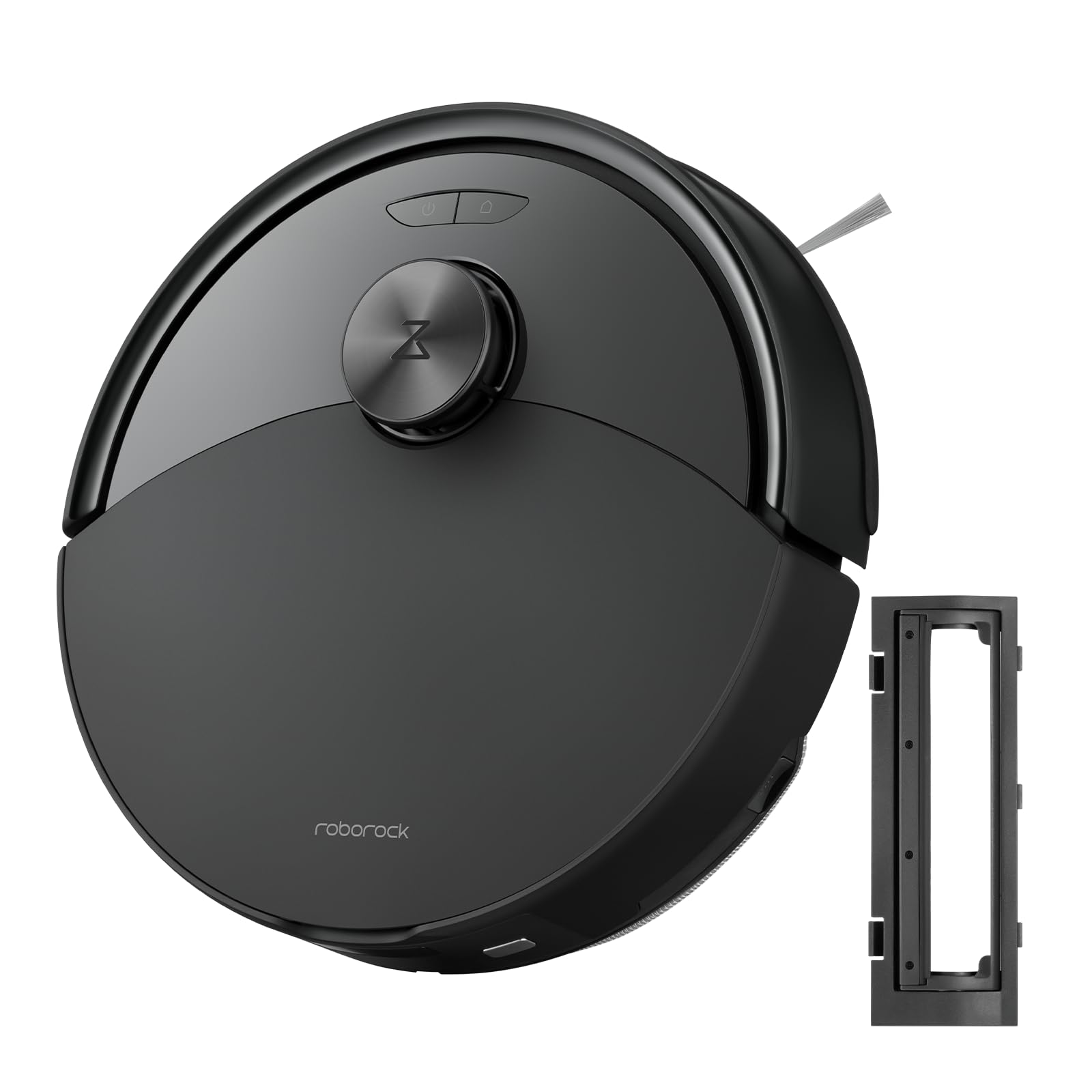
تصویر 1: The roborock Q10 S5 Robot Vacuum and Mop Cleaner. This image shows the top view of the robot, highlighting its sleek black design and main control buttons.
روبوٹ اجزاء:
- اپر کا ڈھکن: Lifts to reveal the dustbin and Wi-Fi indicator.
- پاور/کلین بٹن: Press to start/pause cleaning, hold to turn on/off.
- Dock/Spot Clean Button: Press to send the robot back to the dock, hold for spot cleaning.
- LDS Sensor: For navigation and mapping.
- بمپر: رکاوٹوں کا پتہ لگاتا ہے۔
- سائیڈ برش: کناروں اور کونوں سے ملبے کو جھاڑتا ہے۔
- مین برش: Collects dirt and debris from floors. Features a floating design for better contact.
- Omnidirectional Wheel: تحریک کے لیے۔
- چارجنگ رابطے: چارجنگ ڈاک کے ساتھ جڑتا ہے۔
- کلف سینسر: روبوٹ کو سیڑھیوں سے نیچے گرنے سے روکتا ہے۔
- واٹر ٹینک اور ایم او پی پیڈ: For mopping functionality.
چارجنگ ڈاک:
- Dock Location Beacon: Helps the robot locate the dock.
- چارجنگ رابطے: Transfers power to the robot.
- Power Cable Port: پاور اڈاپٹر کو جوڑتا ہے۔
4. سیٹ اپ
- روبوٹ کو کھولیں: Carefully remove the robot and all accessories from the packaging. Remove any protective films or shipping materials.
- Install the Side Brush: Press the side brush onto its post until it clicks into place.
- چارجنگ ڈاک رکھیں:
- چارجنگ ڈاک کو دیوار کے خلاف سخت، سطح کی سطح پر رکھیں۔
- Ensure there is at least 0.5 meters (1.6 feet) of clear space on both sides and 1.5 meters (4.9 feet) in front of the dock.
- Connect the power cable to the charging dock and plug it into a wall outlet.
- ابتدائی چارج: Place the robot on the charging dock. The robot will automatically turn on and begin charging. For first-time use, fully charge the robot before operation (approximately 4-6 hours). The power indicator light will breathe white during charging and turn solid white when fully charged.
- ایپ ڈاؤن لوڈ کریں: تلاش کریں۔ "Roborock" in the App Store or Google Play Store, or scan the QR code on the packaging to download and install the app.
- Wi-Fi سے جڑیں:
- Open the Roborock app and follow the on-screen instructions to add your device.
- یقینی بنائیں کہ آپ کا فون 2.4 GHz Wi-Fi نیٹ ورک سے منسلک ہے۔
- دبائیں اور تھامیں۔ گودی اور طاقت buttons simultaneously for 3 seconds until you hear the "Resetting Wi-Fi" voice alert.
- Follow the app's instructions to complete the connection.
5. آپریٹنگ ہدایات
صفائی شروع کرنا:
- روبوٹ سے: دبائیں طاقت button once. The robot will start cleaning.
- ایپ سے: Open the Roborock app and tap the "Clean" button.
Pausing/Resuming/Stopping:
- توقف: Press any button on the robot or tap "Pause" in the app.
- دوبارہ شروع کریں: دبائیں طاقت button or tap "Resume" in the app.
- رک: To stop a cleaning cycle, press the گودی button to send the robot back to the charging dock, or tap "Stop" in the app.
موپنگ فنکشن:
- پانی کے ٹینک کو بھریں: Open the water tank cover, fill with clean water, and close securely.
- ایم او پی پیڈ منسلک کریں: Wet the mop pad and wring it out. Slide it into the mop pad slot until it is securely attached.
- Start Mopping: The robot will automatically detect the mop module and switch to mopping mode. You can adjust water flow levels in the app.
ایپ کی خصوصیات:
- نقشہ کا انتظام: Create and save maps, set no-go zones, virtual walls, and invisible barriers.
- منتخب کمرے کی صفائی: Choose specific rooms to clean.
- صفائی کا شیڈول: مختلف اوقات اور دنوں کے لیے صفائی کا نظام الاوقات مرتب کریں۔
- Custom Cleaning Modes: سکشن پاور اور پانی کے بہاؤ کی سطح کو ایڈجسٹ کریں۔
- ریموٹ کنٹرول: روبوٹ کی نقل و حرکت کو دستی طور پر کنٹرول کریں۔
6 دیکھ بھال
Regular maintenance ensures your roborock Q10 S5 operates efficiently. Always turn off the robot and unplug the charging dock before performing any maintenance.
Dustbin and Filter (Weekly):
- Lift the top cover of the robot.
- کوڑے دان کو ہٹا دیں۔
- Open the dustbin cover and empty its contents into a trash bin.
- Remove the filter. Tap it gently to remove dust. The filter can be rinsed with water; ensure it is completely dry before reinstallation (allow 24 hours).
- Rinse the dustbin with water if necessary and allow it to dry completely.
- Reinstall the dry filter and dustbin.
Main Brush (Weekly):
- روبوٹ کو پلٹائیں۔
- Press the tabs to remove the main brush cover.
- مین برش کو باہر نکالیں۔
- Use the cleaning tool (if provided) or scissors to cut and remove any hair or debris tangled around the brush.
- Reinstall the main brush and cover, ensuring it clicks into place.
Side Brush (Monthly):
- سائیڈ برش کو کھولیں۔
- کسی بھی بال یا ملبے کو ہٹا دیں۔
- Reattach and tighten the screw.
Sensors and Charging Contacts (Monthly):
- تمام سینسرز (کلف سینسرز، وال سینسر، LDS سینسر ونڈو) اور روبوٹ اور گودی دونوں پر چارج کرنے والے رابطوں کو نرم، خشک کپڑے سے صاف کریں۔
Mop Pad (After Each Use):
- پانی کے ٹینک سے موپ پیڈ کو ہٹا دیں۔
- Rinse thoroughly with water and allow it to air dry completely before next use.
7 خرابیوں کا سراغ لگانا
If you encounter issues with your robot, please refer to the following table before contacting support.
| مسئلہ | ممکنہ وجہ | حل |
|---|---|---|
| روبوٹ آن نہیں ہوتا ہے۔ | بیٹری کم ہے یا چارج نہیں ہے۔ | روبوٹ کو چارجنگ ڈاک پر رکھیں اور یقینی بنائیں کہ یہ چارج ہو رہا ہے۔ |
| روبوٹ وائی فائی سے منسلک نہیں ہو سکتا۔ | غلط Wi-Fi پاس ورڈ، 5GHz نیٹ ورک، یا خراب سگنل۔ | Ensure correct 2.4GHz Wi-Fi, reset Wi-Fi on robot, move closer to router. |
| روبوٹ اکثر پھنس جاتا ہے۔ | Obstacles, tangled cables, or dirty sensors. | Clear floor, clean sensors, use no-go zones in app. |
| ناقص صفائی کی کارکردگی۔ | Full dustbin, dirty filter, tangled brushes. | Empty dustbin, clean/replace filter, clean main/side brushes. |
| روبوٹ غیر معمولی شور کرتا ہے۔ | Debris in main brush, side brush, or wheels. | Inspect and clean all brushes and wheels for obstructions. |
If the problem persists, please refer to the Roborock app for more detailed error messages or contact customer support.
8. وضاحتیں
| فیچر | تفصیل |
|---|---|
| ماڈل | Q10 S5 |
| طول و عرض | تقریبا 353 x 350 x 96.5 ملی میٹر (13.9 x 13.8 x 3.8 انچ) |
| وزن | تقریبا 3.7 کلوگرام (8.16 پونڈ) |
| بیٹری | Lithium-Ion (Capacity not specified, typical for robot vacuums) |
| ریٹیڈ پاور | Approx. 60W (Typical for robot vacuums) |
| کوڑے دان کی گنجائش | Approx. 470 ml (Typical for robot vacuums) |
| واٹر ٹینک کی گنجائش | Approx. 300 ml (Typical for robot vacuums) |
| سکشن پاور | Up to 10,000 Pa (HyperForce Suction Power from feature bullets) |
| وائی فائی کنیکٹیویٹی | 2.4 GHz |
نوٹ: وضاحتیں بغیر اطلاع کے تبدیل کی جاسکتی ہیں۔
9. وارنٹی اور سپورٹ
roborock products are manufactured to the highest quality standards. For detailed warranty information, please refer to the warranty card included in your product packaging or visit the official roborock website. For technical support, troubleshooting assistance, or to purchase replacement parts, please contact roborock customer service through the app or their official webسائٹ
سرکاری Webسائٹ: www.roborock.com۔