
1. تعارف
This manual provides detailed instructions for the setup, operation, and maintenance of your KiiBoom Phantom 81 V3 Pink Mechanical Gaming Keyboard. Please read this manual thoroughly before using the product to ensure optimal performance and longevity.
پیکیج کے مشمولات
- KiiBoom Phantom 81 V3 Pink Mechanical Gaming Keyboard
- USB Type-C Cable (1.5m)
- کیکپ پلر
- سوئچ پلر
- سکریو ڈرایور
- اسپیئر سوئچز
- Extra Nails

2. سیٹ اپ
ابتدائی رابطہ
The KiiBoom Phantom 81 V3 supports three connectivity modes: Type-C Wired, Bluetooth 5.0, and 2.4GHz wireless. Locate the connectivity switches on the back of the keyboard.

Wired Mode (Type-C)
- فراہم کردہ USB Type-C کیبل کو کی بورڈ کے Type-C پورٹ سے جوڑیں۔
- کیبل کے دوسرے سرے کو اپنے کمپیوٹر پر موجود USB پورٹ سے جوڑیں۔
- Ensure the connectivity switch on the keyboard is set to the 'USB' position.
بلوٹوت موڈ
- Set the connectivity switch on the keyboard to the 'BT' position.
- اپنے آلے پر (کمپیوٹر، ٹیبلیٹ، اسمارٹ فون)، بلوٹوتھ کو فعال کریں اور نئے آلات تلاش کریں۔
- Select 'KiiBoom Phantom 81' from the list of available devices to pair.
- The keyboard supports up to three Bluetooth devices. Switch between them using Fn + 1/2/3.
2.4GHz وائرلیس موڈ
- 2.4GHz USB ریسیور تلاش کریں (عام طور پر کی بورڈ پر ایک ٹوکری میں ذخیرہ کیا جاتا ہے)۔
- USB ریسیور کو اپنے کمپیوٹر پر دستیاب USB پورٹ میں لگائیں۔
- Set the connectivity switch on the keyboard to the '2.4G' position.
- کی بورڈ خود بخود وصول کنندہ سے جڑ جانا چاہیے۔
آپریٹنگ سسٹم کی مطابقت
The KiiBoom Phantom 81 V3 is compatible with both Windows and Mac operating systems. Use the dedicated 'Win/Mac' switch on the back of the keyboard to select your operating system for proper key mapping.

3. آپریٹنگ ہدایات
بنیادی افعال
- حجم کنٹرول: Use the rotary knob on the top right of the keyboard to adjust volume. Press the knob to mute/unmute.
- NKRO (N-Key Rollover): The keyboard supports N-Key Rollover, allowing all keys to register simultaneously for fast and accurate typing.

آر جی بی بیک لائٹنگ کنٹرول
The KiiBoom Phantom 81 V3 features 16.8 million RGB backlights with south-facing LEDs for reduced glare and enhanced illumination. Use the following key combinations to control the lighting effects:
- Fn + V: Toggle backlight effects.
- Fn + J: Toggle backlight colors.
- Fn + P: Toggle bottom light mode.
- Fn + B: Toggle bottom light colors.

سافٹ ویئر حسب ضرورت
The keyboard supports software for advanced customization, including key remapping, light effects, macro programming, and sharing settings. Refer to the official KiiBoom webسافٹ ویئر ڈاؤن لوڈ اور تفصیلی ہدایات کے لیے سائٹ۔

4. گرم بدلنے کے قابل سوئچز
The KiiBoom Phantom 81 V3 features a full-key hot-swappable PCB, allowing you to easily change mechanical switches without soldering. This keyboard is compatible with both 3-pin and 5-pin mechanical switches.
Changing Switches
- فراہم کردہ کی کیپ پلر کا استعمال کرتے ہوئے احتیاط سے کی کیپ کو ہٹا دیں۔
- Use the switch puller to gently grip the top and bottom clips of the switch.
- پی سی بی سے ہٹانے کے لیے سوئچ کو سیدھا اوپر کی طرف کھینچیں۔
- پی سی بی کے سوراخوں کے ساتھ نئے سوئچ کے پنوں کو سیدھ میں رکھیں۔ اس بات کو یقینی بنائیں کہ پن موڑنے سے بچنے کے لیے سیدھے ہیں۔
- آہستہ سے نئے سوئچ کو اس وقت تک دبائیں جب تک کہ یہ محفوظ طریقے سے کلک نہ کرے۔
- کی کیپ کو تبدیل کریں۔


سوئچ نردجیکرن
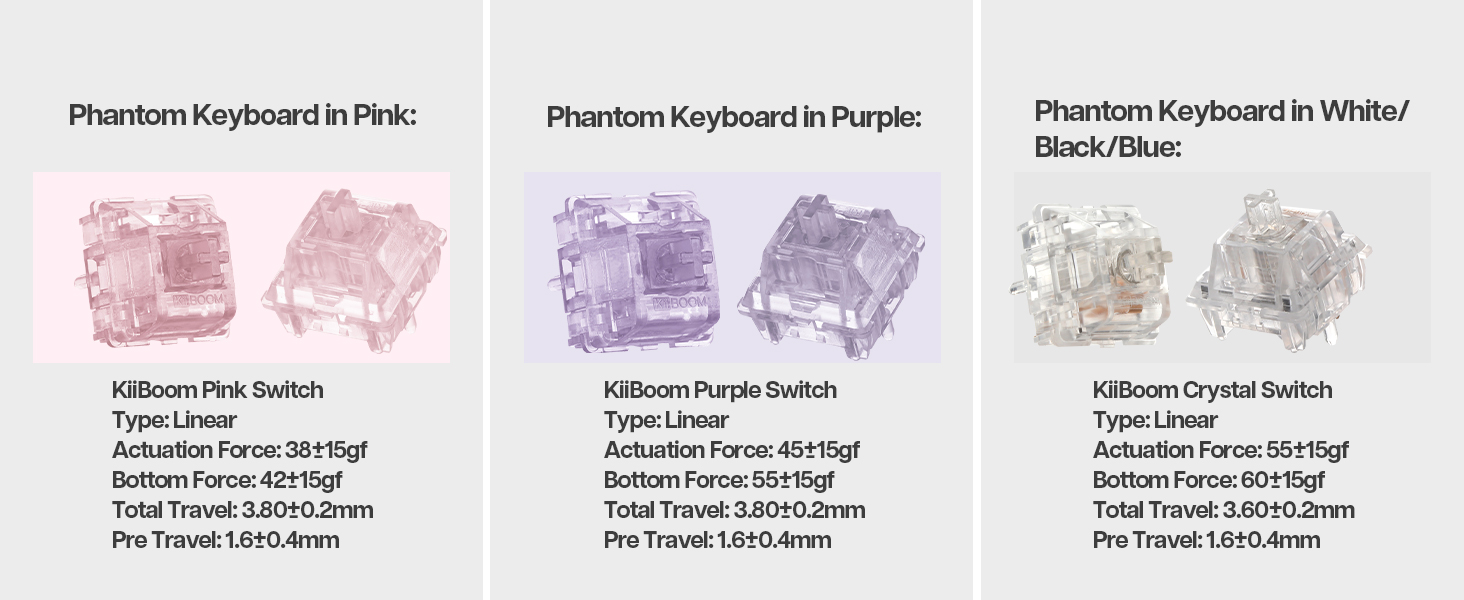
The Phantom 81 V3 Pink model typically comes with KiiBoom Pink Switches. Other KiiBoom switches are also compatible.
| سوئچ کی قسم | قسم | ایکٹیویشن فورس | نیچے کی قوت | کل سفر | سفر سے پہلے |
|---|---|---|---|---|---|
| KiiBoom Pink Switch | لکیری | 38±15gf | 42±15gf | 3.80±0.2 ملی میٹر | 1.6±0.4 ملی میٹر |
| KiiBoom Purple Switch | لکیری | 45±15gf | 55±15gf | 3.80±0.2 ملی میٹر | 1.6±0.4 ملی میٹر |
| KiiBoom Crystal Switch | لکیری | 55±15gf | 60±15gf | 3.60±0.2 ملی میٹر | 1.6±0.4 ملی میٹر |


5. بیٹری کا انتظام
The KiiBoom Phantom 81 V3 is equipped with an 8000mAh rechargeable battery, providing extended wireless usage.
کی بورڈ چارج کرنا
Connect the keyboard to a power source using the provided USB Type-C cable. The keyboard will indicate charging status through its RGB lighting.
بیٹری کی طاقت کی جانچ کر رہا ہے۔
To check the current battery level, press Fn + بیک اسپیس. The RGB lights will display the approximate battery percentage.

6. Construction and Design
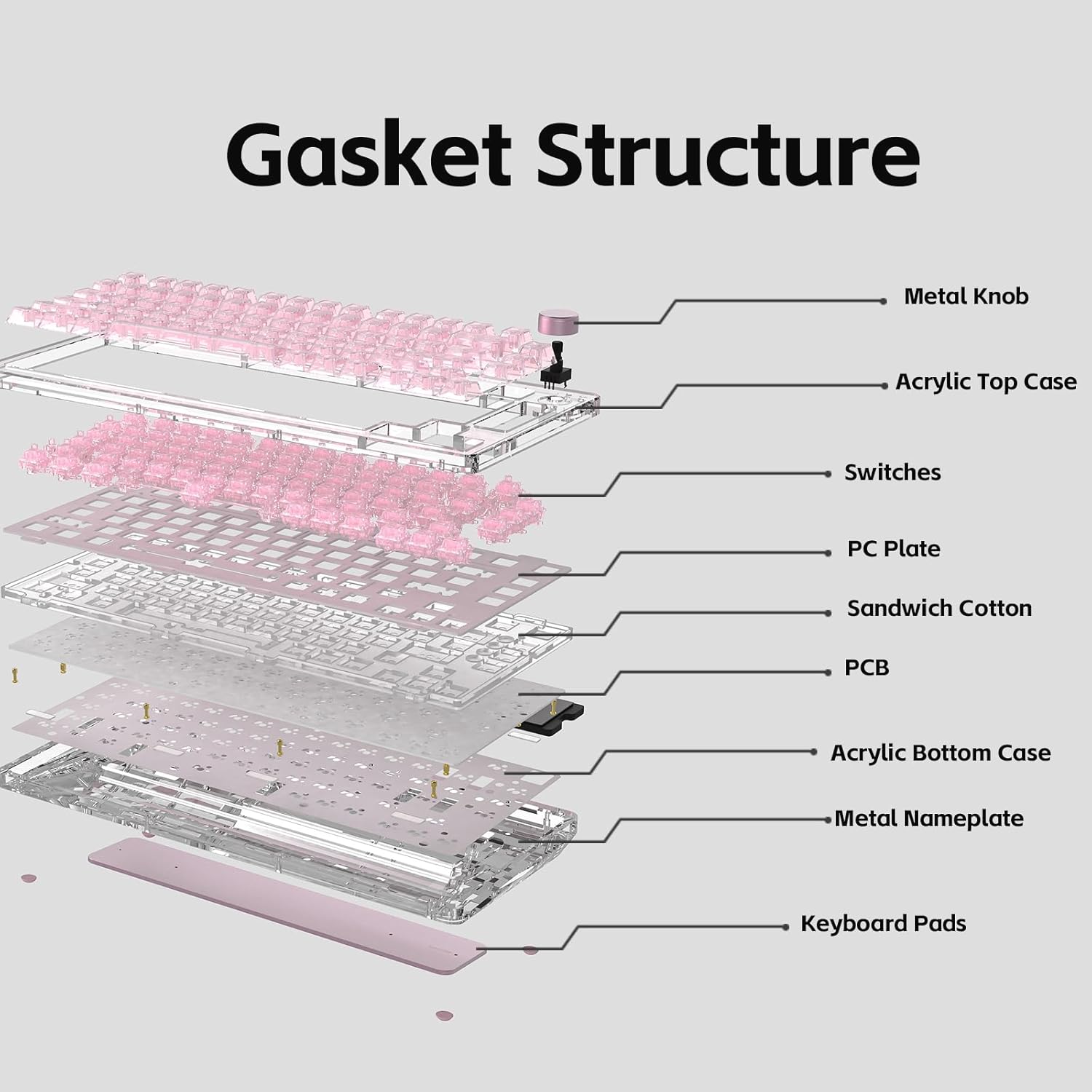
The KiiBoom Phantom 81 V3 features a unique transparent design and robust internal construction.
Acrylic Frame and Keycaps
The keyboard boasts a crystal-clear acrylic frame and transparent polycarbonate keycaps with UV printing, offering both durability and a distinctive aesthetic.


Gasket Mount Structure
The keyboard utilizes an enhanced gasket mount system with a PC (Polycarbonate) plate. This design provides a flexible, cushioned typing feel and contributes to a pleasant acoustic profile.

7. وضاحتیں
| فیچر | تفصیل |
|---|---|
| ماڈل | Phantom 81 V3 Pink |
| لے آؤٹ | 75% (82 keys + 1 knob) |
| کنیکٹوٹی | Type-C Wired, Bluetooth 5.0, 2.4GHz Wireless |
| سوئچ کرتا ہے۔ | گرم تبدیل کرنے کے قابل (3-پن/5-پن ہم آہنگ) |
| بیک لائٹنگ | آر جی بی، جنوب کا سامنا کرنے والی ایل ای ڈی |
| کیکیپس | Transparent Polycarbonate with UV printing, ASA-Like Profile |
| کیس کا مواد | ایکریلک |
| پلیٹ کا مواد | پی سی (پولی کاربونیٹ) |
| بڑھتے ہوئے انداز | گسکیٹ ماؤنٹ |
| بیٹری کی صلاحیت | 8000mAh |
| آپریٹنگ سسٹم | ونڈوز، میک |
| طول و عرض | 332mm x 149mm x 47mm (تقریبا) |
| وزن | 1.45 کلوگرام (تقریباً) |

8 دیکھ بھال
کی بورڈ کی صفائی
- صفائی سے پہلے کی بورڈ کو تمام پاور ذرائع سے منقطع کریں۔
- نرم، لنٹ سے پاک کپڑا استعمال کریں۔ampened with a small amount of water or a mild cleaning solution to wipe down the keycaps and case.
- For deeper cleaning, remove keycaps using the provided keycap puller and use compressed air to clear debris from between switches.
- Avoid using harsh chemicals or abrasive materials, as these can damage the acrylic and keycap surfaces.
جنرل کیئر
- کی بورڈ کو انتہائی درجہ حرارت یا براہ راست سورج کی روشنی میں بے نقاب کرنے سے گریز کریں۔
- Do not spill liquids on the keyboard. In case of a spill, immediately disconnect power and allow it to dry completely before reconnecting.
- Handle switches and keycaps gently during removal and installation to prevent damage.
9 خرابیوں کا سراغ لگانا
کی بورڈ جواب نہیں دے رہا ہے۔
- Ensure the keyboard is properly connected via USB, Bluetooth, or 2.4GHz.
- Check the connectivity switch on the back of the keyboard to ensure it's set to the correct mode.
- Verify the battery level. If low, connect the keyboard to a power source.
- اپنے کمپیوٹر یا ڈیوائس کو دوبارہ شروع کرنے کی کوشش کریں۔
آر جی بی لائٹس کام نہیں کر رہی ہیں۔
- یقینی بنائیں کہ کی بورڈ آن ہے۔
- Check the RGB control key combinations (Fn + V/J/P/B) to ensure lights are not turned off or set to a very dim setting.
- If using customization software, ensure settings are correctly applied.
کیز رجسٹر نہیں ہو رہی ہیں۔
- If a specific key is not working, try removing and re-inserting its switch to ensure it's properly seated.
- Test with a spare switch if available to rule out a faulty switch.
- Ensure no debris is obstructing the switch mechanism.
بلوٹوتھ کنیکٹیویٹی کے مسائل
- یقینی بنائیں کہ کی بورڈ بلوٹوتھ پیئرنگ موڈ میں ہے۔
- Remove the keyboard from your device's Bluetooth list and attempt to re-pair.
- Ensure your device's Bluetooth is enabled and functioning correctly.
- Avoid excessive distance between the keyboard and the connected device.
10. وارنٹی اور سپورٹ
KiiBoom products are manufactured to high-quality standards. For warranty information, technical support, or service inquiries, please refer to the official KiiBoom webسائٹ یا ان کے کسٹمر سپورٹ سے براہ راست رابطہ کریں۔ وارنٹی دعووں کے لیے خریداری کے ثبوت کے طور پر اپنی خریداری کی رسید رکھیں۔