
1. تعارف
The SMSL AS400 is a versatile audio device combining a Digital-to-Analog Converter (DAC), a headphone ampلائفائر (HPA)، اور ایک طاقت ampزندگی (AMP) into a single unit. Designed for high-fidelity audio reproduction, it supports various input sources and offers powerful output for both speakers and headphones. This manual provides detailed instructions for the proper setup, operation, and maintenance of your AS400 unit.

Figure 1.1: The SMSL AS400 functions as a DAC, Headphone Amplifier, and Power Ampزندگی
2. حفاظتی معلومات
- بجلی کی فراہمی: صرف فراہم کردہ پاور اڈاپٹر استعمال کریں۔ والیوم کو یقینی بنائیںtage آپ کی مقامی پاور سپلائی کی تفصیلات سے میل کھاتا ہے۔
- وینٹیلیشن: وینٹیلیشن کے سوراخوں کو مسدود نہ کریں۔ زیادہ گرم ہونے سے بچنے کے لیے یونٹ کے ارد گرد ہوا کا مناسب بہاؤ یقینی بنائیں۔
- نمی: Keep the unit away from water, moisture, and high humidity environments.
- صفائی: صفائی سے پہلے بجلی منقطع کریں۔ خشک، نرم کپڑا استعمال کریں۔ مائع یا ایروسول کلینر استعمال نہ کریں۔
- سروسنگ: اس پروڈکٹ کو خود پیش کرنے کی کوشش نہ کریں۔ تمام سروسز کو اہل سروس اہلکاروں کے حوالے کریں۔
- جگہ کا تعین: یونٹ کو ایک مستحکم، سطحی سطح پر رکھیں۔ اسے گرمی کے ذرائع کے قریب یا براہ راست سورج کی روشنی میں رکھنے سے گریز کریں۔
3. پیکیج کے مشمولات
براہ کرم چیک کریں کہ تمام اشیاء پیکیج میں موجود ہیں:
- SMSL AS400 Unit
- ریموٹ کنٹرول (RC-8A)
- پاور کیبل
- USB کیبل
- بلوٹوتھ اینٹینا
- صارف دستی (یہ دستاویز)
4. پروڈکٹ ختمview
4.1 فرنٹ پینل

Figure 4.1: Front Panel of the SMSL AS400 and included remote control.

Figure 4.2: Front Panel Component Identification.
- ڈسپلے سکرین: موجودہ ان پٹ دکھاتا ہے، sample rate, volume, and menu options.
- Remote Window: ریموٹ کنٹرول کے لیے اورکت رسیور۔
- فنکشن نوب:
- Press: Enter menu / OK
- Hold: Exit menu
- Rotate: Change value / Volume control
- 4.4 ملی میٹر ہیڈ فون جیک: متوازن ہیڈ فون آؤٹ پٹ۔
- 6.35 ملی میٹر ہیڈ فون آؤٹ پٹ: Unbalanced headphone output.
4.2 پیچھے والا پینل

Figure 4.3: Rear Panel Component Identification.
- گراؤنڈنگ ٹرمینل: For connecting a turntable ground wire.
- فونو ان پٹ: RCA inputs for turntables with MM cartridges.
- LINE Input (AUX): RCA analog input for external audio sources.
- سماکشی ان پٹ: ڈیجیٹل آڈیو ان پٹ۔
- SW Out (Preamp): Subwoofer pre-out.
- USB Input (PRE): USB-B input for connecting to a computer or other digital source.
- آپٹیکل ان پٹ: ڈیجیٹل آڈیو ان پٹ۔
- HDMI (ARC) ان پٹ: Audio Return Channel for connecting to a TV.
- بلوٹوتھ اینٹینا: وائرلیس بلوٹوتھ کنیکٹیویٹی کے لیے۔
- Left/Right Channel Output: Speaker terminals for passive speakers.
- AC پاور ان پٹ: پاور کیبل کو یہاں سے جوڑیں۔
4.3 ریموٹ کنٹرول (RC-8A)
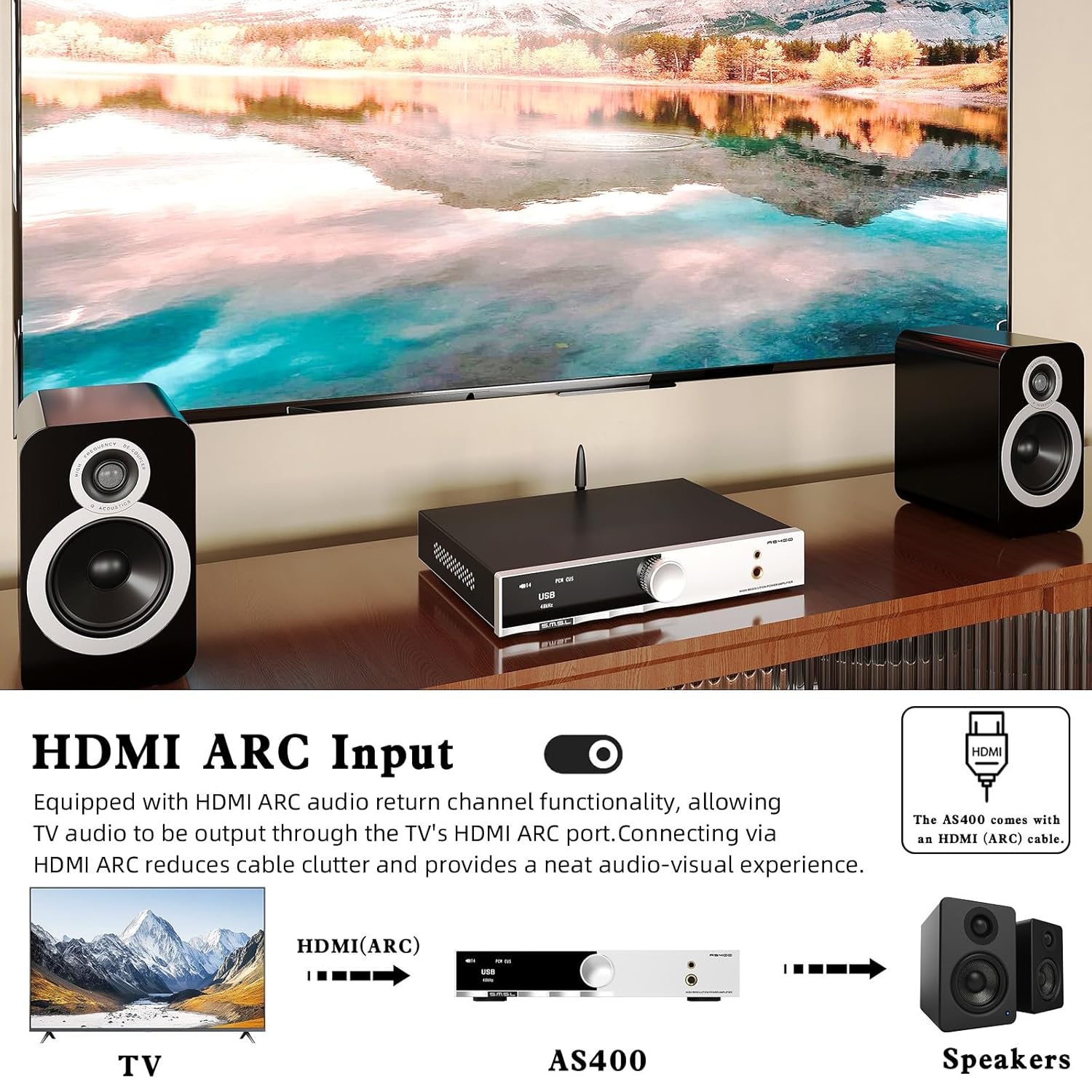
Figure 4.4: Remote Control Functions.
- پاور آن/آف: یونٹ کو آن یا آف کرتا ہے۔
- اوپر نیچے: مینو کے اختیارات پر جائیں یا ترتیبات کو ایڈجسٹ کریں۔
- مینو/ٹھیک ہے: Enters the main menu or confirms a selection.
- FN (Function): Enters the secondary interface for additional settings.
- ان پٹ سلیکٹ: دستیاب ان پٹ ذرائع کے ذریعے سائیکل۔
- خاموش کریں: آڈیو آؤٹ پٹ کو خاموش یا غیر خاموش کرتا ہے۔
- آؤٹ پٹ سوئچنگ: Switches between speaker and headphone outputs.
- حجم +/-: آؤٹ پٹ والیوم کو ایڈجسٹ کرتا ہے۔
5. سیٹ اپ
5.1 مربوط اسپیکرز
- Ensure the AS400 is powered off.
- Connect your passive speakers to the Left and Right Channel Output terminals on the rear panel. Ensure correct polarity (+ to + and - to -).
- If using a powered subwoofer, connect it to the SW Out (Preamp) port using an RCA cable.
5.2 آڈیو ذرائع کو جوڑنا
The AS400 supports multiple input types:
- USB: Connect a computer or other USB audio source to the USB Input (PRE) port using the provided USB cable.
- نظری/ سماکشی: Connect digital audio sources (e.g., CD player, game console) to the Optical or Coaxial Input ports.
- RCA (LINE): Connect analog audio sources (e.g., media player) to the LINE Input (AUX) ports.
- فون: Connect a turntable with an MM cartridge to the PHONO Input ports. Ensure the turntable's ground wire is connected to the Grounding Terminal on the AS400.
- ایچ ڈی ایم آئی (اے آر سی): Connect your TV's HDMI ARC port to the AS400's HDMI (ARC) Input for TV audio output.
- بلوٹوتھ: Screw the Bluetooth antenna onto its designated port for wireless connectivity.

Figure 5.1: HDMI ARC and Bluetooth Connectivity.
5.3 پاور کنکشن
- Connect the power cable to the AC Power Input on the rear panel of the AS400.
- پاور کیبل کے دوسرے سرے کو کسی مناسب دیوار کے آؤٹ لیٹ میں لگائیں۔
6. آپریٹنگ ہدایات
6.1 پاور آن/آف
Press the Power ON/OFF button on the remote control or the function knob to turn the unit on or off.
6.2 ان پٹ سلیکشن
Use the 'Input Select' button on the remote or rotate the function knob to cycle through available inputs (USB, Optical, Coaxial, RCA, PHONO, HDMI ARC, Bluetooth).
6.3 والیوم کنٹرول
Adjust the volume using the 'Volume +/-' buttons on the remote or by rotating the function knob.
6.4 مینو نیویگیشن اور سیٹنگز
Press the function knob or the 'MENU/OK' button on the remote to enter the main menu. Use the 'Up/Down' buttons or rotate the knob to navigate. Press 'MENU/OK' to select an option. Hold the function knob or press the 'FN' button to exit the menu.
Key menu options include:
- ان پٹ: Selects the active audio input.
- آؤٹ پٹ: Switches between speaker and headphone outputs.
- EQ: Select from 8 preset EQ modes (Direct, Bass, Rock, etc.) to tailor sound.
- باس/ٹریبل: Adjust bass and treble levels for personalized sound.
- فلٹر: Select from 5 PCM digital filters.
- رنگ: Change the display screen color.
- BT Clear: Clears paired Bluetooth devices.

Figure 6.1: Setup Menu and Sound Customization Options.
6.5 بلوٹوتھ جوڑی
- یقینی بنائیں کہ بلوٹوتھ اینٹینا منسلک ہے۔
- AS400 پر ان پٹ سورس کے طور پر 'بلوٹوتھ' کو منتخب کریں۔
- On your mobile device, search for Bluetooth devices and select 'SMSL AS400'.
- Once paired, audio from your device will stream to the AS400.
- To clear paired devices, navigate to 'BT Clear' in the menu.
6.6 MQA/MQA-CD پلے بیک
The AS400 supports MQA and MQA-CD decoding. When playing MQA content via USB, Optical, or Coaxial inputs, the display will indicate MQA status, ensuring studio-quality audio reproduction.
7 دیکھ بھال
- صفائی: یونٹ کے بیرونی حصے کو صاف کرنے کے لیے نرم، خشک کپڑا استعمال کریں۔ کھرچنے والے کلینر یا سالوینٹس سے پرہیز کریں۔
- دھول: Regularly dust the unit, especially around ventilation areas, to prevent dust buildup.
- رابطے: وقتاً فوقتاً تمام کیبل کنکشنز کو چیک کریں کہ وہ محفوظ ہیں۔
- ذخیرہ: اگر یونٹ کو لمبے عرصے تک ذخیرہ کر رہے ہیں، تو اسے بجلی سے منقطع کریں اور اسے ٹھنڈی، خشک جگہ پر محفوظ کریں۔
8 خرابیوں کا سراغ لگانا
If you encounter issues with your AS400, please refer to the following common problems and solutions:
| مسئلہ | ممکنہ وجہ | حل |
|---|---|---|
| کوئی طاقت نہیں۔ | پاور کیبل منقطع؛ پاور آؤٹ لیٹ ناقص۔ | پاور کیبل کنکشن چیک کریں؛ ایک مختلف دکان کی کوشش کریں. |
| کوئی آواز آؤٹ پٹ نہیں ہے۔ | Incorrect input selected; volume too low; speakers/headphones not connected; output mode incorrect. | Verify input source; increase volume; check speaker/headphone connections; ensure correct output mode (speaker/headphone) is selected in the menu. |
| بلوٹوتھ کنکشن غیر مستحکم ہے۔ | Antenna not connected; interference; device too far. | Ensure Bluetooth antenna is securely attached; move device closer to AS400; clear paired devices via 'BT Clear' in menu and re-pair. |
| Subwoofer output is weak or not triggering. | Subwoofer sensitivity setting; AS400 subwoofer output level. | Adjust the gain/volume setting on your powered subwoofer. Ensure the subwoofer is powered on. Note that the AS400's subwoofer output is a pre-out and its level is tied to the main volume. |
| مسخ شدہ آواز | Input signal too high; faulty cable; speaker impedance mismatch. | Reduce input source volume; check/replace cables; ensure speaker impedance is within AS400's supported range. |
اگر ان حلوں کو آزمانے کے بعد بھی مسئلہ برقرار رہتا ہے، تو براہ کرم کسٹمر سپورٹ سے رابطہ کریں۔
9. وضاحتیں

Figure 9.1: Detailed Product Specifications.
| فیچر | تفصیلات |
|---|---|
| ان پٹ | RCA / BT / USB / Optical / Coaxial / Phono / I²S / HDMI (ARC) |
| THD+N | 0.003% |
| آؤٹ پٹ پاور (RMS) | 165W x2 (4Ω), 85W x2 (8Ω) |
| ان پٹ حساسیت/امپیڈنس | 280mV/22kΩ |
| طول و عرض (WxHxD) | 210.4 x 46 x 254 ملی میٹر |
| وزن | 1.57 کلوگرام (3.46 پونڈ) |
| USB مطابقت | ونڈوز 7/8/8.1/10/11، میک او ایس ایکس، لینکس |
| بٹ کی گہرائی | USB: 1bit, 16-32bit; Optical/Coaxial: 1bit, 16-32bit |
| ایس این آر | 107dB |
| چینل کی علیحدگی | 98dB |
| USB ٹرانسمیشن | غیر مطابقت پذیر منتقلی۔ |
| بجلی کی کھپت | 40W (عام حجم) |
| ایم کیو اے ڈیکوڈر | USB / آپٹیکل / سماکشی |
| MQA-CD ڈیکوڈر | آپٹیکل / سماکشیی |
| Sampلنگ کی شرح (USB) | PCM: 44.1-768kHz; DSD: 2.8224-11.2896MHz |
| Sampling Rate (Optical/Coaxial) | PCM: 44.1-192kHz; DSD: DSD64 (DoP) |
10. وارنٹی اور سپورٹ
The SMSL AS400 comes with a standard manufacturer's warranty. Please refer to the warranty card included in your package for specific terms and conditions, including warranty period and coverage.
For technical support, troubleshooting assistance beyond this manual, or warranty claims, please contact your authorized SMSL dealer or visit the official SMSL webرابطے کی معلومات کے لیے سائٹ۔
وارنٹی مقاصد کے لیے براہ کرم اپنی خریداری کا ثبوت اپنے پاس رکھیں۔