
1. تعارف
Thank you for choosing the Schneider 43A1 4K UHD LED TV. This television combines advanced display technology with smart features to provide an immersive viewing experience. Featuring a 4K Ultra High Definition display, QLED-LCD technology with Direct LED backlighting, and the VIDAA Smart TV platform, your new TV offers vibrant colors, deep blacks, and access to a wide range of entertainment.
This manual provides essential information for the safe and efficient use of your television. Please read it thoroughly before operating the device and retain it for future reference.
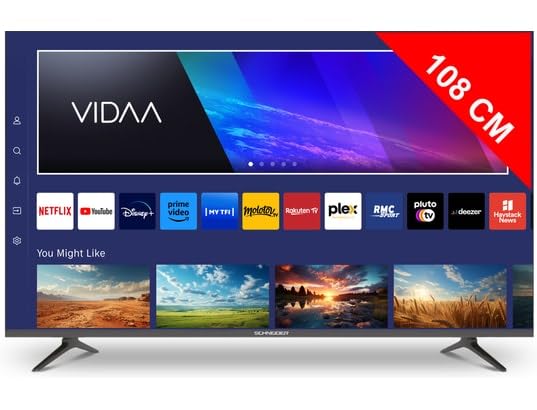
تصویر 1.1: سامنے view of the Schneider 43A1 TV with VIDAA interface.
2. حفاظتی معلومات
محفوظ آپریشن کو یقینی بنانے اور نقصان کو روکنے کے لیے، براہ کرم درج ذیل حفاظتی تدابیر پر عمل کریں:
- جگہ کا تعین: Position the TV on a stable, level surface. Avoid placing it in direct sunlight, near heat sources, or in environments with high humidity or dust.
- وینٹیلیشن: Ensure adequate ventilation around the TV. Do not block ventilation openings. Maintain a minimum distance of 10 cm from walls or other objects.
- بجلی کی فراہمی: صرف مخصوص پاور سپلائی والیوم کا استعمال کریں۔tage. Ensure the power cord is not pinched or walked on. Disconnect the power plug during lightning storms or when unused for extended periods.
- صفائی: صاف کرنے سے پہلے ٹی وی کو ان پلگ کریں۔ نرم، خشک کپڑا استعمال کریں۔ مائع یا ایروسول کلینر استعمال نہ کریں۔
- مائعات: Do not expose the TV to dripping or splashing liquids. Do not place objects filled with liquids, such as vases, on the TV.
- بچے: اس بات کو یقینی بنانے کے لیے بچوں کی نگرانی کریں کہ وہ ٹی وی یا فرنیچر پر نہ چڑھیں۔
- دیوار چڑھانا: If wall-mounting, use a VESA compatible bracket (200 x 200 mm) and ensure proper installation by qualified personnel to prevent injury.
3. پیکیج کے مشمولات
براہ کرم چیک کریں کہ تمام اشیاء موجود ہیں اور اچھی حالت میں ہیں:
- Schneider 43A1 4K UHD LED TV
- ریموٹ کنٹرول
- پاور کیبل
- ٹی وی اسٹینڈ (2 ٹکڑے)
- ٹی وی اسٹینڈ کے لیے پیچ
- صارف دستی (یہ دستاویز)
4. سیٹ اپ
4.1 پیک کھولنا
Carefully remove the TV from its packaging. It is recommended to keep the original packaging for potential future transport or service needs.
4.2 اسٹینڈ تنصیب
If you are not wall-mounting the TV, attach the included stand pieces to the bottom of the TV using the provided screws. Ensure the stand is securely fastened before placing the TV upright.
4.3 وال ماؤنٹنگ (اختیاری)
The Schneider 43A1 is compatible with VESA 200 x 200 mm wall mounts. For safe installation, it is highly recommended to use a professional installer. Refer to your wall mount's instructions for specific details.
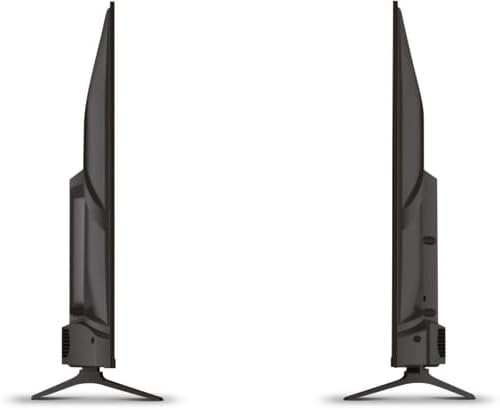
تصویر 4.1: سائیڈ view of the Schneider 43A1 TV, illustrating its profile for placement or wall mounting.
4.4 بیرونی آلات کو جوڑنا
آپ کا TV کنیکٹیویٹی کے مختلف اختیارات پیش کرتا ہے:
- HDMI: HDMI پورٹس سے تین HDMI 2.0 ڈیوائسز (جیسے بلو رے پلیئر، گیم کنسول، سیٹ ٹاپ باکس) تک جوڑیں۔
- USB: Two USB ports are available for connecting USB storage devices to play media.
- AV/Audio Input: For older devices requiring composite video and stereo audio.
- سماکشی پیداوار: بیرونی آڈیو سسٹم سے جڑنے کے لیے۔
- اینٹینا/کیبل ان پٹ: Connect your antenna or cable TV signal for DVB-T/T2/C/S2 reception.
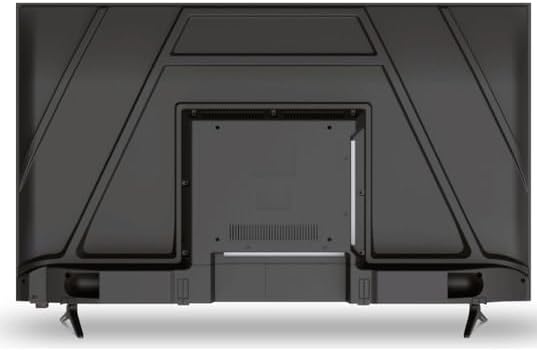
تصویر 4.2: پیچھے view of the Schneider 43A1 TV, highlighting connection ports.
4.5 کنیکٹنگ پاور
Plug the power cable into the TV's power input, then into a suitable wall outlet.
4.6 ابتدائی سیٹ اپ وزرڈ
Upon first power-on, the TV will guide you through an initial setup process. This includes selecting your language, connecting to a Wi-Fi network, and scanning for available channels (DVB-T/T2/C/S2).
5. آپریٹنگ
5.1 ریموٹ کنٹرول کے افعال
The remote control allows you to navigate the TV's features:
- پاور بٹن: ٹی وی کو آن یا آف کرتا ہے۔
- والیوم اوپر/نیچے: آواز کی سطح کو ایڈجسٹ کرتا ہے۔
- چینل اوپر/نیچے: ٹی وی چینلز بدلتے ہیں۔
- ان پٹ/ماخذ: Selects the input source (HDMI, USB, TV Tuner).
- نیویگیشن بٹن: مینو نیویگیشن کے لیے۔
- اسمارٹ ٹی وی کے بٹن: Direct access to popular apps like Netflix, Prime Video, YouTube.
5.2 Smart TV (VIDAA)
The integrated VIDAA Smart TV platform provides access to a variety of applications and streaming services. Connect your TV to the internet via Wi-Fi to enjoy features like Netflix, Prime Video, and YouTube. Bluetooth connectivity allows for wireless connection to compatible audio devices.

تصویر 5.1: زاویہ والا سامنے view of the Schneider 43A1 TV, displaying the VIDAA Smart TV interface.
5.3 ان پٹ سلیکشن
Press the 'Input' or 'Source' button on your remote control to switch between connected devices (HDMI 1, HDMI 2, HDMI 3, USB, AV, TV Tuner).
5.4 تصویر اور آواز کی ترتیبات
Access the TV's menu to adjust picture and sound settings. The 4K UHD resolution, QLED-LCD technology, and Direct LED backlighting ensure a high-quality visual experience. The TV also features upscaling to enhance lower-resolution content. Audio is delivered via 2 x 8 W RMS stereo speakers with Dolby Audio support.
5.5 PC Monitor Mode
The TV can be used as a PC monitor by connecting your computer via an HDMI cable. This mode optimizes the display for computer use.
6 دیکھ بھال
6.1 ٹی وی کی صفائی
Before cleaning, ensure the TV is unplugged from the power outlet.
- سکرین: نرم، لنٹ فری کپڑے سے اسکرین کو آہستہ سے صاف کریں۔ ضدی نشانات کے لیے، ہلکے سے ڈیampur کپڑے میں پانی یا خصوصی سکرین کلینر (براہ راست سکرین پر اسپرے نہ کریں)۔
- بیرونی: ٹی وی صاف کرنے کے لیے نرم، خشک کپڑا استعمال کریں۔asinجی کھرچنے والے کلینر یا سالوینٹس سے پرہیز کریں۔
6.2 سافٹ ویئر اپ ڈیٹس
آپ کے TV کو کارکردگی کو بہتر بنانے اور نئی خصوصیات شامل کرنے کے لیے سافٹ ویئر اپ ڈیٹس موصول ہو سکتے ہیں۔ یقینی بنائیں کہ آپ کا TV انٹرنیٹ سے منسلک ہے تاکہ یہ اپ ڈیٹس خود بخود موصول ہو سکیں یا ترتیبات کے مینو کے ذریعے انہیں دستی طور پر چیک کریں۔
7 خرابیوں کا سراغ لگانا
اگر آپ کو اپنے ٹی وی کے ساتھ مسائل کا سامنا ہے، تو درج ذیل عام مسائل اور حل دیکھیں:
- کوئی طاقت نہیں:
- چیک کریں کہ آیا پاور کیبل محفوظ طریقے سے TV اور وال آؤٹ لیٹ میں لگائی گئی ہے۔
- یقینی بنائیں کہ وال آؤٹ لیٹ کام کر رہا ہے (کسی دوسرے آلے سے ٹیسٹ کریں)۔
- ریموٹ کنٹرول پر یا ٹی وی پر ہی پاور بٹن دبائیں۔
- کوئی تصویر/آواز نہیں:
- تصدیق کریں کہ صحیح ان پٹ ذریعہ منتخب کیا گیا ہے (مثال کے طور پر، HDMI 1، TV)۔
- TV اور بیرونی آلات کے درمیان تمام کیبل کنکشن چیک کریں۔
- یقینی بنائیں کہ والیوم خاموش نہیں ہے یا کم سے کم پر سیٹ ہے۔
- اگر اینٹینا استعمال کر رہے ہیں، تو اینٹینا کنکشن چیک کریں اور چینل اسکین کریں۔
- ریموٹ کنٹرول کام نہیں کر رہا:
- ریموٹ کنٹرول میں بیٹریاں تبدیل کریں۔
- یقینی بنائیں کہ ریموٹ اور ٹی وی کے IR سینسر کے درمیان کوئی رکاوٹ نہیں ہے۔
- Smart TV/Network Issues:
- اپنا وائی فائی روٹر اور انٹرنیٹ کنکشن چیک کریں۔
- Go to the TV's network settings to re-connect to your Wi-Fi network.
- TV اور اپنے راؤٹر کو دوبارہ شروع کریں۔
اگر ان حلوں کو آزمانے کے بعد بھی مسئلہ برقرار رہتا ہے، تو براہ کرم کسٹمر سپورٹ سے رابطہ کریں۔
8. وضاحتیں
| فیچر | تفصیلات |
|---|---|
| ماڈل | Schneider 43A1 |
| ڈسپلے سائز | 109 سینٹی میٹر (43 انچ) |
| قرارداد | 4K الٹرا ایچ ڈی (3840 x 2160 پکسلز) |
| ڈسپلے ٹیکنالوجی | QLED-LCD with Direct LED Backlight |
| کنٹراسٹ ریشو | 1100:1 |
| چمک | 200 cd/m² |
| آڈیو آؤٹ پٹ | 2 x 8 W RMS Stereo |
| آڈیو ٹیکنالوجی | ڈولبی آڈیو |
| HDMI پورٹس | 3 (HDMI 2.0) |
| USB پورٹس | 2 |
| دیگر ان پٹ۔ | AV/Audio Input |
| آؤٹ پٹس | سماکشیی پیداوار |
| ٹونر | DVB-T/T2/C/S2 |
| سمارٹ ٹی وی پلیٹ فارم | VIDAA (Netflix, Prime Video, YouTube) |
| وائرلیس کنیکٹیویٹی | وائی فائی، بلوٹوتھ |
| VESA مطابقت | 200 x 200 ملی میٹر |
| وزن | 7.5 کلوگرام |