
1. تعارف
The NZXT H2 Flow (CI-H21FB-01) is a compact vertical Mini-ITX PC case designed to maximize airflow and save space while accommodating high-performance components. It features smart cable management, tool-less access, and includes dual top fans and a premium PCIe 5.0 riser cable for a streamlined building experience.
اہم خصوصیات:
- Hybrid Glass-and-Mesh Side Panel: Showcases your build while supporting up to a 280 mm radiator for efficient cooling.
- کومپیکٹ ڈیزائن: A 20.7 L volume fits most GPUs up to 331 mm, offering high-end power in a small footprint.
- High Airflow Panels: Ultra-fine mesh panels on multiple sides maximize fresh air intake and filter dust, keeping components cooler and cleaner.
- Effortless Building: Tool-less panels, integrated cable routing Velcro straps, and intuitive wire management channels simplify installation.
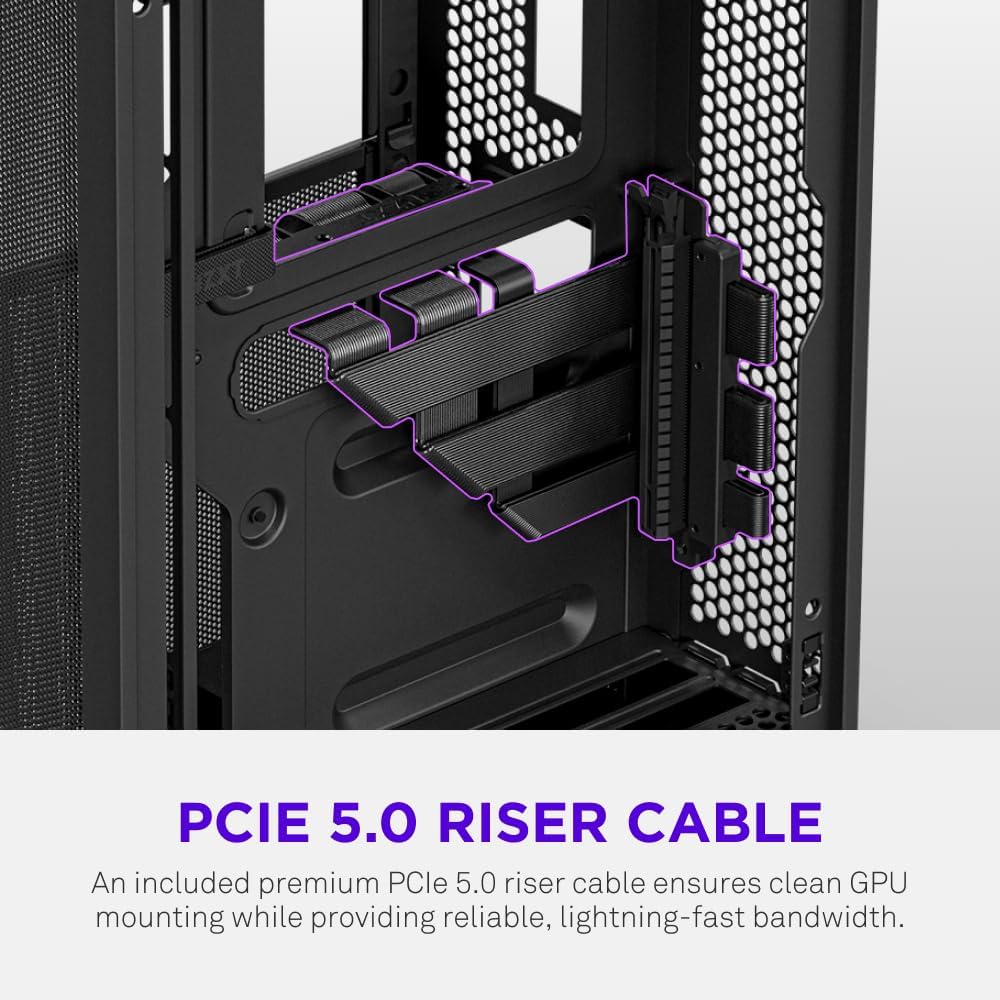
- Pre-Installed Performance: Includes a premium PCIe 5.0 riser cable for vertical GPU mounting and dual F120Q CV fans for immediate exhaust cooling.
2. حفاظتی معلومات
WARNING: Always disconnect power from your PC before performing any installation, maintenance, or troubleshooting. Failure to do so may result in personal injury or damage to components.
- تنصیب سے پہلے تمام ہدایات کو بغور پڑھیں۔
- الیکٹرو سٹیٹک ڈسچارج (ESD) کے اجزاء کو پہنچنے والے نقصان کو روکنے کے لیے اینٹی سٹیٹک کلائی کا پٹا پہنیں یا کسی گراؤنڈ دھاتی چیز کو بار بار چھویں۔
- Handle components with care. Avoid touching pins or exposed circuitry.
- چھوٹے پرزے اور پیکیجنگ مواد کو بچوں سے دور رکھیں۔
- زیادہ گرمی سے بچنے کے لیے پی سی کیس کے ارد گرد مناسب وینٹیلیشن کو یقینی بنائیں۔
3. پیکیج کے مشمولات
Verify that all items are present in your NZXT H2 Flow package:
- NZXT H2 Flow Mini-ITX PC Case
- 2 x 120mm F120Q CV Top Fans (pre-installed)
- Premium PCIe 5.0 Riser Cable (pre-installed)
- آلات خانہ (اسکرو، کیبل ٹائیز اور دیگر چھوٹے حصوں پر مشتمل)
4. اجزاء کی مطابقت
The NZXT H2 Flow case is designed to accommodate specific component sizes for optimal performance and fit:
- مدر بورڈ: منی آئی ٹی ایکس
- گرافکس کارڈ (GPU): Up to 331 mm in length
- ریڈی ایٹر: Up to 280 mm (for liquid cooling solutions)
- پاور سپلائی (PSU): SFX/SFXL form factor is recommended for best compatibility and cable management.
- پرستار: Includes 2 x 120mm top fans. Additional fan mounting options may be available depending on other component choices.
5. سیٹ اپ اور انسٹالیشن
Follow these steps to assemble your PC within the NZXT H2 Flow case. Refer to your individual component manuals for specific installation details.
5.1. Case Overview اور ابعاد
The NZXT H2 Flow is a compact vertical Mini-ITX case. Understanding its dimensions is crucial for planning your build.

5.2. Accessing the Case Interior
The H2 Flow features tool-less panels for easy access to the interior.

5.3. Motherboard and CPU Installation
Install your Mini-ITX motherboard and CPU (with cooler) before placing it into the chassis.
5.4. پاور سپلائی یونٹ (PSU) کی تنصیب
The case supports SFX/SFXL power supplies. Mount the PSU in its designated area, typically at the bottom of the case.

5.5. کیبل کا انتظام
Utilize the integrated cable routing channels and Velcro straps for a clean and organized interior.
5.6۔ گرافکس کارڈ (GPU) کی تنصیب
The H2 Flow supports GPUs up to 331 mm in length and includes a premium PCIe 5.0 riser cable for vertical mounting.

5.7. کولنگ سسٹم
The case comes with two pre-installed 120mm F120Q CV fans at the top for exhaust. It also supports up to a 280mm radiator for liquid cooling.


5.8. پروڈکٹ ختمview ویڈیو
بصری اوور کے لیے یہ آفیشل ویڈیو دیکھیںview of the NZXT H2 Flow Mini-ITX PC Gaming Case.
6. آپریٹنگ ہدایات
6.1. پاور آن/آف
Press the power button located on the front I/O panel to turn your PC on or off.
6.2. Front I/O Ports
سامنے کا I/O پینل آسان رسائی فراہم کرتا ہے:
- USB 3.0 پورٹس
- USB-C پورٹ
- Audio Jack (if applicable)
Connect your peripherals such as keyboards, mice, and headsets to these ports.
7 دیکھ بھال
7.1 دھول کے فلٹرز کی صفائی
The NZXT H2 Flow features ultra-fine mesh panels that act as dust filters. Regularly clean these panels to maintain optimal airflow and prevent dust buildup inside your PC.
- Gently remove the mesh panels from the case.
- Use compressed air or a soft brush to remove accumulated dust.
- Reattach the panels securely.
7.2 عمومی صفائی
ایک نرم استعمال کریں، ڈیamp کیس کے بیرونی حصے کو صاف کرنے کے لیے کپڑا۔ کھرچنے والے کلینر یا سالوینٹس سے پرہیز کریں۔
8 خرابیوں کا سراغ لگانا
اگر آپ کو اپنے پی سی کی تعمیر میں مسائل کا سامنا کرنا پڑتا ہے تو، مندرجہ ذیل عام خرابیوں کا سراغ لگانے کے اقدامات پر غور کریں:
- کوئی طاقت نہیں: Ensure all power cables (PSU to wall, PSU to motherboard, CPU, GPU) are securely connected. Check the power switch on the PSU.
- کوئی ڈسپلے نہیں: Verify that your monitor is connected to the graphics card (not the motherboard I/O unless using integrated graphics) and that the GPU has proper power connections. Reseat the GPU and RAM.
- زیادہ گرم ہونا: Check fan connections and orientation. Ensure mesh panels are clean and not obstructed. Verify CPU cooler installation and thermal paste application.
- اجزاء کا پتہ نہیں چلا: Reseat the component (GPU, RAM, storage drives). Check power and data connections.
For more complex issues, consult your individual component manuals or NZXT customer support.
9. وضاحتیں
| فیچر | تفصیل |
|---|---|
| برانڈ | NZXT |
| ماڈل کا نام | NZXT H2 Flow |
| کیس کی قسم | منی ٹاور |
| مدر بورڈ مطابقت | منی آئی ٹی ایکس |
| GPU لمبائی کی حمایت | 331 ملی میٹر تک |
| ریڈی ایٹر سپورٹ | 280 ملی میٹر تک |
| شائقین شامل ہیں۔ | 2 x 120mm F120Q CV Top Fans |
| Included Riser Cable | Premium PCIe 5.0 |
| پاور سپلائی بڑھتے ہوئے کی قسم | Bottom Mount (SFX/SFXL recommended) |
| کولنگ کا طریقہ | Air, Liquid |
| رنگ | سیاہ |
| مواد | شیشہ، دھات |
| شے کا وزن | 4.55 کلوگرام |
| Total USB 3.0 Ports | 1 |
| Other Special Features | Tool-less Installation, Integrated Cable Management |
10. وارنٹی اور سپورٹ
10.1. وارنٹی کی معلومات
The NZXT H2 Flow Mini-ITX PC Case comes with a 2 سالہ مینوفیکچرر وارنٹی۔. وارنٹی کے دعووں کے لیے براہ کرم اپنی خریداری کا ثبوت اپنے پاس رکھیں۔
10.2. کسٹمر سپورٹ
For technical assistance, troubleshooting, or warranty inquiries, please visit the official NZXT support webسائٹ یا ان کی کسٹمر سروس ٹیم سے رابطہ کریں۔
NZXT Store: Visit the NZXT Store on Amazon