
تعارف
Thank you for choosing the GMBACK Wireless Pro Controller. This manual provides detailed instructions for setting up, operating, and maintaining your controller to ensure optimal performance and an enhanced gaming experience. Please read this manual thoroughly before use.
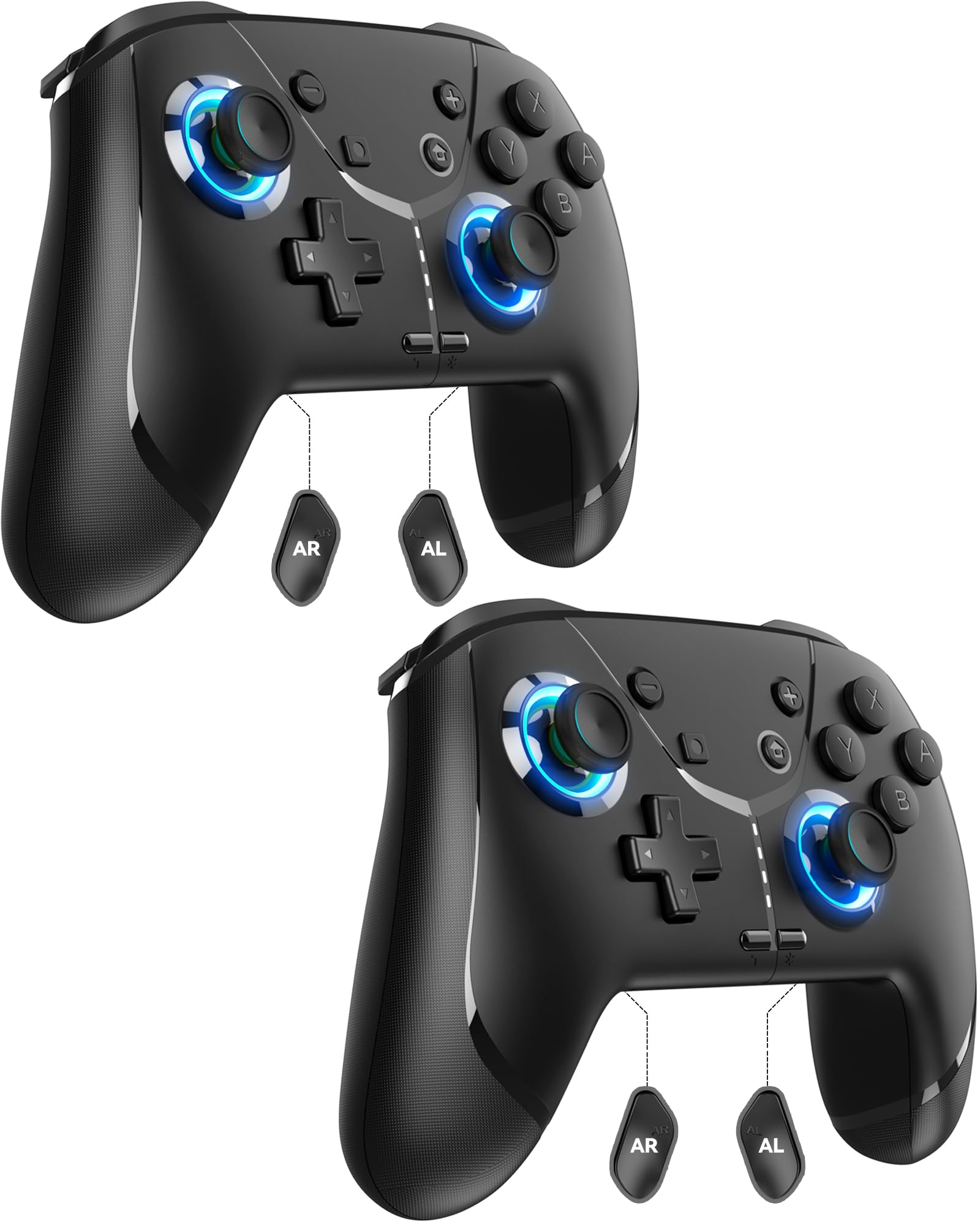
Image: GMBACK Wireless Pro Controller, front view.
پیکیج کے مشمولات
- 2 x GMBACK Wireless Pro Controllers
- 2 x USB-C چارجنگ کیبلز
- 1 ایکس صارف دستی
شروع کرنا
1. نائنٹینڈو سوئچ کے ساتھ جوڑا بنانا
- یقینی بنائیں کہ آپ کا Nintendo Switch کنسول آن ہے اور جدید ترین سسٹم سافٹ ویئر میں اپ ڈیٹ ہے۔
- ہوم مینو سے ، منتخب کریں 'Controllers'، پھر 'Change Grip/Order'.
- On the GMBACK controller, press and hold the مطابقت پذیری کا بٹن (located on the top edge near the USB-C port) for 3-5 seconds until the LED indicators begin to flash rapidly.
- The controller will automatically pair with the Switch. Once paired, the player LED(s) on the bottom of the controller will light up solid.

Image: GMBACK Wireless Pro Controller connected to a Nintendo Switch console.
2. Connecting to PC (Wired)
- Connect the GMBACK controller to your PC using the provided USB-C cable.
- The controller will be recognized as a standard gamepad. Drivers may install automatically.
- For optimal compatibility, ensure your PC's operating system is up to date.
3. کنٹرولر کو چارج کرنا
- Connect the controller to a USB power source (e.g., Switch dock, PC, USB wall adapter) using the provided USB-C cable.
- ایل ای ڈی کے اشارے چارجنگ کی حیثیت کو ظاہر کریں گے۔ مکمل چارج کرنے میں عام طور پر 2-3 گھنٹے لگتے ہیں۔
- The controller features an 800mAh battery, providing approximately 15-20 hours of playtime on a full charge.

Image: Visual representation of the 800mAh battery, 15-20 hours playtime, and 2-3 hours charging time.
کلیدی خصوصیات اور افعال
1. Loop Macro Function
The controller supports a loop macro function, allowing you to record and replay a sequence of up to 30 seconds of button presses and joystick movements. This includes joysticks, triggers, D-pad, ABXY, and +/- buttons.
- ریکارڈ کرنے کے لئے: Refer to the detailed instructions in the included user manual for specific recording steps.
- To Start/Stop Loop: پکڑو ٹربو بٹن اور میکرو بٹن simultaneously. The controller will automatically replay your recorded actions in a continuous loop.

تصویر: پیچھے view of the controller highlighting the AR and AL programmable buttons and the text 'Loop Macro Function'.
2. 6-Axis Gyro Sensor
The integrated 6-axis gyro sensor provides precise motion detection, allowing for intuitive control in compatible games that utilize motion sensing. This enhances immersion and gameplay accuracy.

Image: Controller being used for a racing game, illustrating the 6-Axis Gyro Sensor feature.
3. Customizable Turbo Function
The controller offers three adjustable turbo speeds for rapid-fire actions. This feature can be set to either auto-fire or manual-fire mode.
- To Adjust Turbo Speed: Refer to the included user manual for specific button combinations to cycle through the three turbo speeds.
- To Activate/Deactivate Turbo: دبائیں ٹربو بٹن along with the desired action button.

Image: Controller displaying the 'Auto & Manual Turbo' feature with a gaming background.
4. Dual Vibration Adjustment
Experience immersive feedback with four levels of dual vibration intensity: None, Weak, Medium, and Strong. Adjust the vibration to your preference for different games.
- To Adjust Vibration: Consult the user manual for the specific button combination to cycle through vibration levels.

Image: Controller illustrating the four levels of dual vibration: None, Weak, Medium, Strong.
5. آرجیبی لائٹنگ
The controller features dynamic RGB lighting around the joysticks, enhancing the visual appeal during gameplay. The lighting can be adjusted or turned off.
- To Adjust RGB Lighting: Refer to the user manual for instructions on changing lighting modes or turning off the lights.

Image: Controller showcasing its RGB lighting feature around the joysticks.
6. Remappable ABXY Buttons
The ABXY buttons can be remapped to switch between Nintendo Switch and Xbox layouts, providing flexibility for different gaming preferences without needing to physically remove any buttons.
- To Remap ABXY: Follow the instructions in the user manual for the specific button sequence to switch layouts.

Image: Controller illustrating the ABXY button function switching between Nintendo Switch and Xbox layouts.
7. Screenshot and Home Wake-up
- The controller includes a dedicated اسکرین شاٹ بٹن for capturing in-game moments.
- دی ہوم بٹن can be used to wake up your Nintendo Switch console from sleep mode.
دیکھ بھال
- صفائی: کنٹرولر کو صاف کرنے کے لیے نرم، خشک کپڑا استعمال کریں۔ سخت کیمیکلز یا کھرچنے والے مواد کے استعمال سے پرہیز کریں۔
- ذخیرہ: کنٹرولر کو کسی ٹھنڈی، خشک جگہ پر براہ راست سورج کی روشنی اور انتہائی درجہ حرارت سے دور رکھیں۔
- بیٹری کی دیکھ بھال: بیٹری کی زندگی کو طول دینے کے لیے، کنٹرولر کو کثرت سے مکمل طور پر خارج کرنے سے گریز کریں۔ اسے باقاعدگی سے چارج کریں، چاہے مسلسل استعمال میں نہ ہوں۔
خرابی کا سراغ لگانا
- کنٹرولر منسلک نہیں ہو رہا ہے:
- یقینی بنائیں کہ کنٹرولر چارج ہے۔
- Verify the Switch is in 'Change Grip/Order' mode.
- Try restarting both the Switch and the controller.
- یقینی بنائیں کہ کوئی اور وائرلیس ڈیوائس مداخلت کا باعث نہیں بن رہی ہے۔
- بٹن جواب نہیں دے رہے ہیں:
- Check if the controller is properly paired.
- Test button functionality in Switch system settings.
- Ensure the controller's firmware is up to date (if applicable, check GMBACK support webسائٹ)۔
- چارجنگ کے مسائل:
- Use the provided USB-C cable.
- ایک مختلف USB پاور سورس آزمائیں۔
- Ensure the charging port on the controller is clean and free of debris.
وضاحتیں
| فیچر | تفصیل |
|---|---|
| ماڈل | HD6900 |
| مطابقت | Nintendo Switch 2, Switch, Switch Lite, Switch OLED, Windows PC (wired) |
| بیٹری کی صلاحیت | 800mAh |
| پلے ٹائم | 15-20 گھنٹے |
| چارج کرنے کا وقت | 2-3 گھنٹے |
| کنیکٹوٹی | وائرلیس (بلوٹوتھ)، وائرڈ (USB-C) |
| خصوصی خصوصیات | Loop Macro, 6-Axis Gyro Sensor, Dual Vibration (4 levels), Adjustable Turbo (3 speeds), RGB Lighting, Remappable ABXY, Screenshot, Home Wake-up |
| شے کا وزن | 8.5 اونس |
| پیکیج کے طول و عرض | 6.54 x 5.31 x 5.28 انچ |
آفیشل پروڈکٹ ویڈیو
ویڈیو: ختمview of the GMBACK Wireless Switch Controller, demonstrating its features and compatibility with Nintendo Switch, Switch Lite, and Switch OLED consoles.
وارنٹی اور سپورٹ
GMBACK products come with a standard manufacturer's warranty. For detailed warranty information, technical support, or any inquiries regarding your controller, please refer to the contact information provided on the product packaging or visit the official GMBACK webسائٹ

Image: Icon representing customer support.