
1. اہم حفاظتی ہدایات
Please read all instructions carefully before using this appliance and retain them for future reference. Failure to follow these instructions may result in electric shock, fire, or serious personal injury.
- بجلی کی فراہمی والیوم کو یقینی بنائیںtage آلات پر درجہ بندی کے لیبل سے میل کھاتا ہے۔
- پنکھے کو خراب شدہ ڈوری یا پلگ سے نہ چلائیں۔ اگر ہڈی کو نقصان پہنچا ہے، تو اسے خطرے سے بچنے کے لیے مینوفیکچرر، اس کے سروس ایجنٹ، یا اسی طرح کے اہل افراد کو تبدیل کرنا چاہیے۔
- پنکھے کو صاف کرنے، سرونگ کرنے یا اسے منتقل کرنے سے پہلے ہمیشہ پاور آؤٹ لیٹ سے ان پلگ کریں۔
- جب پنکھا چل رہا ہو تو اس میں انگلیاں یا کوئی چیز نہ ڈالیں۔
- Keep the fan away from water or other liquids. Do not use it in wet or damp ماحولیات
- یہ سامان صرف انڈور استعمال کے لئے ہے۔ باہر کا استعمال نہ کریں۔
- Do not place the fan near heat sources such as radiators, heat registers, stoves, or other appliances that produce heat.
- بچوں کی نگرانی کریں تاکہ یہ یقینی بنایا جا سکے کہ وہ آلات کے ساتھ نہ کھیلیں۔
- Do not use the fan in areas where gasoline, paint, or flammable liquids are stored.
2. پروڈکٹ ختمview
The Altus AL 40 TFB is a sleek and efficient tower air cooler designed for indoor use. It features a compact design, multiple speed settings, and easy-to-use push-button controls.
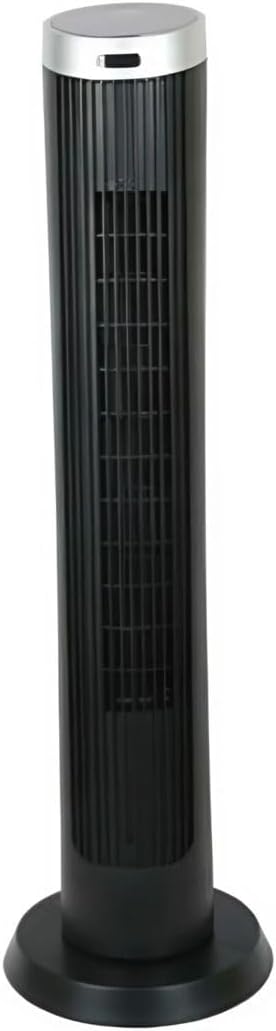
تصویر 2.1: سامنے والا view of the Altus AL 40 TFB Tower Air Cooler. This image shows the tall, slender black body of the fan with its air outlet grille and a stable round base.
اجزاء:
- کنٹرول پینل: Located on the top of the unit for easy access to all functions.
- ایئر آؤٹ لیٹ گرل: Vertical grille on the front for air dispersion.
- بنیاد: Stable round base for secure placement.
- پاور کی ہڈی: یونٹ کے عقب میں واقع ہے۔

تصویر 2.2: تفصیلی view of the control panel on top of the Altus AL 40 TFB Tower Air Cooler. The panel features a digital display showing '28' and several push buttons for various functions.
3. سیٹ اپ
Follow these steps to set up your Altus AL 40 TFB Tower Air Cooler:
- پیک کھولیں: پنکھے کو احتیاط سے اس کی پیکیجنگ سے ہٹا دیں۔ مستقبل کے اسٹوریج یا نقل و حمل کے لیے پیکیجنگ کو برقرار رکھیں۔
- بیس اسمبلی (اگر ضرورت ہو): Some models may require minor base assembly. If your unit's base is detached, align the base sections and secure them according to the diagrams in the packaging. Ensure it is firmly attached.
- جگہ کا تعین: Place the fan on a firm, level surface. Ensure there is adequate space around the fan for proper airflow, at least 30 cm (12 inches) from walls or furniture. This appliance is designed for indoor use only.
- پاور کنکشن: Plug the power cord into a standard electrical outlet. Ensure the outlet meets the voltagمصنوعات کے لیبل پر مخصوص ضروریات۔
4. آپریٹنگ ہدایات
Your Altus AL 40 TFB Tower Air Cooler is equipped with user-friendly push-button controls on the top panel.
کنٹرول پینل کے افعال:
- پاور بٹن (⏻): Press once to turn the fan ON, press again to turn it OFF.
- سپیڈ بٹن (💨): Press repeatedly to cycle through the 3 available fan speeds: Low, Medium, and High. The current speed setting may be indicated on the digital display.
- موڈ بٹن (M): If available, press to select different operating modes (e.g., Normal, Natural, Sleep). Refer to the digital display for the active mode.
- دوغلی بٹن (↔): Press to activate or deactivate the oscillation function, which allows the fan to rotate from side to side to distribute air over a wider area.
- ٹائمر بٹن (🕒): If available, press to set an automatic shut-off timer. Each press typically increases the timer duration by a set increment (e.g., 1 hour).
جنرل آپریشن:
- پنکھے کو کسی مناسب پاور آؤٹ لیٹ میں لگائیں۔
- پاور بٹن دبائیں (⏻) to turn on the fan.
- Select your desired fan speed using the Speed Button (💨).
- Activate oscillation if desired by pressing the Oscillation Button (↔).
- To turn off the fan, press the Power Button (⏻) دوبارہ.
5 دیکھ بھال
Regular maintenance ensures optimal performance and extends the lifespan of your Altus AL 40 TFB Tower Air Cooler.
صفائی:
- صفائی سے پہلے ہمیشہ پنکھے کو ان پلگ کریں۔
- بیرونی صفائی: پنکھے کی بیرونی سطحوں کو نرم سے صاف کریں، ڈیamp cloth. Do not use abrasive cleaners, waxes, or polishes as they may damage the finish.
- Air Inlet/Outlet Grilles: Use a vacuum cleaner with a brush attachment to gently remove dust and debris from the air inlet and outlet grilles. Do not attempt to disassemble the fan for cleaning.
- Ensure the fan is completely dry before plugging it back in and operating.
ذخیرہ:
جب لمبے عرصے تک استعمال نہ ہو تو پنکھے کو ٹھنڈی، خشک جگہ پر رکھیں۔ اسے دھول اور نقصان سے بچانے کے لیے اس کی اصل پیکیجنگ میں ذخیرہ کرنے کی سفارش کی جاتی ہے۔
6 خرابیوں کا سراغ لگانا
If you encounter any issues with your Altus AL 40 TFB Tower Air Cooler, please refer to the following common problems and solutions:
- پنکھا آن نہیں ہوتا:
- چیک کریں کہ آیا بجلی کی تار محفوظ طریقے سے کام کرنے والے الیکٹریکل آؤٹ لیٹ میں لگی ہوئی ہے۔
- Ensure the power button on the control panel has been pressed.
- Verify that the household circuit breaker or fuse has not tripped.
- کمزور ہوا کا بہاؤ:
- Check if the fan speed is set to a higher setting.
- Ensure the air inlet and outlet grilles are not blocked by dust or obstructions. Clean them if necessary.
- غیر معمولی شور:
- یقینی بنائیں کہ پنکھا ایک مستحکم، سطحی سطح پر رکھا گیا ہے۔
- Check for any foreign objects that might have fallen into the fan grilles.
- اگر شور جاری رہتا ہے تو استعمال بند کر دیں اور کسٹمر سپورٹ سے رابطہ کریں۔
If the problem cannot be resolved using the above steps, please contact Altus customer support.
7. وضاحتیں
Detailed technical specifications for the Altus AL 40 TFB Tower Air Cooler:
| فیچر | تفصیلات |
|---|---|
| برانڈ | آلٹس |
| ماڈل کا نام | AL 40 TFB |
| رنگ | سیاہ |
| الیکٹرک فین ڈیزائن | Floor Fan (Tower Type) |
| طاقت کا منبع | کورڈڈ الیکٹرک |
| پروڈکٹ کے طول و عرض (D x W x H) | 29D x 29W x 101H سینٹی میٹر |
| چڑھنے کی قسم | فلور ماؤنٹ |
| ختم کی قسم | پینٹ شدہ |
| انڈور / آؤٹ ڈور استعمال | انڈور |
| کنٹرول کا طریقہ | پش بٹن |
| پاور لیولز کی تعداد | 3 |
| وائرلیس | نہیں |
8. وارنٹی اور سپورٹ
Altus provides comprehensive support for its products. For any assistance or warranty-related inquiries, please contact our customer service.

تصویر 8.1: Altus customer service and warranty information. The image displays the Altus logo, a message about service availability, and a contact number for support.
Our services are always available for your Altus products. You can benefit from our door-to-door service by calling our support line for any assistance you may need.
Arçelik Service Warranty: For products under warranty, our home product pickup service is provided free of charge.
Customer Support Line: 0850 210 0 888
Please have your product model number (AL 40 TFB) and purchase details ready when contacting support.