
1. تعارف
خریداری کے لیے آپ کا شکریہasing the Surge Wireless Pro Controller. This controller is designed for multi-platform compatibility, offering an enhanced gaming experience across various devices. Please read this manual carefully before use to ensure proper operation and to maximize your gaming enjoyment.
اہم خصوصیات:
- Multi-Platform Compatibility: Nintendo Switch/Switch 2 (Note: No C Button/Audio Port support for Switch 2), Windows PC, Steam Deck, Android, and iOS devices.
- Hall Effect Thumb Sticks & Triggers: Provides precise control and reduces the likelihood of stick drift.
- Turbo Functionality: Offers three adjustable turbo levels for rapid-fire control.
- Vibration Feedback: Four adjustable vibration levels for customizable haptic feedback.
- Motion Controls: Supports motion sensing in compatible games.
- Console Wake Up: Ability to wake the Nintendo Switch console from sleep mode (Nintendo Switch only).
- Rechargeable Battery: Built-in 600mAh Li-polymer battery provides up to 10 hours of play.
- USB-C Charging: Includes a 1-meter USB-C charging cable.
2. پیکیج کے مشمولات
- 1 x Surge Wireless Pro Controller
- 1 x USB-C چارجنگ کیبل (1 میٹر)
- 1 ایکس انسٹرکشن دستی
3. Controller Layout
Familiarize yourself with the buttons and features of your Surge Wireless Pro Controller.
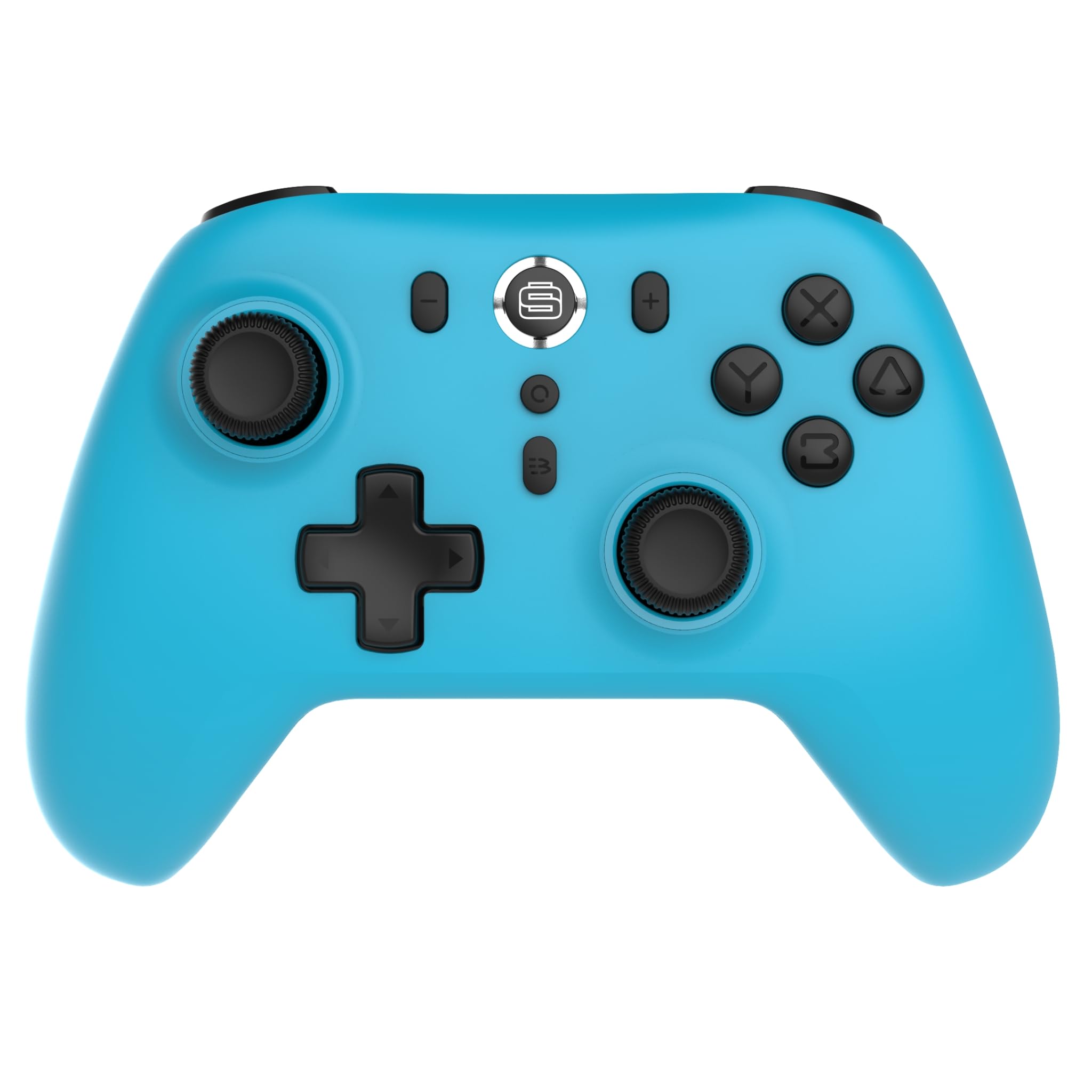
سامنے والا view of the Surge Wireless Pro Controller, showing the D-pad, left and right analog sticks, A/B/X/Y buttons, Home button, Capture button, Plus and Minus buttons, and the Surge logo button.

پیچھے view of the Surge Wireless Pro Controller, showing the textured grips and the charging port.
4. سیٹ اپ اور جوڑا بنانا
The Surge Wireless Pro Controller supports multiple connection methods depending on your device.

This image displays the various platforms compatible with the Surge Wireless Pro Controller, including Nintendo Switch, Nintendo Switch 2, Windows PC, Android, and iOS.
4.1. Pairing with Nintendo Switch / Switch 2
- ہوم مینو سے ، منتخب کریں کنٹرولرز > گرفت / آرڈر کو تبدیل کریں۔.
- کنٹرولر پر، دبائیں اور تھامیں ہوم بٹن for 3-5 seconds until the indicator lights begin to flash rapidly.
- Once paired, the indicator light(s) on the controller will remain solid.
- To wake the console from sleep mode, press the ہوم بٹن کنٹرولر پر.
4.2. Pairing with Windows PC
- Ensure your PC has Bluetooth enabled.
- پر جائیں۔ Bluetooth & other devices settings آپ کے کمپیوٹر پر.
- منتخب کریں۔ بلوٹوتھ یا دیگر ڈیوائس شامل کریں۔ > بلوٹوتھ.
- کنٹرولر پر، دبائیں اور تھامیں ہوم بٹن for 3-5 seconds until the indicator lights begin to flash rapidly.
- Select the controller from the list of available devices on your PC.
- Once paired, the indicator light(s) on the controller will remain solid.
4.3. Pairing with Android / iOS Devices
- اپنے Android یا iOS آلہ پر بلوٹوتھ کو فعال کریں۔
- Go to the Bluetooth settings menu on your device.
- کنٹرولر پر، دبائیں اور تھامیں ہوم بٹن for 3-5 seconds until the indicator lights begin to flash rapidly.
- Select the controller from the list of available devices.
- Once paired, the indicator light(s) on the controller will remain solid.
5. آپریٹنگ خصوصیات
5.1. Hall Effect Thumb Sticks & Triggers
The controller is equipped with Hall Effect technology for its thumb sticks and triggers. This technology uses magnets and electrical conductors to detect position, providing enhanced precision and significantly reducing the risk of stick drift over time compared to traditional potentiometers.

This image highlights the Hall Effect thumbsticks and triggers, emphasizing their role in providing precise inputs and preventing stick drift.
5.2. ٹربو فنکشن
The Turbo function allows for rapid, repeated input of a button press. This controller features 3 adjustable turbo levels.
- ٹربو کو چالو کرنے کے لیے: دبائیں اور تھامیں۔ ٹربو بٹن, then press the desired action button (A/B/X/Y, L1/R1, L2/R2, D-pad directions). The button will now rapidly repeat its input when held.
- ٹربو کی رفتار کو ایڈجسٹ کرنے کے لیے: With Turbo active on a button, press and hold the ٹربو بٹن اور منتقل کریں Right Analog Stick Up or Down to cycle through the 3 speed levels.
- To deactivate Turbo: دبائیں اور تھامیں۔ ٹربو بٹن, then press the same action button again.
5.3 وائبریشن فیڈ بیک
The controller provides haptic feedback through vibration. You can choose from 4 vibration levels.
- To adjust Vibration level: دبائیں اور تھامیں۔ وائبریشن بٹن (if present, or a designated button combination, refer to specific button mapping if available) and move the Left Analog Stick Up or Down to cycle through the 4 levels (Off, Low, Medium, High).
5.4. Motion Controls
The controller supports motion controls for compatible games, particularly on Nintendo Switch/Switch 2. This allows for intuitive gameplay where physical movement of the controller translates into in-game actions.

This image visually represents the controller's advanced features, including Turbo Function, Motion Controls, and Rumble Vibration, enhancing the gaming experience.
6. چارج کرنا
The controller is equipped with a built-in 600mAh Li-polymer battery, providing up to 10 hours of gameplay on a single charge.

This image shows the controller being held, emphasizing its internal rechargeable battery for extended play sessions.
- Connect the included USB-C charging cable to the controller's USB-C port.
- کیبل کے دوسرے سرے کو USB پاور سورس سے جوڑیں (مثلاً کنسول، PC، USB وال اڈاپٹر)۔
- The indicator lights on the controller will show charging status (e.g., blinking while charging, solid when fully charged).
- مکمل چارج ہونے میں عام طور پر تقریباً 2-3 گھنٹے لگتے ہیں۔
7 دیکھ بھال
اپنے کنٹرولر کی لمبی عمر اور بہترین کارکردگی کو یقینی بنانے کے لیے، دیکھ بھال کے ان رہنما خطوط پر عمل کریں:
- صفائی: کنٹرولر کو صاف کرنے کے لیے نرم، خشک کپڑا استعمال کریں۔ ضدی گندگی کے لیے، قدرے ڈیampپانی کے ساتھ کپڑے. سخت کیمیکلز یا کھرچنے والے کلینر کے استعمال سے پرہیز کریں۔
- ذخیرہ: کنٹرولر کو کسی ٹھنڈی، خشک جگہ پر براہ راست سورج کی روشنی اور انتہائی درجہ حرارت سے دور رکھیں۔
- قطروں سے بچیں: Protect the controller from drops and impacts, which can damage internal components.
- مائع کی نمائش: کنٹرولر کو پانی یا دیگر مائعات کے سامنے نہ رکھیں۔
8 خرابیوں کا سراغ لگانا
If you encounter issues with your Surge Wireless Pro Controller, please refer to the following common solutions:
| مسئلہ | حل |
|---|---|
| کنٹرولر آن نہیں ہوتا ہے۔ | Ensure the controller is charged. Connect it to a power source using the USB-C cable. |
| Controller does not pair. | Ensure the controller is in pairing mode (indicator lights flashing rapidly). Check that Bluetooth is enabled on your device. Try restarting both the controller and the device. |
| Input lag or disconnection. | Ensure the controller is within range of the device. Reduce interference from other wireless devices. Ensure the controller is fully charged. |
| Buttons or sticks are unresponsive. | Try resetting the controller (if a reset button is available, typically a small pinhole on the back). Ensure no debris is obstructing the buttons. |
| Vibration not working. | Check the vibration settings on the controller and in the game. Ensure the vibration level is not set to 'Off'. |
9. وضاحتیں
| فیچر | تفصیل |
|---|---|
| ماڈل نمبر | ایس جی 60095 |
| بیٹری کی قسم | 1 Nonstandard Battery (Li-polymer, 600mAh) |
| بیٹری کی زندگی | 10 گھنٹے تک (تقریباً) |
| چارجنگ پورٹ | USB-C |
| طول و عرض | 20.5 x 14 x 6.6 سینٹی میٹر |
| وزن | 320 گرام |
| اصل ملک | چین |
10. وارنٹی اور سپورٹ
For warranty information and customer support, please refer to the documentation included with your purchase or visit the official Surge webسائٹ وارنٹی کے دعووں کے لیے اپنی خریداری کا ثبوت رکھیں۔