
تعارف
Thank you for choosing the Desobry Home CD Player with Speakers. This device offers versatile audio playback options, including CD, Bluetooth, FM radio, USB, and AUX input. It is designed for both wall-mounted and desktop use, providing a convenient and enjoyable listening experience. Please read this manual carefully to ensure proper use and maintenance of your new CD player.
پیکیج کے مشمولات
تصدیق کریں کہ نیچے دی گئی تمام اشیاء آپ کے پیکیج میں شامل ہیں:
- Desobry Compact CD Player
- ریموٹ کنٹرول
- پاور کیبل
- USB اڈاپٹر
- AUX کیبل
- Wall-Mounted Plate
- ڈیسک اسٹینڈ
- پیچ کا پیک۔
- صارف دستی
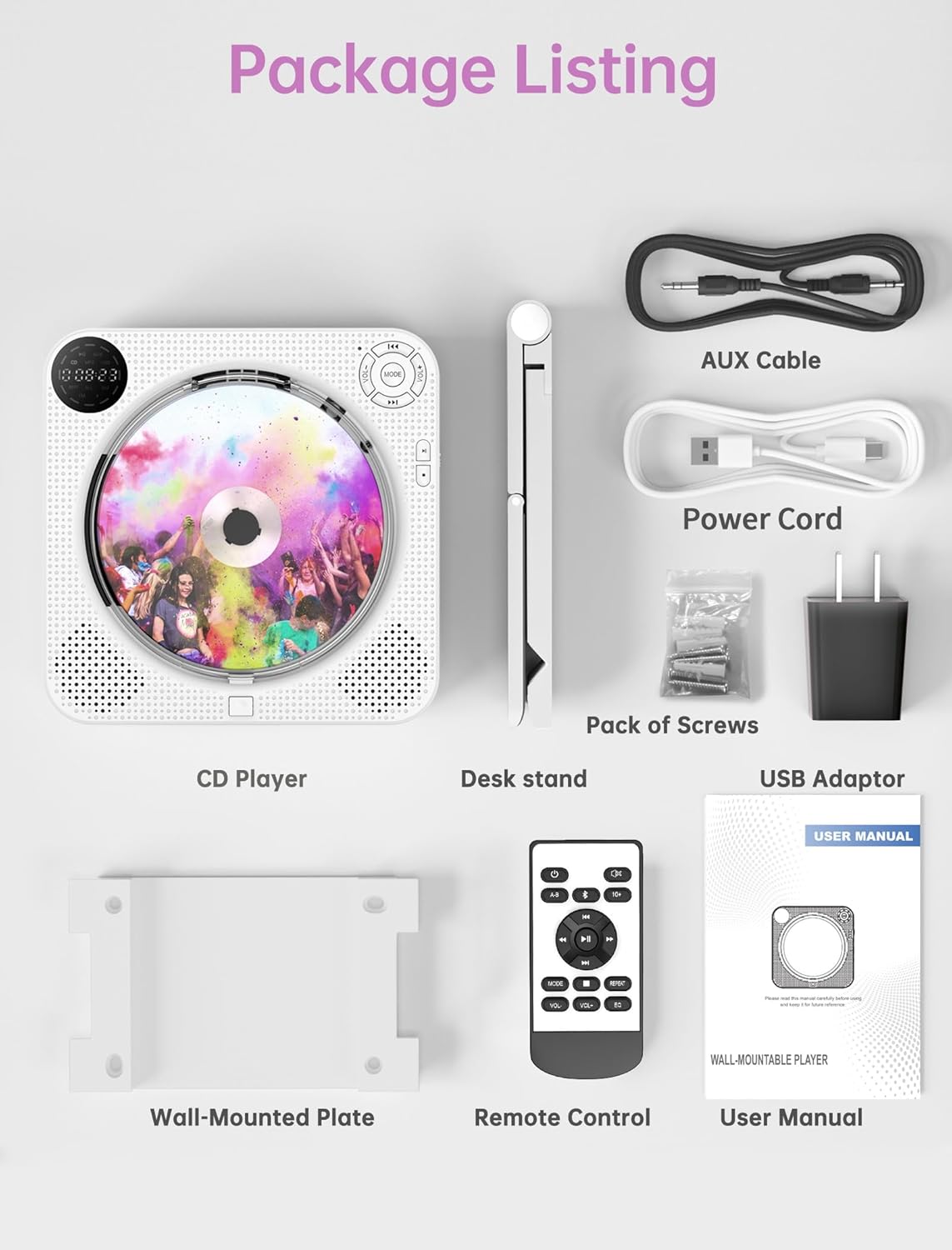
Image: All components included in the Desobry CD Player package, laid out neatly. This includes the CD player, remote control, various cables, mounting hardware, and the user manual.
پروڈکٹ ختمview اور کنٹرولز
Familiarize yourself with the buttons and ports on your CD player:

Image: A detailed diagram of the Desobry CD Player, highlighting and numbering each button and port on the front and side panels for easy identification.
فرنٹ پینل کنٹرولز:
- CD Lid: Protective cover for the CD disc.
- حجم -: حجم کی سطح کو کم کریں۔
- موڈ سوئچ: Cycle through playback modes (CD, Bluetooth, FM, USB, AUX).
- پچھلا: Skip to the previous track/station or navigate menu.
- حجم +: حجم کی سطح میں اضافہ کریں۔
- اگلا: Skip to the next track/station or navigate menu.
- کھیلیں: پلے بیک شروع کریں۔
- توقف: پلے بیک موقوف کریں۔
- لاؤڈ اسپیکر: Integrated audio output speakers.
- اسٹیٹس ڈسپلے: LED screen showing current mode, track, volume, etc.
- Light Charging LED: Indicator light for charging status.
- CD Cover Open Button: Press to open the CD lid for disc insertion/removal.
سائیڈ پینل پورٹس:
- DC-5VIN: Power input port (5V DC).
- پاور آن/آف: مین پاور سوئچ۔
- آکس پورٹ: بیرونی آلات کے لیے 3.5mm آڈیو ان پٹ۔
- USB پورٹ: USB ڈرائیو پلے بیک کے لیے۔
- ہیڈ فون پورٹ: ہیڈ فون کے لیے 3.5 ملی میٹر آڈیو آؤٹ پٹ۔
سیٹ اپ
پاور کنکشن:
Connect the provided power cable to the DC-5VIN port on the side of the CD player and plug the USB adaptor into a standard wall outlet. Alternatively, the player can be powered via a portable power bank using the USB cable.

Image: Illustration showing two power supply options for the CD player: one connected to a wall outlet via a USB adaptor, and another connected to a portable power bank.
ماؤنٹنگ کے اختیارات:
The CD player can be used on a desktop or mounted on a wall.
- ڈیسک ٹاپ کا استعمال: Attach the desk stand to the bottom of the CD player. Place the player on a stable, flat surface.
- دیوار چڑھانا: Use the provided wall-mounted plate and screws to securely attach the plate to a wall. Then, slide the CD player onto the plate. Ensure the wall can support the weight of the player.

Image: The Desobry CD Player shown in both wall-mounted and desktop configurations, illustrating the use of the wall plate and desk stand.
آپریٹنگ ہدایات
After connecting power, turn on the player using the Power ON/OFF switch on the side. Use the MODE button to select your desired function.
سی ڈی پلے بیک:
- Press the CD Cover Open Button to open the CD lid.
- Carefully place a CD (CD, CD-R, HDCD, MP3, WMA format) onto the spindle, label side up.
- Close the CD lid.
- Press the MODE button until "CD" appears on the status display.
- پلے بیک شروع کرنے کے لیے پلے بٹن دبائیں۔
- Use the Previous/Next buttons to skip tracks and Volume +/- to adjust the sound.

Image: The Desobry CD Player displaying its compatibility with various CD formats including CD, CD-R, HDCD, WMA, and MP3, with a person enjoying music in the background.
Bluetooth Mode (Transmitter & Receiver):
The player supports both transmitting and receiving Bluetooth audio.
Bluetooth Transmitter (BT TX):
- Ensure the CD player is in CD, USB, or AUX mode.
- Press the "BT TX" button on the remote control. The Bluetooth icon on the player's display will flash, indicating it is searching for a device.
- اپنے بلوٹوتھ ہیڈ فون یا اسپیکر کو پیئرنگ موڈ میں رکھیں۔
- Once connected, the Bluetooth icon will become solid. The player's internal speakers will be muted.
- نوٹ: If multiple Bluetooth devices are nearby, the player will automatically connect to the device with the strongest signal. Turn off other devices if you need to connect to a specific one.

Image: The Desobry CD Player on a shelf, with a hand holding the remote control pointing to the 'BT TX' button, illustrating the Bluetooth transmitter function for connecting to wireless headphones or speakers.
Bluetooth Receiver (BT RX):
- Press the MODE button until "BT" appears on the status display. The Bluetooth icon will flash.
- On your smartphone, tablet, or other Bluetooth device, search for "Desobry CD Player" (or similar name) in the Bluetooth settings.
- Select the player to pair. Once connected, the Bluetooth icon will become solid.
- Play audio from your device, and it will stream through the CD player's speakers.

Image: The Desobry CD Player on a table, with a smartphone displaying Bluetooth settings, illustrating how to connect external devices to the CD player as a Bluetooth receiver.
ایف ایم ریڈیو:
- Press the MODE button until "FM" appears on the status display.
- The player will automatically scan and store available FM stations (76MHz-108MHz).
- Use the Previous/Next buttons to navigate through the stored stations.
- Adjust volume with Volume +/-.

Image: The Desobry CD Player in a kitchen setting, displaying the FM radio function with various frequencies and icons for weather, traffic, music, and sports, while a couple prepares food.
USB پلے بیک:
- آڈیو پر مشتمل USB فلیش ڈرائیو داخل کریں۔ files into the USB port on the side of the player.
- Press the MODE button until "USB" appears on the status display.
- The player will automatically begin playing audio files USB ڈرائیو سے۔
- Use the Play/Pause, Previous/Next, and Volume +/- buttons for control.

Image: The Desobry CD Player on a desk, with a USB flash drive inserted into its side port, demonstrating its support for USB audio input.
AUX ان پٹ:
- Connect an external audio device (e.g., smartphone, MP3 player) to the AUX port on the side of the CD player using the provided 3.5mm AUX cable.
- Press the MODE button until "AUX" appears on the status display.
- اپنے بیرونی ڈیوائس سے آڈیو چلائیں۔ آواز CD پلیئر کے اسپیکرز کے ذریعے آؤٹ پٹ ہوگی۔
- Control playback and volume primarily from your external device.
AB ریپیٹ فنکشن:
This function allows you to repeat a specific segment of audio. Ideal for language learning or musical practice.
- During CD or USB playback, press the A-B Repeat button (usually on the remote) at the desired starting point (A).
- Press the A-B Repeat button again at the desired ending point (B).
- The segment between A and B will repeat continuously.
- Press the A-B Repeat button a third time to cancel the function.
EQ موڈز:
The player may offer various equalizer (EQ) presets to optimize sound for different music genres. Use the EQ button on the remote control to cycle through available modes such as Pop, Jazz, Rock, Classic, and Flat.
دیکھ بھال
Proper care ensures the longevity of your CD player.
- صفائی: پلیئر کے بیرونی حصے کو صاف کرنے کے لیے نرم، خشک کپڑا استعمال کریں۔ مائع کلینر یا کھرچنے والے مواد کا استعمال نہ کریں۔
- ڈسک کی دیکھ بھال: Handle CDs by their edges. Keep discs clean and free of scratches. Store them in their cases when not in use.
- دھول کا احاطہ: The integrated dust cover protects the CD mechanism from dust and debris. Keep it closed when not changing discs. The CD opening button design facilitates disc changes without removing the entire cover.
- ذخیرہ: When not in use for extended periods, disconnect the power cable and store the player in a cool, dry place.

Image: A close-up of the Desobry CD Player highlighting the dust cover and the dedicated CD cover open button, emphasizing ease of disc replacement and protection.
خرابی کا سراغ لگانا
اگر آپ کو مسائل درپیش ہیں تو عام مسائل اور حل کے لیے نیچے دیے گئے جدول سے رجوع کریں۔
| مسئلہ | ممکنہ وجہ | حل |
|---|---|---|
| پلیئر آن نہیں ہے۔ | Power cable not connected properly; Power outlet issue; Power switch off. | Ensure power cable is securely connected. Try a different power outlet. Confirm the Power ON/OFF switch is in the 'ON' position. |
| اسپیکر سے کوئی آواز نہیں ہے۔ | Volume too low; Mute activated; Incorrect mode selected; Bluetooth TX active. | Increase volume. Check if mute is active. Select the correct playback mode (CD, USB, FM, AUX). If Bluetooth TX is active, sound will output to paired Bluetooth device. |
| CD skipping or not playing. | ڈسک گندی یا خراش ہے؛ ڈسک غلط داخل کی گئی غیر تعاون یافتہ ڈسک فارمیٹ۔ | Clean the CD with a soft cloth. Reinsert the disc correctly. Ensure the disc format is supported (CD, CD-R, HDCD, MP3, WMA). |
| بلوٹوتھ ڈیوائس منسلک نہیں ہو سکتی۔ | Player not in Bluetooth pairing mode; Device too far; Interference; Other devices connected. | Ensure player is in BT RX mode (for receiving) or BT TX mode (for transmitting). Place devices closer. Turn off other Bluetooth devices nearby. |
| ایف ایم ریڈیو کا استقبال ناقص ہے۔ | کمزور سگنل؛ مداخلت | Reposition the player to improve signal reception. Avoid placing near other electronic devices that may cause interference. |
| ریموٹ کنٹرول کام نہیں کر رہا۔ | Batteries low or dead; Obstruction between remote and player. | Replace remote control batteries. Ensure a clear line of sight between the remote and the player. |
وضاحتیں
| فیچر | تفصیل |
|---|---|
| برانڈ | Desobry |
| ماڈل نمبر | CD player with speaker |
| کنیکٹوٹی ٹیکنالوجی | USB, Bluetooth, AUX |
| خصوصی خصوصیات | FM Radio, Programmable Memory, Wireless (Bluetooth TX/RX) |
| شامل اجزاء | Charging cable, Remote control, Wall-mounted plate, Desk stand, USB adaptor, AUX cable |
| ڈسکس کی تعداد | 1 |
| سپورٹ شدہ آڈیو فارمیٹس | CD, CD-R, HDCD, MP3, WMA |
| کنیکٹر کی قسم | 3.5mm Jack (Headphone, AUX) |
| ایف ایم ریڈیو رینج | 76MHz-108MHz |
| پاور ان پٹ | ڈی سی 5V |
وارنٹی اور سپورٹ
This Desobry CD Player comes with a 12 ماہ کی وارنٹی خریداری کی تاریخ سے.
If you encounter any problems with your product or have questions, please contact Desobry customer support. We are committed to providing a positive solution within 24 hours.
For support, please refer to the contact information provided in your original purchase documentation or visit the official Desobry webسائٹ