
Minuteman EN450G
Minuteman EN450G 450VA Standby UPS User Manual
Model: EN450G
1. تعارف
This manual provides essential instructions for the safe and efficient operation of your Minuteman EN450G 450VA Standby Uninterruptible Power Supply (UPS). The EN450G is designed to provide reliable backup power and surge protection for various electronic devices, including gaming consoles, desktop PCs, home office equipment, and network devices. Please read this manual thoroughly before installation and use, and retain it for future reference.
2. اہم حفاظتی ہدایات
WARNING: To reduce the risk of electric shock, fire, or injury to persons, read all instructions before using this product.
- یہ UPS خطرناک والیوم پر مشتمل ہے۔tages. Do not attempt to disassemble the unit. Servicing should be performed by qualified service personnel only.
- غیر کمپیوٹر سے متعلقہ اشیاء جیسے طبی آلات، لائف سپورٹ آلات، مائکروویو اوون، یا ویکیوم کلینر کو UPS سے مت جوڑیں۔
- وینٹیلیشن کے سوراخوں کو مسدود نہ کریں۔ یونٹ کے ارد گرد مناسب ہوا کے بہاؤ کو یقینی بنائیں۔
- Do not install the UPS in direct sunlight, near heat sources, or in areas with excessive dust, moisture, or flammable liquids.
- Connect the UPS to a properly grounded AC power outlet.
- The battery is hot-swappable. Exercise caution when replacing the battery. Refer to the Maintenance section for instructions.
- In case of emergency, press the power button to turn off the UPS and disconnect the power cord from the AC power outlet.
3. پروڈکٹ ختمview
The Minuteman EN450G UPS provides comprehensive power protection. Familiarize yourself with its components:
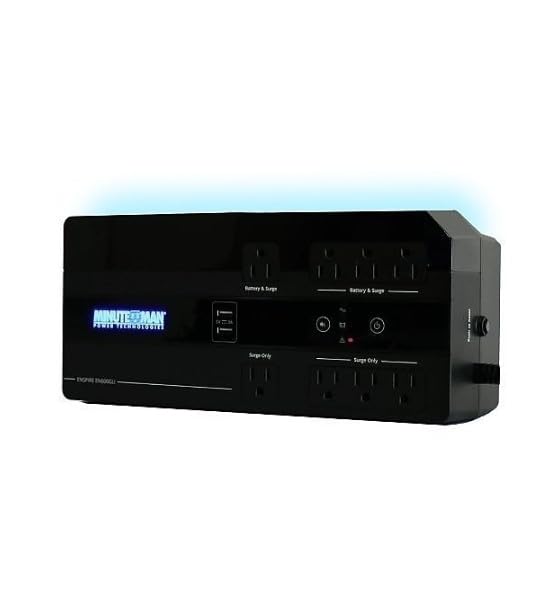
تصویر 1: Minuteman EN450G UPS Unit. This image displays the Minuteman EN450G UPS unit. The front panel features the 'Minuteman Power Technologies' logo, two USB charging ports, and control buttons. The top surface shows four 'Battery & Surge' protected outlets and four 'Surge Only' outlets, clearly labeled. The unit is black and designed for compact placement.
3.1 فرنٹ پینل کی خصوصیات
- پاور بٹن: UPS کو آن یا آف کرتا ہے۔
- USB چارجنگ پورٹس: Two ports for charging mobile devices.
- حیثیت اشارے: LEDs indicating power status, battery status, and fault conditions.
3.2 ریئر پینل کی خصوصیات
- Battery & Surge Outlets (x4): Provide battery backup power and surge protection for critical devices.
- Surge Only Outlets (x4): Provide surge protection only for non-critical devices.
- AC ان پٹ: Connects the UPS to the wall power outlet.
- سرکٹ بریکر: Resettable overload protection.
4. سیٹ اپ اور انسٹالیشن
4.1 پیک کھولنا
UPS کو احتیاط سے کھولیں اور شپنگ کے کسی نقصان کے لیے اس کا معائنہ کریں۔ اگر نقصان پایا جاتا ہے، تو یونٹ نہ چلائیں اور اپنے ڈیلر سے رابطہ کریں۔
4.2 جگہ کا تعین
The EN450G is designed for versatile placement:
- ڈیسک ٹاپ: یونٹ کو ایک مستحکم، ہموار سطح پر رکھیں۔
- منزل: Position on the floor, ensuring ventilation is not obstructed.
- وال ماؤنٹ: The unit can be mounted on a wall using appropriate hardware (not included). Ensure the mounting surface can support the weight of the UPS.
Ensure the installation area is clean, dry, and has adequate ventilation. Avoid placing the UPS near heat-emitting appliances or in direct sunlight.
4.3 پاور سے جڑنا۔
- یقینی بنائیں کہ UPS بند ہے۔
- Plug the UPS power cord into a grounded 120V AC wall outlet.
- Allow the UPS to charge for at least 8 hours before initial use to ensure optimal battery runtime.
4.4 کنیکٹنگ ڈیوائسز
- Battery & Surge Protected Outlets: Connect critical devices such as your computer, monitor, router, or other essential electronics that require continuous power during outages
- سرج صرف آؤٹ لیٹس: Connect non-critical devices like printers, scanners, or desk lamps that only require surge protection.
CAUTION: Do not connect laser printers or shredders to the battery backup outlets, as their high power draw can overload the UPS.
5. آپریشن
5.1 UPS کو آن/آف کرنا
- آن کرنے کے لیے: Press and hold the power button for approximately 2 seconds until you hear a beep and the power indicator illuminates.
- بند کرنے کے لئے: Press and hold the power button for approximately 2 seconds until you hear a beep and the power indicator turns off.
5.2 حیثیت اشارے
The front panel LEDs provide information about the UPS status:
- سبز ایل ای ڈی (ٹھوس): UPS is operating normally, providing AC power.
- Green LED (Flashing) & Audible Alarm: UPS is operating on battery power during an outage.
- Red LED (Solid) & Audible Alarm: Battery low or fault condition. Refer to Troubleshooting.
5.3 بیٹری رن ٹائم
The EN450G provides approximately 3 minutes of runtime at full load (450VA/255W) and 11 minutes at half load. Actual runtime may vary based on connected equipment and battery age.
6 دیکھ بھال
6.1 بیٹری کی تبدیلی
The EN450G features a hot-swappable Sealed Lead Acid (SLA) battery, allowing replacement without interrupting power to connected devices. Batteries typically last 3-5 years depending on usage and environmental conditions. A flashing red LED or continuous alarm may indicate a need for battery replacement.
- Ensure the UPS is connected to AC power and operating normally.
- Locate the battery access panel (refer to product diagram if available).
- Carefully slide out the old battery pack.
- Insert the new, fully charged replacement battery pack, ensuring correct orientation.
- Secure the battery access panel.
- Allow the new battery to charge for 8-12 hours to reach full capacity.
WARNING: Use only approved replacement batteries. Improper battery replacement can result in fire or explosion. Dispose of old batteries properly at a recycling facility.
6.2 صفائی
Periodically clean the exterior of the UPS with a soft, dry cloth. Do not use liquid or aerosol cleaners. Ensure ventilation openings remain clear of dust and debris.
7 خرابیوں کا سراغ لگانا
This section addresses common issues you may encounter with the EN450G UPS. If a problem persists after attempting the solutions below, contact technical support.
| مسئلہ | ممکنہ وجہ | حل |
|---|---|---|
| UPS آن نہیں ہوتا ہے۔ | بیٹری منسلک یا ڈسچارج نہیں ہے۔ بجلی کی تار منسلک نہیں ہے۔ | یقینی بنائیں کہ بیٹری مناسب طریقے سے منسلک اور چارج ہے۔ Verify power cord is securely plugged into wall outlet and UPS. |
| UPS beeps continuously or red LED is solid. | Battery low or fault condition. Overload on battery outlets. | Allow battery to charge. If problem persists, battery may need replacement. Disconnect non-essential devices from battery outlets. Check circuit breaker. |
| UPS operates on battery frequently. | Unstable incoming AC power. UPS sensitivity setting (if applicable, though not specified for this model). | Check the quality of your incoming AC power. Consider connecting to a different outlet. |
| صرف اضافے والے آؤٹ لیٹس سے کوئی طاقت نہیں۔ | سرکٹ بریکر ٹرپ ہو گیا۔ | Press the circuit breaker reset button on the rear panel. Reduce load if necessary. |
8. وضاحتیں
| فیچر | تفصیل |
|---|---|
| ماڈل | EN450G |
| صلاحیت | 450VA / 255W۔ |
| ان پٹ/آؤٹ پٹ والیومtage | 120V AC |
| آؤٹ پٹ ویوفارم | مصنوعی سائن ویو۔ |
| آؤٹ لیٹس | 4 x Battery & Surge Protected, 4 x Surge Only |
| بیٹری کی قسم | Sealed Lead Acid (SLA), Hot-Swappable |
| Typical Runtime (Full Load) | 3 منٹ تک |
| Typical Runtime (Half Load) | 11 منٹ تک |
| ابعاد (D x W x H) | 12.8 x 5.7 x 4.1 انچ (32.5 x 14.5 x 10.4 سینٹی میٹر) |
| وزن | 4.4 پاؤنڈ (2 کلوگرام) |
| بڑھتے ہوئے اختیارات | Desktop, Floor, Wall Mount |
9. وارنٹی کی معلومات
Please refer to the warranty card included with your product or visit the manufacturer's webتفصیلی وارنٹی شرائط و ضوابط کے لیے سائٹ۔ وارنٹی کے دعووں کے لیے اپنی خریداری کا ثبوت رکھیں۔
10. تکنیکی معاونت
If you require technical assistance or have questions regarding your Minuteman EN450G UPS, please contact your dealer or the manufacturer's customer support. Have your model number (EN450G) and serial number ready when contacting support.
For more information, you may visit the official Minuteman webسائٹ