
1. تعارف
The Radioddity X1 Walkie Talkies are designed for reliable two-way communication in various environments. Featuring an IP67 waterproof and dustproof rating, durable construction, and advanced noise reduction, these FRS radios are suitable for outdoor adventures, professional use, and emergency situations. They offer a long communication range and include essential features like NOAA weather alerts and voice-activated transmission (VOX).

Image: The Radioddity X1 Walkie Talkie, showcasing اس کا مضبوط ڈیزائن۔
2. باکس میں کیا ہے۔
Upon opening your Radioddity X1 package, you should find the following items:
- 2 x Radioddity X1 Walkie Talkies
- 2 ایکس ریچارج ایبل بیٹریاں
- 1 x 2-in-1 USB-C Charging Cable
- 2 ایکس بیلٹ کلپس
- 2 ایکس ہاتھ پٹے
- 1 ایکس اڈاپٹر
- 1 ایکس یوزر مینوئل (یہ دستاویز)

Image: All components included in the Radioddity X1 package, including two radios, batteries, charging cable, belt clips, hand straps, and adapters.
3. سیٹ اپ
3.1. بیٹری کی تنصیب
- یقینی بنائیں کہ واکی ٹاکی بند ہے۔
- یونٹ کے پچھلے حصے میں بیٹری کے ٹوکرے کو تلاش کریں۔
- Align the battery with the contacts and gently push it into the compartment until it clicks into place.
3.2. بیٹری چارج کرنا
The Radioddity X1 features a 2500mAh rechargeable lithium battery. For optimal performance, fully charge the battery before first use.
- Connect the provided USB-C charging cable to the charging port on the walkie talkie.
- Connect the other end of the USB-C cable to the adapter, and then plug the adapter into a standard power outlet. Alternatively, you can connect the USB-C cable to a compatible USB power source (e.g., computer, power bank).
- The battery indicator on the display will show charging status. A full charge typically takes several hours.
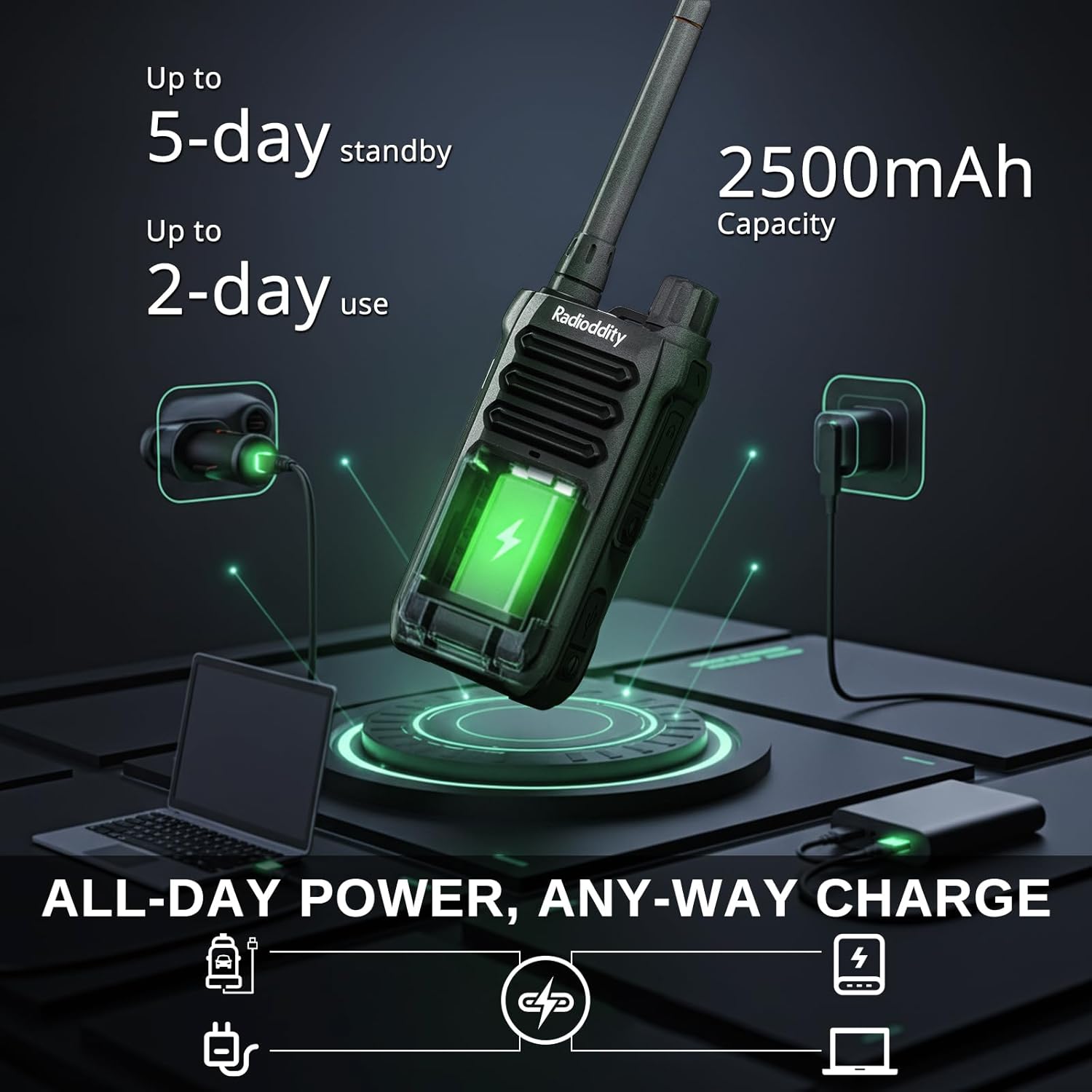
Image: The Radioddity X1 Walkie Talkie connected to a USB-C charger, illustrating the charging process.
3.3. لوازمات کو منسلک کرنا
- بیلٹ کلپ: Secure the belt clip to the designated slot on the back of the walkie talkie.
- ہاتھ کا پٹا: Thread the hand strap through the loop on the top or side of the walkie talkie for added security.
3.4. پر / آف پاور
To power on or off the device, rotate the power/volume knob located on the top of the unit clockwise to turn on, and counter-clockwise until it clicks to turn off.
4. آپریٹنگ ہدایات
4.1 چینل کا انتخاب
The Radioddity X1 comes pre-programmed with 22 FRS channels. To select a channel:
- دبائیں مینو مینو میں داخل ہونے کے لیے بٹن۔
- استعمال کریں۔ اوپر/نیچے تیر buttons to navigate to the channel setting.
- دبائیں OK تصدیق کرنے کے لیے، پھر استعمال کریں۔ اوپر/نیچے تیر اپنے مطلوبہ چینل کو منتخب کرنے کے لیے بٹن (1-22)۔
- دبائیں OK again to save the selection and مینو باہر نکلنے کے لیے
4.2. پرائیویسی کوڈز (CTCSS/DCS)
The radio supports 155 privacy codes (CTCSS/DCS) to filter out unwanted conversations on a channel. While not providing true privacy, these codes ensure you only hear transmissions from radios set to the same channel and code.
- دبائیں مینو بٹن
- Navigate to the CTCSS or DCS setting using the اوپر/نیچے تیر بٹن
- دبائیں OK, then select your desired code.
- دبائیں OK بچانے کے لئے اور مینو to exit. Ensure all radios in your group use the same channel and privacy code.
4.3 پش ٹو ٹاک (PTT)
منتقل کرنے کے لیے، بڑے کو دبائیں اور تھامیں۔ پی ٹی ٹی button on the side of the radio. Speak clearly into the microphone. Release the پی ٹی ٹی سننے کے لیے بٹن۔
4.4 VOX فنکشن (وائس آپریٹڈ ٹرانسمیشن)
The VOX function allows for hands-free operation. When activated, the radio transmits automatically when it detects your voice.
- دبائیں مینو بٹن
- پر نیویگیٹ کریں۔ VOX ترتیب
- دبائیں OK, then select an appropriate sensitivity level (higher numbers for lower sensitivity).
- دبائیں OK بچانے کے لئے اور مینو باہر نکلنے کے لیے

Image: Icon representing the Voice Operated Transmission (VOX) function.
4.5. NOAA ویدر الرٹس
Stay informed with 10 built-in NOAA weather channels providing real-time alerts.
- دبائیں مینو بٹن
- پر نیویگیٹ کریں۔ NOAA ترتیب
- دبائیں OK, then select the desired NOAA channel or activate weather alerts.
- دبائیں OK بچانے کے لئے اور مینو باہر نکلنے کے لیے

Image: Icon representing the NOAA Scan & Alert feature.
4.6. Recording Playback
The Radioddity X1 features a unique recording playback function for up to 20 messages.
- To record, press and hold the dedicated ریکارڈ button (if available, or refer to specific menu options).
- To play back recorded messages, press the دوبارہ چلائیں۔ بٹن

Image: The Radioddity X1 display showing the recording and replay functions, highlighting its audio safety net capability.

Image: Icon representing the Recording function.
4.7. شور کی کمی
The dual-way noise reduction feature ensures clear communication even in noisy environments.

Image: The Radioddity X1 in a construction setting, illustrating its noise reduction capabilities for clear communication.
5 دیکھ بھال
5.1. IP67 Waterproof and Dustproof Care
The Radioddity X1 is rated IP67, meaning it is dustproof and can withstand submersion in up to 1 meter of water for 30 minutes. To maintain its integrity:
- Ensure all port covers (e.g., charging port, accessory port) are securely closed before exposure to water or dust.
- After exposure to water, wipe the radio dry with a clean cloth. Do not charge the radio if the charging port is wet.
- متعین گہرائی اور وقت سے زیادہ دیر تک ڈوبنے سے گریز کریں۔

Image: The Radioddity X1 Walkie Talkie submerged in clear water, demonstrating its IP67 waterproof capability.

Image: The Radioddity X1 Walkie Talkie partially covered in sand, highlighting its dustproof design.
5.2. بیٹری کی دیکھ بھال
The 2500mAh battery provides up to 48 hours of average use. To prolong battery life:
- بیٹری کو باقاعدگی سے مکمل طور پر خارج کرنے سے گریز کریں۔
- استعمال میں نہ ہونے پر ریڈیو کو ٹھنڈی، خشک جگہ پر اسٹور کریں۔
- صرف فراہم کردہ چارجنگ کیبل اور اڈاپٹر استعمال کریں۔
5.3. صفائی
ریڈیو کو نرم سے صاف کریں، ڈیamp کپڑا سخت کیمیکل یا کھرچنے والے کلینر کا استعمال نہ کریں۔
6 خرابیوں کا سراغ لگانا
| مسئلہ | ممکنہ وجہ | حل |
|---|---|---|
| کوئی طاقت نہیں۔ | بیٹری کم ہے یا صحیح طریقے سے انسٹال نہیں ہے۔ | Charge the battery or re-install it. |
| منتقل یا وصول نہیں کیا جا سکتا | Incorrect channel or privacy code. Out of range. | Verify channel and privacy code settings. Move closer to the other radio. |
| خراب آڈیو کوالٹی | Weak signal, interference, or volume too low. | Adjust volume. Move to an area with less obstruction. Check for interference sources. |
| مختصر مواصلاتی رینج | Obstructions (buildings, terrain), low power channel. | Move to an open area. Use channels 1-7 or 15-22 for higher power output. |
7. وضاحتیں
| فیچر | تفصیل |
|---|---|
| برانڈ | تابکاری |
| ماڈل نمبر | X1 |
| رنگ | سیاہ |
| چینلز کی تعداد | 22 (FRS) |
| تعدد کی حد | ایف آر ایس |
| بات کرنے کی حد زیادہ سے زیادہ | 5 Miles (open areas), 2 Miles (urban settings) |
| پانی کی مزاحمت کی سطح | IP67 واٹر پروف |
| خصوصی خصوصیات | Dust Proof, Emergency Alarm (SOS), Long Range, Shockproof, Voice Operated Transmission (VOX), Noise Reduction, NOAA Weather Alerts, Recording Playback |
| بیٹری کی صلاحیت | 2500mAh لتیم |
| بیٹری کی اوسط زندگی | 48 گھنٹے |
| چارج ہو رہا ہے۔ | USB-C |
| پروڈکٹ کے طول و عرض (D x W x H) | 1.1" x 2.4" x 7.1" |
| FCC ID | 2AN62-X1 |

Image: Visual representation of the Radioddity X1's communication range, showing up to 5 miles in open areas and 2 miles in urban settings.

Image: The Radioddity X1 Walkie Talkie on the ground at a construction site, illustrating its durability and shockproof design after 1,000+ drop tests.
8. وارنٹی اور سپورٹ
8.1. وارنٹی کی معلومات
The Radioddity X1 Walkie Talkies come with an 18 ماہ کی وارنٹی from the date of purchase. This warranty covers manufacturing defects and ensures your product is free from material and workmanship flaws under normal use. Please retain your proof of purchase for warranty claims.
8.2. کسٹمر سپورٹ
For technical assistance, troubleshooting, or warranty inquiries, please visit the official Radioddity website or contact their customer support team. You can find contact information and additional resources on their webسائٹ: www.radioddity.com.
9. پروڈکٹ ویڈیوز
Radioddity X1 | Built for Harsh Conditions
Video: This official Radioddity video demonstrates the X1's robust features, including its IP67 dustproof and waterproof capabilities, drop resistance, car-crush resistance, long-range communication, and noise-cancelling audio, highlighting its suitability for challenging environments.