
تعارف
Thank you for choosing the Digitus DA-70919 USB-C 8K 12-Port Docking Station. This device is designed to expand the connectivity of your USB-C enabled laptop or computer, providing a comprehensive solution for video output, data transfer, network access, and power delivery. Please read this manual carefully to ensure proper installation and operation.
پروڈکٹ ختمview
The Digitus DA-70919 docking station offers 12 essential ports to enhance your workspace. It supports high-resolution video output, fast data transfer, and efficient power delivery to your host device.

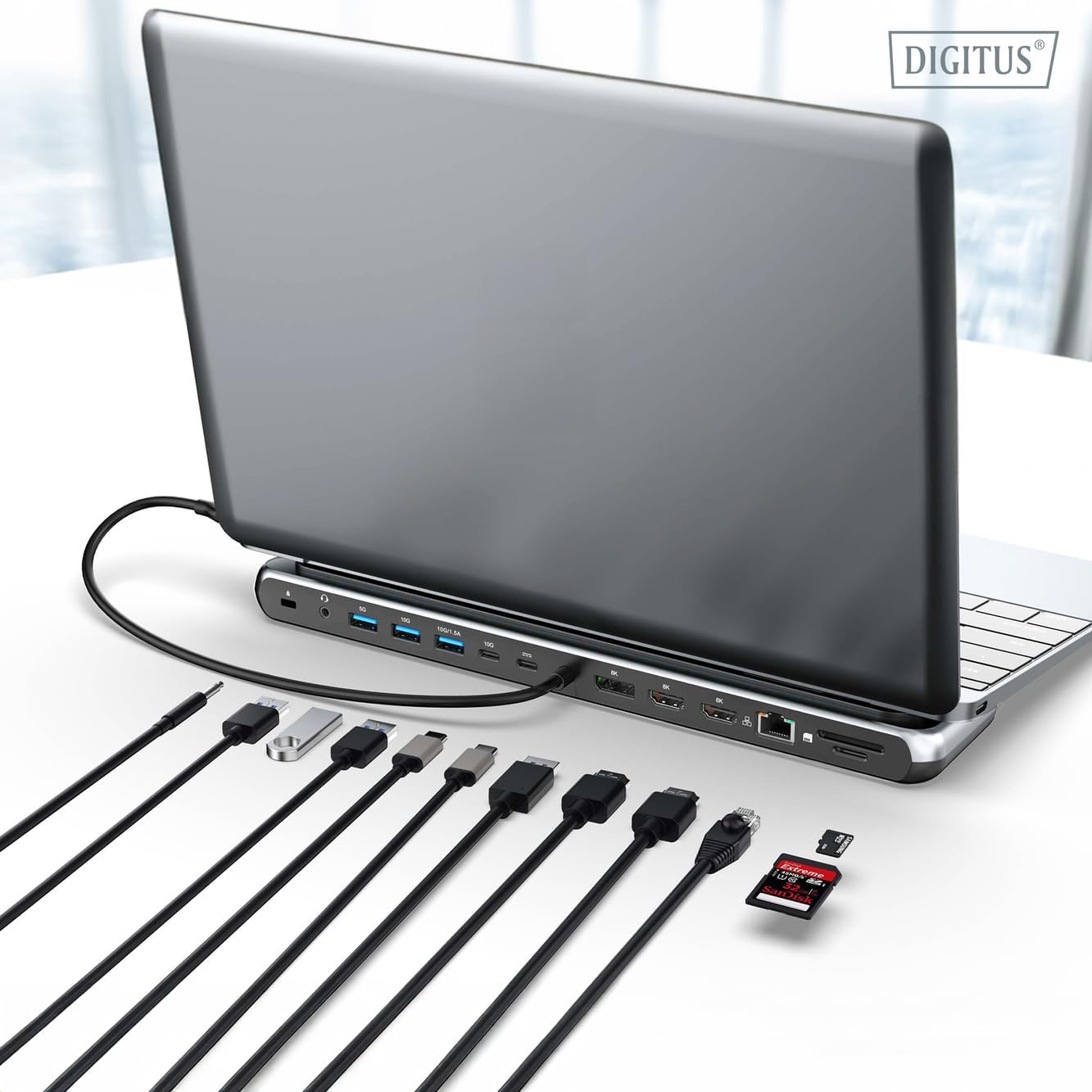
تصویر 1: Detailed diagram of the Digitus DA-70919 docking station ports and their functions. This diagram labels each of the 12 ports on the docking station, including Audio Jack, USB-A, USB-C, USB-C PD, DisplayPort, HDMI, RJ45 Gigabit Ethernet, and SD/MicroSD card slots, along with anti-theft protection.

تصویر 2: سامنے والا view of the Digitus DA-70919 docking station showing all accessible ports. A clear view of the docking station's front panel, displaying the various input and output ports including USB-A, USB-C, HDMI, DisplayPort, Ethernet, and card readers.
اہم خصوصیات:
- ویڈیو آؤٹ پٹ: 2x HDMI, 1x DisplayPort (DP) supporting up to 8K/30Hz for single display, or multi-display configurations.
- USB ڈیٹا پورٹس: 2x USB-A 3.2 Gen 2 (10Gbps), 1x USB-A 3.2 Gen 1 (5Gbps), 1x USB-C 3.2 Gen 2 (10Gbps).
- پاور ڈیلیوری (PD): USB-C PD 3.0 port for charging your host laptop (up to 85W output).
- نیٹ ورک: Gigabit Ethernet (RJ45) for stable wired internet connection.
- کارڈ ریڈرز: SD and MicroSD card slots with 104 MBps transfer speed.
- آڈیو: 3.5mm audio jack for headphones or speakers.
سیٹ اپ کی ہدایات
Follow these steps to set up your Digitus DA-70919 docking station:
- Check Host USB-C Port Compatibility: Ensure your laptop's USB-C port supports DisplayPort Alternate Mode (DP Alt Mode) for video output and Power Delivery for charging. Without DP Alt Mode, video output will not function.

تصویر 3: Guide to USB-C port compatibility for DisplayPort Alternate Mode. This graphic explains which types of USB-C ports on your laptop support the full functionality of the docking station, specifically highlighting the requirement for DisplayPort Alternate Mode (DP Alt Mode) for video output.
- میزبان ڈیوائس سے جڑیں: Connect the integrated USB-C cable from the docking station to the USB-C port on your laptop.
- پاور اڈاپٹر کو جوڑیں (اختیاری لیکن تجویز کردہ): If you wish to charge your laptop via the docking station or power high-demand peripherals, connect a USB-C Power Delivery adapter (not included, up to 100W recommended) to the USB-C PD input port on the docking station.
- بیرونی ڈسپلے کو جوڑیں: Connect your monitors to the HDMI and/or DisplayPort outputs on the docking station using appropriate cables.
- پیری فیرلز کو جوڑیں: Plug in your USB devices (keyboard, mouse, external drives), Ethernet cable, SD/MicroSD cards, and audio devices to the corresponding ports on the docking station.
- ڈرائیور کی تنصیب: In most cases, the docking station is plug-and-play and does not require additional drivers. If prompted, allow your operating system to install any necessary drivers automatically.
آپریٹنگ ہدایات
ڈسپلے موڈز
The docking station supports various display configurations:
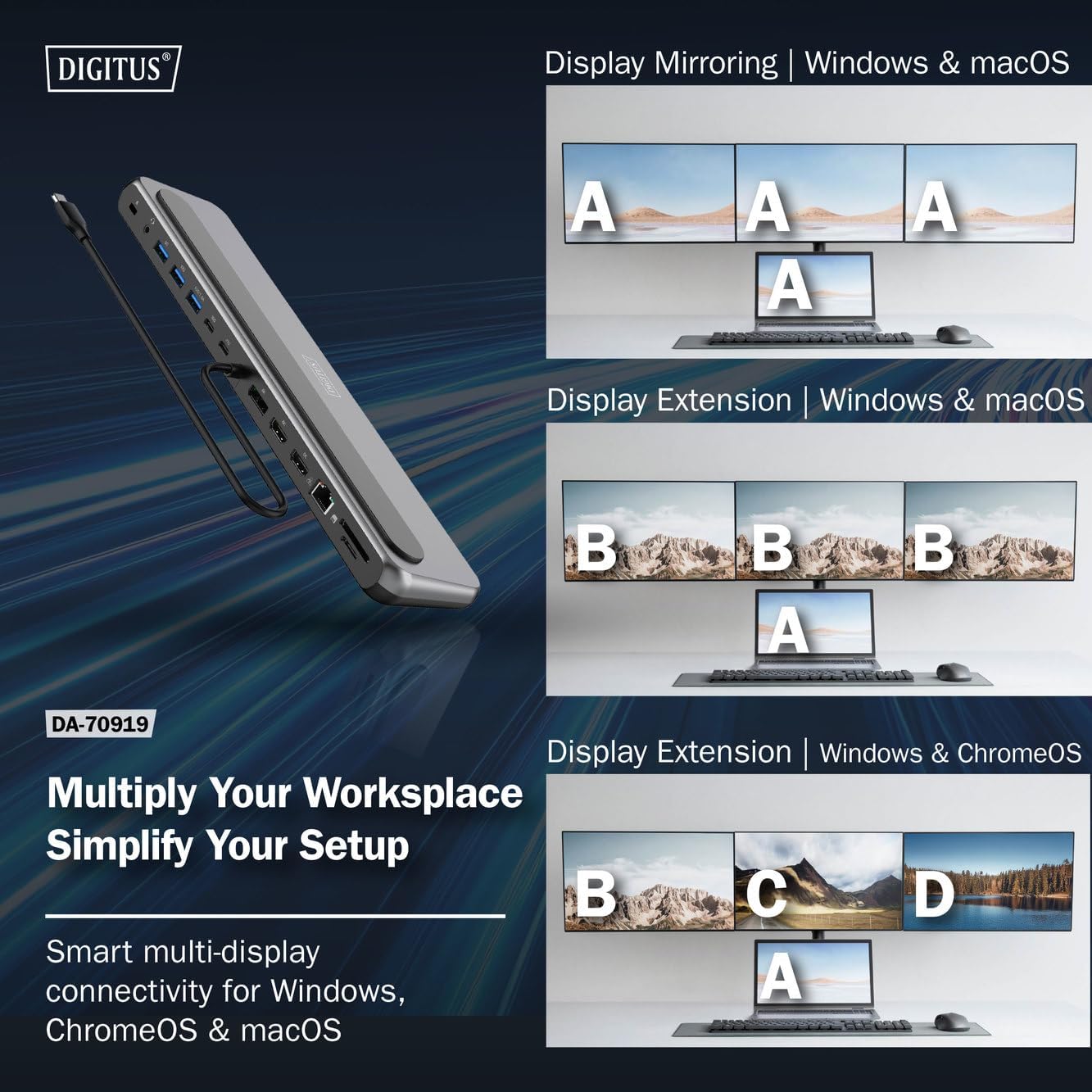
تصویر 4: Diagram showing display mirroring and extension modes for Windows, macOS, and ChromeOS. This image illustrates the various display configurations supported by the docking station, including mirroring your screen or extending it across multiple external monitors on Windows, macOS, and ChromeOS.
- آئینہ موڈ: آپ کے لیپ ٹاپ کے ڈسپلے کو بیرونی مانیٹر پر نقل کرتا ہے۔
- Extend Mode (Windows/ChromeOS): Extends your desktop across multiple external monitors, allowing for a multi-tasking environment. Supports dual monitors (2x 4K/60Hz) and triple monitors (1x 4K/60Hz + 2x 4K/30Hz) in MST (Multi Stream Transport) mode.
- Extend Mode (macOS): macOS typically supports extended desktop to one external monitor, with other external monitors mirroring each other.
To configure display settings, access your operating system's display settings (e.g., Windows Display Settings, macOS System Preferences > Displays).
ڈیٹا ٹرانسفر
Utilize the USB-A and USB-C data ports for connecting external storage devices, keyboards, mice, and other USB peripherals. The USB 3.2 Gen 2 ports offer speeds up to 10Gbps, while the USB 3.2 Gen 1 port offers speeds up to 5Gbps.
پاور ڈلیوری
When a compatible USB-C PD power adapter is connected to the docking station's PD input port, the docking station can deliver up to 85W of power to charge your connected laptop. This allows you to power your laptop and peripherals through a single USB-C connection.
تصویر 5: Illustration of the docking station's fast charging capability via USB-C Power Delivery. This image demonstrates the Power Delivery function, showing a 100W input to the docking station and an 85W output to charge the connected laptop.
نیٹ ورک کنکشن
Connect an Ethernet cable to the RJ45 port for a stable and high-speed wired network connection (10/100/1000 Mbps Gigabit Ethernet).
کارڈ ریڈرز
Insert SD or MicroSD cards into the dedicated slots for quick access to photos, videos, and other files. The card readers support transfer speeds up to 104 MBps.
آڈیو آؤٹ پٹ
Connect your headphones or speakers to the 3.5mm audio jack for audio output.
دیکھ بھال
- صفائی: Use a soft, dry cloth to clean the surface of the docking station. Avoid using liquid cleaners or solvents.
- ذخیرہ: ڈاکنگ اسٹیشن کو براہ راست سورج کی روشنی اور انتہائی درجہ حرارت سے دور ٹھنڈی، خشک جگہ پر اسٹور کریں۔
- ہینڈلنگ: Avoid dropping or subjecting the device to strong impacts. Do not attempt to disassemble the docking station.
خرابی کا سراغ لگانا
If you encounter issues with your docking station, please refer to the following common solutions:
- کوئی ڈسپلے آؤٹ پٹ نہیں:
- یقینی بنائیں کہ آپ کے لیپ ٹاپ کی USB-C پورٹ DisplayPort Alternate Mode کو سپورٹ کرتی ہے۔
- Check all video cables (HDMI/DP) are securely connected to both the docking station and the monitor.
- تصدیق کریں کہ مانیٹر آن ہے اور درست ان پٹ سورس پر سیٹ ہے۔
- مسئلے کو الگ کرنے کے لیے ایک وقت میں ایک مانیٹر کو جوڑنے کی کوشش کریں۔
- اپنے لیپ ٹاپ کے گرافکس ڈرائیورز کو اپ ڈیٹ کریں۔
- لیپ ٹاپ پر پاور ڈیلیوری نہیں:
- Ensure a compatible USB-C PD power adapter (up to 100W) is connected to the docking station's PD input port.
- Verify that your laptop's USB-C port supports Power Delivery.
- نقصان کے لیے پاور اڈاپٹر اور کیبل چیک کریں۔
- USB آلات کی شناخت نہیں ہوئی:
- Reconnect the USB device to a different port on the docking station.
- Ensure the docking station is properly connected to the host laptop.
- If using a high-power USB device, ensure the docking station is connected to an external power adapter.
- ایتھرنیٹ کنکشن کے مسائل:
- Check the Ethernet cable connection to both the docking station and your router/modem.
- اپنے لیپ ٹاپ پر نیٹ ورک کی ترتیبات کی تصدیق کریں۔
- Restart your router/modem and laptop.
- Card Reader Not Working:
- Ensure the SD/MicroSD card is inserted correctly and fully.
- Test the card with another device to confirm it is not damaged.
وضاحتیں
| فیچر | تفصیلات |
|---|---|
| ماڈل | DA-70919 |
| میزبان کنکشن | USB-C (مربوط کیبل) |
| ویڈیو آؤٹ پٹ | 2x HDMI، 1x ڈسپلے پورٹ (DP) |
| Max. Single Display Resolution | 8K (7680x4320) @ 30Hz |
| Max. Dual Display Resolution (MST) | 2x 4K (3840x2160) @ 60Hz |
| Max. Triple Display Resolution (MST) | 1x 4K@60Hz + 2x 4K@30Hz |
| USB-A ڈیٹا پورٹس | 2x USB 3.2 Gen 2 (10Gbps), 1x USB 3.2 Gen 1 (5Gbps) |
| USB-C ڈیٹا پورٹ | 1x USB 3.2 Gen 2 (10Gbps) |
| Power Delivery (PD) Input | USB-C PD 3.0 (up to 100W) |
| Power Delivery (PD) Output to Host | 85W تک |
| ایتھرنیٹ | RJ45 Gigabit (10/100/1000 Mbps) |
| کارڈ ریڈرز | SD, MicroSD (104 MBps) |
| آڈیو | 1x 3.5mm آڈیو جیک |
| مطابقت | ونڈوز، میک او ایس، کروم او ایس |
| آپریٹنگ درجہ حرارت | 0°C سے 45°C (32°F سے 113°F) |
| اسٹوریج کا درجہ حرارت | -10°C سے 70°C (14°F سے 158°F) |
وارنٹی اور سپورٹ
The Digitus DA-70919 USB-C 8K 12-Port Docking Station comes with a 2 سال کی وارنٹی from the date of purchase. This warranty covers manufacturing defects and ensures the product functions as described under normal use.
For technical support, warranty claims, or further assistance, please contact your retailer or visit the official Digitus website for contact information. Please have your product model number (DA-70919) and proof of purchase ready when seeking support.