
تعارف
This manual provides detailed instructions for the installation, operation, and maintenance of your Reobiux 2K Outdoor WiFi Surveillance Camera, Model K6Q-1P. Please read this manual thoroughly before using the product to ensure proper functionality and safety.
پیکیج کے مشمولات
تصدیق کریں کہ نیچے دی گئی تمام اشیاء آپ کے پیکج میں شامل ہیں۔ اگر کوئی اشیاء غائب یا خراب ہیں، تو براہ کرم کسٹمر سپورٹ سے رابطہ کریں۔
- 1 x Surveillance Camera
- 1 ایکس پاور اڈاپٹر
- بڑھتے ہوئے پیچ کا 1 ایکس سیٹ
- 1 x Waterproof Cover Kit
- 1 ایکس صارف دستی
پروڈکٹ ختمview
The Reobiux 2K Outdoor WiFi Surveillance Camera (Model K6Q-1P) is an advanced security solution featuring a dual-lens design for comprehensive monitoring. It offers 2K resolution, color night vision, motion detection, two-way audio, and compatibility with Amazon Alexa.
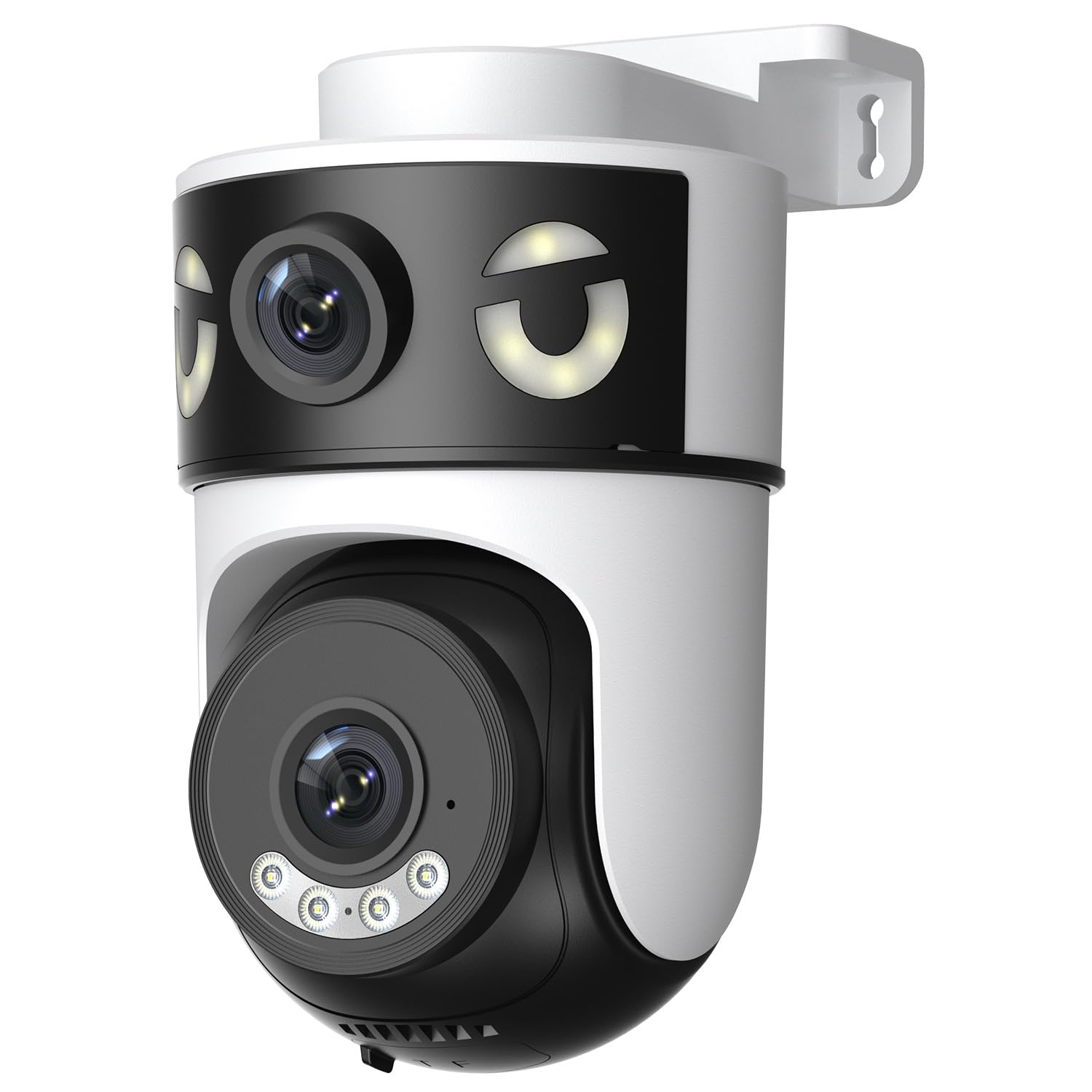
Image: Reobiux 2K Outdoor WiFi Surveillance Camera, Model K6Q-1P. This image shows the camera unit with its dual lenses, two external antennas, and a wall-mount bracket.
کلیدی خصوصیات
- Dual Lens & 355° View: Unique 2-in-1 design supporting fixed area surveillance and mobile full-view monitoring. Features two high-resolution lenses; one fixed and one rotatable for wide panoramic views.
- 2K ریزولوشن اور کلر نائٹ ویژن: Delivers clear and detailed images and videos. Offers three night vision modes: Infrared, Color, and Smart Night Vision for reliable 24-hour surveillance.
- Motion Detection & Alarm Siren: Advanced motion detection sends real-time alarm notifications to your mobile device upon detecting movement.
- Two-Way Audio & Multi-User Access: Built-in microphone and speaker allow for remote communication. Supports sharing camera access with multiple users.
- SD Card/Cloud Storage & Alexa Compatibility: Supports 24-hour continuous recording to a Micro SD card (max 128GB) or cloud server. Compatible with Amazon Alexa for voice control.
سیٹ اپ گائیڈ
1. کیمرہ لگانا
The camera is designed for wall mounting. Choose a suitable location that provides the desired surveillance coverage and is within range of your Wi-Fi network and a power outlet.
- کیمرہ کی بنیاد کو بطور ٹیمپلیٹ استعمال کرتے ہوئے دیوار پر ڈرلنگ پوائنٹس کو نشان زد کریں۔
- Drill holes and insert the wall plugs if necessary.
- Secure the camera to the wall using the provided mounting screws.
- Ensure the camera is firmly attached and the waterproof cover kit is properly installed to protect connections.
2. پاورنگ آن۔
Connect the provided power adapter to the camera's power input and then plug it into a standard electrical outlet. The camera will power on and initiate its startup sequence.
3. نیٹ ورک کنکشن (وائی فائی)
The camera connects via 2.4GHz Wi-Fi. Follow these steps to connect your camera to your home network:
- ڈاؤن لوڈ کریں۔ O-kam Pro application from the App Store (iOS) or Google Play Store (Android) on your smartphone or tablet.
- ایک نئے اکاؤنٹ کے لیے رجسٹر ہوں یا اگر آپ کے پاس پہلے سے موجود ہے تو لاگ ان کریں۔
- اپنا نیا کیمرہ شامل کرنے کے لیے درون ایپ ہدایات پر عمل کریں۔ اس میں عام طور پر کیمرے پر QR کوڈ اسکین کرنا یا دستی طور پر اس کی ID درج کرنا شامل ہے۔
- Select your 2.4GHz Wi-Fi network and enter the password when prompted.
- Wait for the camera to connect to the network. A voice prompt or indicator light will confirm a successful connection.

Image: Reobiux camera with a smartphone displaying the O-kam Pro app interface, demonstrating remote control and live view صلاحیتیں
آپریٹنگ ہدایات
جیو View اور پین/جھکاؤ کنٹرول
Once connected, open the O-kam Pro app to access the live feed from your camera. The dual-lens system provides both a fixed wide view and a movable PTZ (Pan-Tilt-Zoom) view.
- ایپ میں کیمرے پر ٹیپ کریں۔ view لائیو سلسلہ
- Use the on-screen controls to pan (horizontal rotation up to 355°) and tilt (vertical movement) the movable lens to adjust the viewING زاویہ
- Switch between the fixed and movable lens views within the app interface.
نائٹ ویژن موڈز
کیمرا تین نائٹ ویژن موڈ پیش کرتا ہے:
- انفراریڈ نائٹ ویژن: Provides black and white images in low-light conditions using infrared LEDs.
- کلر نائٹ ویژن: Utilizes built-in spotlights to provide full-color images at night.
- سمارٹ نائٹ ویژن: پتہ چلنے والی حرکت یا روشنی کے حالات کی بنیاد پر اورکت اور کلر نائٹ ویژن کے درمیان خودکار طور پر سوئچ ہوجاتا ہے۔
- You can select your preferred night vision mode in the O-kam Pro app settings.
حرکت کا پتہ لگانے اور انتباہات
Configure motion detection settings and receive alerts on your mobile device:
- Navigate to the camera settings in the O-kam Pro app.
- حرکت کا پتہ لگانے کو فعال کریں اور ضرورت کے مطابق حساسیت کی سطح کو ایڈجسٹ کریں۔
- Set up alert notifications to be sent to your smartphone.
- You can also enable the alarm siren to deter intruders.
دو طرفہ آڈیو
Use the two-way audio feature to communicate through the camera:
- لائیو میں view interface of the O-kam Pro app, tap the microphone icon to speak. Your voice will be transmitted through the camera's speaker.
- کیمرے کے ارد گرد سے آڈیو سننے کے لیے اسپیکر کے آئیکن کو تھپتھپائیں۔
ویڈیو ریکارڈنگ اور اسٹوریج
The camera supports continuous 24-hour recording. You have two storage options:
- مائیکرو ایسڈی کارڈ: Insert a Micro SD card (up to 128GB, not included) into the designated slot on the camera. The camera will automatically begin recording to the card.
- کلاؤڈ اسٹوریج: Subscribe to a cloud storage plan through the O-kam Pro app for secure off-site video storage.
- ریکارڈ شدہ foo تک رسائی حاصل کریں۔tage via the O-kam Pro app.
ایمیزون الیکسا انٹیگریشن
Integrate your Reobiux camera with Amazon Alexa for voice control:
- اپنے موبائل آلہ پر ایمیزون ایلیکا ایپ کھولیں۔
- Go to "Skills & Games" and search for the "O-kam Pro" skill.
- Enable the skill and link your O-kam Pro account.
- Discover devices. You can now use voice commands like "Alexa, show me the front door camera" to view ہم آہنگ الیکسا ڈیوائسز پر لائیو فیڈ۔
دیکھ بھال
- صفائی: باقاعدگی سے کیمرے کے لینس اور جسم کو نرم سے صاف کریں، ڈیamp دھول اور گندگی کو دور کرنے کے لئے کپڑا. سخت کیمیکل یا کھرچنے والے کلینر کا استعمال نہ کریں۔
- موسم کی حفاظت: The camera is waterproof, but ensure all connections are sealed properly, especially the power cable and any SD card slots, to maintain its weather resistance.
- فرم ویئر اپ ڈیٹس: Check the O-kam Pro app periodically for firmware updates to ensure optimal performance and security.
خرابی کا سراغ لگانا
- کیمرہ آن نہیں ہو رہا ہے:
- Ensure the power adapter is securely connected to both the camera and a working electrical outlet. Verify the outlet has power.
- وائی فائی سے منسلک ہونے سے قاصر:
- Ensure your Wi-Fi network is 2.4GHz. Check your Wi-Fi password for accuracy. Move the camera closer to your Wi-Fi router to improve signal strength. Restart your router and the camera.
- زندہ نہیں۔ view or recording:
- Check your internet connection. Ensure the camera is connected to Wi-Fi. Verify that the Micro SD card is inserted correctly and not full, or that your cloud storage subscription is active.
- Motion detection alerts not received:
- Check app notification settings on your phone and within the O-kam Pro app. Ensure motion detection is enabled and sensitivity is set appropriately. Verify your phone has an active internet connection.
- دو طرفہ آڈیو کام نہیں کر رہا ہے:
- Ensure your phone's microphone and speaker are enabled for the O-kam Pro app. Check the volume settings on your phone and within the app. Ensure there are no obstructions blocking the camera's microphone or speaker.
وضاحتیں
| فیچر | تفصیلات |
|---|---|
| برانڈ | Reobiux |
| ماڈل کا نام | K6Q-1P |
| ماڈل نمبر | REO-K6Q-1P |
| چڑھنے کی قسم | وال ماؤنٹ |
| ویڈیو ریکارڈنگ ریزولوشن | 2K |
| اشیاء کی تعداد | 1 |
| وائرلیس کمیونیکیشن ٹیکنالوجی | Wi-Fi (2.4GHz) |
| Viewآئی اینگل | 355 Degrees (Pan) |
| تنصیب کی قسم | سکرو ان |
| مواد | پلاسٹک |
| والیومtage | 5 وولٹ (DC) |
| طاقت | 5 واٹ |
| پانی کی مزاحمت کی سطح | واٹر پروف |
| خصوصی خصوصیات | Two-Way Audio, Local Recording, HD Resolution, PTZ Technology |
| تجویز کردہ استعمال | آؤٹ ڈور سیکیورٹی |
| ہم آہنگ آلات | لیپ ٹاپ، اسمارٹ فون، ٹیبلٹ، ٹیلی ویژن |
| طاقت کا منبع | الیکٹرک کیبل |
| کنیکٹیویٹی پروٹوکول | آر ٹی ایس پی |
| کنٹرولر کی قسم | O-kam Pro App |
وارنٹی اور سپورٹ
For warranty information and technical support, please refer to the official Reobiux website or contact Reobiux customer service directly. Keep your purchase receipt as proof of purchase for warranty claims.
Manufacturer: Reobiux