
1. تعارف
Thank you for choosing the LOEWE Leo Wireless Headphones. These premium headphones are designed to deliver an exceptional audio experience with advanced features such as Hi-Res Audio, adaptive noise cancellation, and real-time voice translation. This manual provides essential information for setting up, operating, and maintaining your headphones to ensure optimal performance and longevity.
2. پیکیج کے مشمولات
استعمال کرنے سے پہلے، براہ کرم تصدیق کریں کہ تمام اشیاء پیکیج میں موجود ہیں:
- LOEWE Leo Wireless Headphones
- USB-C چارجنگ کیبل
- AUX to USB-C Audio Cable
- چمڑا لے جانے والا کیس
- سخت کیرینگ کیس
- Cable Pouch
- صارف دستی (یہ دستاویز)
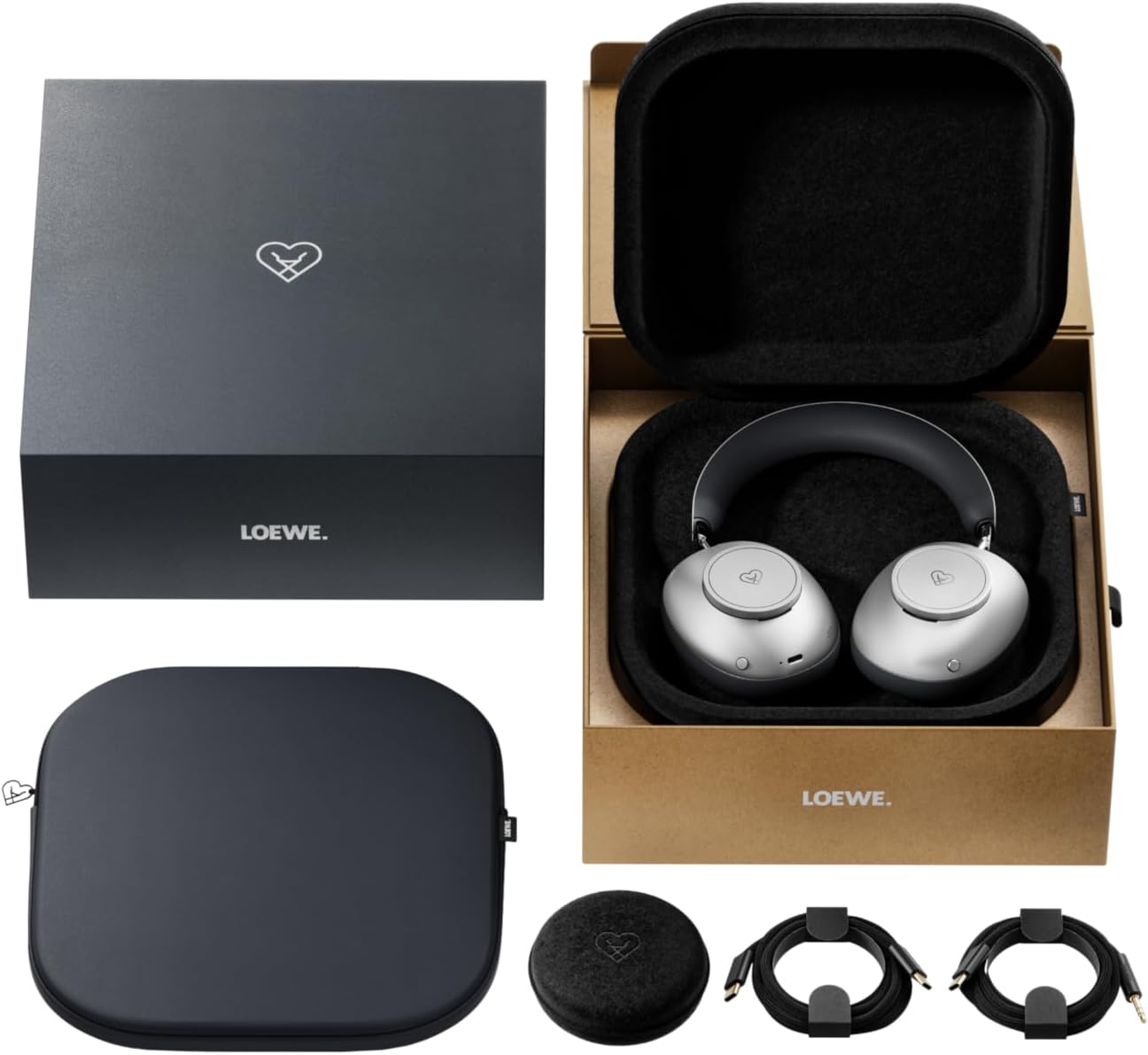
Image: The LOEWE Leo Wireless Headphones package contents, showing the headphones, USB-C cable, AUX cable, leather case, hard case, and cable pouch.
3. پروڈکٹ ختمview
Familiarize yourself with the physical components and controls of your LOEWE Leo headphones.

تصویر: سامنے view of the LOEWE Leo Wireless Headphones, showcasinجی ایئرکپس اور ہیڈ بینڈ۔
3.1 کنٹرولز اور پورٹس
The headphones feature intuitive controls for easy operation:
- کنٹرول ڈائل: Two precision-crafted rotary wheels for volume adjustment and navigation.
- ایکشن بٹن: Dedicated buttons for playback control, ANC modes, and voice translation activation.
- USB-C پورٹ: چارجنگ اور وائرڈ آڈیو کنکشن کے لیے۔
- 3.5 ملی میٹر جیک: For traditional wired audio connection.

تصویر: تفصیلی view of the earcup, highlighting the control dial, USB-C port, and 3.5mm audio jack.
4. شروع کرنا
4.1. ہیڈ فون چارج کرنا
Before first use, fully charge your LOEWE Leo headphones. A full charge provides up to 65 hours of continuous playback.
- فراہم کردہ USB-C چارجنگ کیبل کو ہیڈ فون پر USB-C پورٹ سے جوڑیں۔
- کیبل کے دوسرے سرے کو ایک ہم آہنگ USB پاور اڈاپٹر (شامل نہیں) یا کمپیوٹر کے USB پورٹ سے جوڑیں۔
- The LED indicator on the headphones will show the charging status. It will typically turn off or change color once fully charged.
4.2. پاور آن/آف
- پاور آن کرنے کے لیے: پاور بٹن کو تقریباً 3 سیکنڈ تک دبائے رکھیں جب تک کہ LED انڈیکیٹر روشن نہ ہو۔
- پاور آف کرنا: پاور بٹن کو تقریباً 3 سیکنڈ تک دبائے رکھیں جب تک کہ LED انڈیکیٹر بند نہ ہو جائے۔
4.3. بلوٹوت جوڑی بنانا
The LOEWE Leo headphones utilize Bluetooth Low Energy (BLE) for faster pairing and reduced power consumption.
- یقینی بنائیں کہ ہیڈ فون بند ہیں۔
- پاور بٹن کو تقریباً 5 سیکنڈ تک دبائے رکھیں جب تک کہ LED انڈیکیٹر تیزی سے چمک نہ جائے، جو جوڑنے کے موڈ کی نشاندہی کرتا ہے۔
- اپنے آلے پر (اسمارٹ فون، ٹیبلیٹ، کمپیوٹر)، بلوٹوتھ کو فعال کریں اور دستیاب آلات تلاش کریں۔
- Select "LOEWE Leo" from the list of found devices.
- ایک بار منسلک ہونے کے بعد، LED اشارے چمکنا بند کر دے گا اور ٹھوس نیلا رہے گا۔
4.4. وائرڈ کنکشن۔
For a wired audio experience, use the supplied AUX to USB-C cable.
- Connect the USB-C end of the AUX cable to the headphones.
- Connect the 3.5mm end of the AUX cable to your audio source's 3.5mm jack.
- ہیڈ فون خود بخود وائرڈ موڈ میں بدل جائیں گے۔
5. اپنے ہیڈ فون کو آپریٹ کرنا
5.1. آڈیو پلے بیک اور والیوم کنٹرول
Use the control dials and action buttons for managing your audio:
- والیوم اوپر/نیچے: Rotate the designated control dial.
- چلائیں/روکیں: Press the central action button once.
- اگلا ٹریک: Double-press the central action button.
- پچھلا ٹریک: Triple-press the central action button.

Image: Close-up of the earcup's control dial, used for volume and navigation.
5.2. Adaptive Noise Cancellation (ANC)
The LOEWE Leo features advanced adaptive noise cancellation that continuously analyzes your environment and adjusts in real-time.
- ANC کو فعال/غیر فعال کریں: Press the dedicated ANC button once.
- شفافیت موڈ: Press the ANC button twice to allow ambient sounds to pass through, enhancing situational awareness.

Image: Illustration of the adaptive noise cancellation feature, depicting sound wave management.
5.3. Real-time Voice Translation
Communicate across language barriers with the integrated real-time voice translation feature.
- Ensure your headphones are connected to a device with internet access and the LOEWE companion app installed.
- Activate the translation feature via the dedicated button or the companion app.
- Speak into the headphone's microphone. The translated audio will be played back in real-time.

Image: Earcup detail showing the microphone for voice input and the 'leo' icon, representing the real-time translation function.
5.4. Dolby Atmos and Spatial Audio
Experience immersive sound with Dolby Atmos and spatial audio support. This feature is automatically enabled when compatible content is played through a connected device that supports these audio technologies.
6. دیکھ بھال اور دیکھ بھال
6.1. صفائی
- ہیڈ فون کو نرم، خشک، لنٹ فری کپڑے سے صاف کریں۔
- کھرچنے والے کلینر، الکحل یا کیمیائی سالوینٹس کا استعمال نہ کریں۔
- Keep moisture away from openings.
6.2. بیٹری کی دیکھ بھال
- بیٹری کو بار بار مکمل طور پر خارج کرنے سے گریز کریں۔
- Store the headphones in a cool, dry place when not in use for extended periods.
- The battery is user-replaceable, contributing to the product's longevity.
6.3. Modular Design
The LOEWE Leo headphones feature a durable modular design with replaceable components, such as ear cushions and headbands. This design allows for easy replacement of worn parts, extending the product's lifespan.

Image: The modular construction of the LOEWE Leo headphones, showing detachable earcups and headband for maintenance or replacement.
7 خرابیوں کا سراغ لگانا
If you encounter issues with your LOEWE Leo headphones, refer to the following common solutions:
- کوئی طاقت نہیں: یقینی بنائیں کہ ہیڈ فون پوری طرح سے چارج ہیں۔ USB-C کیبل کا استعمال کرتے ہوئے انہیں پاور سورس سے جوڑیں۔
- کوئی آواز نہیں:
- ہیڈ فونز اور اپنے منسلک ڈیوائس دونوں پر والیوم لیول چیک کریں۔
- Ensure the headphones are properly paired via Bluetooth or the AUX cable is securely connected.
- Try restarting both the headphones and the audio source device.
- بلوٹوتھ منقطع:
- Ensure the headphones are within the Bluetooth range of your device (typically 10 meters).
- Disable and re-enable Bluetooth on your device, then attempt to re-pair.
- Clear the LOEWE Leo from your device's Bluetooth history and pair again.
- ANC مؤثر طریقے سے کام نہیں کر رہا:
- Ensure the earcups form a good seal around your ears. Adjust the fit if necessary.
- Verify that ANC is activated.
- Voice Translation Issues:
- Check your device's internet connection.
- Ensure the LOEWE companion app is up-to-date and configured correctly.
- صاف اور معتدل رفتار سے بات کریں۔
If problems persist, please contact LOEWE customer support.
8. وضاحتیں
| فیچر | تفصیل |
|---|---|
| ماڈل کا نام | لیو |
| ماڈل نمبر | 64641J10 |
| کنیکٹوٹی ٹیکنالوجی | Wireless (Bluetooth), Wired |
| وائرلیس کمیونیکیشن | بلوٹوتھ لو لو انرجی (BLE) |
| آواز کی خصوصیات | Hi-Res Audio, Dolby Atmos, Spatial Audio |
| شور کی منسوخی | Adaptive Noise Reduction (ANC) |
| خصوصی خصوصیات | Real-time Voice Translation, Modular Design with Replaceable Components |
| بیٹری کی زندگی | 65 گھنٹے تک (تقریباً) |
| کنٹرول کی قسم | Button Control, Rotary Dials |
| ہم آہنگ آلات | Cellular Phone, Tablet, Computer, Laptop |
| وزن | 3 Kilograms (product weight as listed, may include packaging) |
9. وارنٹی اور سپورٹ
9.1 مینوفیکچرر کی وارنٹی
The LOEWE Leo Wireless Headphones come with a 2 سالہ صنعت کار کی وارنٹی. یہ وارنٹی عام استعمال کے تحت مواد اور کاریگری میں نقائص کا احاطہ کرتی ہے۔ وارنٹی کے دعووں کے لیے براہ کرم اپنی خریداری کا ثبوت اپنے پاس رکھیں۔
For specific terms and conditions of the warranty, please refer to the warranty card included in your product packaging or visit the official LOEWE webسائٹ
9.2. کسٹمر سپورٹ
For technical assistance, troubleshooting, or warranty inquiries, please contact LOEWE customer support through their official webسائٹ یا آپ کی مصنوعات کی دستاویزات میں فراہم کردہ رابطے کی معلومات۔
آن لائن وسائل: Visit the official LOEWE webFAQs، سافٹ ویئر اپ ڈیٹس، اور اضافی امدادی وسائل کے لیے سائٹ۔