
1. تعارف
Thank you for choosing the Fenge G04B211-FR Monitor Stand Riser. This product is designed to elevate your monitor or laptop to an ergonomic viewing height, reducing neck and eye strain. It also provides additional storage space to help organize your workspace. This manual provides detailed instructions for assembly, operation, and maintenance to ensure safe and efficient use of your new monitor stand.
2. حفاظتی معلومات
- اس بات کو یقینی بنائیں کہ اسمبلی سے پہلے تمام اجزاء موجود ہیں اور بغیر کسی نقصان کے ہیں۔ اگر کوئی پرزہ غائب یا ٹوٹا ہوا ہے تو استعمال نہ کریں۔
- خروںچ کو روکنے کے لیے یونٹ کو نرم، صاف سطح پر جمع کریں۔
- زیادہ سے زیادہ وزن کی گنجائش 75 کلوگرام (165 پونڈ) سے زیادہ نہ ہو۔
- Place the monitor stand on a stable, level surface to prevent tipping.
- دم گھٹنے کے خطرات سے بچنے کے لیے چھوٹے حصوں کو بچوں سے دور رکھیں۔
- نقصان سے بچنے کے لیے گرم اشیاء کو براہ راست سطح پر رکھنے سے گریز کریں۔
3. پیکیج کے مشمولات
براہ کرم تصدیق کریں کہ آپ کے پیکیج میں درج ذیل تمام اجزاء شامل ہیں:
- Main Monitor Stand Sections (L-shaped and straight sections)
- Storage Drawers (if applicable to your configuration)
- Assembly Hardware (screws, connectors, Allen key)
- ہدایت نامہ
4. اسمبلی کی ہدایات
The Fenge G04B211-FR monitor stand riser is designed for flexible assembly, allowing for various configurations to suit your workspace. Follow these general steps for assembly:
4.1. پیک کھولنا اور تیاری
Carefully remove all components from the packaging. Lay them out on a soft, flat surface to prevent damage. Identify each part according to the included parts list (if provided in the physical manual).
4.2. Connecting the Sections
The stand consists of modular sections that can be connected to form different shapes (e.g., straight, L-shape). Align the connecting points of the desired sections and secure them using the provided screws and connectors. Ensure all connections are tight and stable.

Figure 4.2.1: Illustration of connecting the modular sections during assembly.
4.3. Installing Drawers and Shelves
If your configuration includes drawers or additional shelves, slide them into their designated slots. Ensure they move smoothly and are properly seated.
4.4. Final Placement and Stability Check
Once assembled, place the monitor stand on your desk. Gently push down on various parts of the stand to ensure it is stable and does not wobble. Adjust connections if necessary.

شکل 4.4.1: سابقample of a compact, single-tier assembly style.

شکل 4.4.2: سابقample of an L-shaped assembly style for corner desks.

شکل 4.4.3: سابقample of a straight, extended assembly style for multiple devices.
5. آپریٹنگ ہدایات
Using your Fenge G04B211-FR monitor stand riser is straightforward:
- جگہ کا تعین: Position your monitor(s) or laptop(s) on the top surface of the stand. Ensure the weight is evenly distributed and does not exceed the maximum capacity.
- فعالیات پیمائی: Adjust your seating position so that the top of your screen is at or slightly below eye level. This helps maintain a neutral neck posture.
- ذخیرہ: Utilize the integrated drawers and open shelves for storing office supplies, documents, keyboards, mice, or other small items to keep your desk tidy.

Figure 5.1: Monitor stand in use, supporting a monitor and laptop.

Figure 5.2: Monitor stand configured to support two monitors.

شکل 5.3: تفصیلی view of the storage drawers and shelves.
6 دیکھ بھال
To ensure the longevity and appearance of your monitor stand, follow these maintenance guidelines:
- صفائی: سطحوں کو نرم سے صاف کریں، ڈیamp کپڑا سخت کیمیکلز یا کھرچنے والے کلینر استعمال کرنے سے گریز کریں، کیونکہ وہ ختم کو نقصان پہنچا سکتے ہیں۔
- دھول: Regularly dust the stand to prevent accumulation, especially in the storage compartments.
- معائنہ: وقتاً فوقتاً تمام پیچ اور کنکشن چیک کریں تاکہ یہ یقینی بنایا جا سکے کہ وہ سخت ہیں۔ اگر ضروری ہو تو دوبارہ سخت کریں۔
- نمی سے بچیں: Keep the stand away from excessive moisture or direct sunlight to prevent warping or discoloration.
7 خرابیوں کا سراغ لگانا
If you encounter any issues with your Fenge G04B211-FR monitor stand, refer to the following common solutions:
- ہلچل/ عدم استحکام: Ensure all screws are fully tightened. Verify that the stand is placed on a flat, even surface.
- دراز چپکانا: Check for any obstructions in the drawer slides. Ensure the stand is level.
- گمشدہ حصے: If any parts were missing upon arrival, please contact customer support immediately.
8. وضاحتیں
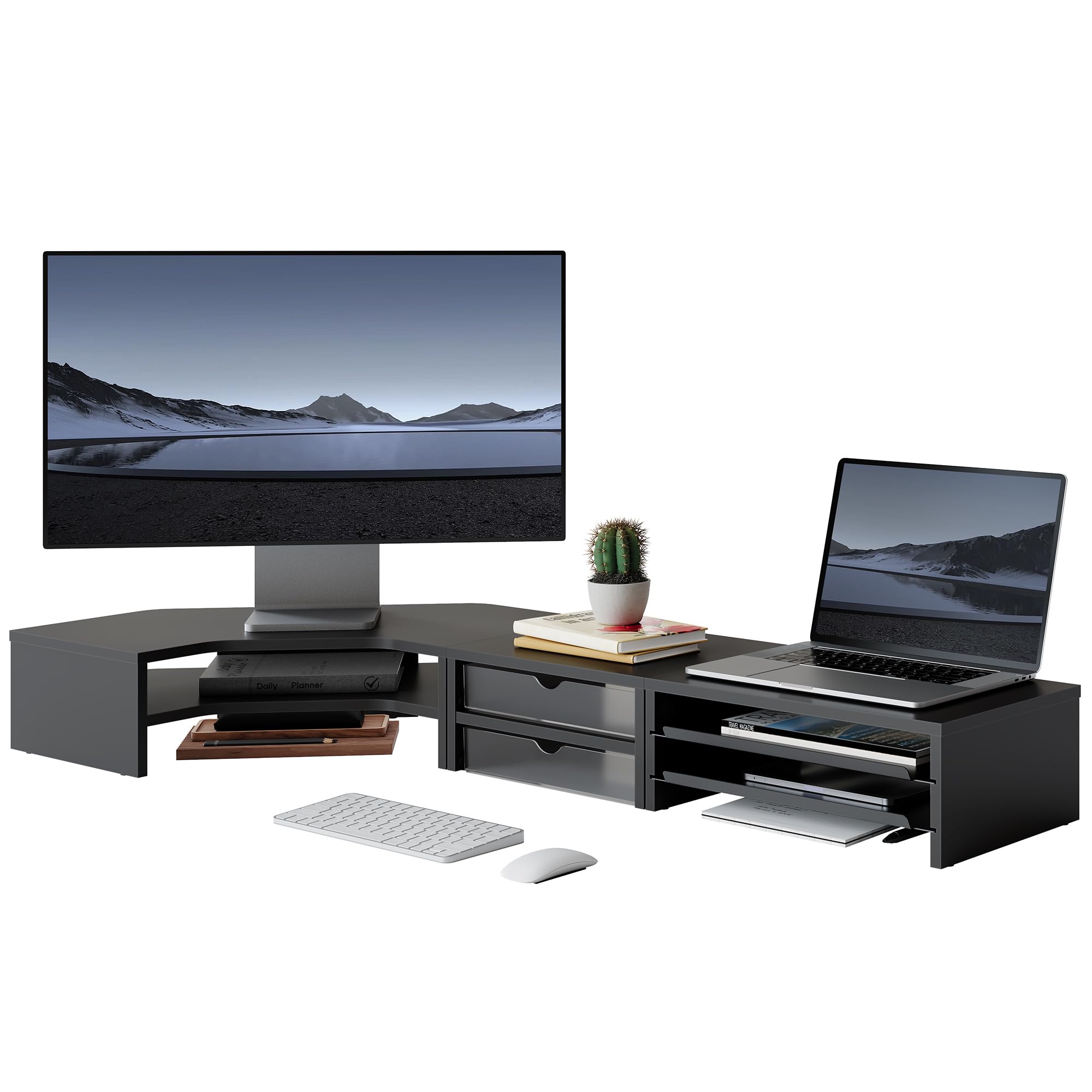
شکل 8.1: پروڈکٹ کے طول و عرض اور وزن کی گنجائش۔
| فیچر | تفصیل |
|---|---|
| ماڈل نمبر | G04B211-FR |
| طول و عرض (L x W x H) | 111.3 x 46.2 x 13.4 سینٹی میٹر (43.8 x 18.2 x 5.3 انچ) |
| شے کا وزن | 8.4 کلوگرام (18.5 پونڈ) |
| زیادہ سے زیادہ لوڈ کی گنجائش | 75 کلوگرام (165 پونڈ) |
| رنگ | سیاہ |
| مواد | Not specified, typically wood composite/MDF with metal accents |
| اسمبلی کی ضرورت ہے۔ | جی ہاں |
| درجات کی تعداد | 2 |
| شکل | L-Shape (modular for various configurations) |
9. وارنٹی اور سپورٹ
For warranty information, technical support, or to inquire about replacement parts, please contact Fenge customer service through the retailer's platform or the official Fenge website. Please have your model number (G04B211-FR) and purchase date available when contacting support.