
تعارف
This manual provides instructions for the VINABTY RT22R3KECA Replacement Voice Remote Control. This remote is designed to function as a replacement for specific Hyundai and Continental Edison television models, offering voice search capabilities and standard remote control functions.
Key features include an ergonomic design, sensitive buttons for quick response, and a durable ABS construction. It operates with a transmission distance of up to 10 meters.
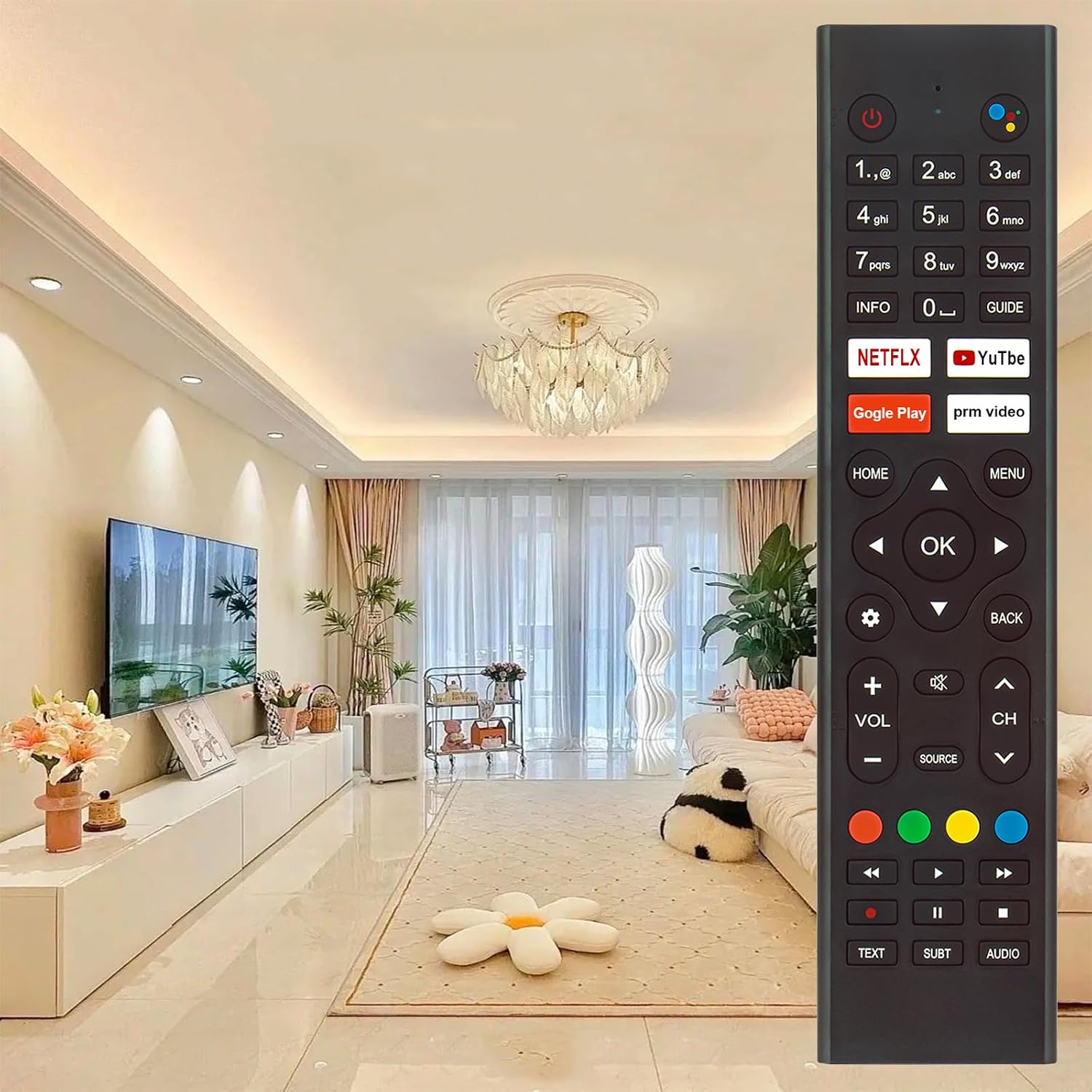
Image: The VINABTY RT22R3KECA remote control, showcasing its design and button layout in a typical home environment.
سیٹ اپ
1. بیٹری کی تنصیب
The remote control requires two AAA batteries (not included) for operation.
- ریموٹ کنٹرول کے پیچھے بیٹری کے ٹوکرے کو تلاش کریں۔
- بیٹری کور کو کھولنے کے لیے اسے نیچے کی طرف سلائیڈ کریں۔
- دو AAA بیٹریاں ڈالیں، اس بات کو یقینی بناتے ہوئے کہ مثبت (+) اور منفی (-) ٹرمینلز کمپارٹمنٹ کے اندر نشانات کے ساتھ درست طریقے سے سیدھ میں ہوں۔
- بیٹری کور کو اس وقت تک تبدیل کریں جب تک کہ یہ محفوظ طریقے سے کلک نہ کرے۔

تصویر: View of the remote control's back with the battery cover removed, showing the battery compartment for two AAA batteries.
2. اپنے TV کے ساتھ جوڑا بنانا
This remote control is a voice search remote and requires pairing with your television before full functionality, especially voice control, can be utilized. Refer to your TV's user manual for specific pairing instructions, as the process can vary by TV model. Generally, pairing involves:
- Ensuring your TV is powered on.
- Accessing the TV's settings menu (often under "Remotes & Accessories" or "Bluetooth Settings").
- Following the on-screen prompts to add a new remote control or Bluetooth device.
- Pressing and holding specific buttons on the VINABTY remote (e.g., "OK" and "Home" simultaneously, or a dedicated pairing button if present) until the TV detects it.
Once successfully paired, the remote control will function correctly.
آپریٹنگ ہدایات
The VINABTY RT22R3KECA remote control offers intuitive operation with clearly labeled buttons.
معیاری افعال
- پاور بٹن: Located at the top right, used to turn the TV on or off.
- نمبر پیڈ: براہ راست چینل ان پٹ کے لیے۔
- Navigation Pad (OK, Up, Down, Left, Right): مینو نیویگیشن اور انتخاب کے لیے۔
- والیوم کنٹرول (VOL +/-): Adjusts the television's volume.
- چینل کنٹرول (CH +/-): ٹیلی ویژن چینلز بدلتے ہیں۔
- ہوم بٹن: TV کی مرکزی ہوم اسکرین پر واپس آجاتا ہے۔
- مینو بٹن: Accesses the TV's settings or options menu.
- پیچھے کا بٹن: پچھلی اسکرین یا مینو پر واپس آجاتا ہے۔
- ماخذ بٹن: ان پٹ ذرائع (HDMI، AV، وغیرہ) کو منتخب کرتا ہے۔
- وقف کردہ ایپ بٹن: Netflix اور YouTube جیسی مقبول اسٹریمنگ سروسز تک فوری رسائی۔
Voice Control Functionality
After successful pairing, the voice control feature allows you to issue commands to your TV using your voice.
- تلاش کریں۔ صوتی تلاش کا بٹن (often represented by a microphone icon or colored dots) near the top of the remote.
- Press and hold the Voice Search Button.
- Speak your command clearly into the remote control. Examples include "Open Netflix," "تلاش کریں۔ action movies," or "Change to Channel 5."
- Release the button once you have finished speaking.

Image: The VINABTY RT22R3KECA remote control with an overlay highlighting the voice search button and its microphone icon.
The remote control operates effectively up to a distance of 10 meters from the television.
دیکھ بھال
To ensure the longevity and optimal performance of your VINABTY RT22R3KECA remote control, follow these maintenance guidelines:
- صفائی: Wipe the remote control regularly with a soft, dry cloth. For stubborn dirt, slightly dampen the cloth with water or a mild, non-abrasive cleaner. Avoid using harsh chemicals or solvents.
- بیٹری کی دیکھ بھال: Replace batteries when the remote's response becomes sluggish or it stops functioning. If the remote will not be used for an extended period, remove the batteries to prevent leakage and potential damage.
- ذخیرہ: ریموٹ کو براہ راست سورج کی روشنی اور انتہائی درجہ حرارت سے دور ٹھنڈی، خشک جگہ پر اسٹور کریں۔
- استحکام: The remote is constructed from durable ABS material with soft rubber buttons, designed for long-term use. Avoid dropping the remote or exposing it to excessive force.

Image: Diagram illustrating the features of the remote control, including sensitive buttons for fast response, durable ABS materials, and a comfortable grip.
خرابی کا سراغ لگانا
If you encounter issues with your VINABTY RT22R3KECA remote control, consider the following troubleshooting steps:
- ریموٹ جواب نہیں دے رہا ہے:
- Check the batteries. Ensure they are inserted correctly with the correct polarity and are not depleted. Replace with fresh batteries if necessary.
- یقینی بنائیں کہ ریموٹ کنٹرول اور ٹی وی کے انفراریڈ ریسیور کے درمیان کوئی رکاوٹ نہیں ہے۔
- تصدیق کریں کہ ریموٹ براہ راست ٹی وی کی طرف اشارہ کیا گیا ہے۔
- صوتی کنٹرول کام نہیں کر رہا ہے:
- Confirm that the remote control is properly paired with your TV. If unsure, attempt to re-pair it according to the "Pairing with Your TV" section and your TV's manual.
- Ensure your TV supports voice control and that the feature is enabled in its settings.
- Speak clearly and hold the voice button while speaking.
- بٹن درست طریقے سے کام نہیں کر رہے ہیں:
- Clean the remote control, especially around the buttons, to remove any dirt or debris that might be causing stickiness or preventing proper contact.
- If only specific buttons are not working, and battery replacement doesn't help, there might be an internal issue.
If these steps do not resolve the issue, please refer to the "Support and Contact" section for further assistance.
وضاحتیں
| برانڈ | ونابٹی |
| ماڈل کا نام | RT22R3KECA |
| ماڈل نمبر | RT22R3KECA (Mfr Part Number: BYDE-RT22R3KECA) |
| خصوصی خصوصیات | Ergonomic, Voice Search |
| کنیکٹوٹی ٹیکنالوجی | اورکت |
| کنٹرولر کی قسم | وائس کنٹرول |
| زیادہ سے زیادہ رینج | 10 میٹر |
| بٹن کی مقدار | 25 |
| شے کا وزن | 60 گرام |
| آئٹم کے طول و عرض (L x W x H) | 18L x 4W x 1H centimeters (approximately 8.11 x 1.85 x 0.98 inches) |
| طاقت کا منبع | 2 x AAA بیٹریاں (شامل نہیں) |

Image: Diagram showing the length, width, and thickness dimensions of the VINABTY RT22R3KECA remote control.

Image: The VINABTY RT22R3KECA remote control overlaid with text indicating an upgraded smart chip for stable performance, set against a futuristic circuit board background.
ہم آہنگ ٹی وی ماڈلز
This VINABTY RT22R3KECA remote control is compatible with the following television models:
- Hyundai: HY-TVSAND43-004, HY-TVSAND55-55-001, HY-TVSAND55-00551 US
- Continental Edison: CELED55SAUDV23B7, CELED65UHDSA23B7, CELED32SAHDV23B7, ED55C05UHD-MM, ED65C05UHD-MM
Please verify your TV model number against this list to ensure compatibility.
سپورٹ اور رابطہ
For any questions regarding the compatibility or operation of your VINABTY RT22R3KECA remote control, or if you encounter any issues not resolved by the troubleshooting steps, please contact our customer support.
It is recommended to contact us before purchase if you are unsure about the remote's suitability for your device. If the remote you received does not work as expected, please reach out for assistance.
Contact information is typically available through your purchase platform or the VINABTY official webسائٹ