
1. تعارف
This manual provides detailed instructions for the assembly, operation, and maintenance of your VASAGLE Electric Height Adjustable Standing Desk, model LSD310KD03. Designed to promote a healthier work environment, this desk allows seamless transitions between sitting and standing positions. Please read this manual thoroughly before use to ensure proper setup and safe operation.
2. حفاظتی ہدایات
- اس بات کو یقینی بنائیں کہ اسمبلی سے پہلے تمام اجزاء موجود ہیں اور بغیر کسی نقصان کے ہیں۔ اگر کوئی پرزہ غائب یا خراب ہو تو استعمال نہ کریں۔
- چوٹ سے بچنے کے لیے آپریشن کے دوران بچوں اور پالتو جانوروں کو میز سے دور رکھیں۔
- Do not overload the desk. The maximum load capacity is 70 kg (154 lbs).
- مائعات کو براہ راست کنٹرول پینل پر یا برقی اجزاء کے قریب رکھنے سے گریز کریں۔
- صرف فراہم کردہ پاور اڈاپٹر استعمال کریں۔
- تمام پیچ اور کنکشن کو باقاعدگی سے چیک کریں تاکہ یہ یقینی بنایا جا سکے کہ وہ سخت ہیں۔
- The desk features a locking function to prevent accidental height adjustments. Utilize this feature, especially in households with children.
- Do not attempt to modify or disassemble the motor or control system. Contact customer support for assistance.
3. پیکیج کے مشمولات
تصدیق کریں کہ آپ کے پیکیج میں درج ذیل تمام اجزاء شامل ہیں:
- 1 x Electric Height Adjustable Desk (LSD310KD03)
- اسمبلی ہارڈ ویئر (پیچ، اوزار، وغیرہ)
- ہدایت نامہ
Note: Specific quantities of hardware components are detailed in the assembly instructions provided in the box.
4. سیٹ اپ اور اسمبلی
Assembly of the VASAGLE Electric Height Adjustable Standing Desk is designed to be straightforward. Follow the step-by-step instructions and use the numbered parts for easy identification.

تصویر: Assembly steps for the VASAGLE standing desk. The image shows an exploded diagram of the desk components and three main steps: assembling the tabletop, assembling the frame, and attaching the tabletop to the frame.
- ٹیبل ٹاپ کو جمع کریں: Connect the tabletop sections if applicable, ensuring a secure fit.
- فریم کو جمع کریں: Attach the lifting columns to the foot supports and connect the crossbar.
- ٹیبل ٹاپ کو فریم سے منسلک کریں: Securely fasten the assembled tabletop to the lifting frame using the provided screws.
- پاور سے رابطہ کریں: Plug in the power adapter to the control box and then to a wall outlet.
Refer to the illustrated guide included in your package for detailed assembly instructions.
5. آپریٹنگ ہدایات
Your electric standing desk offers intuitive controls for height adjustment and personalized settings.
5.1۔ اونچائی کی ایڈجسٹمنٹ

تصویر: The desk adjusts smoothly between a minimum height of 72 cm (for sitting) and a maximum height of 120 cm (for standing), accommodating various user preferences.
- استعمال کریں۔ اوپر (▲) اور نیچے (▼) ڈیسک کی اونچائی کو دستی طور پر ایڈجسٹ کرنے کے لیے کنٹرول پینل پر بٹن۔
- ڈیسک کو 72 سینٹی میٹر کی کم از کم اونچائی سے 120 سینٹی میٹر کی زیادہ سے زیادہ اونچائی تک ایڈجسٹ کیا جا سکتا ہے۔
5.2 میموری پرسیٹس

تصویر: The control panel features four programmable memory buttons (1, 2, 3, 4) for quick height adjustments to your preferred sitting or standing positions.
- The desk features 4 programmable memory presets (buttons 1, 2, 3, 4).
- To save a height: Adjust the desk to your desired height, then press and hold a memory button (1, 2, 3, or 4) until you hear a beep or see the display flash. The height is now saved.
- To use a saved height: Simply press the corresponding memory button (1, 2, 3, or 4), and the desk will automatically move to the saved position.
5.3 بیچینی یاد دہانی

تصویر: The sedentary reminder function prompts you to change your working posture, encouraging movement and reducing prolonged sitting.
- The desk includes a sedentary reminder function to encourage you to switch between sitting and standing.
- To activate/deactivate or set the reminder interval, refer to the specific instructions on the control panel (often integrated with one of the memory buttons or a dedicated timer button).
5.4. لاکنگ فنکشن

تصویر: The locking function prevents unintended height adjustments, enhancing safety, especially around children. Instructions show how to lock and unlock the control panel.
- کو تالا the control panel: Press and hold the اوپر (▲) اور نیچے (▼) buttons simultaneously for 3 seconds. The display will show "LOC" or a lock icon.
- کو غیر مقفل کریں۔ the control panel: Press and hold the اوپر (▲) اور نیچے (▼) buttons simultaneously for 3 seconds. The display will return to the current height.
5.5. Cable Management and Accessories

تصویر: Two integrated cable grommets help keep your workspace tidy by routing cables neatly through the desk surface.

تصویر: The desk includes two convenient hooks, ideal for hanging headphones, bags, or other accessories, keeping your desktop clear.
- The desk is equipped with two cable grommets to help organize your cables and maintain a clutter-free workspace.
- Two integrated hooks are provided for hanging headphones, bags, or other items, freeing up desktop space.
6 دیکھ بھال
- صفائی: میز کی سطح اور فریم کو نرم سے صاف کریں، ڈیamp کپڑا سخت کیمیکلز یا کھرچنے والے کلینر سے پرہیز کریں۔
- معائنہ: وقتاً فوقتاً تمام پیچ اور کنکشن چیک کریں تاکہ یہ یقینی بنایا جا سکے کہ وہ سخت ہیں۔ اگر ضروری ہو تو دوبارہ سخت کریں۔
- کیبل مینجمنٹ: یقینی بنائیں کہ کیبلز پنچ یا الجھ نہیں ہیں، خاص طور پر اونچائی کی ایڈجسٹمنٹ کے دوران۔
- موٹر کی دیکھ بھال: The motor is designed for durability (tested for 20,000 lift cycles). No special lubrication is required.
7 خرابیوں کا سراغ لگانا
اگر آپ کو اپنی میز کے ساتھ کوئی مسئلہ درپیش ہے، تو براہ کرم مندرجہ ذیل عام ٹربل شوٹنگ کے اقدامات سے رجوع کریں:
- ڈیسک حرکت نہیں کرتا:
- چیک کریں کہ آیا پاور کی ہڈی ڈیسک اور دیوار کے آؤٹ لیٹ دونوں میں محفوظ طریقے سے لگائی گئی ہے۔
- Ensure the control panel is not locked (refer to Section 5.4).
- Check for any obstructions under or around the desk that might prevent movement.
- ناہموار حرکت:
- یقینی بنائیں کہ میز پر زیادہ بوجھ نہیں ہے اور وزن یکساں طور پر تقسیم کیا گیا ہے۔
- Verify that all assembly screws are tightened.
- ایرر کوڈز:
- If an error code appears on the display, try unplugging the desk for 10-15 minutes, then plug it back in to reset the system.
- Consult the full troubleshooting guide in the included manual for specific error code meanings.
If the problem persists, please contact VASAGLE customer support for further assistance.
8. وضاحتیں
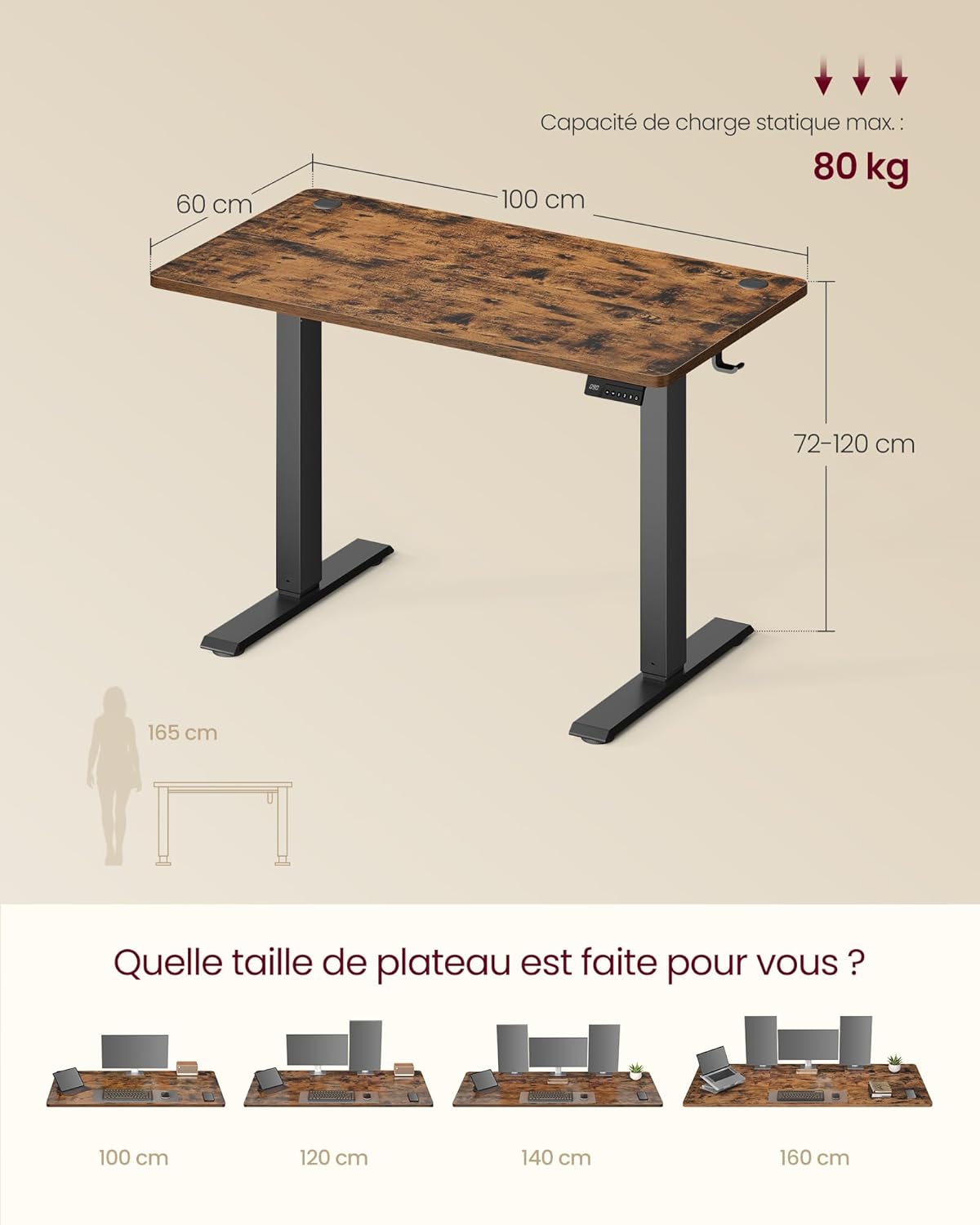
تصویر: Detailed dimensions of the desk (100 cm length, 60 cm width, 72-120 cm height) and its static load capacity of 80 kg.
| فیچر | تفصیل |
|---|---|
| ماڈل نمبر | LSD310KD03 |
| طول و عرض (L x W x H) | 100 x 60 x 72-120 سینٹی میٹر |
| کم از کم اونچائی | 72 سینٹی میٹر |
| زیادہ سے زیادہ اونچائی | 120 سینٹی میٹر |
| وزن | 17 کلوگرام |
| زیادہ سے زیادہ لوڈ کی گنجائش | 70 کلوگرام |
| فریم کا مواد | مرکب سٹیل |
| ٹیبل ٹاپ مواد | انجینئرڈ لکڑی |
| رنگ | دہاتی براؤن |
| شور کی سطح | ≤ 48 ڈی بی |
| ایڈجسٹمنٹ کی رفتار | 20 ملی میٹر فی سیکنڈ |
9. وارنٹی اور سپورٹ
Your VASAGLE Electric Height Adjustable Standing Desk is covered by a standard manufacturer's warranty. For specific warranty details, please refer to the documentation included with your purchase or visit the official VASAGLE webسائٹ
If you have any questions, require technical assistance, or need to report a missing or damaged part, please contact VASAGLE customer support. Contact information can typically be found on the product packaging or the brand's official webسائٹ