
1. تعارف
The AJAZZ AKP03 Macro Keypad Stream Controller is a versatile device designed to enhance productivity and streamline workflows for gamers, streamers, and professionals. Featuring six programmable keys with LCD displays, three physical knobs, and three toggle switches, it offers extensive customization options for various tasks.
This manual provides detailed instructions for setting up, operating, and maintaining your AKP03 device, ensuring optimal performance and user experience.
2. مصنوعات کی خصوصیات
- Six Programmable Macro Keys: Customizable LCD displays for single or continuous actions.
- Three Physical Knobs: For precise control over various functions.
- Three Toggle Switches: Additional control options.
- One-Click Operation: Instant execution of macro commands, text input, application launches, and media control.
- Intuitive Driver Software: Drag-and-drop functionality for easy key assignment and property configuration.
- وسیع مطابقت: Seamless integration with platforms like Streamlabs, Twitch, YouTube, and various software applications on Windows and Mac.
- Removable 40° Stand: Provides an ergonomic viewing angle and stable placement.

شکل 2.1: ختمview of the AJAZZ AKP03 Macro Keypad, highlighting its programmable buttons, toggle switches, and scroll wheels.
3. پیکیج کے مشمولات
تصدیق کریں کہ تمام اشیاء آپ کے پیکیج میں موجود ہیں:
- AJAZZ AKP03 Macro Keypad Stream Controller
- USB-C سے USB-A کیبل
- Removable 40° Stand
- صارف دستی (یہ دستاویز)
4. سیٹ اپ
4.1 جسمانی تعلق
- Attach the removable 40° stand to the bottom of the AKP03 for an ergonomic angle, if desired.
- Connect the provided USB-C cable to the USB-C port on the AKP03.
- کیبل کے USB-A سرے کو اپنے کمپیوٹر (PC یا Mac) پر دستیاب USB پورٹ سے جوڑیں۔
- ڈیوائس خود بخود آن ہو جائے گی۔

Figure 4.1: Attaching the removable 40° stand to the AKP03.
4.2 سافٹ ویئر کی تنصیب
To unlock the full customization capabilities of your AKP03, you must install the dedicated driver software.
- اپنا کھولیں۔ web browser and navigate to the official AJAZZ webسائٹ: www.a-jazz.com.
- Locate the 'Driver Download' section.
- تلاش کریں۔ 'AKP03' or browse for the corresponding driver for your model.
- Download the driver software compatible with your operating system (Windows or macOS).
- انسٹالر چلائیں اور انسٹالیشن مکمل کرنے کے لیے اسکرین پر دی گئی ہدایات پر عمل کریں۔
- اگر کہا جائے تو اپنے کمپیوٹر کو دوبارہ شروع کریں۔
Video 4.1: Demonstrates the software installation process and initial setup for the AJAZZ Macro Keypad.
5. آپریٹنگ ہدایات
5.1 Customizing Keys and Knobs
The AKP03's driver software provides a user-friendly interface for customization:
- Launch the 'Stream Dock AJAZZ' software from your desktop or applications folder.
- The software will display a visual representation of your AKP03.
- To assign an action, drag and drop a desired function (e.g., launch application, media control, macro command) from the software's library onto one of the six programmable keys.
- For knobs, select the knob in the software and assign functions such as volume control, scrolling, or zooming.
- You can configure properties for each assigned action, including specific file راستے، web URLs, or macro sequences.
- The LCD displays on the keys will update to show the assigned icon or text.
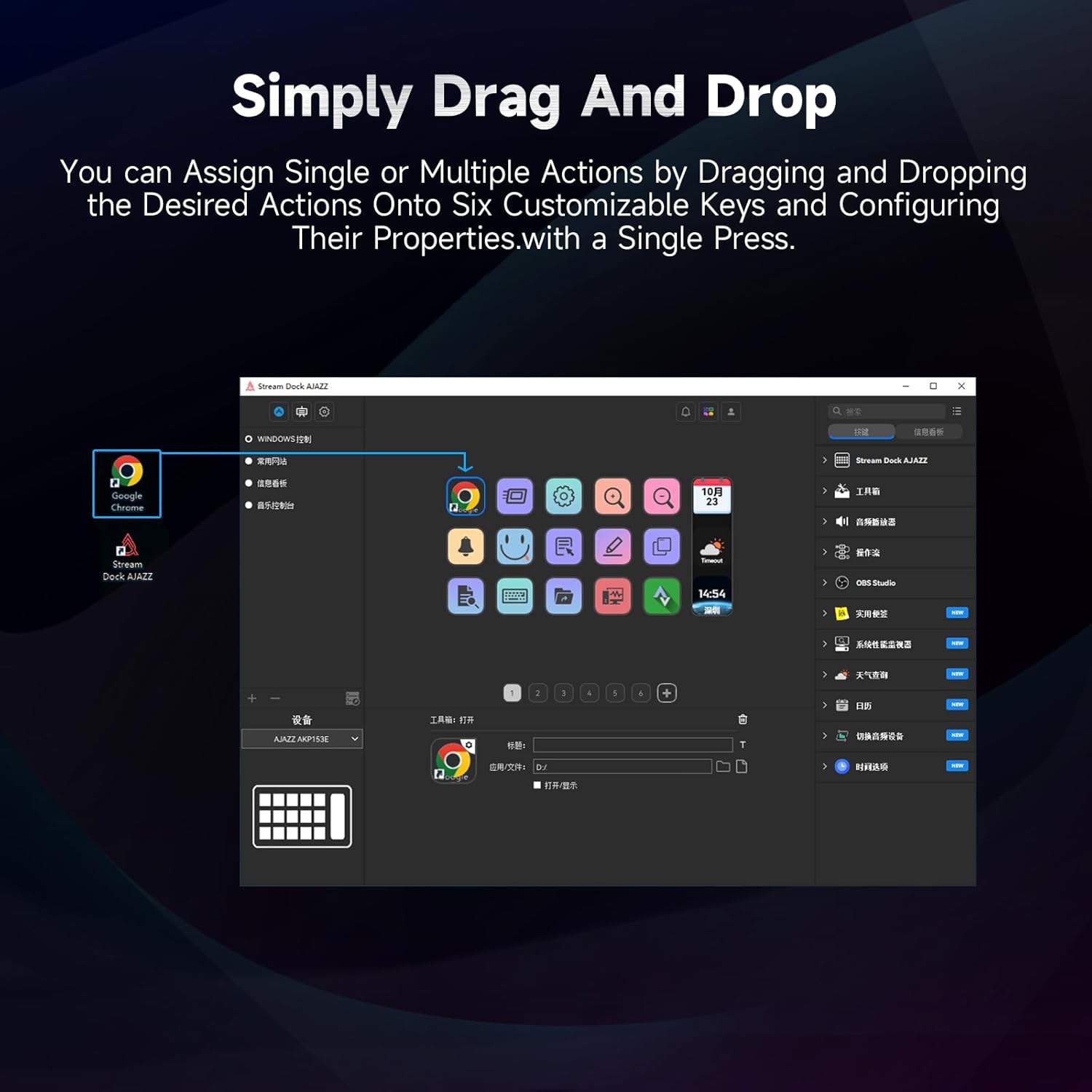
Figure 5.1: Customizing keys using the drag-and-drop interface in the AJAZZ software.
Video 5.1: Demonstration of assigning actions to keys for launching web pages and software with a single click.
5.2 Using Profiles and Pages
The software supports multiple profiles and pages, allowing you to switch between different sets of key assignments for various applications or tasks.
- نیا پرو بنائیںfiles for specific games, editing software, or streaming setups.
- ہر پرو کے اندرfile, you can create multiple pages of key assignments, accessible by navigating through the device's buttons or software interface.
- The AKP03 automatically switches to the relevant profile when a linked application is in focus.
Video 5.2: Illustrates the multi-functional capabilities and profile switching of the AKP03 for various tasks.
6 دیکھ بھال
To ensure the longevity and optimal performance of your AJAZZ AKP03, follow these maintenance guidelines:
- صفائی: Use a soft, dry cloth to wipe the surface of the device. Avoid abrasive cleaners or solvents.
- ذخیرہ: آلے کو براہ راست سورج کی روشنی اور انتہائی درجہ حرارت سے دور ٹھنڈی، خشک جگہ پر اسٹور کریں۔
- کیبل کی دیکھ بھال: نقصان سے بچنے کے لیے USB کیبل کو ضرورت سے زیادہ موڑنے یا موڑنے سے گریز کریں۔
- سافٹ ویئر اپ ڈیٹس: Regularly check the AJAZZ website for software and firmware updates to ensure compatibility and access to new features.
7 خرابیوں کا سراغ لگانا
If you encounter issues with your AKP03, refer to the following common troubleshooting steps:
- ڈیوائس کی شناخت نہیں ہوئی:
- Ensure the USB cable is securely connected to both the AKP03 and your computer.
- کسی دوسرے USB پورٹ سے جڑنے کی کوشش کریں۔
- اپنے کمپیوٹر کو دوبارہ شروع کریں۔
- Verify that the driver software is correctly installed and up to date.
- چابیاں جواب نہیں دے رہی ہیں:
- Check the software to ensure keys are properly assigned and the correct profile فعال ہے.
- یقینی بنائیں کہ ڈرائیور سافٹ ویئر پس منظر میں چل رہا ہے۔
- سافٹ ویئر کے مسائل:
- Reinstall the driver software.
- Check for software updates on the AJAZZ webسائٹ
8. وضاحتیں
| فیچر | تفصیل |
|---|---|
| برانڈ | عاجز۔ |
| ماڈل کا نام | AKP03 |
| ہم آہنگ آلات | پی سی، لیپ ٹاپ |
| کنٹرولر کی قسم | کی بورڈ |
| کنیکٹوٹی ٹیکنالوجی | USB-C |
| بٹن کی مقدار | 6 Programmable Keys (with LCD displays), 3 Physical Knobs, 3 Toggle Switches |
| شے کا وزن | 0.32 کلوگرام |
| آئٹم کے طول و عرض (L x W x H) | 5 x 3 x 2 انچ |
| طاقت کا منبع | کورڈڈ الیکٹرک |
9. وارنٹی اور سپورٹ
9.1 وارنٹی کی معلومات
The AJAZZ AKP03 Macro Keypad Stream Controller comes with a 1 سال کی محدود وارنٹی from the date of purchase. This warranty covers manufacturing defects and malfunctions under normal use. It does not cover damage caused by misuse, accidents, unauthorized modifications, or improper installation.
وارنٹی کے دعووں کے لیے براہ کرم اپنی خریداری کا ثبوت اپنے پاس رکھیں۔
9.2 کسٹمر سپورٹ
For technical assistance, troubleshooting, or warranty inquiries, please contact AJAZZ customer support:
- Webسائٹ: www.a-jazz.com (Refer to the 'Support' or 'Contact Us' section)
- ای میل: [Insert Customer Support Email, if available]
- فون: [Insert Customer Support Phone Number, if available]
ہماری سپورٹ ٹیم آپ کے پروڈکٹ سے متعلق کسی بھی سوال یا خدشات میں آپ کی مدد کے لیے دستیاب ہے۔