
1. تعارف
This manual provides detailed instructions for the safe and efficient use of your Surfans F20 Pro Android Hi-Res Music Player. Please read this manual thoroughly before operating the device and retain it for future reference.
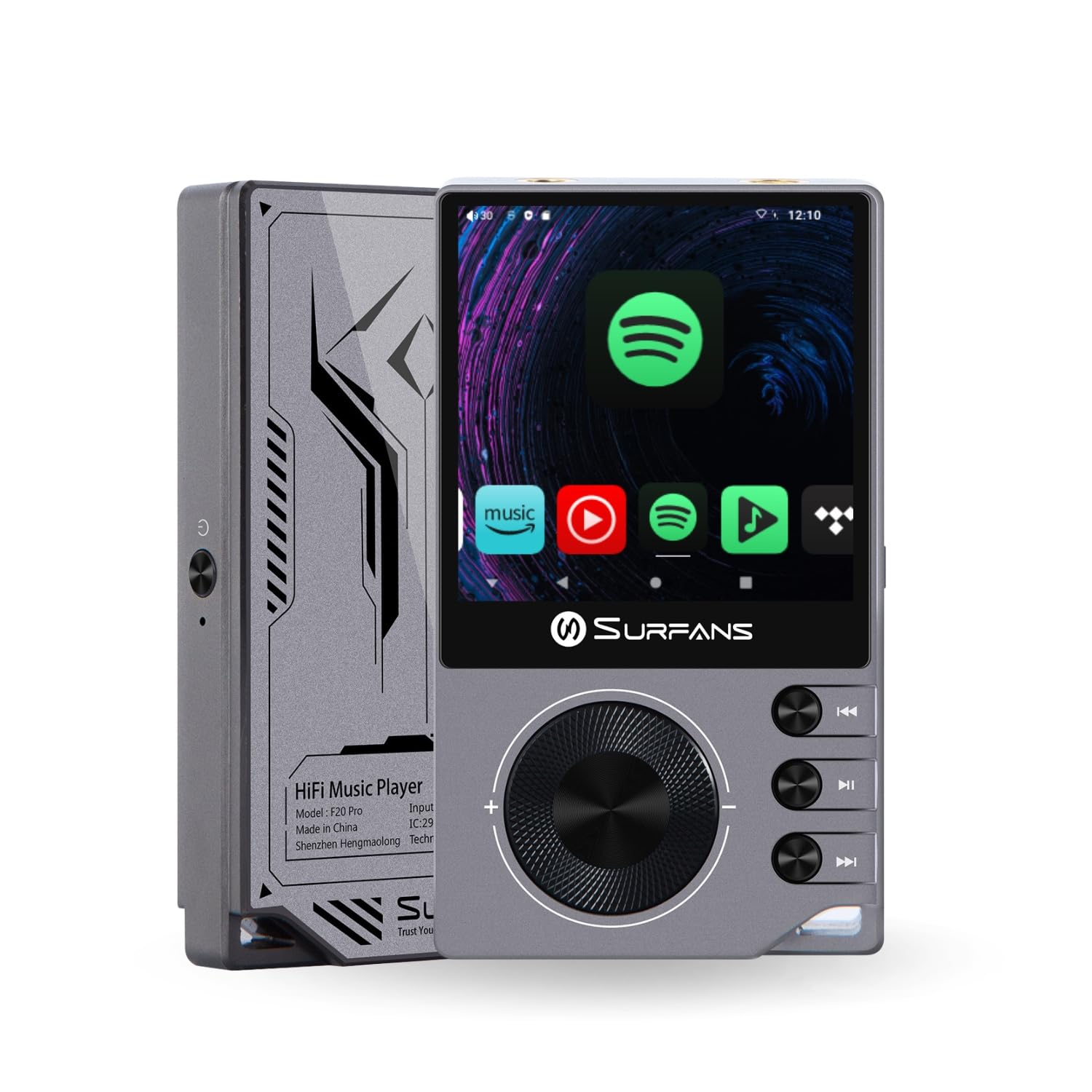
The Surfans F20 Pro Hi-Res Music Player, showcasing its compact design and touchscreen interface.
2. پیکیج کے مشمولات
تصدیق کریں کہ تمام اشیاء پیکیج میں موجود ہیں:
- Surfans F20 Pro Hi-Res Music Player
- USB ٹائپ سی کیبل
- 32 GB MicroSD Memory Card (pre-installed or separate)
- حفاظتی کیس
- صارف دستی (یہ دستاویز)
3. آلہ ختمview
Familiarize yourself with the physical components and ports of your F20 Pro player.

آگے اور پیچھے view of the Surfans F20 Pro, highlighting its robust CNC metal chassis and button layout.
3.1. کلیدی خصوصیات
- Dual ESS9018Q2M DACs: For high-fidelity audio processing.
- Octa-Core Android 12 System: Enables streaming app compatibility and smooth operation.
- 3.5mm Single-Ended & 4.4mm Balanced Outputs: Versatile headphone connectivity.
- Bluetooth 5.0 with LDAC: High-quality wireless audio transmission.
- Dual-Band Wi-Fi (2.4GHz & 5GHz): For stable internet connectivity.
- قابل توسیع ذخیرہ: Supports up to 1TB via MicroSD card.
- 2.7 انچ ٹچ اسکرین: بدیہی صارف انٹرفیس۔
4. سیٹ اپ
4.1. ڈیوائس کو چارج کرنا
Before first use, fully charge the F20 Pro. Connect the included USB Type-C cable to the device's charging port and a compatible USB power adapter (not included) or computer USB port. The charging indicator will show the charging status.
4.2. مائیکرو ایس ڈی کارڈ داخل کرنا
The F20 Pro supports MicroSD cards up to 1TB for expanded storage. Locate the MicroSD card slot on the side of the device. Gently insert the card until it clicks into place. To remove, push the card in again until it springs out.
4.3. ابتدائی پاور آن
Press and hold the power button until the screen illuminates. Follow the on-screen prompts to complete the initial setup, including language selection and Wi-Fi connection.
4.4. وائی فائی سے جڑنا
پر نیویگیٹ کریں۔ ترتیبات > نیٹ ورک اور انٹرنیٹ > Wi-Fi. Select your desired network and enter the password if prompted. The F20 Pro supports both 2.4GHz and 5GHz Wi-Fi bands.

The Surfans F20 Pro demonstrating its dual-band Wi-Fi capability for fast and stable connections.
4.5. بلوٹوت جوڑی بنانا
بلوٹوتھ ہیڈ فون یا اسپیکر کو مربوط کرنے کے لیے:
- یقینی بنائیں کہ آپ کا بلوٹوتھ ڈیوائس پیئرنگ موڈ میں ہے۔
- On the F20 Pro, go to سیٹنگز > منسلک ڈیوائسز > نئے ڈیوائس کا جوڑا بنائیں.
- Select your device from the list and confirm pairing.

An illustration of the Bluetooth 5.0 chip, indicating support for high-resolution wireless audio codecs like LDAC.
5. ڈیوائس کو چلانا
5.1. بنیادی نیویگیشن
The F20 Pro features a 2.7-inch touchscreen for navigation. Swipe to scroll, tap to select, and use the physical buttons for quick controls:
- پاور بٹن: پاور آن/آف، اسکرین آن/آف۔
- والیوم وہیل: آڈیو آؤٹ پٹ والیوم کو ایڈجسٹ کرتا ہے۔
- پلے بیک کنٹرول بٹن: Play/Pause, Next Track, Previous Track.
5.2. میوزک پلے بیک۔
The F20 Pro supports various audio formats including DSD512, 192kHz/24bit, FLAC, WAV, WMA, M4A, MP3, MP2, and AAC.
5.2.1. مقامی Files
موسیقی کی منتقلی files to the device's internal storage or MicroSD card via USB connection to a computer. Use the pre-installed music player application to browse and play your library.
5.2.2 اسٹریمنگ ایپلی کیشنز
The Android 12 operating system allows installation of streaming apps like Spotify, Apple Music, Tidal, or YouTube. Connect to Wi-Fi and download apps from the Google Play Store or other compatible sources.

The Surfans F20 Pro's screen showing various streaming application icons, demonstrating its Android capabilities.
5.3. Headphone Connections
The device offers both single-ended and balanced audio outputs.
- 3.5mm Single-Ended Output: Standard headphone jack (125mW/32Ω).
- 4.4 ملی میٹر متوازن آؤٹ پٹ: For enhanced audio performance with compatible headphones (500mW/32Ω).

کلوز اپ view of the 3.5mm single-ended and 4.4mm balanced audio output ports on the Surfans F20 Pro.
6 دیکھ بھال
6.1. صفائی
Use a soft, dry, lint-free cloth to clean the device. Avoid using abrasive cleaners or solvents, which may damage the surface.
6.2. سافٹ ویئر اپڈیٹس
Periodically check for software updates to ensure optimal performance and access to new features. Updates can typically be found in ترتیبات > سسٹم > سسٹم اپ ڈیٹ.
6.3. بیٹری کی دیکھ بھال
To prolong battery life, avoid fully discharging the device frequently. Store the device in a cool, dry place when not in use for extended periods.

ایک اندرونی view of battery cells, representing the long-lasting battery capacity of the F20 Pro.
7 خرابیوں کا سراغ لگانا
If you encounter issues with your F20 Pro, refer to the following common problems and solutions:
| مسئلہ | ممکنہ وجہ | حل |
|---|---|---|
| ڈیوائس آن نہیں ہے۔ | کم بیٹری؛ سسٹم کریش | ڈیوائس کو چارج کریں؛ زبردستی دوبارہ شروع کرنے کے لیے پاور بٹن کو 10-15 سیکنڈ تک دبائے رکھیں۔ |
| کوئی آواز آؤٹ پٹ نہیں ہے۔ | Volume too low; Incorrect output selected; Faulty headphones | Increase volume; Check headphone connection; Test with different headphones. |
| Wi-Fi سے منسلک نہیں ہو سکتا | غلط پاس ورڈ؛ حد سے باہر؛ راؤٹر کا مسئلہ | Verify password; Move closer to router; Restart router. |
| سست کارکردگی/ایپ کریش | بہت زیادہ ایپس چل رہی ہیں؛ کم اسٹوریج؛ پرانا سافٹ ویئر | Close background apps; Free up storage; Check for system updates. |
8. وضاحتیں
Detailed technical specifications for the Surfans F20 Pro:
| فیچر | تفصیل |
|---|---|
| برانڈ | Surfans |
| ماڈل کا نام | F20 PRO |
| ڈی اے سی چپس | Dual ESS9018Q2M |
| Op-Amps | Dual OPA1612 |
| آپریٹنگ سسٹم | اینڈرائیڈ 12 |
| رام | 3 جی بی |
| اندرونی اسٹوریج | 32 جی بی |
| قابل توسیع اسٹوریج | مائیکرو ایس ڈی کارڈ کے ذریعے 1TB تک |
| اسکرین کا سائز | 2.73 انچ |
| کنیکٹوٹی | Aux, Bluetooth 5.0 (LDAC), USB Type-C, Wi-Fi (2.4GHz & 5GHz) |
| آڈیو آؤٹ پٹس | 3.5mm Single-Ended (125mW/32Ω), 4.4mm Balanced (500mW/32Ω) |
| سپورٹ شدہ آڈیو فارمیٹس | DSD512, 192kHz/24bit, FLAC, WAV, WMA, M4A, MP3, MP2, AAC |
| رنگ | گرے |

An illustration of the dual ESS9018K2M DAC chips, central to the F20 Pro's high-resolution audio capabilities.
9. وارنٹی کی معلومات
The Surfans F20 Pro comes with a 1 سال کی وارنٹی خریداری کی تاریخ سے. یہ وارنٹی عام استعمال کے تحت مینوفیکچرنگ نقائص اور کاریگری کا احاطہ کرتی ہے۔ یہ غلط استعمال، حادثات، غیر مجاز ترمیم، یا عام ٹوٹ پھوٹ سے ہونے والے نقصان کو پورا نہیں کرتا ہے۔ وارنٹی کے دعووں کے لیے براہ کرم اپنی خریداری کا ثبوت اپنے پاس رکھیں۔
10. کسٹمر سپورٹ
For further assistance, technical support, or warranty inquiries, please contact Surfans customer service through the official website or your retailer. You may also find additional resources and FAQs online.