
تعارف
Thank you for choosing the LIORQUE Wireless Weather Station YGH6208. This device provides accurate indoor and outdoor temperature and humidity readings, weather forecasts, and features a DCF radio-controlled clock with alarm functions. This manual will guide you through the setup, operation, and maintenance of your weather station.
پیکیج کے مشمولات
- 1 x LIORQUE Wireless Weather Station (Main Unit)
- 1 ایکس آؤٹ ڈور سینسر۔
- 3 x AAA Batteries (for Main Unit)
- 2 x AAA Batteries (for Outdoor Sensor)
- 1 ایکس یوزر مینوئل (یہ دستاویز)
پروڈکٹ ختمview
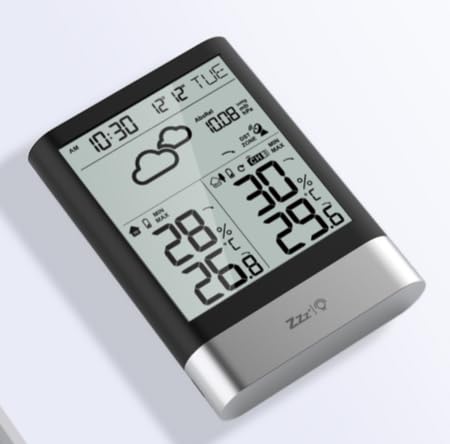
تصویر 1: LIORQUE Wireless Weather Station Main Unit. This image shows the front view of the main display unit, highlighting its LCD screen and compact design.
مرکزی یونٹ کی خصوصیات:
- 4.3-inch LCD screen with backlight
- اندرونی درجہ حرارت اور نمی ڈسپلے
- بیرونی درجہ حرارت اور نمی ڈسپلے
- موسم کی پیشن گوئی کے شبیہیں
- DCF radio-controlled clock with manual setting option
- Double alarm clock with snooze function
- Calendar and day of the week display (7 languages)
- Max/Min temperature and humidity records
- Air pressure display and weather trend
- 12/24 گھنٹے ٹائم ڈسپلے۔
Outdoor Sensor Features:
- Wireless transmission up to 100m (open area)
- درجہ حرارت اور نمی کی پیمائش
- Supports hanging or standing placement
- Data updated every 30 seconds
- Supports up to 3 sensors (one included)
سیٹ اپ
1. بیٹری کی تنصیب
- آؤٹ ڈور سینسر: Open the battery compartment cover on the back of the outdoor sensor. Insert 2 x AAA batteries, ensuring correct polarity (+/-). Close the cover.
- مین یونٹ: Open the battery compartment cover on the back of the main unit. Insert 3 x AAA batteries, ensuring correct polarity (+/-). Close the cover.
- The main unit will power on and display indoor readings.
2. سینسر جوڑا
After installing batteries in both units, the main unit will automatically search for the outdoor sensor. The outdoor temperature and humidity should appear on the main unit's display within a few minutes. If the outdoor readings do not appear:
- Ensure both units are within range (up to 100m in open air).
- Press the "TX" button inside the outdoor sensor's battery compartment to manually send a signal.
- On the main unit, press and hold the "CHANNEL" button to initiate a manual search for the sensor.
3. Initial Settings (Time, Date, Units)
The weather station will attempt to synchronize with the DCF radio signal for automatic time setting. This may take several hours, especially in areas with weak signals. You can manually set the time and date if needed.
- دستی وقت کی ترتیب: Press and hold the "MODE" button to enter time setting mode. Use the "UP" and "DOWN" buttons to adjust values and "MODE" to confirm and move to the next setting (e.g., 12/24 hour format, hour, minute, year, month, day, language for day of week).
- درجہ حرارت کی اکائیاں: سیلسیس اور فارن ہائیٹ کے درمیان سوئچ کرنے کے لیے "°C/°F" بٹن دبائیں۔
- Air Pressure Units: Press the "BARO" button to cycle through air pressure units (e.g., hPa, inHg).
آپریٹنگ ہدایات
معلومات ڈسپلے کریں۔
The 4.3-inch LCD screen displays various information:
- وقت اور تاریخ: Current time, date, and day of the week.
- اندرونی ریڈنگز: Current indoor temperature and humidity.
- آؤٹ ڈور ریڈنگز: Current outdoor temperature and humidity from the connected sensor.
- موسم کا حال: Icons indicating predicted weather conditions (e.g., sunny, cloudy, rainy).
- ہوا کا دباؤ: Current atmospheric pressure and trend.
- بیک لائٹ: The screen backlight activates with a light touch and returns to normal brightness after 10 seconds to conserve battery.
الارم کلاک فنکشن
The weather station features a double alarm clock with snooze.
- الارم ترتیب دینا: Press the "ALARM" button to view Alarm 1. Press "ALARM" again to view Alarm 2. Hold "ALARM" to enter alarm setting mode. Use "UP" and "DOWN" to adjust the hour and minute, and "ALARM" to confirm.
- الارم کو چالو/غیر فعال کرنا: جبکہ viewing an alarm, press "UP" to toggle it on or off. An alarm icon will appear when active.
- اسنوز فنکشن: When an alarm sounds, press any button (except "ALARM OFF") to activate snooze. The alarm will sound again after a set interval. Press "ALARM OFF" to stop the alarm completely.
زیادہ سے زیادہ اور کم سے کم ریکارڈز
The weather station records the maximum and minimum indoor/outdoor temperature and humidity values.
- Press the "MAX/MIN" button once to display maximum recorded values.
- Press "MAX/MIN" again to display minimum recorded values.
- Press "MAX/MIN" a third time to return to current readings.
- To clear records, hold the "MAX/MIN" button while viewریکارڈز
دیکھ بھال
- بیٹری کی تبدیلی: Replace batteries in both the main unit and outdoor sensor when the low battery indicator appears on the display. Always replace all batteries at the same time.
- صفائی: Clean the display and unit surfaces with a soft, damp کپڑا کھرچنے والے کلینر یا سالوینٹس کا استعمال نہ کریں۔
- آؤٹ ڈور سینسر پلیسمنٹ: For optimal performance and longevity, install the outdoor sensor in a shaded area, protected from direct sunlight and rain. Ensure it is within the 100m wireless range of the main unit.
خرابی کا سراغ لگانا
| مسئلہ | ممکنہ حل |
|---|---|
| کوئی بیرونی درجہ حرارت/نمی ڈسپلے نہیں۔ |
|
| Incorrect time display. |
|
| ڈسپلے مدھم یا خالی ہے۔ |
|
| موسم کی پیشن گوئی غلط معلوم ہوتی ہے۔ |
|
وضاحتیں
- ماڈل: YGH6208۔
- برانڈ: LIORQUE
- ڈسپلے کی قسم: LCD
- پاور سورس (مین یونٹ): 3 x AAA بیٹریاں (شامل)
- پاور ماخذ (بیرونی سینسر): 2 x AAA بیٹریاں (شامل)
- وائرلیس رینج: 100m تک (کھلا علاقہ)
- درجہ حرارت کی درستگی: ±0.5 °C
- سینسر ٹیکنالوجی: Funk (Wireless)
- خصوصی خصوصیات: DCF Radio Clock, Alarm, Snooze, Weather Forecast, Max/Min Records, Backlight
- شامل اجزاء: Weather Station Main Unit, Outdoor Sensor
وارنٹی اور سپورٹ
LIORQUE products are designed for reliability and performance. For warranty information or technical support, please refer to the contact details provided with your purchase or visit the official LIORQUE webسائٹ وارنٹی کے دعووں کے لیے براہ کرم اپنی خریداری کا ثبوت اپنے پاس رکھیں۔