
تعارف
This manual provides essential information for setting up, operating, and maintaining your Roku 32-Inch Select Series 1080p Full HD Smart TV. Designed for a delightful streaming experience, this TV offers excellent picture quality, clear sound, and automatic updates. Please read this manual thoroughly before using your television.
باکس میں کیا ہے۔
تصدیق کریں کہ تمام اجزاء پیکیجنگ میں موجود ہیں:
- Roku 32-Inch Select Series 1080p Full HD Smart TV
- ریموٹ کنٹرول
- کھڑے ہو جاؤ (2 ٹکڑے)
- Stand Screws (4 pieces)
- پاور کیبل
- صارف دستی (یہ دستاویز)

Image: Contents of the Roku TV box, showing the television, remote control, two stand pieces, and four screws.
سیٹ اپ کی ہدایات
1. ٹی وی اسٹینڈ کو منسلک کرنا
- Carefully place your TV face-down on a soft, clean surface to prevent damage to the screen.
- اسٹینڈ کے ٹکڑوں کو ٹی وی کے نیچے سکرو ہولز کے ساتھ سیدھ میں رکھیں۔
- Secure each stand piece with two screws using a Phillips head screwdriver. Do not overtighten.
2. پاور اور ڈیوائسز کو جوڑنا
- پاور کیبل کو TV کے پاور ان پٹ سے اور پھر وال آؤٹ لیٹ سے جوڑیں۔
- Connect your external devices (e.g., cable box, gaming console, Blu-ray player) to the available HDMI ports on the back of the TV. This model features 3 HDMI ports.
- For older devices, use the AV input ports (yellow, white, red).
- An optical audio output is available for connecting to soundbars or home theater systems.
- A USB port is provided for media playback.

تصویر: پیچھے view of the Roku TV displaying HDMI, AV, Antenna, USB, Optical, and Headphone ports.
3. ابتدائی پاور آن اور نیٹ ورک کنکشن
- ریموٹ کنٹرول یا ٹی وی پر پاور بٹن دبائیں۔
- Follow the on-screen instructions to select your language and connect to your Wi-Fi network.
- Activate your Roku account or create a new one. This is required to access streaming channels and features.
آپریٹنگ ہدایات
1. Roku OS Interface
The Roku OS provides a simple and intuitive home screen for accessing all your entertainment. Easily navigate between streaming apps, live TV, and connected devices.

Image: The Roku TV home screen with a menu on the left and app icons on the right, including Netflix, Disney+, Apple TV, and Roku Channel.
2. Voice Remote
Your Roku TV comes with a voice remote for convenient control. Use your voice to search for content, launch apps, and control playback.
- صوتی تلاش: Press the voice button and speak your command (e.g., "Find comedies," "Open Netflix").
- ایپ شارٹ کٹس: سرشار بٹن مقبول اسٹریمنگ سروسز تک فوری رسائی فراہم کرتے ہیں۔
- حجم کنٹرول: سائیڈ بٹن کا استعمال کرتے ہوئے والیوم کو ایڈجسٹ کریں۔
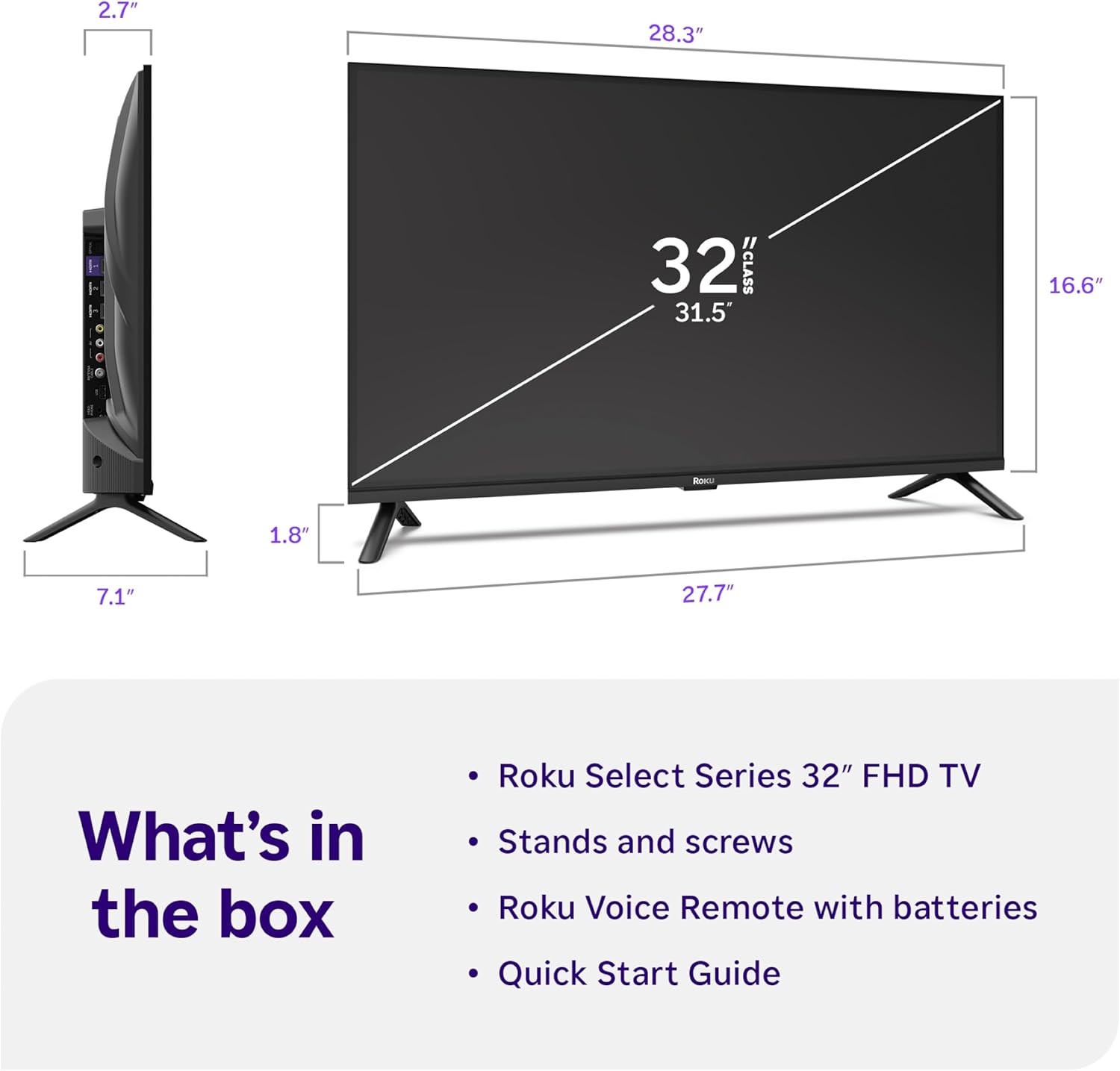
Image: Close-up of the Roku Voice Remote, highlighting buttons for TV power, volume, mute, voice search, instant replay, options, and dedicated app shortcuts.
3. Streaming Apps and Live TV
Access thousands of streaming channels, including Netflix, Disney+, Hulu, Prime Video, and Apple TV+. The Roku Channel also offers free live TV and on-demand content.

Image: A vibrant Roku TV home screen displaying a selection of popular streaming applications and recommended shows.
4 تصویر کی ترتیبات
اپنی اصلاح کریں۔ viewتصویر کی مختلف ترتیبات کے ساتھ تجربہ:
- روکو اسمارٹ تصویر: Automatically adjusts picture mode for optimal viewing
- تصویر کے طریقوں: Choose from presets like Movie, Sports, Vivid, Standard, or Low Power.
- حسب ضرورت: Adjust brightness, contrast, sharpness, color, and tint for a personalized picture.
5. آواز کی ترتیبات
اپنے آڈیو تجربے کو بہتر بنائیں:
- ڈولبی آڈیو: Enjoy clear speech and louder sound.
- صوتی موڈز: Select from Standard, Dialogue, Movie, Music, or Night mode.
- Bluetooth Headphone Mode: Connect your wireless headphones to listen without disturbing others.

Image: A child wearing wireless headphones while watching the Roku TV, demonstrating the Bluetooth Headphone Mode.
6. سمارٹ ہوم انٹیگریشن
Your Roku TV is compatible with various smart home ecosystems:
- وائس کنٹرول: Use Roku Voice, Siri, Alexa, or Google Assistant for hands-free control.
- ایپل ایئر پلے: Effortlessly share videos, photos, and music from your Apple devices.
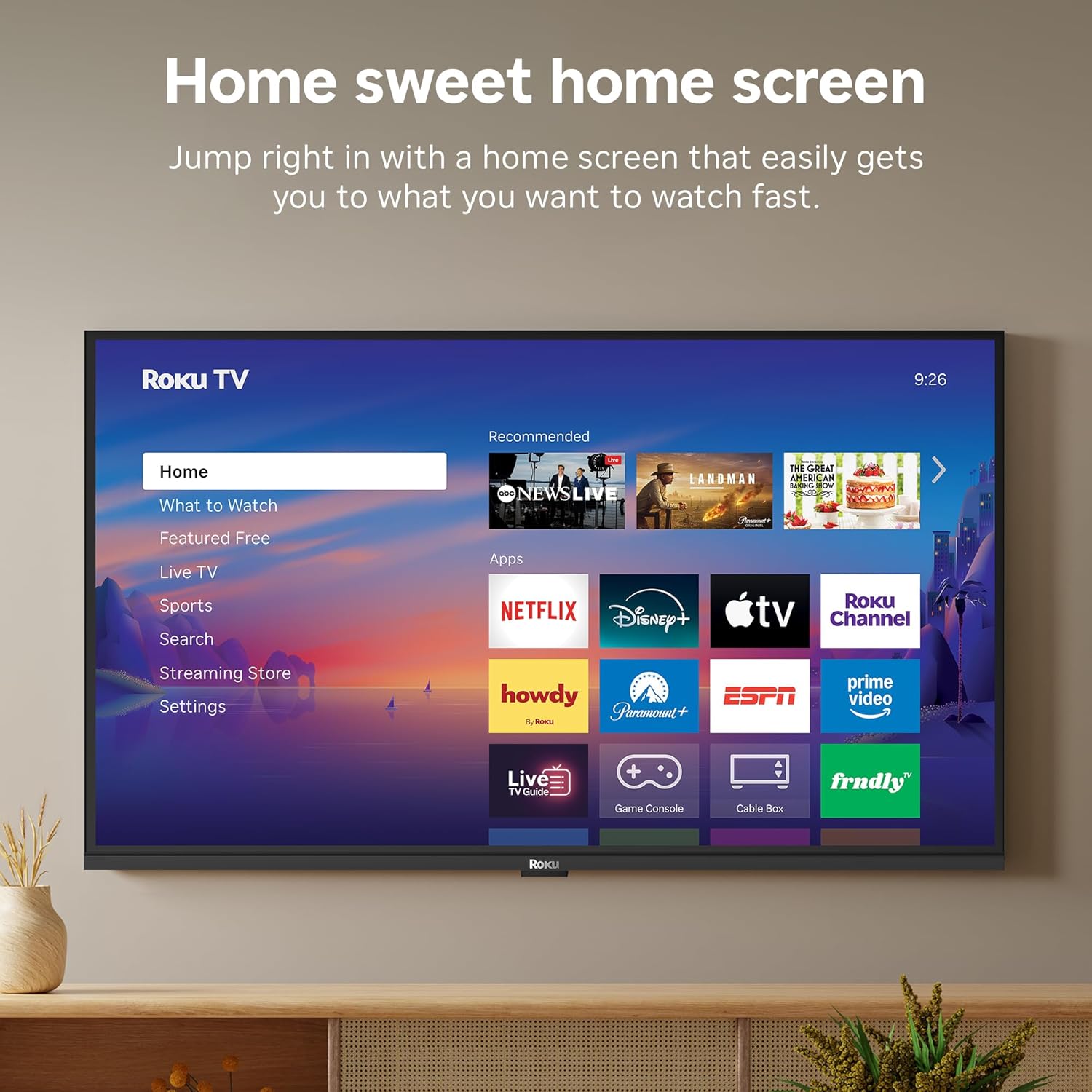
Image: The Roku TV screen displaying smart home compatibility logos for Roku Smart Home, Apple AirPlay, Apple Home, Alexa, and Google Home, with a smart speaker nearby.
7. والدین کے کنٹرول
Manage content access with built-in parental controls, including V-Chip technology, to ensure a safe viewبچوں کے لئے ماحول.
آفیشل پروڈکٹ ویڈیو
ویڈیو: ایک اوورview of the Roku TV OS, demonstrating its user-friendly interface, app selection, and smart features. This video is provided by Roku, Inc.
وضاحتیں
- سکرین کا سائز:
- 32 انچ
- قرارداد:
- 1080p فل ایچ ڈی
- ڈسپلے ٹیکنالوجی:
- ایل ای ڈی
- ریفریش ریٹ:
- 60 Hz
- خصوصی خصوصیات:
- Bluetooth Headphone Mode, Dolby Audio, Voice Remote, Roku Smart Picture
- کنیکٹوٹی ٹیکنالوجی:
- بلوٹوتھ ، وائی فائی
- ہارڈ ویئر انٹرفیس:
- 3 HDMI Ports, 1 USB Port, S/PDIF (Optical Audio Out)
- آپریٹنگ سسٹم:
- روکو OS
- پروڈکٹ کے طول و عرض (D x W x H):
- 7.1"D x 28.3"W x 18.4"H
- آئٹم کا وزن:
- 7.7 پاؤنڈز (اسٹینڈ کے ساتھ)
- VESA ماؤنٹ سٹینڈرڈ:
- 200 x 200 ملی میٹر
- ماڈل نمبر:
- 32R3E5
- UPC:
- 829610009469
خرابی کا سراغ لگانا
If you encounter issues with your Roku TV, please refer to the following common solutions:
- کوئی طاقت نہیں: یقینی بنائیں کہ پاور کیبل محفوظ طریقے سے TV اور کام کرنے والے الیکٹریکل آؤٹ لیٹ دونوں سے جڑی ہوئی ہے۔ ایک مختلف آؤٹ لیٹ آزمائیں۔
- کوئی تصویر/آواز نہیں: Verify that the correct input source is selected on your TV. Check all cable connections (HDMI, AV, etc.) for looseness.
- ریموٹ جواب نہیں دے رہا ہے: Replace the batteries in your remote control. Ensure there are no obstructions between the remote and the TV.
- نیٹ ورک کنکشن کے مسائل: Restart your Wi-Fi router and modem. Go to the TV's Settings > Network > Check connection to diagnose and reconnect.
- App Not Loading: Restart the app. If the issue persists, try removing and reinstalling the app from the Roku Channel Store.
For more detailed troubleshooting, visit the official Roku support webسائٹ
دیکھ بھال
To ensure the longevity and optimal performance of your Roku TV, follow these maintenance guidelines:
- سکرین کی صفائی: نرم، خشک مائکرو فائبر کپڑے سے اسکرین کو آہستہ سے صاف کریں۔ ضدی smudges کے لیے، ہلکے سے dampur پانی کے ساتھ کپڑا یا سکرین کی صفائی کا محلول خاص طور پر الیکٹرانکس کے لیے ڈیزائن کیا گیا ہے۔ مائع کو براہ راست اسکرین پر نہ چھڑکیں۔
- ٹی وی کے جسم کی صفائی: ٹی وی کے بیرونی حصے کو صاف کرنے کے لیے نرم، خشک کپڑا استعمال کریں۔ کھرچنے والے کلینر یا سالوینٹس سے پرہیز کریں۔
- وینٹیلیشن: Ensure the TV's ventilation openings are not blocked to prevent overheating. Maintain adequate space around the TV for air circulation.
- سافٹ ویئر اپ ڈیٹس: Your Roku TV automatically receives software updates. Ensure your TV is connected to the internet to receive the latest features and performance improvements.
- پاور مینجمنٹ: بجلی کے طوفان کے دوران یا جب اسے لمبے عرصے تک بغیر توجہ کے چھوڑ دیا جائے تو ٹی وی کو پاور آؤٹ لیٹ سے ان پلگ کریں۔
وارنٹی اور سپورٹ
وارنٹی کی معلومات
Roku warrants the hardware of this device against defects in materials and workmanship under normal use for a period of one (1) year from the date of purchase ("Warranty Period"). If Roku determines that the device’s hardware is defective during the Warranty Period, Roku’s sole obligation, and your exclusive remedy, will be to either repair or replace the unit with either a new or rebuilt device, at its option. This warranty applies if the device is used in accordance with the provided documentation.
Important information about warranty returns and replacements is available on the Roku support site. You may also return a device for any reason, subject to the terms of the applicable return policy: 1) Within thirty (30) days from the date of purchase from Roku; or 2) within the applicable return period if purchased from an authorized reseller or distributor. Additional details regarding product returns can be found on the Roku support site.
کسٹمر سپورٹ
For further assistance, technical support, or to access the full range of support resources, please visit the official Roku support webسائٹ آپ وہاں FAQs، ٹربل شوٹنگ گائیڈز، اور کسٹمر سروس کے لیے رابطہ کی معلومات حاصل کر سکتے ہیں۔