
1. تعارف
Thank you for choosing the VENNQD Corner Desk. This manual provides essential information for the safe assembly, operation, and maintenance of your new desk. Please read these instructions carefully before beginning assembly and retain them for future reference.
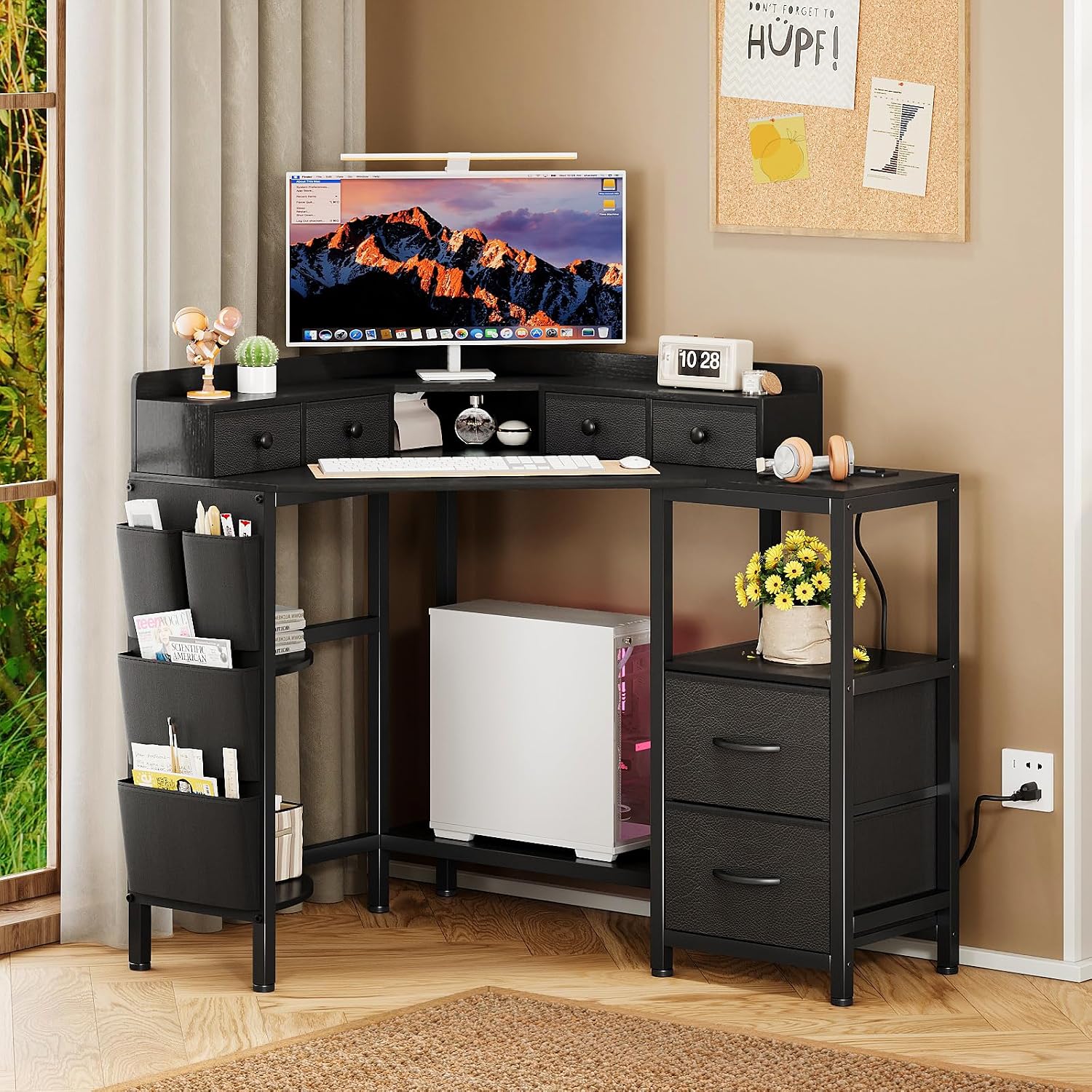
The VENNQD Corner Desk provides an efficient workspace, accommodating a monitor, keyboard, and other office essentials. Its corner design optimizes space utilization.
2. حفاظتی معلومات
اہم حفاظتی ہدایات:
- Always assemble the desk according to the included instructions.
- Ensure the desk is stable and secure before use.
- Do not overload the desk or place heavy objects on the edges.
- Keep the electrical components dry and away from heat sources.
- Unplug the desk from the power source when not in use or when leaving the room.
- Always follow local electrical safety guidelines.
3. پیکیج کے مشمولات
Before assembly, verify that all components are present and undamaged. Refer to the detailed parts list and diagrams provided in your assembly guide. Typical components include:
- Desktop panels (main, monitor stand, side shelves)
- دھاتی فریم کے اجزاء
- Fabric drawers (6 units)
- Power outlet strip with USB ports
- اسمبلی ہارڈویئر (پیچ، بولٹ، ٹولز)
- ہدایت نامہ

This diagram illustrates the precise measurements of the desk, including the main desktop, monitor stand, shelves, and fabric drawers. Refer to these dimensions during assembly and for space planning.
4. سیٹ اپ اور اسمبلی
Assembly is required for this desk. Please follow the step-by-step instructions and diagrams provided in the separate assembly guide included with your package. It is recommended to assemble the desk in the room where it will be used.
- ان پیک اجزاء: احتیاط سے پیکیجنگ سے تمام حصوں کو ہٹا دیں اور انہیں صاف، نرم سطح پر ڈالیں تاکہ خروںچ سے بچا جا سکے۔
- حصوں کی شناخت: Match each part to the corresponding number or letter in the assembly guide.
- فریم جمع کریں: Begin by assembling the metal frame structure according to the diagrams. Ensure all connections are secure but do not overtighten until the desk is fully assembled.
- ڈیسک ٹاپ پینل منسلک کریں: Secure the main desktop, monitor stand, and side shelf panels to the frame.
- پاور آؤٹ لیٹ انسٹال کریں: Integrate the power outlet strip into its designated slot on the desk.
- فیبرک دراز داخل کریں: Place the fabric drawers into their respective compartments.
- حتمی سختی: Once all components are in place, carefully tighten all screws and bolts to ensure stability.
نوٹ: Assembly may require two people for easier handling of larger components.
5. آپریٹنگ ہدایات
5.1 پاور آؤٹ لیٹس اور USB پورٹس
The desk is equipped with an integrated charging station for your convenience.
- AC آؤٹ لیٹس: Plug your computer, monitor, or other AC-powered devices into the two 120V/12A AC outlets.
- USB پورٹس: Use the two 5V/3A USB ports to charge your smartphones, tablets, or other USB-powered accessories.
- پاور کنکشن: Connect the desk's main power cord to a standard wall outlet.

The desk features two AC outlets and two USB ports for convenient charging of electronic devices such as phones, tablets, and other peripherals, reducing cable clutter.
5.2. Drawers and Shelves
Utilize the storage features to keep your workspace organized.
- فیبرک دراز: The six fabric drawers are designed for storing documents, stationery, and personal items. Ensure items are placed evenly to prevent drawer deformation.
- کھلی شیلف: The two open shelves provide additional space for books, decorative items, or small office equipment.
- سی پی یو اسٹینڈ: The dedicated CPU stand keeps your computer tower elevated and off the floor, promoting better airflow.

The six fabric drawers offer ample storage for various items, including documents, stationery, and personal belongings, helping to keep your workspace organized.

This image highlights the desk's smooth corner shelves for additional storage or display, an open storage compartment, and a dedicated CPU stand designed to keep your computer tower off the floor.
5.3. مانیٹر اسٹینڈ
The full-size monitor stand is designed to elevate your monitor(s), helping to maintain an ergonomically favorable sitting position and reduce neck strain. It can accommodate two monitors.

The monitor stand elevates displays to promote better posture and reduce eye and neck strain during extended use.
6 دیکھ بھال
To ensure the longevity and appearance of your VENNQD Corner Desk, follow these maintenance guidelines:
- صفائی: The desk surface is waterproof and designed to be anti-dust. Wipe surfaces with a soft, damp کپڑا کھرچنے والے کلینر یا سخت کیمیکل سے پرہیز کریں جو ختم کو نقصان پہنچا سکتے ہیں۔
- پھیلاؤ: پانی کو پہنچنے والے نقصان یا داغ کو روکنے کے لیے کسی بھی چھلکوں کو فوری طور پر صاف کریں۔
- ہارڈ ویئر: وقتاً فوقتاً تمام پیچ اور بولٹ چیک کریں تاکہ یہ یقینی بنایا جا سکے کہ وہ سخت ہیں۔ اگر ضروری ہو تو دوبارہ سخت کریں۔
- حرارت اور نمی: Avoid placing hot items directly on the desk surface. Keep the desk away from excessive moisture or direct sunlight to prevent warping or fading.
7 خرابیوں کا سراغ لگانا
If you encounter issues with your VENNQD Corner Desk, consider the following common solutions:
- ڈیسک ڈوبتے: Ensure all assembly screws and bolts are fully tightened. Check that the desk is on a level surface. Adjust any leveling feet if present.
- پاور آؤٹ لیٹس کام نہیں کر رہے: Verify that the desk's main power cord is securely plugged into a functional wall outlet. Check if the wall outlet itself is receiving power (e.g., by plugging in another device).
- دراز آسانی سے نہیں پھسل رہے: Ensure the fabric drawers are correctly inserted and not overloaded. Check for any obstructions in the drawer compartments.
- گمشدہ حصے: If any parts were missing upon delivery, refer to the warranty and support section for assistance.
8. وضاحتیں
| فیچر | تفصیل |
|---|---|
| برانڈ | VENNQD |
| ماڈل نمبر | QD003233۔ |
| ڈیسک ڈیزائن | کارنر کمپیوٹر ڈیسک |
| شکل | مثلث |
| پروڈکٹ کے طول و عرض (D x W x H) | 31.5"D x 70.87"W x 29.53"H |
| شے کا وزن | 36.2 پاؤنڈ |
| مواد کی قسم | Iron, Particle Board |
| درازوں کی تعداد | 6 (کپڑا) |
| شیلف کی تعداد | 2 |
| شامل اجزاء | Built-in Outlet (2 AC, 2 USB) |
| اسمبلی | Assembly required, instructions included |
9. وارنٹی اور سپورٹ
وارنٹی کی قسم: محدود وارنٹی
For specific warranty details, terms, and conditions, please refer to the warranty card included with your product or contact the manufacturer directly.
کسٹمر سپورٹ:
If you have any questions regarding assembly, missing parts, or product functionality, please contact VENNQD customer support. Contact information can typically be found on the product packaging, the VENNQD official webسائٹ، یا آپ کی خریداری کے اصل نقطہ کے ذریعے۔