
1. تعارف
The ZTE U60 Pro MU5250 is a portable 5G Wi-Fi 7 router designed to provide high-speed internet connectivity on the go. It features an ultra-high-speed 5G-A network, the flagship Snapdragon X75 chip platform, and advanced Wi-Fi 7 technology. This device is equipped with a 10,000 mAh high-capacity battery, offering extended usage and the ability to function as a power bank for other electronic devices. Its 3.5-inch HD touchscreen allows for easy network management and traffic monitoring. The U60 Pro supports up to 64 simultaneous device connections and offers convenient NFC one-touch connectivity, intelligent AI scenes, and AI voice management for a fast, stable, and efficient internet experience.

تصویر 1.1: سامنے view of the ZTE U60 Pro MU5250, showing its 3.5-inch display with network information.
2. سیٹ اپ
2.1 پیکیج کے مشمولات
شروع کرنے سے پہلے، یقینی بنائیں کہ تمام اجزاء موجود ہیں:
- ZTE U60 Pro MU5250 5G Pocket Wi-Fi 7 Router
- AC اڈاپٹر
- صارف دستی (یہ دستاویز)
2.2 سم کارڈ کی تنصیب
To enable 5G connectivity, a compatible SIM card must be installed.
- Locate the SIM card slot on the side of the device.
- Using the provided SIM ejector tool (if applicable) or a small pin, gently press into the small hole next to the SIM tray to eject it.
- Place your 5G-enabled Nano-SIM card into the tray, ensuring proper orientation.
- سم ٹرے کو احتیاط سے آلے میں دوبارہ داخل کریں جب تک کہ یہ اپنی جگہ پر کلک نہ کرے۔
2.3 پاور آن/آف۔
To power on the device, press and hold the power button located on the side until the screen illuminates. To power off, press and hold the power button until the power-off options appear on the screen, then select 'Power Off'.
2.4 Initial Wi-Fi Connection
After powering on, the device will automatically search for a 5G network. You can connect to the Wi-Fi network using one of the following methods:
- دستی کنکشن: On your device (phone, laptop, etc.), search for available Wi-Fi networks. Select the network name (SSID) displayed on the U60 Pro's screen and enter the password (also displayed on the screen).
- این ایف سی ون ٹچ کنکشن: For Android phones with NFC enabled, tap your phone against the NFC area on the U60 Pro. Your phone will automatically connect to the Wi-Fi network without requiring a password.

Image 2.1: Illustrates the NFC one-touch connection process for quick Wi-Fi access.
3. آپریٹنگ ہدایات
3.1 ٹچ اسکرین انٹرفیس
The 3.5-inch HD touchscreen provides a minimalist user interface for managing the device. You can view network status, data usage, signal strength, battery level, and adjust basic settings directly from the screen. Swipe and tap gestures are used for navigation.
3.2 متعدد آلات کو جوڑنا
The ZTE U60 Pro supports simultaneous connections for up to 64 devices, allowing multiple users to share the 5G network. Connect devices using the standard Wi-Fi connection method as described in Section 2.4.
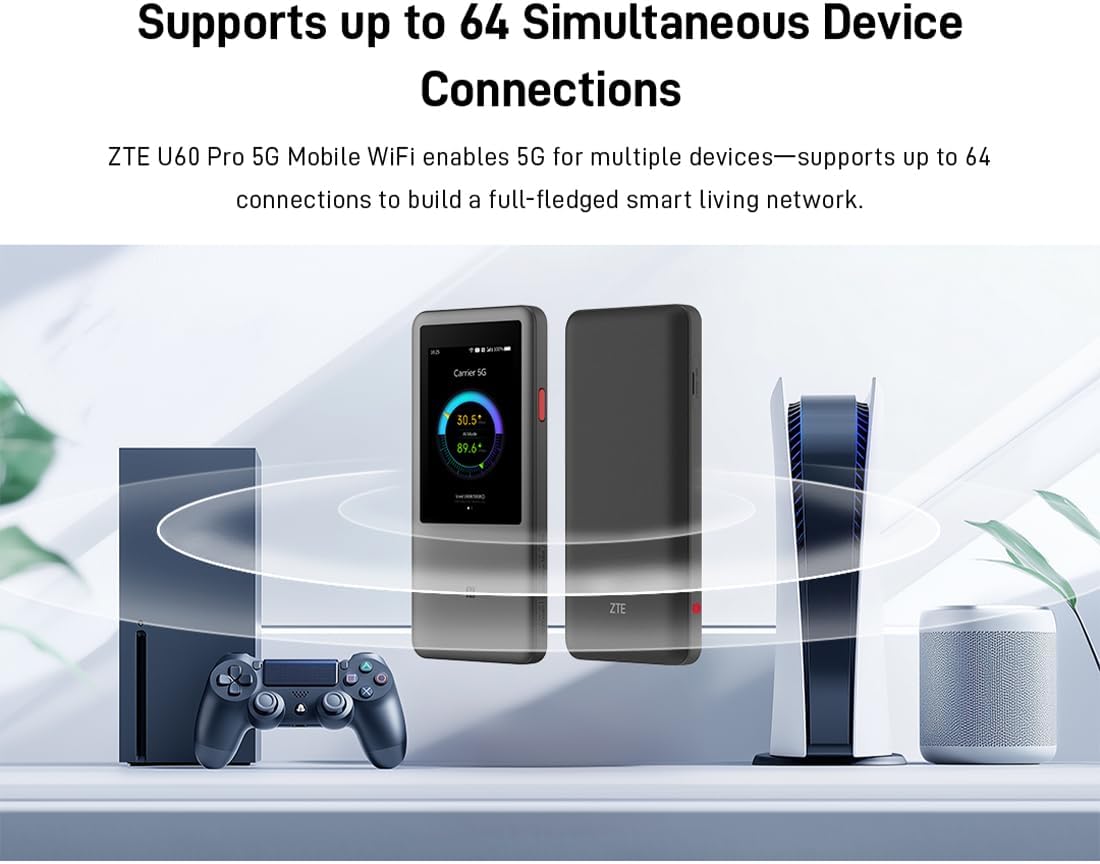
Image 3.1: The ZTE U60 Pro providing 5G Wi-Fi connectivity to various electronic devices.
3.3 AI Smart Scene Modes
The device features intelligent AI Scene technology with dynamic bandwidth allocation. It adjusts bandwidth and priority for applications based on user usage patterns to ensure smooth operation. Available modes include:
- Anchor Mode: Optimized for live streaming.
- کانفرنس موڈ: Prioritizes video conferencing applications.
- ویڈیو موڈ: Enhances video playback and streaming.
- رفتار موڈ: Maximizes overall network speed.
- گیم موڈ: Reduces latency for online gaming.
3.4 AI Voice Management (via ZTE Smart Life APP)
The ZTE Smart Life APP enables effortless device management, including AI voice control. This feature allows for intelligent management of the router through voice commands. Download the ZTE Smart Life APP from your device's app store.

Image 3.2: The ZTE Smart Life APP interface demonstrating AI voice management capabilities.
3.5 پاور بینک کی فعالیت
The U60 Pro can also serve as a power bank. With its 10,000 mAh battery and 18W reverse fast charging, you can charge other electronic devices by connecting them to the router's appropriate port (e.g., USB-C).
4 دیکھ بھال
4.1 بیٹری کی دیکھ بھال
ڈیوائس 10,000 ایم اے ایچ کی بیٹری سے لیس ہے۔ بیٹری کی زندگی کو زیادہ سے زیادہ کرنے کے لیے:
- انتہائی درجہ حرارت سے پرہیز کریں۔
- بہترین چارجنگ کے لیے فراہم کردہ 27W فاسٹ چارجر استعمال کریں۔
- طویل مدتی اسٹوریج کے لیے، بیٹری کو تقریباً 50% چارج کریں اور ٹھنڈی، خشک جگہ پر اسٹور کریں۔
4.2 جنرل ڈیوائس کیئر
To ensure the longevity and optimal performance of your ZTE U60 Pro:
- آلے کو صاف اور دھول سے پاک رکھیں۔ صفائی کے لیے نرم، خشک کپڑا استعمال کریں۔
- آلے کو پانی یا ضرورت سے زیادہ نمی کے سامنے لانے سے گریز کریں۔
- آلے کو نہ گرائیں اور نہ ہی اس کو سخت اثرات سے دوچار کریں۔
- زیادہ گرم ہونے سے بچنے کے لیے استعمال کے دوران مناسب وینٹیلیشن کو یقینی بنائیں۔
5 خرابیوں کا سراغ لگانا
If you encounter issues with your ZTE U60 Pro, refer to the following common solutions:
5.1 کوئی نیٹ ورک کنکشن نہیں۔
- سم کارڈ چیک کریں: Ensure the SIM card is correctly inserted and activated with a 5G data plan.
- سگنل کی طاقت: Verify the signal strength indicator on the device's screen. Move to an area with better 5G coverage if the signal is weak.
- ڈیوائس کو دوبارہ شروع کریں: Power off and then power on the U60 Pro.
- نیٹ ورک کی ترتیبات: Check network settings via the touchscreen or ZTE Smart Life APP to ensure APN settings are correct (usually automatic).
5.2 وائی فائی کنیکٹیویٹی کے مسائل
- غلط پاس ورڈ: Double-check the Wi-Fi password displayed on the U60 Pro's screen.
- ڈیوائس کی حد: Ensure you have not exceeded the maximum of 64 connected devices.
- Restart Connected Device: Restart the device attempting to connect to the Wi-Fi.
- راؤٹر دوبارہ شروع کریں: Restart the ZTE U60 Pro.
5.3 سست انٹرنیٹ کی رفتار
- سگنل کی طاقت: ایک کمزور 5G سگنل کے نتیجے میں رفتار کم ہوگی۔
- ڈیٹا کیپ: Check if your data plan has a fair usage policy or if you have exceeded a data cap, which might throttle speeds.
- AI Scene Mode: Ensure the appropriate AI Scene mode (e.g., Speed Mode) is selected for your activity.
- مداخلت: آلے کو دوسرے الیکٹرانک آلات سے دور رکھیں جو مداخلت کا سبب بن سکتے ہیں۔
6. وضاحتیں
The following table details the technical specifications of the ZTE U60 Pro MU5250:

Image 6.1: The Snapdragon X75 Flagship Chip-set Platform, central to the router's performance.
| فیچر | تفصیل |
|---|---|
| برانڈ | زیڈ ٹی ای |
| ماڈل کا نام | MU5250 |
| آئٹم ماڈل نمبر | MU5250 |
| کارخانہ دار | زیڈ ٹی ای |
| خصوصی خصوصیت | 5G Connection, Wi-Fi 7, AI Scenes, Voice Control, Power Bank |
| کنیکٹوٹی ٹیکنالوجی | 5G، Wi-Fi |
| وائی فائی جنریشن | وائی فائی 7 |
| وائرلیس مواصلات کا معیار | 802.11a, 802.11ac, 802.11b, 802.11g, 802.11n |
| فریکوئنسی بینڈ کلاس | ڈوئل بینڈ |
| تعدد | 5 GHz |
| ڈیٹا کی منتقلی کی شرح | 4.29 Gigabits per second (Download) |
| Maximum Upstream Data Transfer Rate | 3600 Megabits per second (Wi-Fi 7 Peak Throughput) |
| انٹینا کی تعداد | 9 (Omnidirectional 5G Array) |
| کوریج | Wide and complete (360° full-band coverage) |
| کنٹرول کا طریقہ | چھوئے۔ |
| آپریٹنگ سسٹم | ZyNOS |
| سیکیورٹی پروٹوکول | WPA3 |
| Router Firewall Security Level | بنیادی |
| بیٹری (ies) | 1 AAA - included (Note: Product description mentions 10,000 mAh, likely internal) |
| شے کا وزن | 435 گرام |
| شامل اجزاء | AC اڈاپٹر |
| ہم آہنگ آلات | Game Console, various Wi-Fi enabled devices |
| مصنوعات کے لیے تجویز کردہ استعمال | Streaming, Gaming, Outdoor/Travel, Small Office |
| انٹرنیٹ کنیکٹیویٹی | جی ہاں |
| Modem Compatible | No (Functions as a standalone 5G router) |
| اسمارٹ ہوم مطابقت | Not Smart Home Compatible |
| اسپیئر پارٹس کی دستیابی | معلومات دستیاب نہیں ہیں۔ |
| سافٹ ویئر اپڈیٹس کی گارنٹی تک | معلومات دستیاب نہیں ہیں۔ |

Image 6.2: Highlighting the 5G ultra-high-speed network of the ZTE U60 Pro MU5250.

Image 6.3: Illustration of the 9 omnidirectional 5G antennas providing 360° full-band coverage.
7. سپورٹ اور وارنٹی۔
7.1 کسٹمر سپورٹ
For further assistance, technical support, or inquiries not covered in this manual, please refer to the official ZTE support channels or contact your retailer.
7.2 وارنٹی کی معلومات
Warranty terms and conditions may vary by region and retailer. Please refer to the warranty card included with your product or consult your point of purchase for detailed warranty information.