
1. تعارف
This manual provides essential information for the safe and efficient use of your suevery Prebuilt Gaming PC. Please read these instructions carefully before operating the device and retain them for future reference. This gaming PC is designed for high-performance computing, suitable for gaming, business, and everyday use.

تصویر 1.1: ختمview of the suevery Prebuilt Gaming PC with internal RGB lighting.
2. سیٹ اپ گائیڈ
Follow these steps to set up your new suevery Prebuilt Gaming PC:
- پیک کھولنا: Carefully remove the PC from its packaging. Inspect for any visible damage.
- جگہ کا تعین: Place the PC on a stable, flat surface with adequate ventilation. Ensure no vents are obstructed.
- پیری فیرلز کو جوڑیں:
- Connect your monitor(s) to the graphics card's HDMI or DisplayPort outputs.
- اپنے کی بورڈ اور ماؤس کو دستیاب USB پورٹس سے مربوط کریں۔
- اسپیکر یا ہیڈ فون کو آڈیو آؤٹ پٹ پورٹس سے جوڑیں۔
- For wired internet, connect an Ethernet cable to the LAN port. For Wi-Fi, ensure antennas are attached if external.
- پاور کنکشن: Connect the power cable to the PC's power supply unit and then to a grounded electrical outlet.
- پہلا بوٹ: Press the power button on the front of the PC. The system will initiate the boot process. Follow any on-screen instructions for initial operating system setup.
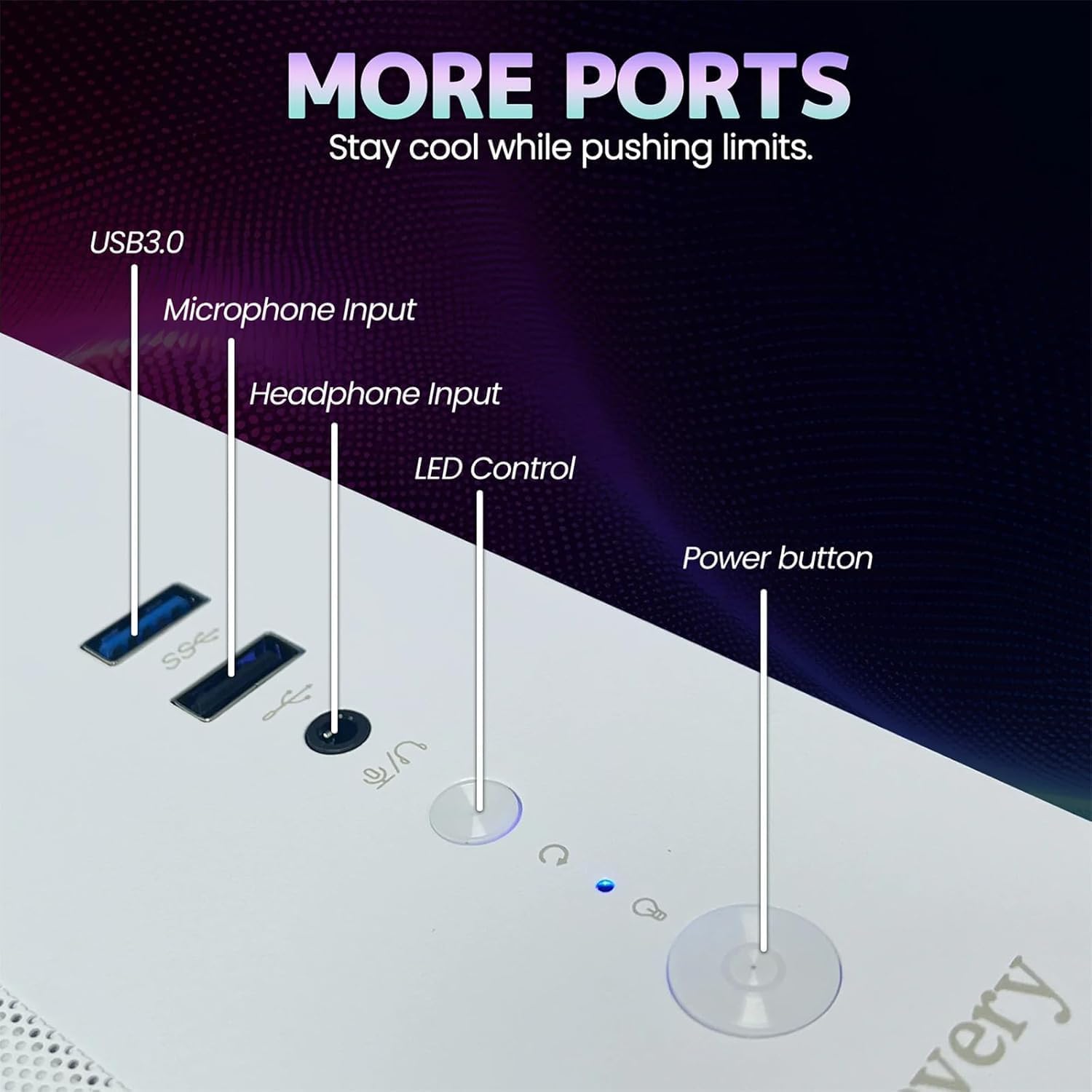
Image 2.1: Rear panel of the PC illustrating various connectivity ports including USB, HDMI, and audio jacks.
3. آپریٹنگ ہدایات
Your suevery Prebuilt Gaming PC comes with a pre-installed operating system (DOS, requiring user installation of a full OS). Once your preferred operating system is installed and configured, you can begin using your PC.
- پاور آن/آف: Press the power button to turn the PC on. To turn off, use the operating system's shutdown function. Avoid direct power-off unless necessary to prevent data loss.
- آرجیبی لائٹنگ کنٹرول: The PC features customizable RGB lighting. Refer to the specific software or physical button (if available, as indicated in Image 2.1) for adjusting lighting modes and colors.
- سافٹ ویئر کی تنصیب: Install necessary drivers for your graphics card and other components from the manufacturer's websites for optimal performance. Install your desired games and applications.
- کنیکٹوٹی: Utilize the Wi-Fi 6 for high-speed wireless internet or the Ethernet port for a stable wired connection. The multiple USB ports allow for connecting various peripherals.
Video 3.1: An official video demonstrating the suevery Prebuilt Gaming PC Desktop Computer, showcasing اس کا ڈیزائن اور خصوصیات۔
4 دیکھ بھال
Regular maintenance ensures the longevity and optimal performance of your PC.
- دھول کی صفائی: Periodically clean dust from the internal components, especially fans and heatsinks, using compressed air. Ensure the PC is powered off and unplugged before cleaning.
- سافٹ ویئر اپ ڈیٹس: Keep your operating system, drivers, and antivirus software updated to ensure security and performance.
- کیبل مینجمنٹ: Ensure internal and external cables are neatly organized to improve airflow and prevent accidental disconnections.
- وینٹیلیشن: Always ensure the PC has clear space around its vents for proper airflow.

تصویر 4.1: اندرونی view of the PC highlighting the cooling fans and component layout, emphasizing the importance of dust removal.
5 خرابیوں کا سراغ لگانا
یہ سیکشن عام مسائل کو حل کرتا ہے جن کا آپ کو سامنا ہو سکتا ہے۔
| مسئلہ | ممکنہ حل |
|---|---|
| پی سی آن نہیں ہوتا ہے۔ | Check power cable connections to the PC and wall outlet. Ensure the power supply switch on the back of the PC is in the 'On' position. Test the outlet with another device. |
| مانیٹر پر کوئی ڈسپلے نہیں۔ | Ensure the monitor is powered on and connected to the graphics card (not the motherboard's video output). Try a different cable or monitor. |
| سسٹم سست یا منجمد ہے۔ | Check for background applications consuming resources. Update drivers. Scan for malware. Ensure adequate ventilation to prevent overheating. |
| وائی فائی کنکشن کے مسائل۔ | Ensure Wi-Fi antennas are securely attached. Restart your router and PC. Update Wi-Fi drivers. |
| آر جی بی لائٹنگ کام نہیں کر رہی ہے۔ | Check connections to the RGB controller. Use the dedicated RGB control button or software to adjust settings. |
6. وضاحتیں
Detailed technical specifications for your suevery Prebuilt Gaming PC.
| فیچر | تفصیل |
|---|---|
| برانڈ | suevery |
| ماڈل کا نام | SU-V9W2-V9W4 |
| سی پی یو ماڈل | AMD Ryzen 5 (6 Cores, 3.6 GHz up to 4.1 GHz) |
| ریم میموری | 16 GB DDR4 3200 MHz (Max 32 GB) |
| ذخیرہ | 512 GB M.2 PCIe NVMe SSD |
| گرافکس کا پروسیسر | RX 560 4G GDDR5 (Dedicated) |
| آپریٹنگ سسٹم | DOS (User-installed OS required) |
| کنیکٹوٹی | Wi-Fi 6 (802.11ax), USB (2x USB 3.0, 4x USB 2.0), HDMI |
| بجلی کی کھپت | 400 واٹ |
| طول و عرض (L x W x H) | 13.35 x 10.87 x 12.99 انچ |
| رنگ | سفید |

Image 6.1: Dimensional diagram of the suevery Prebuilt Gaming PC, indicating its compact size.
7. وارنٹی اور سپورٹ
Your suevery Prebuilt Gaming PC comes with a 1 سال کی وارنٹی خریداری کی تاریخ سے، مینوفیکچرنگ نقائص کا احاطہ.
For technical support, warranty claims, or further assistance, please contact suevery customer service through the retailer's platform or visit the official suevery webرابطے کی معلومات کے لیے سائٹ۔
Please have your product model number (Ryzen5-16G-512G-RX560 4G) and proof of purchase ready when contacting support.