
تعارف
Welcome to the HP OmniDesk M03 AI Desktop PC. This manual provides essential information for setting up, operating, maintaining, and troubleshooting your new computer. The HP OmniDesk M03 is designed for performance and efficiency, featuring an Intel Core Ultra 7 265 processor with dedicated AI cores, 16GB DDR5 RAM, and a 2TB NVMe SSD, running on Windows 11 Home.
باکس میں کیا ہے۔
تصدیق کریں کہ تمام اجزاء پیکیجنگ میں موجود ہیں:
- HP OmniDesk ڈیسک ٹاپ پی سی
- وائرلیس کی بورڈ
- ماؤس
- فوری سیٹ اپ گائیڈ
- پاور کیبل

Image: The HP OmniDesk M03 desktop PC, wireless keyboard, mouse, and power cable, illustrating the contents of the product box.
سیٹ اپ
1. پیری فیرلز کو جوڑنا
Before powering on your PC, connect your monitor, keyboard, and mouse.
- مانیٹر: Connect your monitor to the PC using an HDMI or DisplayPort cable. The ports are located on the rear of the PC.
- کی بورڈ اور ماؤس: The included keyboard and mouse are wireless. Insert batteries (if not pre-installed) and connect their USB receiver to an available USB port on the PC.
- طاقت: Connect the power cable to the PC's power input on the rear and then to a wall outlet.
- نیٹ ورک (اختیاری): For a wired internet connection, connect an Ethernet cable from your router to the RJ45 port on the rear of the PC.

Image: Rear panel of the HP OmniDesk M03, highlighting the DisplayPort, HDMI, USB, and Ethernet ports for connecting external devices.

تصویر: سائیڈ view of the HP OmniDesk M03 AI Desktop PC, showing its compact tower design.
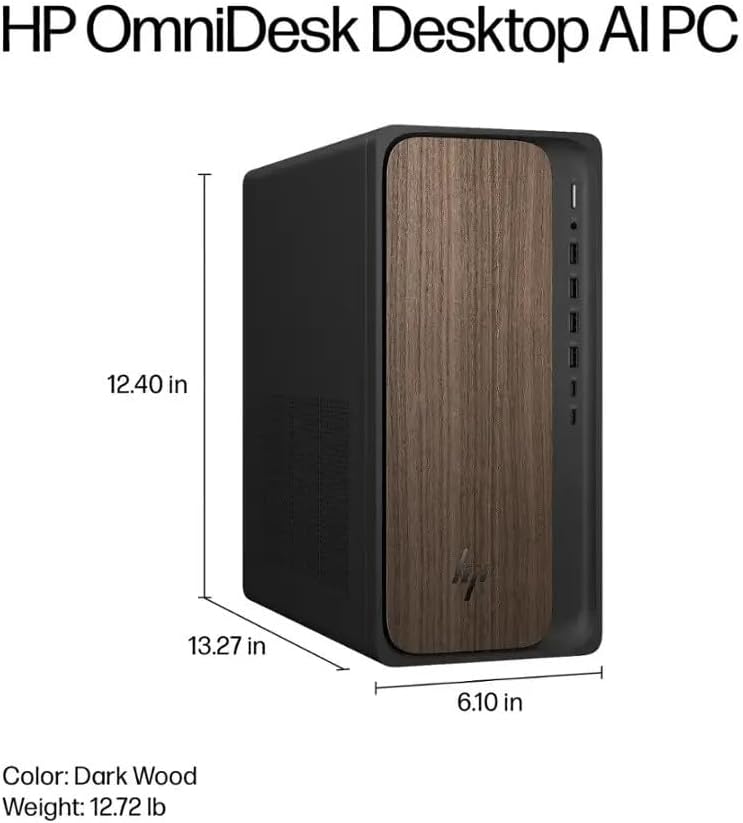
Image: Diagram illustrating the location and type of front and rear ports on the HP OmniDesk M03, including USB-A, USB-C, HDMI, DisplayPort, and audio jacks.
2. پاور آن اور ابتدائی سیٹ اپ
Once all peripherals are connected:
- پی سی کے سامنے والے پاور بٹن کو دبائیں۔
- Follow the on-screen instructions to complete the Windows 11 Home initial setup, including language selection, network connection (if not wired), account creation, and privacy settings.

تصویر: سامنے view of the HP OmniDesk M03, showing the power button at the top right and various USB ports below it.
آپ کے کمپیوٹر کو آپریٹ کرنا
ونڈوز 11 ہوم
Your HP OmniDesk M03 comes pre-installed with Windows 11 Home. Familiarize yourself with the operating system's interface, Start menu, and settings. Microsoft provides extensive online resources for Windows 11 usage.
اے آئی کی خصوصیات
The Intel Core Ultra 7 265 processor includes dedicated AI cores and Intel AI Boost, enhancing performance for AI-driven applications and features within Windows 11, such as AI Copilot. These features can assist with tasks, content creation, and system optimization.
کنیکٹوٹی
- Wi-Fi 6 (802.11ax): Connect to wireless networks for internet access. Manage Wi-Fi settings through the Windows 11 network settings.
- بلوٹوتھ 5.4: Pair wireless devices such as headphones, speakers, or additional input devices. Access Bluetooth settings via the Windows 11 settings menu.
- ایتھرنیٹ: For a stable, high-speed wired connection, ensure an Ethernet cable is connected to the RJ45 port.
دیکھ بھال
Cleaning Your PC
- بیرونی: تھوڑا سا نرم، لنٹ سے پاک کپڑا استعمال کریں۔ampened with water or a mild cleaning solution to wipe down the exterior. Avoid harsh chemicals.
- وینٹس: Periodically clean dust from the ventilation grilles using compressed air to ensure proper airflow and prevent overheating.
- بندرگاہیں: بندرگاہوں کو دھول اور ملبے سے پاک رکھیں۔
سافٹ ویئر اپڈیٹس
Regularly update Windows 11 and device drivers to ensure optimal performance, security, and compatibility. Access Windows Update through the Settings menu.
ڈیٹا بیک اپ
It is recommended to regularly back up your important data to an external drive or cloud storage to prevent data loss.
خرابی کا سراغ لگانا
یہ سیکشن عام مسائل کو حل کرتا ہے جن کا آپ کو سامنا ہو سکتا ہے۔
- کوئی طاقت نہیں:
- یقینی بنائیں کہ پاور کیبل پی سی اور وال آؤٹ لیٹ دونوں سے محفوظ طریقے سے جڑی ہوئی ہے۔
- دوسرے ڈیوائس میں پلگ لگا کر تصدیق کریں کہ وال آؤٹ لیٹ فعال ہے۔
- کوئی ڈسپلے نہیں:
- Check that the monitor is powered on and correctly connected to the PC via HDMI or DisplayPort.
- یقینی بنائیں کہ آپ کے مانیٹر پر صحیح ان پٹ سورس کا انتخاب کیا گیا ہے۔
- کوئی انٹرنیٹ کنکشن نہیں:
- Wi-Fi کے لیے، چیک کریں کہ آیا Wi-Fi اڈاپٹر فعال ہے اور اگر آپ صحیح پاس ورڈ کے ساتھ درست نیٹ ورک سے جڑے ہوئے ہیں۔
- وائرڈ کنکشن کے لیے، یقینی بنائیں کہ ایتھرنیٹ کیبل ٹھیک طرح سے جڑی ہوئی ہے اور آپ کا راؤٹر کام کر رہا ہے۔
- کی بورڈ/ماؤس جواب نہیں دے رہا ہے:
- وائرلیس آلات کے لیے بیٹری کی سطح چیک کریں۔
- Ensure the USB receiver is plugged into a functional USB port.
- پی سی کو دوبارہ شروع کرنے کی کوشش کریں۔
مزید پیچیدہ مسائل کے لیے، HP سپورٹ سے رجوع کریں۔ webسائٹ یا کسٹمر سروس سے رابطہ کریں۔
وضاحتیں
Detailed technical specifications for the HP OmniDesk M03 AI Desktop PC:
| جزو | تفصیلات |
| پروسیسر | Intel Core Ultra 7 265 (20-Core, up to 5.3 GHz, Intel AI Boost) |
| آپریٹنگ سسٹم | ونڈوز 11 ہوم (64 بٹ) |
| میموری (RAM) | 16GB DDR5 5600 میگاہرٹز |
| ذخیرہ | 2TB PCIe NVMe M.2 SSD |
| گرافکس | انٹیگریٹڈ انٹیل گرافکس۔ |
| ویڈیو آؤٹ پٹ | 1x HDMI 2.1، 1x ڈسپلے پورٹ 1.4a |
| USB پورٹس (سامنے) | 2x USB-A 5Gbps, 2x USB-A 10Gbps, 1x USB-C 5Gbps, 1x USB-C 10Gbps |
| USB پورٹس (پیچھے) | 4x USB 2.0 Type-A |
| آڈیو پورٹس | 1x Headphone/Microphone Combo, 1x Line Input, 1x Line Output |
| نیٹ ورک | Wi-Fi 6 (802.11ax), Bluetooth 5.4, Gigabit Ethernet (RJ45) |
| طول و عرض (H x W x D) | 13.3" x 6.1" x 12.4" (33.8 سینٹی میٹر x 15.5 سینٹی میٹر x 31.5 سینٹی میٹر) |
| وزن | 11.77 پونڈ (5.34 کلوگرام) |

Image: Diagram showing the height (13.27 inches), width (6.10 inches), and depth (12.40 inches) of the HP OmniDesk M03 desktop PC.
وارنٹی اور سپورٹ
وارنٹی کی معلومات
Your HP OmniDesk M03 AI Desktop PC comes with a 90 دن کی محدود وارنٹی. This warranty covers defects in materials and workmanship under normal use. For detailed terms and conditions, please refer to the warranty documentation included with your product or visit the official HP support webسائٹ
کسٹمر سپورٹ
For technical assistance, troubleshooting, or warranty claims, please contact HP Customer Support:
- آن لائن مدد: اہلکار کا دورہ کریں۔ HP سپورٹ Webسائٹ ڈرائیوروں، دستورالعمل، اور ٹربل شوٹنگ گائیڈز کے لیے۔
- فون سپورٹ: Refer to the Quick Setup Guide or HP's webعلاقائی رابطہ نمبروں کے لیے سائٹ۔
When contacting support, please have your product model (M03) and serial number ready.