
1. تعارف
Thank you for choosing the PUTRIMS S36 Smart Mini Projector. This manual provides essential information for setting up, operating, and maintaining your projector. Please read it thoroughly before use to ensure optimal performance and safety.
2. باکس میں کیا ہے۔
تصدیق کریں کہ تمام اشیاء پیکیج میں موجود ہیں:
- S36 Smart Projector with WiFi and Bluetooth
- ریموٹ (2*AAA بیٹریاں درکار ہیں، شامل نہیں)
- HDMI Cable x 1 (1.4M/4.59ft)
- Power Cord x 1 (1.5M/4.92ft)
- Quick Start Guide & FAQs
- لینس کلیننگ کٹ

Image: The PUTRIMS S36 projector and its accessories, including the remote, cables, and cleaning kit.
3. پروڈکٹ ختمview
The PUTRIMS S36 is an ultra-portable smart mini projector designed for versatile entertainment. It features a native 1080P resolution with 4K decoding support, AI auto-setup for instant image clarity, and a 330° rotatable stand for flexible projection.
اہم خصوصیات:
- Exclusive SmartOS: Access massive native apps and 1,000+ free live TV channels via Whale TV.
- بہتر کارکردگی: Equipped with 1.5GB DDR RAM for smooth streaming and responsiveness.
- الٹرا پورٹیبل ڈیزائن: Weighs 1.9 lbs, similar in size to an iPad mini, with a 330° rotatable stand for projection onto walls, ceilings, or angled surfaces.
- Pro Theater System: Native 1080P resolution, 4K decoding, HDR support, and CEC support for simplified control.
- AI Auto-Setup: Features auto-focus, auto keystone correction, obstacle avoidance, and screen alignment for a perfect image in seconds.
- All-in-One Connectivity: Wi-Fi 6 and 2-way Bluetooth for smooth AirPlay/Miracast and flexible audio options. Includes HDMI ARC and USB ports.

تصویر: ختمview of the PUTRIMS S36 projector's smart features and adjustable design.
4. سیٹ اپ
4.1 Initial Power-On and Auto-Setup
- پاور کی ہڈی کو پروجیکٹر اور پاور آؤٹ لیٹ سے جوڑیں۔
- اسے آن کرنے کے لیے پروجیکٹر یا ریموٹ کنٹرول پر پاور بٹن دبائیں۔
- The projector will automatically perform auto-focus and auto keystone correction to optimize the image.
Video: Demonstrates how the projector automatically adjusts image focus and keystone correction when moved.
4.2 وائی فائی سے جڑنا
- ہوم اسکرین سے، تشریف لے جائیں۔ ترتیبات (گیئر آئیکن)۔
- منتخب کریں۔ نیٹ ورک.
- فہرست سے اپنا Wi-Fi نیٹ ورک منتخب کریں اور پاس ورڈ درج کریں۔
4.3 پروجیکشن کو ایڈجسٹ کرنا
The S36 features a 330° rotatable stand for flexible placement. It also includes AI auto-setup for instant image clarity.
- خودکار ایڈجسٹمنٹ: The projector automatically adjusts focus, keystone, avoids obstacles, and aligns the screen when moved.
- ڈیجیٹل زوم: To adjust the image size, go to ترتیبات > پروجیکٹر کی ترتیبات > ڈیجیٹل زوم۔. Use the remote to zoom in or out (50-100%).
- دستی فوکس: If needed, you can manually trigger focus adjustment via the remote control.
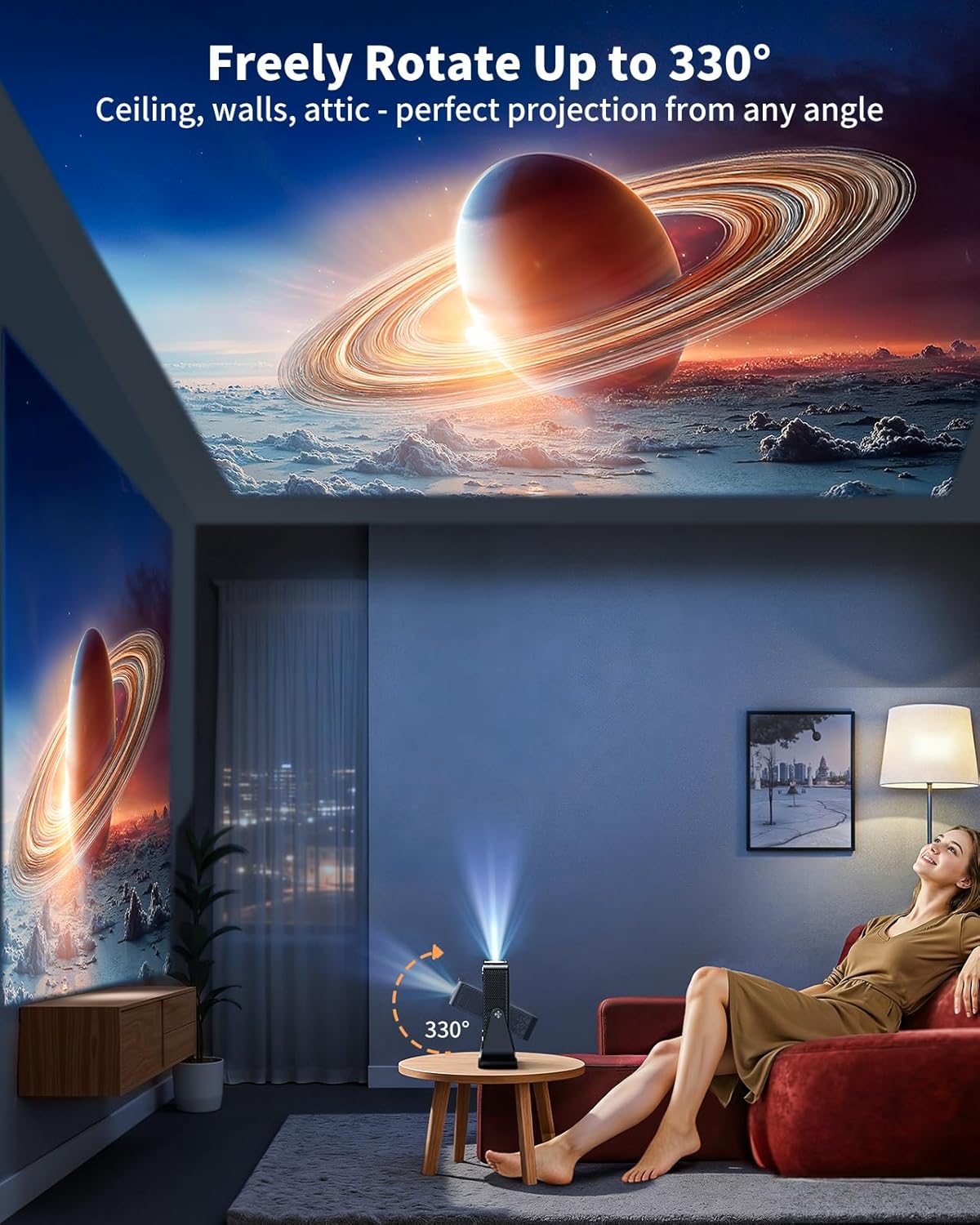
Image: The projector's flexible stand allows projection onto various surfaces, including ceilings.
4.4 بیرونی آلات کو جوڑنا
پروجیکٹر متعدد کنیکٹیویٹی آپشنز پیش کرتا ہے:
- HDMI: Connect gaming consoles, laptops, TV sticks, or other HDMI-enabled devices via the HDMI port.
- USB: میڈیا چلائیں files براہ راست USB ڈرائیو سے۔
- بلوٹوتھ: Connect external Bluetooth speakers or headphones for enhanced audio. The projector also supports 2-way Bluetooth, allowing it to function as a standalone speaker.
- 3.5 ملی میٹر آڈیو جیک: ہیڈ فون یا بیرونی اسپیکر کے لیے وائرڈ آڈیو آؤٹ پٹ کے لیے۔

Image: Illustration of the projector's various input/output ports and compatible devices.
5. آپریٹنگ
5.1 ریموٹ کنٹرول
The included remote control provides full functionality for navigating the projector's interface. It features dedicated buttons for power, settings, apps, home, volume, and direct access to popular streaming services.

Image: Close-up of the remote control for the PUTRIMS S36 projector.
5.2 Accessing Apps
The S36 runs on an official SmartOS, providing access to a wide range of applications:
- پہلے سے انسٹال کردہ ایپس: Popular apps like Netflix, YouTube, Prime Video, Apple TV, Max, and ESPN are pre-installed.
- Whale TV: Access 1,000+ free live TV channels.
- پلے اسٹور: Download additional apps from the integrated Play Store.
Video: Shows the unboxing and initial setup, highlighting the pre-installed apps and smart interface.
5.3 اپنے فون سے کاسٹ کرنا
Use the TV Casting App to control the projector from your smartphone and cast content:
- یقینی بنائیں کہ آپ کا فون اور پروجیکٹر ایک ہی Wi-Fi نیٹ ورک سے جڑے ہوئے ہیں۔
- Download the TV Casting App on your smartphone (scan the QR code displayed on the projector's casting screen).
- Open the app, select your projector, and start screen mirroring or casting content.
Video: Instructions on how to download apps, use your phone as a remote, and cast your screen to the projector.
5.4 آڈیو اور تصویر کی ترتیبات
Adjust audio and picture quality via the Settings menu:
- صوتی وضع: Choose from various sound modes (Standard, Music, Movie, News, Game, User) or connect external speakers via Bluetooth or the 3.5mm audio jack.
- رنگ درجہ حرارت: Adjust the color temperature (Cool, Standard, Warm) to your preference.
- آنکھوں کی حفاظت کا طریقہ: Enable this mode for reduced eye strain during prolonged viewing
6 دیکھ بھال
To ensure the longevity and optimal performance of your PUTRIMS S36 projector, regular maintenance is recommended:
- لینس کی صفائی: Use the provided lens cleaning kit to gently clean the projector lens. Avoid abrasive materials that could scratch the surface.
- دھول ہٹانا: Keep the projector's vents clear of dust and debris to prevent overheating. Use a soft brush or compressed air.
- ذخیرہ: جب استعمال میں نہ ہو تو، پروجیکٹر کو ٹھنڈی، خشک جگہ پر، براہ راست سورج کی روشنی اور انتہائی درجہ حرارت سے دور رکھیں۔
7 خرابیوں کا سراغ لگانا
If you encounter issues with your projector, refer to the included Quick Start Guide & FAQs for common solutions. For further assistance, please contact customer support.
عام مسائل اور حل:
- کوئی تصویر نہیں/دھندلی تصویر: Check power connection, ensure lens cap is removed, and allow auto-focus to complete. Manually adjust focus if needed.
- کوئی آواز نہیں: Check volume settings on the projector and any connected external devices. Ensure correct audio output is selected.
- رابطے کے مسائل: Verify Wi-Fi connection, ensure devices are on the same network for casting, and check HDMI/USB cable connections.
- ایپس لوڈ نہیں ہو رہی ہیں: Ensure a stable internet connection. Try restarting the app or the projector.
8. وضاحتیں
| فیچر | تفصیل |
|---|---|
| برانڈ | PUTRIMS |
| ماڈل | S36 |
| ڈسپلے ریزولوشن | Native 1920 x 1080P (4K Decoding Supported) |
| شے کا وزن | 1.8 پاؤنڈ |
| مصنوعات کے طول و عرض | 7.7 x 3.5 x 8.3 انچ |
| کنیکٹوٹی ٹیکنالوجی | 3.5mm Jack, Bluetooth (2-way), HDMI (ARC/CEC), Wi-Fi 6 |
| خصوصی خصوصیات | Smart Operating System (Whale OS), 330° Rotating Stand, 1.5GB DDR RAM, HDR10, Smart Phone Remote, Auto Focus, Auto Keystone Correction, Smart Obstacle Avoidance, Screen Alignment, 50–100% Zoom Out, Lower Noise (<30dB) |
| رنگ | سیاہ |
9. وارنٹی اور سپورٹ
PUTRIMS is committed to providing excellent customer service:
- کسٹمر سپورٹ: 24/7 after-sales customer support.
- منی بیک گارنٹی: 2-YEAR money-back guarantee.
- Repair Coverage: 3-YEAR repair coverage.
- تکنیکی معاونت: زندگی بھر تکنیکی مدد۔
For any questions or assistance, please contact us at: support@putrims.com