
1. اہم حفاظتی معلومات
براہ کرم اس پروڈکٹ کو استعمال کرنے سے پہلے تمام حفاظتی ہدایات کو احتیاط سے پڑھیں۔ اس دستی کو مستقبل کے حوالے کے لیے رکھیں۔
- آلے کو بارش یا نمی کے سامنے نہ رکھیں۔
- انتہائی درجہ حرارت سے پرہیز کریں۔
- صرف فراہم کردہ پاور اڈاپٹر استعمال کریں۔
- آلہ کو خود سے جدا کرنے یا مرمت کرنے کی کوشش نہ کریں۔ اہل سروس کے اہلکاروں سے رابطہ کریں۔
- بیٹریوں اور الیکٹرانک اجزاء کو مقامی ضابطوں کے مطابق ذمہ داری سے ٹھکانے لگائیں۔
2. باکس میں کیا ہے۔
تصدیق کریں کہ تمام آئٹمز ان باکسنگ پر موجود ہیں:
- 1 x Desobry 14.2" Portable TV
- 1 ایکس صارف دستی
- 1 X اینٹینا
- 1 ایکس کار چارجر
- 1 x 12V AC Adapter
- 1 X آر سی اے کیبل
- 1 x Car Headrest Mount Holder
- 2 ایکس AAA بیٹریاں (ریموٹ کنٹرول کے لیے)
- 1 ایکس ریموٹ کنٹرول

تصویر: مصنوعات کی پیکیجنگ میں شامل تمام اجزاء۔
3. پروڈکٹ ختمview
سامنے اور پہلو Views
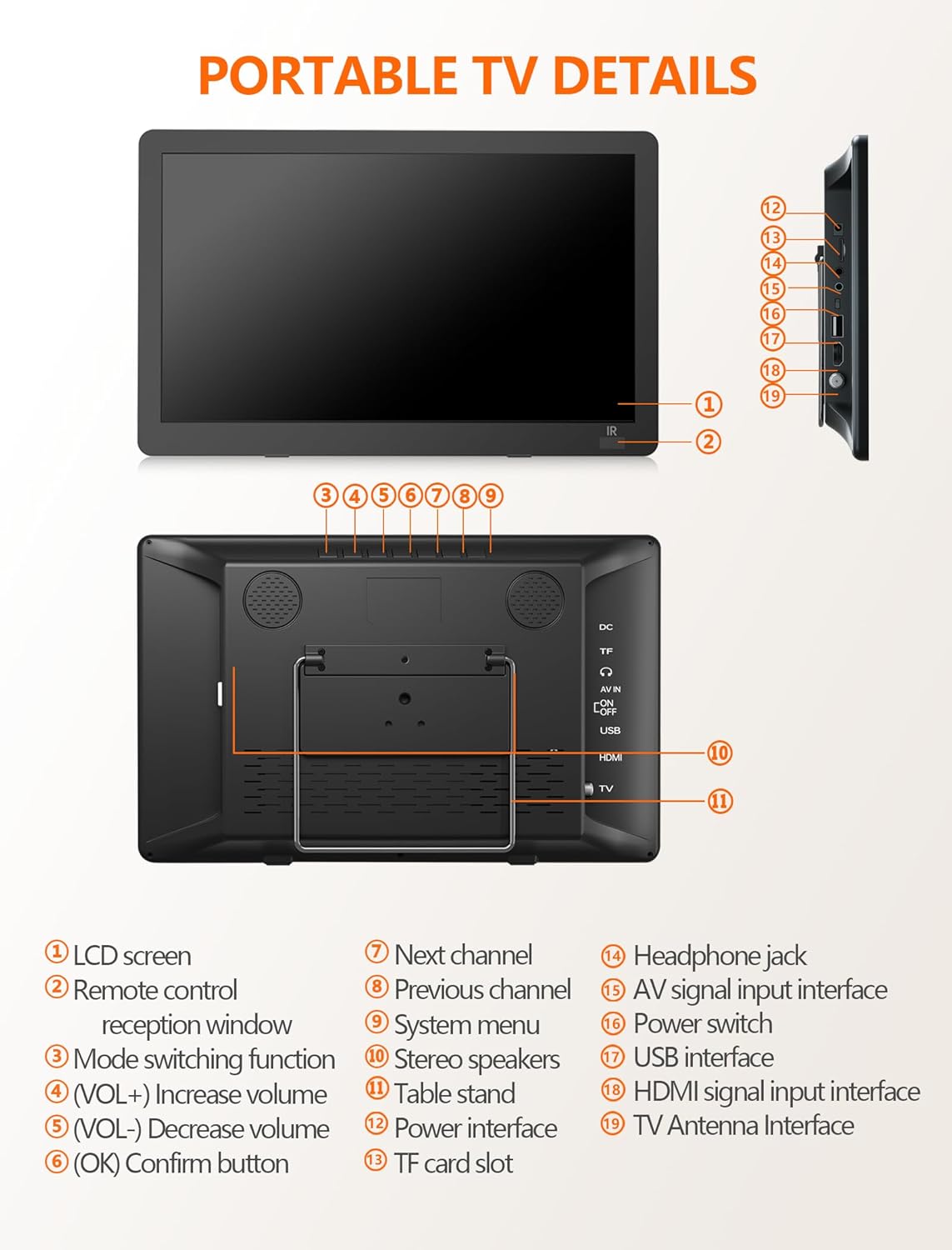
تصویر: سامنے اور طرف view of the portable TV with labeled components.
- LCD اسکرین
- ریموٹ کنٹرول استقبالیہ ونڈو
- موڈ سوئچنگ فنکشن
- Volume Up (VOL+)
- Volume Down (VOL-)
- OK / Confirm button
- اگلا چینل۔
- پچھلا چینل
- سسٹم مینو
- سٹیریو اسپیکر
- ٹیبل اسٹینڈ
- پاور انٹرفیس
- TF کارڈ سلاٹ
- ہیڈ فون جیک
- AV signal input interface
- پاور سوئچ
- USB انٹرفیس
- HDMI سگنل ان پٹ انٹرفیس
- TV Antenna Interface
4. سیٹ اپ
4.1 Powering the TV
The TV can be powered in three ways:
- AC اڈاپٹر: Connect the 12V AC adapter to the power interface (12) and a wall outlet.
- کار چارجر: Use the provided car charger to power the TV in a vehicle.
- بلٹ ان بیٹری: The TV features a 4000mAh built-in rechargeable battery for portable use.

Image: Three charging systems for the portable TV.
4.2 Antenna Connection and Channel Scan
To receive free-to-air digital TV signals:
- Connect the detachable antenna to the TV Antenna Interface (19). For optimal signal, place the antenna near a window or outdoors.
- یقینی بنائیں کہ TV آن ہے۔
- Navigate to the system menu (9) and select ATSC mode.
- Perform an auto-scan for channels. The TV will search and store available digital channels.

Image: Portable TV with antenna connected, displaying a baseball game.
Video: Demonstration of connecting the antenna and performing a channel scan on a portable TV.
Video: Step-by-step guide to connecting the antenna and initiating the channel setup wizard.
5. آپریٹنگ
5.1 ان پٹ ذرائع کا انتخاب کرنا
The TV supports multiple input sources:
- ATSC: For digital TV channels via antenna.
- HDMI: Connect external devices like laptops, gaming consoles, or streaming sticks (HDMI cable not included).
- اے وی میں: Connect devices using the AV cable (AV cable included).
- USB: میڈیا چلائیں files USB ڈرائیو سے۔

Image: HDMI input screen mirroring from a smartphone to the portable TV.

Image: Portable TV connected via AV cable, showing a child watching content.
5.2 میڈیا پلے بیک بذریعہ USB
The USB port (17) supports various media formats:
- ویڈیو: MAVI, MPG, MOV, MKV, MP4, TS, VOB, DAT
- آڈیو: MP3, WMA, M4A, AAC
- تصاویر: JPG، JPEG، BMP، PNG
- متن: TXT

Image: Portable TV showing supported multiple formats for media playback.
5.3 Adjusting Volume and Channels
Use the VOL+ (4) and VOL- (5) buttons on the TV or the remote control to adjust the volume. Use the CH+ (7) and CH- (8) buttons on the TV or the remote control to change channels.
6 خصوصیات
6.1 High-Definition Display
The 14.2-inch widescreen LCD display offers 1080P high-definition picture quality for clear viewing

Image: Comparison of 720P and 1080P picture quality on the portable TV.
6.2 ایڈجسٹ اسٹینڈ
The TV includes a desktop stand and a headrest stand for versatile placement. The built-in table stand (11) is adjustable up to 180 degrees.
6.3 Dual Speakers and Headphone Jack
Enjoy audio through the built-in dual stereo speakers (10) or connect headphones via the headphone jack (14) for private listening.

Image: Portable TV with built-in dual speakers highlighted.
ویڈیو: ختمview of the portable TV's features, including 1080P display, flexible connectivity, adjustable kickstand, dual speakers, and sleep timer function.
7 دیکھ بھال
To ensure the longevity of your Desobry Portable TV:
- Clean the screen and exterior with a soft, dry cloth. Avoid abrasive cleaners.
- آلے کو پانی اور زیادہ نمی سے دور رکھیں۔
- استعمال میں نہ ہونے پر ٹھنڈی، خشک جگہ پر اسٹور کریں۔
- زیادہ گرمی سے بچنے کے لیے وینٹیلیشن کے سوراخوں کو روکنے سے گریز کریں۔
8 خرابیوں کا سراغ لگانا
8.1 Signal Reception Issues
- Ensure the antenna is securely connected to the TV Antenna Interface (19).
- Place the antenna near a window or outdoors for better signal reception.
- Confirm the TV is set to ATSC mode for digital channels.
- If the local signal is weak, try connecting an outdoor antenna and performing a channel scan again.
8.2 ریموٹ کنٹرول جواب نہیں دے رہا ہے۔
- Ensure the AAA batteries in the remote control are correctly inserted and not depleted.
- Point the remote control directly at the remote control reception window (2) on the TV.
- Maintain a distance of no more than 3 meters (10 feet) and within a 30-degree angle from the TV's IR sensor.
9. وضاحتیں
| اسکرین کا سائز | 14.2 انچ |
| ڈسپلے ٹیکنالوجی | LCD |
| قرارداد | 1080ص |
| ریفریش ریٹ | 60 Hz |
| کنیکٹوٹی ٹیکنالوجی | HDMI، USB، AV |
| خصوصی خصوصیات | بلٹ ان اسپیکر، پورٹیبل |
| بیٹری کی صلاحیت | 4000mAh (بلٹ ان) |
| شے کا وزن | 3.61 پاؤنڈ |
| مصنوعات کے طول و عرض | 2"D x 2"W x 2"H |
10. وارنٹی اور سپورٹ
For warranty information or technical support, please refer to the contact details provided with your purchase documentation or visit the official Desobry website. If you encounter any problems with your portable TV, please do not hesitate to contact customer support for assistance.