
تعارف
Welcome to the Thunderobot Zero 16 Pro user manual. This document provides essential information for setting up, operating, maintaining, and troubleshooting your new gaming laptop. The Thunderobot Zero 16 Pro is engineered for high-performance gaming and demanding applications, featuring an Intel Core Ultra 9 275HX processor, NVIDIA GeForce RTX 5080 graphics, a 16-inch QHD+ 360Hz display, 32GB DDR5 RAM, and a 1TB PCIe M.2 SSD.
For optimal performance and longevity, please read this manual thoroughly before using your device.
پیکیج کے مشمولات
تصدیق کریں کہ تمام اشیاء آپ کے پیکیج میں موجود ہیں:
- Thunderobot Zero 16 Pro Gaming Laptop
- پاور اڈاپٹر اور کیبل
- صارف دستی (یہ دستاویز)
- وارنٹی کارڈ
سیٹ اپ
1 ابتدائی پاور آن
- پاور سے رابطہ کریں: پاور اڈاپٹر کو لیپ ٹاپ کے پاور پورٹ میں اور پھر وال آؤٹ لیٹ میں لگائیں۔
- لیپ ٹاپ کھولیں: لیپ ٹاپ کا ڈھکن احتیاط سے کھولیں۔
- پاور آن: پاور بٹن دبائیں، جو عام طور پر کی بورڈ کے اوپر یا سائیڈ پر ہوتا ہے۔
- ابتدائی ڈھانچہ: Windows 11 ہوم سیٹ اپ مکمل کرنے کے لیے آن اسکرین ہدایات پر عمل کریں، بشمول زبان، علاقہ، نیٹ ورک کنکشن، اور صارف اکاؤنٹ بنانا۔
2. پیری فیرلز کو جوڑنا
The Thunderobot Zero 16 Pro offers various ports for connecting external devices:
- USB-A پورٹس: Connect mice, keyboards, external hard drives, and other USB accessories.
- USB-C Port (Thunderbolt 5): For high-speed data transfer, external displays, and power delivery.
- HDMI 2.1 پورٹ: توسیعی ڈسپلے کے لیے بیرونی مانیٹر یا ٹی وی سے جڑیں۔
- RJ-45 ایتھرنیٹ پورٹ: ایک مستحکم وائرڈ نیٹ ورک کنکشن کے لیے۔
- 3.5 ملی میٹر آڈیو جیک: ہیڈ فون یا بیرونی اسپیکر کو مربوط کریں۔
تصویر: سائیڈ view of the Thunderobot Zero 16 Pro, highlighting the RJ-45, USB3.2 Gen2 Type-A, HDMI 2.1, Thunderbolt 5 Type-C, Power, USB3.2 Gen1 Type-A, and 3.5mm audio jack ports.

Image: Detailed diagram illustrating the location and type of ports available on the Thunderobot Zero 16 Pro, including USB, HDMI, Ethernet, and audio connections.
آپریٹنگ ہدایات
1. Keyboard and Lighting
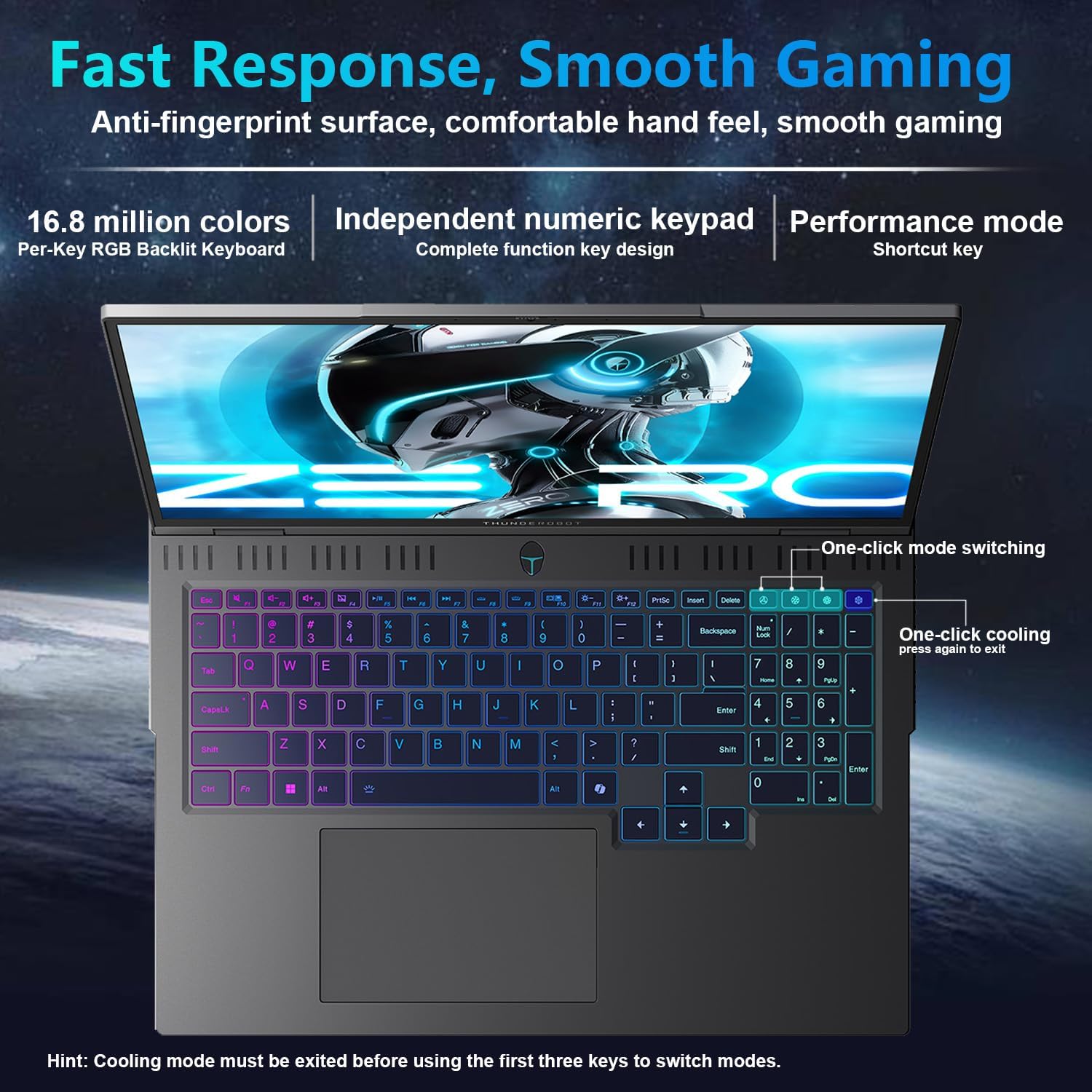
The laptop features a full-size, per-key RGB backlit keyboard with a numeric keypad. You can customize the RGB lighting effects through the Thunderobot Control Center software.
- Performance Mode Switching: Use dedicated shortcut keys to switch between performance profiles (e.g., Quiet, Balance, Turbo).
- One-Click Cooling: A dedicated key allows for instant activation of maximum cooling.
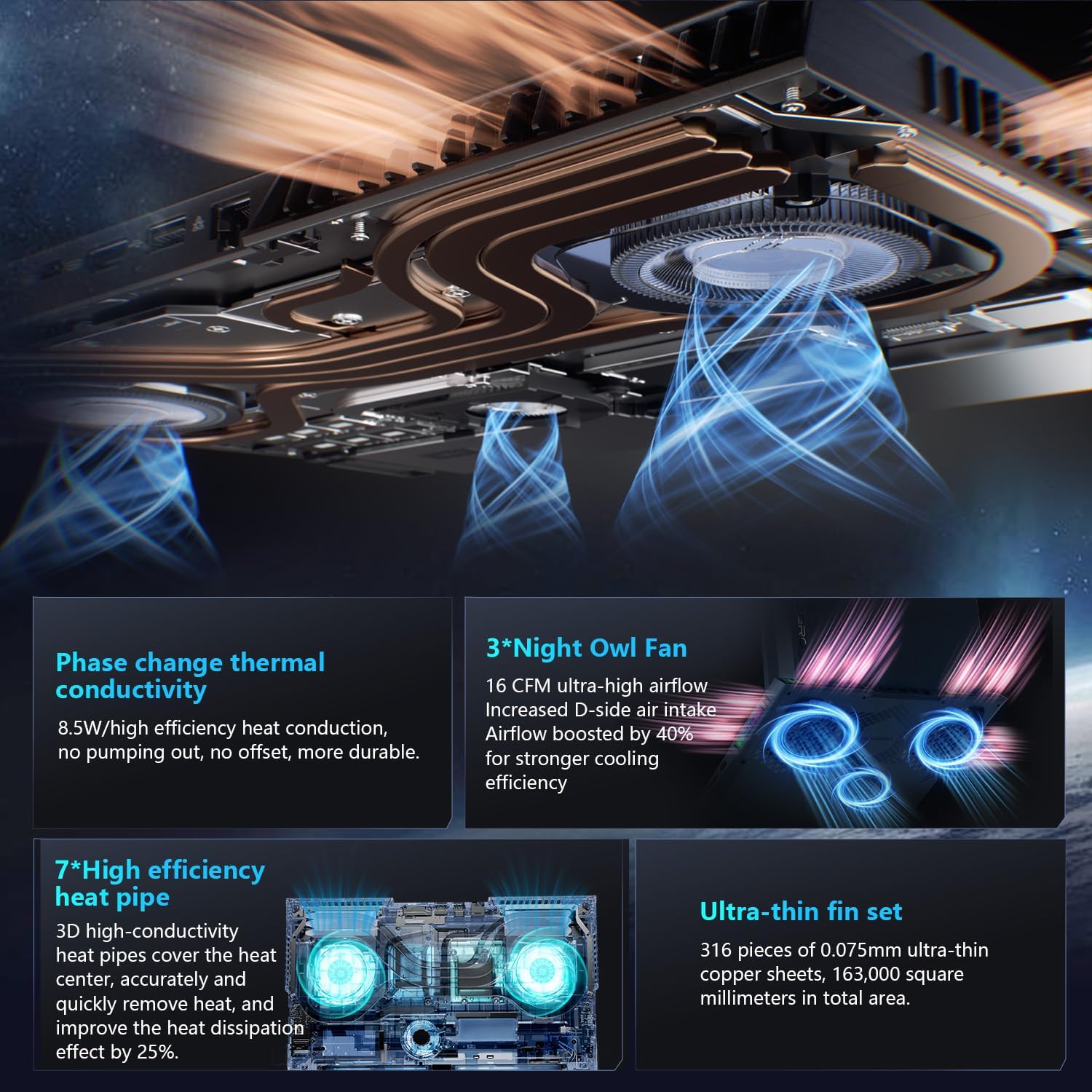
Image: The RGB backlit keyboard of the Thunderobot Zero 16 Pro, showing the full layout and numeric keypad.

Image: Visual guide to the keyboard's one-click mode switching and cooling activation keys.
Video: This video demonstrates the RGB lighting system and keyboard features of the Thunderobot Zero 16 Pro, including performance mode switching and one-click cooling.
2. ڈسپلے کی خصوصیات
The 16-inch QHD+ (2560x1600) display offers a 360Hz refresh rate and eye-care technology. To utilize the highest refresh rate, ensure the dedicated graphics direct connection mode is enabled in the Control Center.
- Anti-Glare & Anti-Reflection: Reduces distractions from ambient light.
- اینٹی بلیو لائٹ: Helps reduce eye strain during prolonged use.
- ڈی سی ڈمنگ: Provides flicker-free eye protection.
- Professional Color Calibration: Ensures accurate color reproduction.

Image: The 16-inch QHD+ display of the Thunderobot Zero 16 Pro, showcasing its high refresh rate and eye-care features.

Image: Infographic detailing the display's features such as 2.5K resolution, 360Hz refresh rate, 500 nits brightness, and various eye protection technologies.
3. Thunderobot Control Center
The AI Intelligent Control Center software allows for comprehensive management of your laptop's performance, lighting, and system settings. It is recommended to connect the device to a power source for full functionality of system mode switching.
- Performance Tuning: Adjust CPU and GPU settings for optimal performance or power saving.
- Intelligent Light Adjustment: Customize keyboard, strip, and logo RGB lighting.
- Comprehensive Adjustment: Monitor system status, fan speeds, and manage other personalized settings.
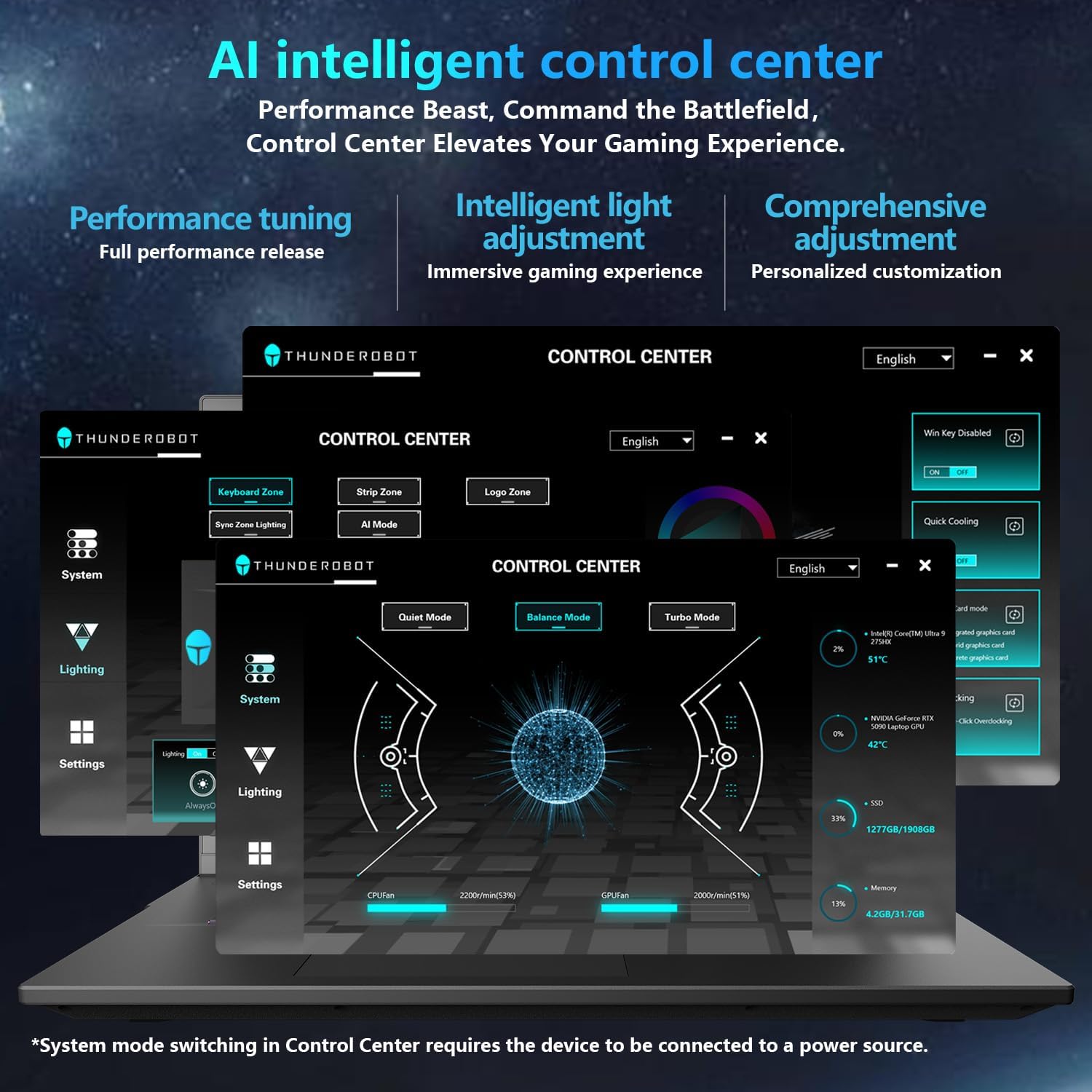
Image: A visual representation of the Thunderobot Control Center interface, showing options for system monitoring, lighting control, and performance settings.
Image: Infographic explaining the capabilities of the AI Intelligent Control Center, including performance tuning, intelligent light adjustment, and comprehensive system management.
4 آڈیو سسٹم
The laptop is equipped with a Soundstage Full audio system, featuring 4 speakers and Nahimic high-quality sound effects for an immersive audio experience.

Image: A graphic illustrating the Soundstage Full audio system with sound waves, emphasizing the immersive experience.
Video: This video showcases the display quality and overall design of the Thunderobot Zero series, including the Zero 16 Pro.
دیکھ بھال
1. کولنگ سسٹم
The Thunderobot Zero 16 Pro features a robust cooling system designed to maintain performance under heavy loads. This includes dual Night Owl fans, 7 enlarged heat pipes, and 316 ultra-thin copper fins.
- وینٹوں کو صاف رکھیں: Ensure that the air intake and exhaust vents are not obstructed to allow for proper airflow.
- باقاعدگی سے صفائی: Periodically clean dust from the vents using compressed air.

تصویر: ایک دھماکہ view of the laptop's internal cooling components, showing the dual fans, heat pipes, and fin set.

Image: Infographic explaining the Night Hawk fans, high-efficiency heat pipes, phase-change thermal conduction, and ultra-thin fin array.
2. عمومی دیکھ بھال
- صفائی: اسکرین اور چیسس کو صاف کرنے کے لیے نرم، لنٹ فری کپڑا استعمال کریں۔ سخت کیمیکلز سے پرہیز کریں۔
- ماحولیاتی حالات: Operate the laptop within recommended temperature ranges (-20°C to 60°C) and humidity (up to 90%).
- بیٹری لمبی عمر: To prolong battery life, avoid frequently discharging the battery completely and store the laptop with a partial charge if not used for extended periods.
Video: This video highlights the robust build quality and testing of Thunderobot gaming products, demonstrating their durability.
خرابی کا سراغ لگانا
مشترکہ مسائل اور حل
| مسئلہ | ممکنہ وجہ | حل |
|---|---|---|
| Display not reaching 360Hz refresh rate. | Dedicated graphics direct connection mode is not enabled. | Enable the dedicated graphics direct connection mode in the Thunderobot Control Center. |
| Laptop performance is lower than expected. | Laptop is not connected to power, or is in a power-saving mode. | Connect the laptop to its power adapter. Adjust performance settings to "Turbo Mode" or "Performance Mode" in the Thunderobot Control Center. Ensure cooling vents are clear. |
| Keyboard RGB lighting is not working or customizable. | Lighting settings are disabled or not configured in the Control Center. | Open the Thunderobot Control Center and navigate to the "Lighting" section to enable and customize RGB effects. |
| اسپیکر یا ہیڈ فون سے کوئی آواز نہیں ہے۔ | Audio drivers are outdated, volume is muted, or incorrect output device selected. | Check volume levels and audio output settings in Windows. Update audio drivers if necessary. Ensure headphones are fully plugged into the 3.5mm jack. |
وضاحتیں
| فیچر | تفصیل |
|---|---|
| برانڈ | تھنڈربوٹ |
| ماڈل کا نام | زیرو 16 پرو |
| اسکرین کا سائز | 16 انچ |
| قرارداد | 2560x1600 pixels (QHD+) |
| ریفریش ریٹ | 360Hz |
| سی پی یو ماڈل | Intel Core Ultra 9 275HX (24 Cores, up to 5.4 GHz) |
| گرافکس کا پروسیسر | NVIDIA GeForce RTX 5080 (12 GB GDDR7) |
| RAM میموری انسٹال شدہ سائز | 32 GB DDR5 (4800 MHz) |
| ہارڈ ڈسک کا سائز | 1 TB SSD (PCIe x4) |
| آپریٹنگ سسٹم | ونڈوز 11 ہوم |
| کنیکٹوٹی ٹیکنالوجی | Wi-Fi 6E, Bluetooth, USB-A, USB-C (Thunderbolt 5), HDMI, Ethernet, Audio Jack |
| کل USB پورٹس | 4 |
| HDMI پورٹس | 1 |
| کی بورڈ | بیک لِٹ، عددی کی پیڈ کے ساتھ فل سائز |
| Webکیمرے کی صلاحیت | جی ہاں |
| آئٹم کے طول و عرض (L x W x موٹائی) | 14.09"L x 10.52"W x 1.03"th |
| مصنوعات کے لیے مخصوص استعمال | گیمنگ |
وارنٹی اور سپورٹ
وارنٹی کی معلومات
ہر تھنڈربوٹ لیپ ٹاپ میں شامل ہوتا ہے۔ 12 ماہ کی وارنٹیاگر مرمت کی ضرورت ہو تو ماہر کی مدد، مکمل تشخیص، اور حقیقی حصوں کی پیشکش۔ اس کے علاوہ، اے 90 دن کی وارنٹی تمام وارنٹی متبادل حصوں پر فراہم کیا جاتا ہے، پریشانی سے پاک مرمت کو یقینی بناتے ہوئے آپ کا مکمل اطمینان ہمارا عزم ہے۔
کسٹمر سپورٹ
For technical assistance, warranty claims, or product inquiries, please visit the official Thunderobot website or contact their customer support. Refer to the warranty card included in your package for specific contact details and terms.
آپ بھی ملاحظہ کر سکتے ہیں۔ Thunderobot Store on Amazon اضافی مصنوعات کی معلومات اور معاون وسائل کے لیے۔