
1. تعارف
خریداری کے لیے آپ کا شکریہasing the DEPSTECH DS620-TL Triple Lens Endoscope Camera. This device is designed for visual inspection in hard-to-reach areas, featuring a 1080P triple-lens camera, a 5-inch IPS monitor, and an IP67 waterproof semi-rigid cable. This manual provides essential information for safe and effective use of your endoscope camera.
2. پروڈکٹ ختمview
2.1 کلیدی خصوصیات
- 1080P Triple Lens Camera: Equipped with three cameras (front, side B, side C) for multi-angle inspection.
- 5 انچ آئی پی ایس مانیٹر: Provides clear, real-time images with excellent color reproduction.
- IP67 واٹر پروف تحقیقات: The 7.9mm diameter semi-rigid cable is waterproof, suitable for wet environments.
- سایڈست ایل ای ڈی لائٹس: Features 8+1+1 high-brightness LED chips with adjustable intensity for optimal illumination.
- 5M Semi-Rigid Cable: Offers flexibility and durability for navigating various spaces.
- ریچارج ایبل بیٹری: Built-in battery provides approximately 2-3 hours of continuous operation.
2.2 پیکیج کے مشمولات
یقینی بنائیں کہ تمام اشیاء پیکیج میں موجود ہیں:
- DEPSTECH DS620-TL Endoscope Camera
- ٹائپ سی چارجنگ کیبل
- Hook and Magnet Attachments
- Storage Drawstring Bag
- صارف دستی

شکل 2.2: شامل لوازمات اور مرکزی یونٹ۔
3. حفاظتی معلومات
- آتش گیر یا دھماکہ خیز گیسوں والے ماحول میں آلہ استعمال نہ کریں۔
- ڈیوائس کو مضبوط برقی مقناطیسی فیلڈز سے دور رکھیں۔
- Avoid direct exposure of the camera lens to strong light sources.
- Do not attempt to disassemble or modify the device. Repairs should only be performed by authorized personnel.
- Ensure the device is fully charged before use to avoid interruptions during inspection.
- Clean the probe and lens after each use, especially after contact with liquids or corrosive substances.
4. سیٹ اپ
4.1 ڈیوائس کو چارج کرنا
Connect the provided Type-C charging cable to the device's charging port and a suitable USB power adapter (not included). The charging indicator will show the charging status. A full charge typically takes 2-3 hours.
4.2 مائیکرو ایس ڈی کارڈ داخل کرنا
To save photos and videos, a Micro SD card (Class 10/Class 10 or higher, 8-32GB) is required (not included). Locate the Micro SD card slot on the side of the monitor unit and insert the card until it clicks into place.
4.3 لوازمات منسلک کرنا
The endoscope comes with hook and magnet attachments. These can be screwed onto the tip of the camera probe for retrieving small objects or maneuvering in tight spaces.

Figure 4.3: Magnet and hook attachments for the probe.
5. آپریٹنگ ہدایات
5.1 پاور آن/آف۔
Press and hold the power button (usually located on the side or front panel) for a few seconds to turn the device on. The screen will display the DEPSTECH logo. To power off, press and hold the power button again.

Figure 5.1: Monitor button layout and functions.
5.2 Switching Lenses
The DS620-TL features a triple-lens system. Press the lens switch button (often labeled with a camera icon or 'M') to cycle between Front Camera A, Side Camera B, and Side Camera C. This allows for comprehensive viewing without repositioning the probe.

Figure 5.2: Triple lens camera detail.
5.3 ایل ای ڈی کی چمک کو ایڈجسٹ کرنا
Use the up/down arrow buttons on the monitor to adjust the brightness of the LED lights on the camera probe. There are multiple levels of brightness to suit different inspection environments.
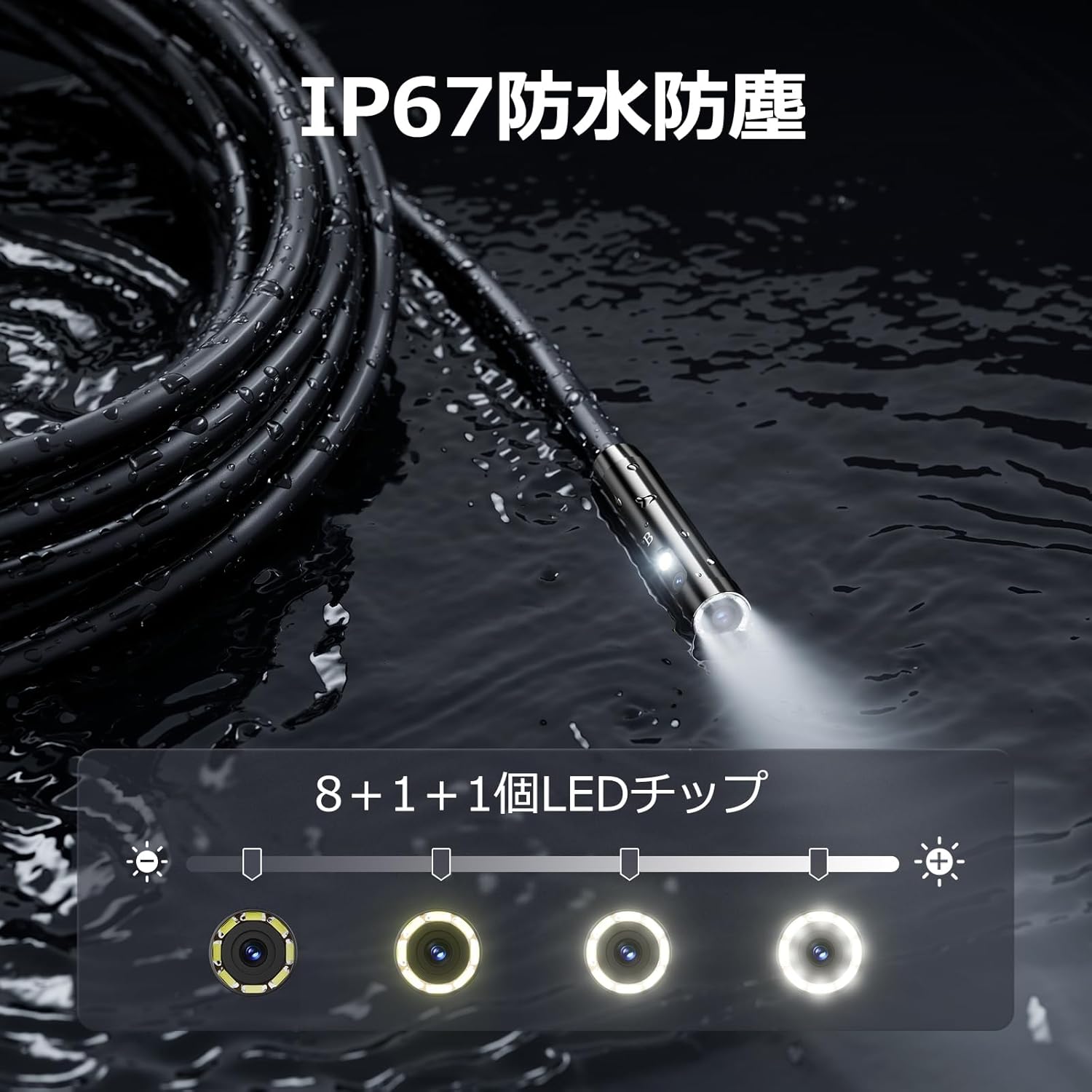
Figure 5.3: IP67 waterproof probe with adjustable LED illumination.
5.4 تصاویر لینا اور ویڈیوز ریکارڈ کرنا
Press the photo/video button (usually a camera icon) to capture a still image. To record video, press and hold the photo/video button; press again to stop recording. Ensure a Micro SD card is inserted to save your media.

Figure 5.4: Monitor interface for photo and video capture.
5.5 اسکرین کی گردش
Press the screen rotation button (often a circular arrow icon) to rotate the image on the monitor by 180 degrees. This is useful when the probe is in an inverted position.
5.6 Practical Applications
The DS620-TL is suitable for various tasks including home appliance maintenance, pipe inspection, wall wiring checks, and automotive repairs.

Figure 5.6: Various inspection scenarios for the endoscope.
5.7 پروڈکٹ ڈیموسٹریشن ویڈیو
Video 5.7: A demonstration of the DEPSTECH DS620-TL endoscope camera in use, showcasing its features and applications.
6 دیکھ بھال
6.1 Cleaning the Probe and Lens
After each use, especially in dirty or wet conditions, gently wipe the camera probe and lens with a soft, dry cloth. For stubborn dirt, a slightly damp cloth can be used, followed by drying. Do not use abrasive cleaners or solvents.
6.2 اسٹوریج
Store the endoscope camera in a cool, dry place, away from direct sunlight and extreme temperatures. Use the provided drawstring bag for protection. Ensure the cable is coiled neatly without sharp bends.
6.3 بیٹری کی دیکھ بھال
To prolong battery life, avoid fully discharging the device frequently. If storing for an extended period, charge the battery to approximately 50% every three months.
7 خرابیوں کا سراغ لگانا
7.1 اسکرین پر کوئی تصویر نہیں۔
- یقینی بنائیں کہ ڈیوائس آن ہے اور مکمل چارج ہے۔
- Check if the camera cable is securely connected to the monitor unit.
- Adjust the LED brightness to ensure adequate lighting in the inspection area.
7.2 Cannot Record Photos/Videos
- Verify that a compatible Micro SD card (Class 10/Class 10 or higher, 8-32GB) is inserted correctly.
- چیک کریں کہ آیا مائیکرو ایس ڈی کارڈ میں کافی خالی جگہ ہے۔
- Ensure the Micro SD card is not locked (read-only).
- Try formatting the Micro SD card (this will erase all data).
7.3 ڈیوائس چارج نہیں ہو رہی ہے۔
- Ensure the Type-C charging cable is properly connected to both the device and the power source.
- Try using a different USB power adapter or charging cable.
- کسی بھی ملبے یا نقصان کے لیے چارجنگ پورٹ کو چیک کریں۔
If you encounter issues not listed here or if the problem persists, please contact DEPSTECH customer support.
8. وضاحتیں
| فیچر | تفصیلات |
|---|---|
| برانڈ | DEPSTECH |
| ماڈل کا نام | DS620TL-JP |
| رنگ | سیاہ |
| واٹر پروف لیول | آئی پی 67 |
| میڈیا کی قسم | SD Memory Card (8-32GB, Class 10/Class 10 or higher recommended) |
| File فارمیٹ | MP4, MOV, AVI, JPEG, RAW |
| ویڈیو کیپچر فارمیٹ | MP4 |
| Viewفائنڈر کی قسم | آئی پی ایس |
| سینسر کی قسم | CMOS |
| تصویر سینسر کی قرارداد | 2.1 MP |
| فوکس فنکشن | فکسڈ فوکس |
| آٹو فوکس | نہیں |
| بیٹری کی اوسط زندگی | 2 گھنٹے |
| شامل اجزاء | Type-C Cable, Attachments, Storage Drawstring Bag |
| مینوفیکچرر وارنٹی | 2 سال |
| اصل ملک | چین |
9. وارنٹی اور سپورٹ
9.1 مینوفیکچرر وارنٹی
The DEPSTECH DS620-TL comes with a 24-month manufacturer warranty. Your order number serves as proof of purchase for warranty claims.
9.2 کسٹمر سپورٹ
For any inquiries, technical assistance, or warranty claims, please contact our dedicated support team:
- ای میل: support@depstech.com۔
- جواب کا وقت: We aim to respond to all inquiries within 24 hours. For requests submitted on weekends or holidays, a response will be provided on the next business day.

Figure 9.2: DEPSTECH support details.