
1. تعارف
Thank you for choosing the FORGING MOUNT Full-Motion TV Wall Mount. This manual provides essential information for safe and correct installation, operation, and maintenance of your new TV wall mount. Please read these instructions thoroughly before installation and keep them for future reference.
2. حفاظتی معلومات
انتباہ: Improper installation may result in serious personal injury and property damage. If you do not understand these instructions or have doubts about the safety of the installation, please contact a qualified installer.
- اس بات کو یقینی بنائیں کہ بڑھتی ہوئی سطح آلات کے مشترکہ وزن اور تمام منسلک ہارڈ ویئر اور اجزاء کو محفوظ طریقے سے سہارا دے سکتی ہے۔
- Do not install on drywall alone. This mount is designed for wood stud, concrete, and brick walls.
- Always use an assistant or mechanical lifting equipment to safely lift and position the television.
- Tighten screws firmly but do not overtighten. Overtightening can damage the screws and components.
- تنصیب کے دوران بچوں اور پالتو جانوروں کو دور رکھیں۔
- Regularly check the mount for any signs of wear or loosening.
3. پیکیج کے مشمولات
Verify that all components are present and undamaged before proceeding with installation. If any parts are missing or defective, please contact customer support.

Figure 3.1: All components included in the package. This includes the main wall plate, TV attachment brackets, extension arms, a variety of mounting hardware for different TV models and wall types, a spirit level for accurate installation, and cable ties for cable management.
پیکیج میں عام طور پر شامل ہیں:
- وال پلیٹ اسمبلی
- TV Bracket Arms (x2)
- Extension Arms (if applicable)
- ماؤنٹنگ ہارڈ ویئر کٹ (مختلف پیچ، واشر، ٹی وی اور دیوار کے لیے اسپیسر)
- Concrete Anchors (for concrete/brick installation)
- روح کی سطح
- کیبل ٹائیز
- تنصیب کا سانچہ۔
4. وضاحتیں
| فیچر | تفصیلات |
|---|---|
| ماڈل نمبر | HY9370 |
| ہم آہنگ ٹی وی سائز | 37 - 75 انچ |
| زیادہ سے زیادہ لوڈ کی گنجائش | 45 کلوگرام (99 پونڈ) |
| VESA مطابقت | 100x100 ملی میٹر سے 600x400 ملی میٹر |
| چڑھنے کی قسم | وال ماؤنٹ |
| حرکت کی قسم | Full-Motion (Swivel, Tilt, Level Adjustment) |
| جھکاؤ کا زاویہ | +5° / -10° |
| کنڈا زاویہ | 180° تک (ٹی وی کے سائز پر منحصر ہے) |
| لیول ایڈجسٹمنٹ | ±3° |
| بازو کی توسیع | Up to 103.5 cm (1015mm) |
| Minimum Wall Distance | 82 ملی میٹر |
| مواد | ہیوی ڈیوٹی کاربن اسٹیل |
| رنگ | سیاہ |
| پروڈکٹ کا وزن | 7.1 کلوگرام |
5. سیٹ اپ اور انسٹالیشن
Before installation, ensure you have the necessary tools (e.g., drill, stud finder, screwdriver, wrench). It is highly recommended to have at least two people for installation.
5.1 دیوار کی مطابقت
This mount is compatible with:
- Wood Stud Walls
- Solid Concrete Walls
- اینٹوں کی دیواریں۔
DO NOT install this mount on drywall (plasterboard) alone without securing it to wood studs or concrete.

Figure 5.1: Wall type compatibility. The mount can be installed on wood stud, concrete, or brick walls. Drywall installation without proper stud support is prohibited.
5.2 VESA مطابقت
Ensure your TV's VESA mounting pattern falls within the supported range of 100x100mm to 600x400mm.

Figure 5.2: VESA mounting pattern. Measure the horizontal and vertical distance between the mounting holes on the back of your TV to determine its VESA size.
5.3 Cable Exit Check
Before attaching the TV brackets, check if the cable exit points on your TV will be obstructed by the brackets. Adjust bracket placement if necessary.

Figure 5.3: Cable exit check. Ensure that the TV brackets do not block any essential cable ports on your television.
5.4 تنصیب کے مراحل
Follow these general steps for installation. Refer to the included detailed manual and installation template for precise measurements and hardware selection.
- ٹی وی پر بریکٹ منسلک کریں: Secure the TV bracket arms to the back of your television using the appropriate screws, washers, and spacers from the hardware kit. Ensure they are centered and firmly tightened.
- وال پلیٹ انسٹال کریں: Using the provided drilling template and spirit level, mark and drill pilot holes on your chosen wall location. Secure the wall plate assembly to the wall using the appropriate anchors and screws for your wall type.
- وال پلیٹ پر ٹی وی ہینگ: Carefully lift the television with the attached brackets and hook it onto the wall plate. Ensure the TV is securely seated and engage any safety locking mechanisms.
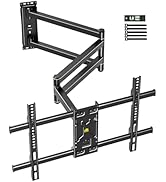
Figure 5.4: Simplified 3-step installation process. (1) Attach brackets to TV, (2) Mount wall plate to wall, (3) Hang TV onto wall plate.
6. آپریٹنگ ہدایات (ایڈجسٹمنٹ)
The FORGING MOUNT HY9370 offers full-motion capabilities for optimal viewلچک میں.
6.1 Arm Extension and Retraction
The mount features an ultra-long dual-folding arm that can extend up to 103.5 cm (1015mm) from the wall and retract to a minimum distance of 82mm.

Figure 6.1: Arm extension and retraction. The mount's arm can be extended to provide a maximum reach of 1015mm and folded back to a minimum distance of 82mm from the wall.
6.2 کنڈا ایڈجسٹمنٹ
The TV can be swiveled up to 180 degrees left or right, depending on the TV size and wall position, allowing for viewing from multiple angles or rooms.

Figure 6.2: 180-degree swivel capability. The TV can be rotated horizontally to accommodate various viewing positions, ideal for open-plan living spaces or corner installations.
6.3 جھکاؤ ایڈجسٹمنٹ
Adjust the tilt angle from +5° (upward) to -10° (downward) to reduce glare and optimize your viewتجربہ ہے.
6.4 سطح کی ایڈجسٹمنٹ
After installation, fine-tune the TV's horizontal level by adjusting it ±3° to ensure a perfectly straight display.

Figure 6.3: Tilt and level adjustments. The top image shows the TV tilting up to +5 degrees and down to -10 degrees to minimize glare. The bottom image demonstrates the ability to adjust the TV's horizontal level by +/-3 degrees for perfect alignment.
7 دیکھ بھال
باقاعدگی سے دیکھ بھال آپ کے TV وال ماؤنٹ کی لمبی عمر اور محفوظ آپریشن کو یقینی بناتی ہے۔
- صفائی: نرم، خشک کپڑے سے پہاڑ کو صاف کریں۔ کھرچنے والے کلینر یا سالوینٹس سے پرہیز کریں جو ختم کو نقصان پہنچا سکتے ہیں۔
- معائنہ: Periodically check all screws and bolts to ensure they remain tight. Re-tighten if necessary, but do not overtighten.
- حرکت: If the arm movement becomes stiff, apply a small amount of silicone-based lubricant to the pivot points.
8 خرابیوں کا سراغ لگانا
If you encounter issues with your TV wall mount, refer to the following common problems and solutions.
| مسئلہ | ممکنہ وجہ | حل |
|---|---|---|
| ٹی وی انسٹالیشن کے بعد لیول نہیں ہے۔ | تنصیب کے دوران معمولی غلطی۔ | Use the built-in level adjustment feature (±3°) to correct the horizontal alignment. |
| پہاڑ ڈھیلا یا غیر مستحکم محسوس ہوتا ہے۔ | Mounting screws are not fully tightened or wall anchors are insufficient. | Re-check all wall mounting screws and TV attachment screws. Ensure proper anchors were used for your wall type. If unsure, consult a professional. |
| Arm movement is stiff or difficult. | Lack of lubrication or dust accumulation. | Clean the arm joints and apply a small amount of silicone-based lubricant to the pivot points. |
| TV cables are pinched or obstructed. | Cables were not routed correctly during installation. | Carefully detach the TV, re-route cables using the provided cable ties, and re-attach the TV. Ensure cables have enough slack for full motion. |
9. وارنٹی اور سپورٹ
This FORGING MOUNT product is covered by a 1 سالہ صنعت کار کی وارنٹی خریداری کی تاریخ سے. یہ وارنٹی عام استعمال کے تحت مواد اور کاریگری میں نقائص کا احاطہ کرتی ہے۔
وارنٹی کا احاطہ نہیں کرتا:
- غلط تنصیب، غلط استعمال، یا غفلت کی وجہ سے نقصان۔
- غیر مجاز ترمیم یا مرمت کی وجہ سے نقصان۔
- عام ٹوٹ پھوٹ۔
For warranty claims, technical support, or any questions regarding your product, please contact FORGING MOUNT customer service through your retailer or the official FORGING MOUNT webسائٹ