
1. تعارف
The JONR X1 Max is an advanced robot vacuum and mop cleaner designed to provide comprehensive floor cleaning. It features powerful suction, intelligent navigation, and an all-in-one self-cleaning station for a hands-free cleaning experience. This manual will guide you through the setup, operation, and maintenance of your device.
اہم خصوصیات:
- 20000 پا سکشن پاور: Effectively removes hair, dust, and debris from various floor types.
- TroboWave DuoBrush System: Anti-tangle design to minimize hair entanglement and maintenance.
- 30 mm Obstacle Climbing: Easily navigates over thresholds and carpets.
- 3D LiDAR Navigation with RGB Technology: Precise room mapping and intelligent obstacle avoidance.
- آل ان ون اسٹیشن: Automatic dust collection, hot water mop washing (75°C), and hot air mop drying (45°C).
- اسمارٹ کنٹرول: App control and voice command compatibility (Alexa, Google Home).
- لمبی بیٹری کی زندگی: Up to 150 minutes of cleaning, covering over 200 m².
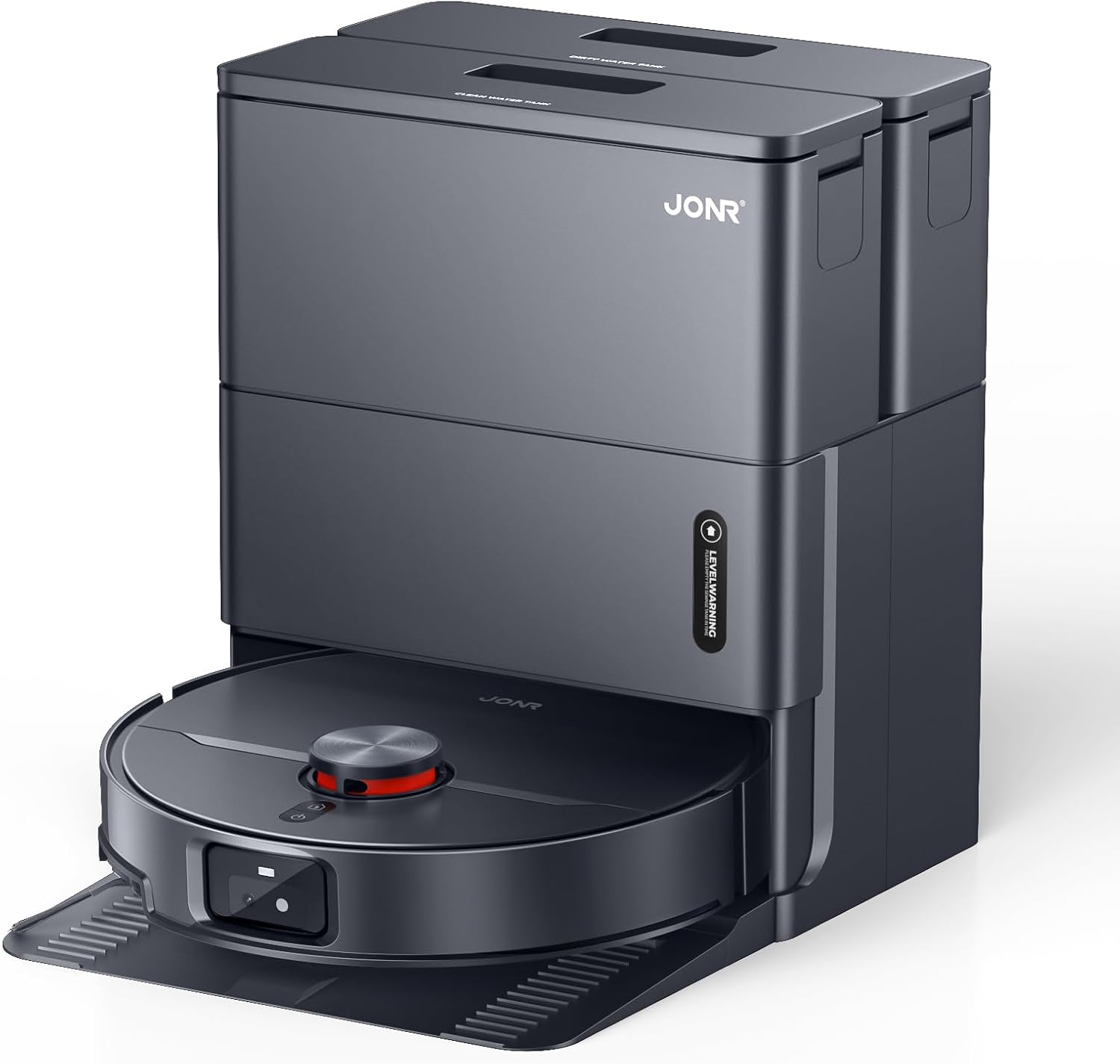
Image: The JONR X1 Max robot vacuum demonstrating its powerful 20000 Pa suction, effectively lifting dust and pet hair from various surfaces.
2. سیٹ اپ
2.1 پیک کھولنا اور اجزاء کی جانچ
پیکیجنگ سے تمام اجزاء کو احتیاط سے ہٹا دیں۔ یقینی بنائیں کہ نیچے دی گئی تمام اشیاء موجود ہیں۔
- JONR X1 Max Robot Vacuum and Mop Cleaner
- All-in-One Docking Station
- پاور اڈاپٹر
- ایم او پی پیڈ (پہلے سے نصب یا الگ)
- ہدایات دستی (یہ دستاویز)
- Dust Bag (pre-installed in station or separate)
- Clean Water Tank (4.2 L)
- Dirty Water Tank (3.8 L)
2.2 ڈاکنگ اسٹیشن کی جگہ کا تعین
Place the docking station on a hard, level surface against a wall. Ensure there is at least 0.5 meters of clear space on both sides and 1.5 meters in front of the station for the robot to navigate freely. Connect the power adapter to the station and plug it into a wall outlet.

Image: The JONR X1 Max robot vacuum and its all-in-one docking station. The station is designed for automatic dust collection, mop washing, and drying.
2.3 ابتدائی چارجنگ
Place the robot onto the docking station. Ensure the charging contacts on the robot align with those on the station. The robot will automatically begin charging. For first-time use, fully charge the robot before operation (approximately 2.5 hours).
2.4 ایپ انسٹال کرنا اور جوڑا بنانا
- Download the "JONR" app from your smartphone's app store (iOS or Android).
- ایپ کھولیں اور ایک اکاؤنٹ بنائیں یا لاگ ان کریں۔
- Follow the in-app instructions to add your JONR X1 Max device. This typically involves connecting to the robot's Wi-Fi hotspot temporarily and then connecting the robot to your home Wi-Fi network.
- Once paired, you can control the robot, set cleaning schedules, and view ایپ سے نقشے
3. آپریٹنگ ہدایات
3.1 صفائی کا چکر شروع کرنا
You can start a cleaning cycle using one of the following methods:
- روبوٹ بٹن: Press the power button on the robot once to start a general cleaning cycle.
- JONR App: Open the app, select your device, and tap "Start Cleaning." You can choose specific cleaning modes (Vacuum, Mop, Vacuum & Mop) and areas.
- وائس کنٹرول: If integrated with Amazon Alexa or Google Home, use commands like "Alexa, start JONR robot" or "Hey Google, tell JONR to clean."
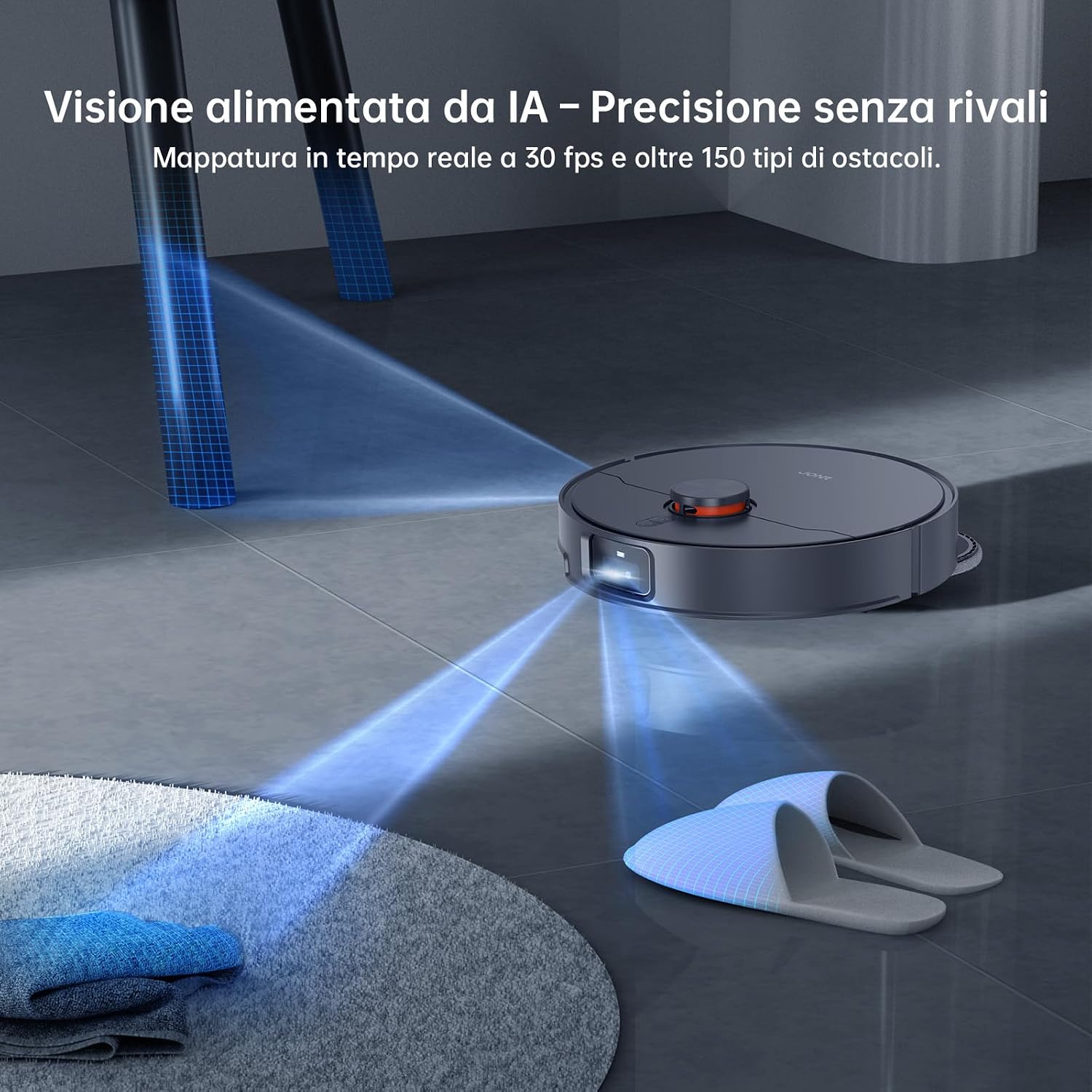
Image: The JONR X1 Max robot vacuum navigating a room, demonstrating its AI-powered obstacle avoidance system to detect and bypass objects like slippers.
3.2 صفائی کے طریقے
- ویکیوم موڈ: The robot will only vacuum, suitable for carpets or dry debris.
- موپ موڈ: The robot will only mop, suitable for hard floors. Ensure water tanks are filled.
- ویکیوم اور موپ موڈ: The robot will vacuum and mop simultaneously. This is the default and recommended mode for most hard floors.
- زون کی صفائی: روبوٹ کو صاف کرنے کے لیے مخصوص علاقوں کی وضاحت کرنے کے لیے ایپ کا استعمال کریں۔
- اسپاٹ کی صفائی: Direct the robot to a specific spot for intensive cleaning.

Image: The JONR X1 Max robot vacuum demonstrating its edge-to-edge cleaning capability, with extendable mop pads ensuring thorough coverage near walls and furniture.
3.3 رکاوٹ نیویگیشن
The JONR X1 Max is equipped with a lifting roller design, allowing it to overcome obstacles up to 30 mm, such as door thresholds and thick carpets. Its 3D LiDAR navigation and RGB technology enable precise mapping and real-time obstacle avoidance.

Image: The JONR X1 Max robot vacuum demonstrating its ability to climb over obstacles up to 30mm high, such as floor transitions or rugs, compared to a standard robot's 8mm capability.
3.4 آل ان ون اسٹیشن کے افعال
The docking station provides automated maintenance for the robot:
- خودکار دھول خالی کرنا: After each cleaning cycle, the robot's dustbin is automatically emptied into a 3L dust bag within the station.
- گرم پانی سے موپ دھونا: The mop pads are washed with 75°C hot water to remove dirt and grime effectively.
- گرم ہوا موپ خشک کرنا: After washing, the mop pads are dried with 45°C hot air to prevent mildew and odors.
- Automatic Water Refill/Drain: The station manages the clean and dirty water tanks, refilling the robot's water tank and draining dirty water as needed.

Image: The JONR X1 Max docking station actively cleaning the robot's mop pads with 75°C hot water, ensuring thorough sanitation and removal of stubborn stains.
4 دیکھ بھال
Regular maintenance ensures the optimal performance and longevity of your JONR X1 Max.
4.1 Dust Bag Replacement (Docking Station)
- The 3L dust bag in the docking station typically lasts up to 2.5 months, depending on usage.
- When the app indicates the dust bag is full, open the station's top cover, remove the full bag, and replace it with a new one.
4.2 Water Tank Maintenance (Docking Station)
- صاف پانی کا ٹینک (4.2 L): Refill with clean tap water as needed. Do not add detergents or cleaning solutions unless specifically designed for robot vacuums and approved by JONR.
- گندے پانی کا ٹینک (3.8 L): Empty the dirty water tank regularly to prevent odors and ensure proper mop washing. Clean the tank with water if necessary.
4.3 ایم او پی پیڈ کی صفائی اور تبدیلی
- The docking station automatically washes and dries the mop pads.
- Periodically inspect the mop pads for wear and tear. Replace them when they become excessively worn or no longer clean effectively.
4.4 مین برش اور سائیڈ برش کی صفائی
- مین برش: The TroboWave DuoBrush system is designed to reduce hair entanglement. However, periodically remove the main brush and clean any accumulated hair or debris using the cleaning tool provided.
- سائیڈ برش: Check side brushes for tangled hair or damage. Remove and clean them. Replace if bristles are bent or broken.

تصویر: ایک قریبی اپ view of the JONR X1 Max's patented helical blade design, illustrating its anti-tangle technology that significantly reduces hair obstructions and minimizes maintenance requirements.
4.5 فلٹر کی صفائی
- The robot uses a sponge filter. Remove the filter from the dustbin (after automatic emptying) and tap it gently to remove dust. Do not wash the filter with water unless specified.
- استعمال کے لحاظ سے ہر 3-6 ماہ بعد فلٹر کو تبدیل کریں۔
4.6 سینسر کی صفائی
- Wipe the cliff sensors, wall sensors, and charging contacts on the robot and docking station with a clean, dry cloth periodically to ensure proper navigation and charging.
5 خرابیوں کا سراغ لگانا
| مسئلہ | ممکنہ وجہ | حل |
|---|---|---|
| روبوٹ شروع یا جواب نہیں دیتا. | کم بیٹری؛ پاور سوئچ آف؛ روبوٹ پھنس گیا۔ | روبوٹ کو چارج کریں؛ یقینی بنائیں کہ پاور سوئچ آن ہے؛ کسی بھی رکاوٹ کو صاف کریں۔ |
| ناقص صفائی کی کارکردگی۔ | Full dustbin; Clogged filter; Worn brushes/mop pads. | Empty dustbin/replace dust bag; Clean/replace filter; Clean/replace brushes/mop pads. |
| Robot cannot return to docking station. | Station obstructed; Robot too far; Charging contacts dirty. | Clear area around station; Manually place robot on station; Clean charging contacts. |
| ایپ کنکشن کے مسائل۔ | Incorrect Wi-Fi password; Router too far; Robot offline. | Verify Wi-Fi credentials; Move robot closer to router; Restart robot and app. |
| ایم او پی پیڈ مؤثر طریقے سے صفائی نہیں کررہے ہیں۔ | Dirty water tank full; Clean water tank empty; Worn mop pads. | خالی گندے پانی کے ٹینک؛ صاف پانی کے ٹینک کو دوبارہ بھرنا؛ ایم او پی پیڈز کو تبدیل کریں۔ |
6. وضاحتیں
| فیچر | تفصیل |
|---|---|
| برانڈ | JONR |
| ماڈل کا نام | X1 میکس۔ |
| سکشن پاور | 20,000 پا |
| Obstacle Climbing Capability | 30 ملی میٹر |
| Hot Water Mop Washing Temperature | 75 °C |
| Hot Air Mop Drying Temperature | 45 °C |
| بیٹری کی زندگی | Up to 2.5 Hours (150 minutes) |
| بیٹری کی ساخت | لتیم پولیمر |
| صاف پانی کے ٹینک کی صلاحیت | 4.2 لیٹر |
| گندے پانی کے ٹینک کی گنجائش | 3.8 لیٹر |
| ڈسٹ بیگ کی اہلیت | 3 لیٹر |
| کنٹرول کی قسم | Button Control, App Control, Voice Control |
| ہم آہنگ آلات | ایمیزون ایکو، گوگل ہوم، اسمارٹ فونز |
| فلٹر کی قسم | سپنج |
| طول و عرض (L x W x H) | 33L x 34W x 55H سینٹی میٹر |
| شے کا وزن | 12 کلوگرام |
| شور کی سطح | 70 ڈیسیبل |
| تجویز کردہ سطحیں۔ | Tiles, Hard Floors, Carpets |
7. وارنٹی اور سپورٹ
JONR provides 365-day customer service for the X1 Max robot vacuum and mop cleaner. For warranty claims, technical support, or any inquiries regarding your product, please contact JONR customer service through the official webآپ کی خریداری کی دستاویزات میں فراہم کردہ سائٹ یا رابطے کی معلومات۔
وارنٹی مقاصد کے لیے براہ کرم اپنی خریداری کا ثبوت اپنے پاس رکھیں۔