
1. تعارف
Thank you for choosing the TOPTRO TP3 4K Google TV Portable Projector. This manual provides essential information for setting up, operating, and maintaining your projector. Please read it thoroughly before use to ensure optimal performance and safety.
The TOPTRO TP3 is designed to deliver a versatile and immersive viewing experience, featuring integrated Google TV, AI-powered image adjustments, and comprehensive connectivity options. Enjoy your content at home, outdoors, or on the go.
2. پروڈکٹ ختمview
2.1 کلیدی خصوصیات
- Integrated Google TV: Access over 10,000 official streaming applications, including Netflix, Prime Video, and YouTube, without additional devices.
- Google Voice Control: Use the remote control's voice assistant button to search for content, adjust settings, and control playback hands-free.
- AI-Powered Image Adjustment: Features automatic focus, automatic keystone correction, obstacle avoidance, and automatic screen adjustment for a perfectly aligned and clear image within seconds.
- Native 1080P Resolution with 4K Decoding: Delivers sharp, detailed images and natural colors, supporting 4K video decoding.
- Short Throw Ratio (0.8:1): Projects a 60-inch image from just one meter distance, ideal for small spaces.
- 90-Degree Rotating Stand: Allows for flexible projection angles, including ceiling projection.
- ایڈوانس کنیکٹیویٹی: Equipped with dual-band WiFi 6, Bluetooth 5.3, HDMI ARC, USB, and a 3.5mm audio jack for wide device compatibility.
- پورٹیبل ڈیزائن: Weighing only 1.2 kg (2.6 lbs) with a hidden carry handle, making it easy to transport.
2.2 پیکیج کے مشمولات
یقینی بنائیں کہ تمام اشیاء پیکیج میں موجود ہیں:
- TOPTRO TP3 پروجیکٹر
- ریموٹ کنٹرول
- HDMI کیبل
- پاور اڈاپٹر
- صارف دستی
3. سیٹ اپ
3.1 ابتدائی جگہ کا تعین
Place the projector on a stable, flat surface. The 90-degree rotating stand allows for various projection angles, including wall, ceiling, or tabletop. For optimal image quality, ensure the projection surface is smooth and light-colored.

Image: The TOPTRO TP3 projector can be used in diverse environments, from living rooms to outdoor camping, showcasing اس کی موافقت۔
3.2 پاور کنکشن
- Connect the power adapter to the projector's power input.
- Plug the power adapter into a suitable electrical outlet (220V).
- اسے آن کرنے کے لیے پروجیکٹر یا ریموٹ کنٹرول پر پاور بٹن دبائیں۔
3.3 نیٹ ورک کنکشن
Upon first startup, follow the on-screen prompts to connect to your Wi-Fi network. The projector supports dual-band WiFi 6 for a fast and stable connection.
3.4 گوگل ٹی وی سیٹ اپ
After connecting to Wi-Fi, sign in with your Google account to access Google TV and download applications from the Google Play Store. This step is crucial for utilizing the integrated streaming services.

Image: The projector's interface showing integrated Google TV with direct access to popular streaming applications.
4. آپریٹنگ ہدایات
4.1 بنیادی آپریشن
- پاور آن/آف: ریموٹ یا پروجیکٹر پر پاور بٹن دبائیں۔
- نیویگیشن: Use the directional buttons on the remote to navigate menus.
- انتخاب: Press the 'OK' button to confirm selections.
- حجم کنٹرول: ریموٹ پر والیوم بٹن استعمال کریں۔
4.2 تصویری ایڈجسٹمنٹ
The TOPTRO TP3 features AI-powered automatic image adjustments:
- آٹو فوکس: پروجیکٹر خود بخود تصویر کی وضاحت کو ایڈجسٹ کرتا ہے۔
- آٹو کی اسٹون تصحیح: Automatically corrects distorted images to a rectangular shape.
- رکاوٹ سے بچنا: Detects and adjusts the image to avoid objects on the projection surface.
- Auto Screen Adjustment: Optimizes the image to fit the screen area.
These adjustments occur automatically within seconds of powering on or repositioning the projector. Manual digital zoom (80-100%) is also available for fine-tuning image size.

Image: Visual representation of the projector's AI-powered automatic image adjustment features, ensuring a clear and aligned picture.
4.3 گوگل وائس کنٹرول
Press the dedicated voice assistant button on your remote control and speak your command. For example, say "Open YouTube" or "Play music." The projector will respond to your voice commands for quick access to functions and content.
4.4 Screen Mirroring (Google Cast)
Utilize Google Cast technology to wirelessly mirror content from your smartphone or tablet to the projector. For iPhone users, download the "AirScreen" application from the Google Play Store on the projector for wireless screen mirroring.
4.5 Rotating Stand Usage
The integrated 90-degree rotating stand allows you to easily adjust the projection angle. Simply pivot the projector to direct the image onto a wall, screen, or ceiling. This feature is particularly useful for bedroom viewing or creative setups.
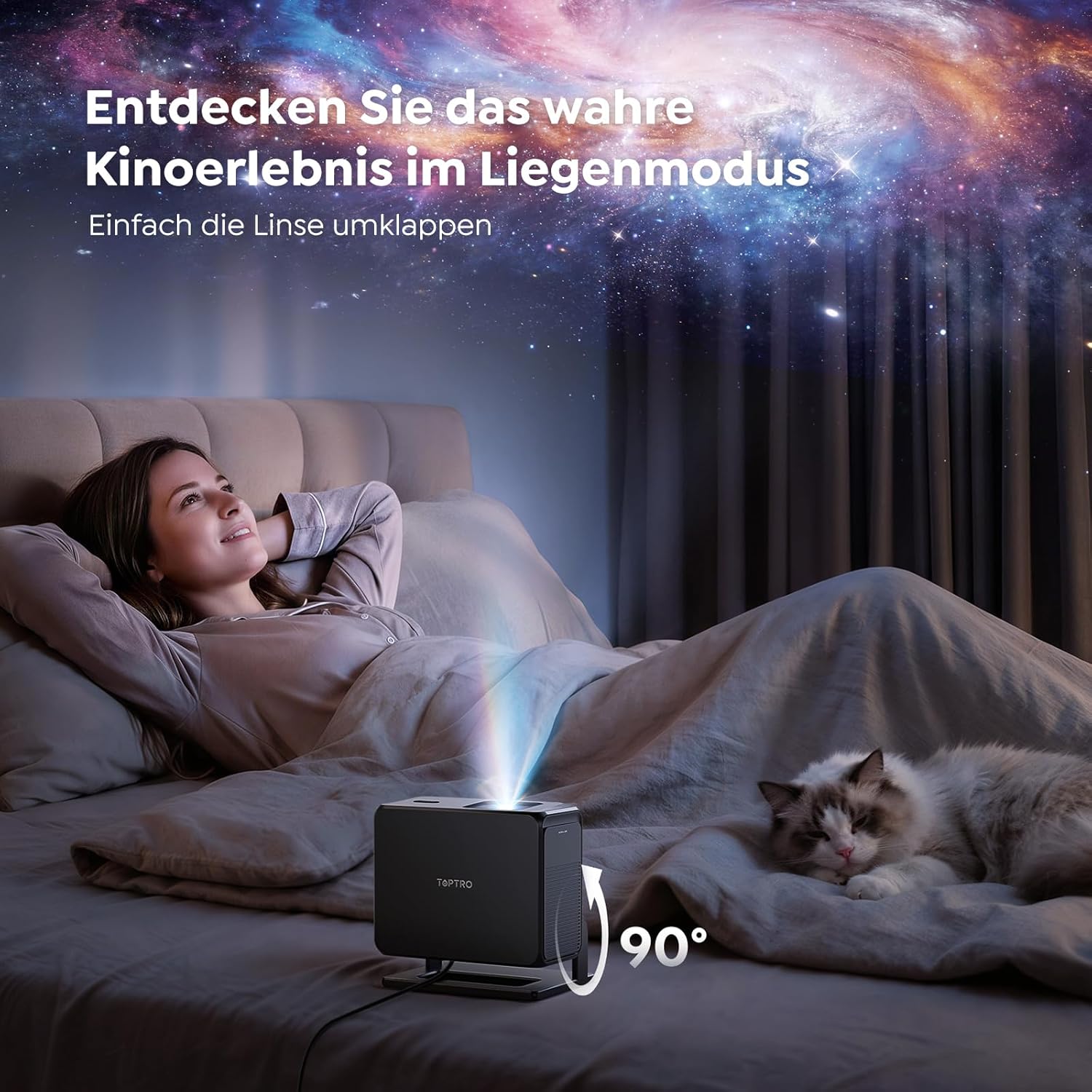
Image: The TOPTRO TP3 projector rotated 90 degrees to project content onto a bedroom ceiling, offering a unique viewتجربہ ہے.
5. کنیکٹیویٹی
5.1 وائرڈ کنکشنز
- HDMI ARC/CEC: Connect external devices like laptops, gaming consoles (Xbox/PlayStation 5), or Blu-ray players. The ARC feature allows audio to be sent back to a compatible sound system.
- USB: میڈیا پلے بیک کے لیے USB ڈرائیوز کو جوڑیں۔
- 3.5 ملی میٹر آڈیو جیک: Connect external wired speakers or headphones.
5.2 وائرلیس کنکشنز
- Wi-Fi 6: Provides faster and more stable wireless connectivity for streaming and online content.
- بلوٹوتھ 5.3: Connect Bluetooth headphones or speakers for an enhanced audio experience.
6 دیکھ بھال
6.1 لینز کی صفائی
Gently clean the projector lens with a soft, lint-free cloth designed for optical surfaces. Avoid using abrasive cleaners or excessive force, as this can scratch the lens.
6.2 عمومی صفائی
پروجیکٹر کے بیرونی حصے کو نرم، خشک کپڑے سے صاف کریں۔ مائع کلینر کو براہ راست ڈیوائس پر استعمال نہ کریں۔
6.3 اسٹوریج
When not in use, store the projector in a cool, dry place, away from direct sunlight and extreme temperatures. Use the original packaging or a protective case to prevent dust accumulation and damage.
7 خرابیوں کا سراغ لگانا
7.1 کوئی تصویر نہیں دکھائی گئی۔
- Ensure the projector is powered on and connected to a power source.
- Check all cable connections (HDMI, USB) to external devices.
- Verify the input source selected on the projector matches the connected device.
- Confirm the lens cap is removed.
7.2 دھندلی تصویر
- Allow the auto-focus function to complete its adjustment.
- یقینی بنائیں کہ پروجیکشن کی سطح فلیٹ ہے اور پروجیکٹر مستحکم ہے۔
- Clean the projector lens if smudges or dust are visible.
7.3 کوئی آواز نہیں۔
- پروجیکٹر اور منسلک سورس ڈیوائس دونوں پر والیوم لیول چیک کریں۔
- Ensure external speakers or headphones are properly connected (wired or Bluetooth).
- If using HDMI ARC, verify your sound system is compatible and correctly configured.
7.4 ریموٹ کنٹرول کام نہیں کر رہا ہے۔
- ریموٹ کنٹرول میں بیٹریاں تبدیل کریں۔
- یقینی بنائیں کہ ریموٹ اور پروجیکٹر کے IR ریسیور کے درمیان کوئی رکاوٹ نہیں ہے۔
For further assistance, refer to the detailed troubleshooting section in the full user manual or contact customer support.
8. وضاحتیں
| فیچر | تفصیلات |
|---|---|
| برانڈ | ٹوپٹرو |
| ماڈل کا نام | ٹی پی 3 |
| مقامی قرارداد | 1920 x 1080 (1080P) |
| Video Decoding Support | 4K |
| ڈسپلے کی قسم | ایل ای ڈی |
| خصوصی خصوصیات | Auto Focus, Auto Keystone Correction, Obstacle Avoidance, Auto Screen Adjustment, Google TV, Google Voice Control |
| کنیکٹوٹی ٹیکنالوجی | HDMI, USB, Bluetooth 5.3, Wi-Fi 6 |
| ہارڈ ویئر انٹرفیس | HDMI ARC/CEC, USB, 3.5mm Audio |
| پروڈکٹ کے طول و عرض (LxWxH) | 19.4 x 15.8 x 14.1 سینٹی میٹر |
| شے کا وزن | 1.2 کلوگرام |
| فارم فیکٹر | پورٹیبل |
| چڑھنے کی قسم | Ceiling Mount, Tabletop, Wall |
| کم از کم تصویری سائز | 40 انچ |
| زیادہ سے زیادہ تصویری سائز | 120 انچ |
| زیادہ سے زیادہ پھینکنے کا فاصلہ | 2.13 میٹر |
| والیومtage | 220 وولٹ |
| شامل اجزاء | HDMI کیبل |
| رنگ | سیاہ |
| کنٹرولر کی قسم | ریموٹ کنٹرول |
| ہم آہنگ آلات | Xbox/PlayStation 5, Smartphone, Tablet, Laptop, Speaker, Notebook |
| تجویز کردہ استعمال | Gaming, Business, Home Cinema, Education |
9. وارنٹی اور سپورٹ
9.1 وارنٹی کی معلومات
Please refer to the warranty card included with your product for specific warranty terms and conditions. Keep your proof of purchase for warranty claims.
9.2 کسٹمر سپورٹ
If you encounter any issues or have questions regarding your TOPTRO TP3 projector, please contact our customer service team. We provide prompt, professional, and effective support to ensure a smooth user experience.
Contact details can typically be found on our official webسائٹ یا وارنٹی کارڈ پر۔