
1. تعارف
The SKYRC B6 Neo2 is a compact and powerful balance charger designed for various battery types, including LiPo, LiFe, LiIon, LiHV, NiMH, NiCd, and Pb. This next-generation charger offers advanced features such as high-power charging (up to 300W DC, 80W PD), efficient discharging (up to 24W), storage mode, and a battery checker function. Its intuitive ColorX interface and quiet operation ensure a user-friendly experience, while comprehensive safety features protect against electrical hazards. The B6 Neo2 is ideal for maintaining the health and readiness of RC batteries for cars, drones, planes, and boats.

تصویر 1.1: سامنے اور طرف view of the SKYRC B6 Neo2 Balance Charger, showcasing اس کا کمپیکٹ ڈیزائن اور ڈسپلے۔
2. سیٹ اپ
2.1 پاور سورس سے جڑنا
The SKYRC B6 Neo2 offers two options for power input:
- ڈی سی ان پٹ: Connect a power source providing 10.0-28.0V to the DC input port.
- PD ان پٹ: Connect a PD3.0 compatible power supply providing 12.0-20.0V to the Type-C PD input port.
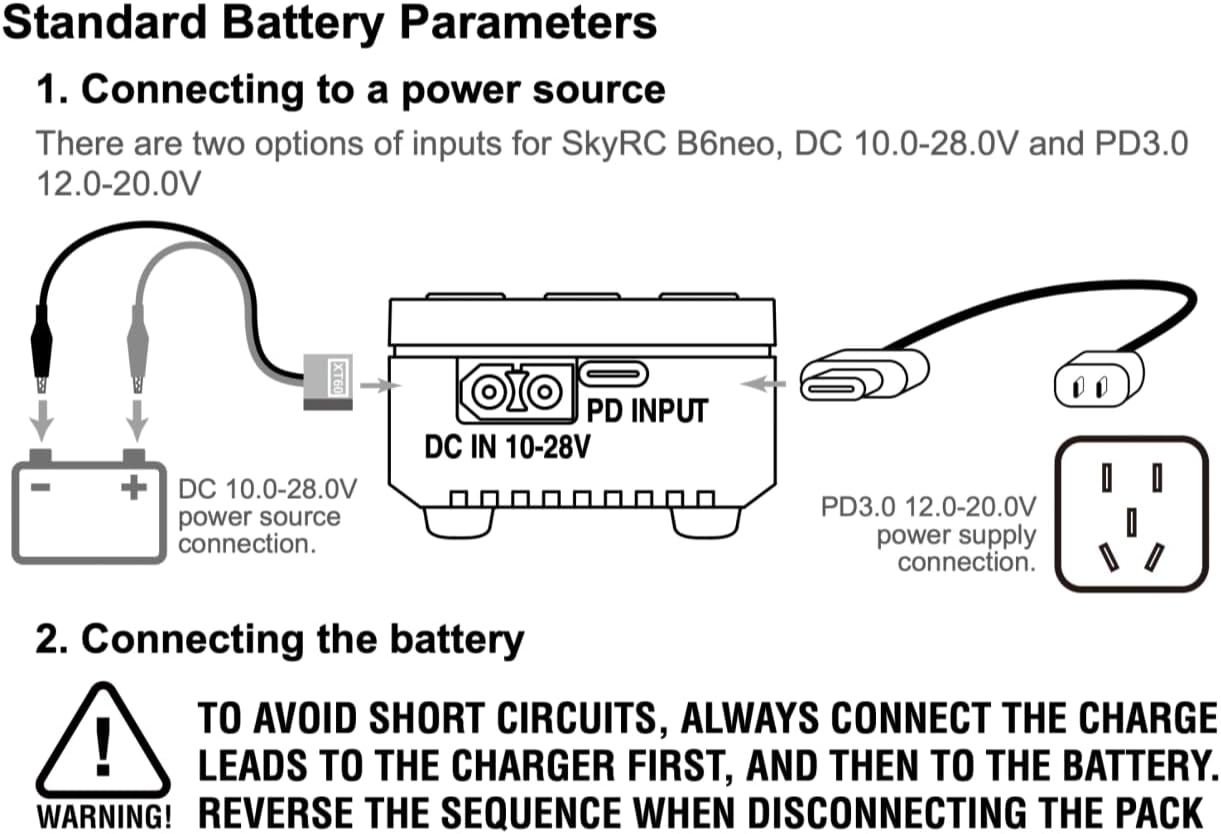
Image 2.1: Diagram illustrating how to connect the SKYRC B6 Neo2 to either a DC power source (10.0-28.0V) or a PD3.0 power supply (12.0-20.0V).
2.2 بیٹری کو جوڑنا
When connecting a battery to the charger, always follow the correct sequence to prevent short circuits and ensure safety:
- Connect the charge leads to the charger first.
- Then, connect the charge leads to the battery.
انتباہ: Reverse this sequence when disconnecting the battery pack. Disconnect the battery from the charge leads first, then disconnect the charge leads from the charger.
3. آپریٹنگ ہدایات
3.1 یوزر انٹرفیس
The B6 Neo2 features an intuitive ColorX interface, designed for easy navigation similar to a smartphone. Use the navigation buttons on the side of the unit to select options and adjust settings on the display.
3.2 چارجنگ موڈز
The charger supports various battery chemistries and charging parameters:
- LiPo/LiFe/LiIon/LiHV: 1S-6S batteries.
- NiMH/NiCd: 2-15 cell batteries.
- پی بی: 3S/6S/12S batteries.
Maximum charging power is 300W when powered by DC (5-27V, 0.2-15A) and 80W when using Type-C PD input (12-20V, 5A).
3.3 Discharging, Storage, and Checker Modes
Beyond charging, the B6 Neo2 offers additional battery management functions:
- ڈسچارج موڈ: The integrated balance port enables discharging at up to 24W, allowing for faster and more efficient battery maintenance.
- اسٹوریج وضع: Prepares batteries for long-term storage by bringing them to an optimal voltage level, extending battery life.
- Battery Checker Mode: بیٹری والیوم پر حقیقی وقت کی معلومات فراہم کرتا ہے۔tage and cell balance, helping to monitor battery health.
3.4 Digital Power Supply Function
The B6 Neo2 can also function as a digital power supply, providing optimal voltage and current settings for various applications. It includes comprehensive protection against electrical hazards to ensure safe operation.
4 دیکھ بھال
4.1 فرم ویئر اپ گریڈ
Keep your charger up-to-date with the latest features and performance enhancements through firmware upgrades. This process is managed via the Charger Master App:
- Connect the B6 Neo2 to your computer using a USB-C cable.
- Launch the Charger Master software, which will automatically detect the connection.
- After successful detection, click to check for new firmware versions.
- If a new version is available, the 'Update' option will become active.
- Click 'Update' and wait for the process to complete.
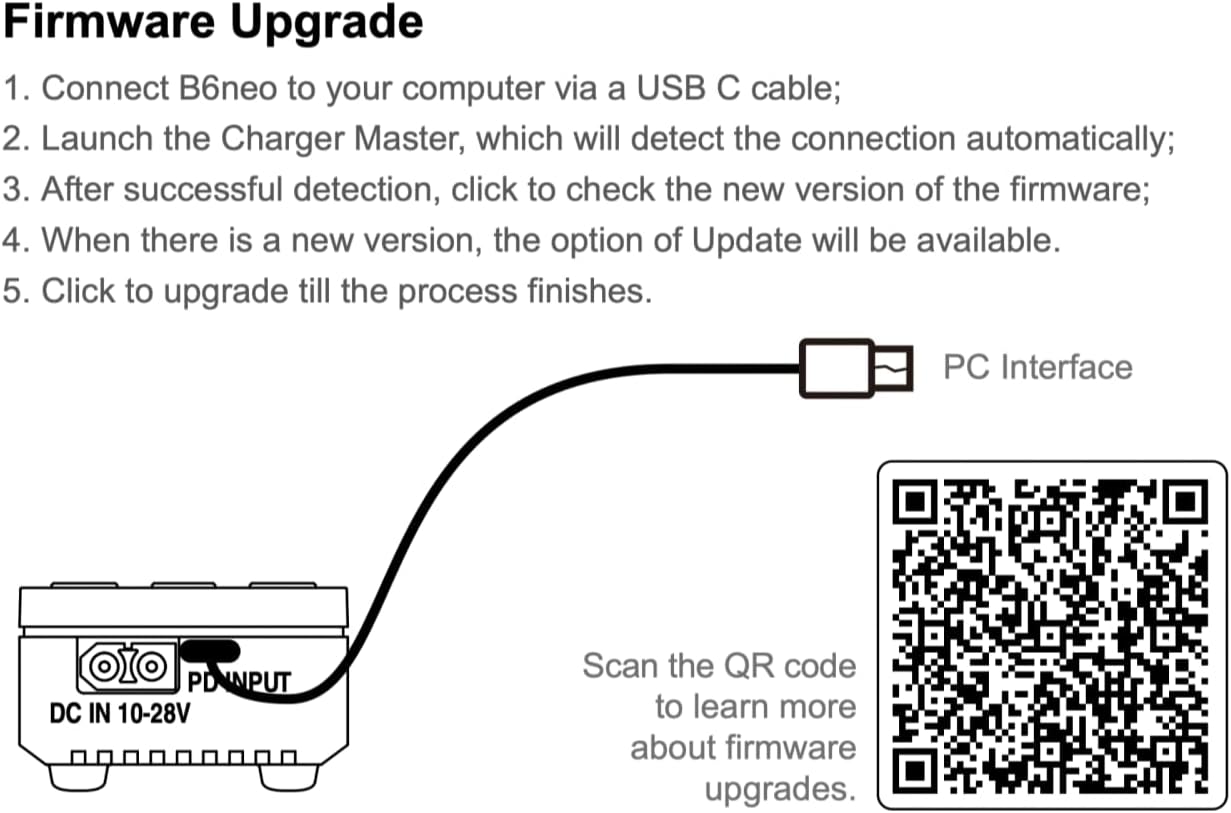
Image 4.1: Diagram illustrating the connection for firmware upgrades using a USB-C cable to a PC. For more information, visit the official SKYRC firmware upgrade page.
4.2 صفائی ستھرائی اور ذخیرہ
To ensure longevity and optimal performance, keep the charger clean and free from dust and debris. Use a soft, dry cloth for cleaning. Store the charger in a cool, dry place away from direct sunlight and extreme temperatures when not in use.
5 خرابیوں کا سراغ لگانا
If you encounter issues with your SKYRC B6 Neo2 charger, consider the following:
- کوئی پاور/ڈسپلے نہیں: Ensure the power source is correctly connected and providing the specified voltage (DC 10.0-28.0V or PD3.0 12.0-20.0V). Check all cable connections.
- Charging Errors: Verify that the battery type and cell count settings match the connected battery. Ensure the balance port is correctly connected for LiPo/LiFe/LiIon/LiHV batteries.
- Over-Temperature/Short-Circuit Protection: If the charger stops operating unexpectedly, it might be due to activated safety features. Allow the unit to cool down if it's hot. Check for any short circuits in the connections.
- غیر جوابی انٹرفیس: Try restarting the charger by disconnecting and reconnecting the power. If issues persist, consider performing a firmware upgrade as described in Section 4.1.
For persistent issues, refer to the official SKYRC support resources or contact your retailer.
6. وضاحتیں
| برانڈ | SKYRC |
| ماڈل | B6 Neo2 |
| پروڈکٹ کے طول و عرض (D x W x H) | 1.22" x 1.97" x 2.76" (31mm x 50mm x 70mm) |
| شے کا وزن | 82 گرام |
| ان پٹ جلدtage | DC: 10.0-28.0V, PD3.0: 12.0-20.0V |
| زیادہ سے زیادہ چارج پاور | DC: 300W (5-27V, 0.2-15A), PD: 80W (12-20V, 5A) |
| زیادہ سے زیادہ خارج ہونے والی طاقت | 24W (when balance port connected) |
| تائید شدہ بیٹری کی اقسام | LiPo/LiFe/LiIon/LiHV (1S-6S), NiMH/NiCd (2-15 cells), Pb (3S/6S/12S) |
| کنیکٹر کی قسم | XT60 (DC Input), Type-C PD (PD Input) |
| بندرگاہوں کی تعداد | 2 (DC Input, PD Input) |
| حفاظتی خصوصیات | Short-circuit protection, Over-temperature protection, Active balancer |
| سرٹیفیکیشنز | CE، FCC، RoHS، UL |
| شور کی سطح | 48 ڈی بی |

Image 6.1: Dimensional diagram of the SKYRC B6 Neo2, showing its compact size (70mm x 50mm x 32mm).
7. وارنٹی اور سپورٹ
7.1 وارنٹی کی معلومات
The SKYRC B6 Neo2 comes with a 1 سال کی وارنٹی if purchased from an authorized retailer such as RCJuice. Please retain your proof of purchase for warranty claims.
7.2 کسٹمر سپورٹ
For technical assistance, troubleshooting, or warranty inquiries, please contact your point of purchase or visit the official SKYRC webمعاون وسائل اور رابطہ کی معلومات کے لیے سائٹ۔