
تعارف
This manual provides detailed instructions for the safe and efficient use of your Samvix iBusiness Mehadrin 128 Kosher MP3 Player. Please read this manual thoroughly before operating the device and retain it for future reference.
کلیدی خصوصیات
- Massive 128GB Storage: Store thousands of songs, lectures, and audio files without needing an SD card.
- Full MP3 Playback: Features repeat, shuffle, bookmark, Add to Playlist, and adjustable playback speed for a customized listening experience.
- High-Quality Voice Recording: Built-in recorder with noise reduction and voice activity detection (VAD) for clear recordings.
- Secure and Family-Friendly: Three parental password options, plus USB and Bluetooth password protection for safe use.
- Multilingual and Convenient: Supports English, Hebrew, and Yiddish, with auto power-saving shutdown, date/time display, and Type C USB charging.
- No SD Card Slot: ڈیوائس کی خصوصیات ample internal storage and does not include an SD card slot.
- No Radio Functionality: This device is designed for dedicated audio playback and does not include a radio tuner.
باکس میں کیا ہے۔
- Samvix iBusiness Mehadrin 128GB Kosher MP3 Player
- USB Type-C Charging Cable (not explicitly listed but implied for Type C USB charging)
- صارف دستی (یہ دستاویز)
ڈیوائس ختمview
Familiarize yourself with the physical components of your Samvix iBusiness Mehadrin MP3 Player.
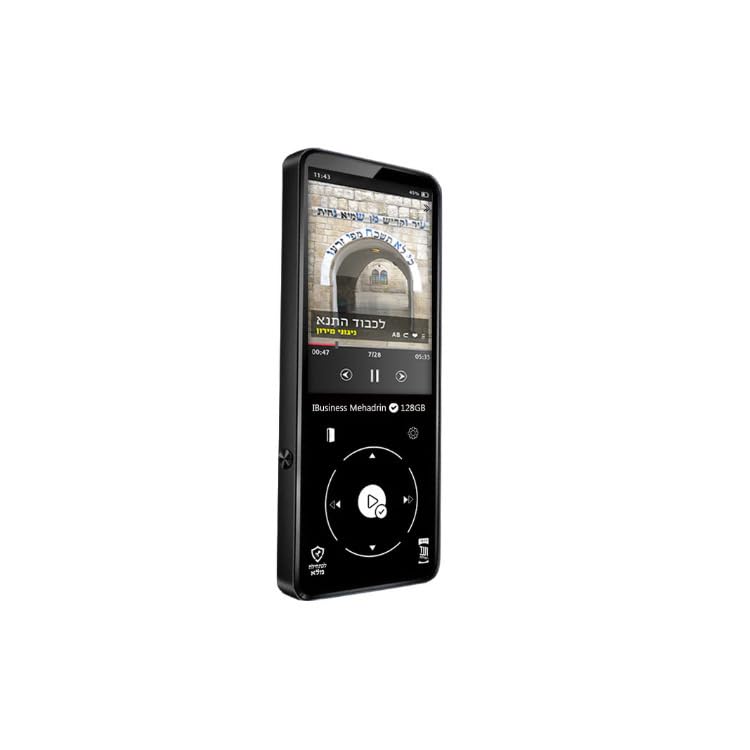
Figure 1: Samvix iBusiness Mehadrin 128 Kosher MP3 Player in its retail packaging.
فرنٹ پینل
- 2.4 انچ LCD سکرین: مینو، موسیقی کی معلومات، اور ترتیبات دکھاتا ہے۔
- اسکرول وہیل: Used for navigating through menus and lists.
- پلے/پاز بٹن: Initiates or pauses music playback.
- مینو بٹن: مین مینو تک رسائی حاصل کرتا ہے یا پچھلی اسکرین پر واپس آتا ہے۔
- پچھلا/ریوائنڈ بٹن: Skips to the previous track or rewinds the current track.
- Next/Fast-forward Button: Skips to the next track or fast-forwards the current track.
- پیچھے کا بٹن: پچھلے مینو یا اسکرین پر واپس آجاتا ہے۔
سائیڈ پینل
- حجم اوپر / نیچے بٹن: آڈیو آؤٹ پٹ والیوم کو ایڈجسٹ کرتا ہے۔
- مائیکرو ایسڈی کارڈ سلاٹ: Note: This model does not include an SD card slot.
اوپر/نیچے پینل
- پاور بٹن: ڈیوائس کو آن/آف کرتا ہے یا اسکرین کو لاک/ان لاک کرتا ہے۔
- ایرفون پورٹ: Connects to wired headphones.
- USB ٹائپ سی پورٹ: Used for charging the device and transferring fileکمپیوٹر سے/سے۔
- لائن آؤٹ پورٹ: Provides an audio output for connecting to external ampلائفائر یا اسپیکر۔
- بلٹ ان اسپیکر: ہیڈ فون کے بغیر براہ راست آڈیو پلے بیک کے لیے۔
سیٹ اپ
1. ڈیوائس کو چارج کرنا
- Connect the USB Type-C charging cable to the device's USB Type-C port.
- کیبل کے دوسرے سرے کو USB پاور اڈاپٹر (شامل نہیں) یا کمپیوٹر کے USB پورٹ سے جوڑیں۔
- The device will indicate charging status on the screen. Allow sufficient time for a full charge before first use.
2. Transferring Music Files
To transfer music from your computer to the Samvix iBusiness Mehadrin MP3 Player:
- Connect the MP3 player to your computer using the provided USB Type-C cable.
- On the MP3 player, navigate to سسٹم کی ترتیبات > USB موڈ اور منتخب کریں یو ایس بی (do not select DAC).
- Your computer should recognize the MP3 player as a removable disk or portable device.
- Open the device's drive on your computer. You can create new folders (e.g., "Music 1", "Music 2") to organize your files.
- اپنی مطلوبہ آڈیو کو گھسیٹیں اور چھوڑیں۔ files (MP3, FLAC, etc.) from your computer into the folders on the MP3 player.
- ایک بار سب files کو منتقل کیا جاتا ہے، USB کیبل کو منقطع کرنے سے پہلے اپنے کمپیوٹر سے آلہ کو محفوظ طریقے سے نکال دیں۔
- The device will automatically update its music library after disconnection.
آپریٹنگ ہدایات
1. پاور آن/آف
- پاور آن کرنے کے لیے: اسکرین لائٹ ہونے تک پاور بٹن دبائیں اور تھامیں۔
- پاور آف کرنا: Press and hold the Power button until the power-off prompt appears, then confirm.
- اسکرین لاک/انلاک: Briefly press the Power button to lock or unlock the screen during operation.
2. مینو کو نیویگیٹ کرنا
- استعمال کریں۔ اسکرول وہیل to move through menu options.
- دبائیں پلے/پاز بٹن (center of the scroll wheel) to select an option.
- دبائیں بیک بٹن پچھلے مینو پر واپس جانے کے لیے۔
- دبائیں مینو بٹن مین مینو پر جانے کے لیے۔
3. میوزک پلے بیک۔
- From the main menu, select "Music" or "Category" to browse your audio files.
- Use the Scroll Wheel to highlight a song, then press the Play/Pause button to start playback.
- پلے بیک کے دوران، استعمال کریں۔ پچھلا/ریوائنڈ اور اگلا/فاسٹ فارورڈ buttons to change tracks. Press and hold these buttons to fast-forward or rewind within a track.
- دبائیں پلے/پاز بٹن پلے بیک کو روکنے یا دوبارہ شروع کرنے کے لیے۔
- کا استعمال کرتے ہوئے حجم کو ایڈجسٹ کریں حجم اوپر / نیچے کے بٹن طرف
4. بلوٹوت جوڑی بنانا
To connect your Samvix iBusiness Mehadrin MP3 Player to Bluetooth headphones or speakers:
- یقینی بنائیں کہ آپ کا بلوٹوتھ ڈیوائس پیئرنگ موڈ میں ہے۔
- On the MP3 player, navigate to سسٹم کی ترتیبات > بلوٹوتھ کی ترتیبات.
- بلوٹوتھ کو موڑ دیں۔ On.
- منتخب کریں۔ بلوٹوتھ اسکین to search for available devices.
- فہرست میں آپ کا آلہ ظاہر ہونے کے بعد، جوڑا بنانے کے لیے اسے منتخب کریں۔
- Confirm any pairing requests on both devices. Once connected, the Bluetooth icon will appear on the MP3 player's screen.
5. وائس ریکارڈنگ
The device features a built-in voice recorder:
- From the main menu, select the "Voice Recorder" option.
- Follow the on-screen prompts to start, pause, save, or delete recordings.
- Recordings benefit from noise reduction and Voice Activity Detection (VAD) for clear audio.
والدین کا کنٹرول
The Samvix iBusiness Mehadrin MP3 Player offers robust parental control features to ensure a safe listening environment:
- Three Parental Password Options: Configure different password levels to restrict access to certain features or content.
- USB Password Protection: Secure the device with a password to prevent unauthorized file USB کے ذریعے منتقلی
- Bluetooth Password Protection: Implement a password for Bluetooth connections to control which devices can pair with the MP3 player.
Refer to the device's settings menu for detailed configuration of these parental control features.
دیکھ بھال
صفائی
- آلے کو صاف کرنے کے لیے نرم، خشک، لنٹ سے پاک کپڑا استعمال کریں۔
- مائع کلینر، ایروسول یا سخت کیمیکل استعمال نہ کریں۔
بیٹری کی دیکھ بھال
- آلے کو انتہائی درجہ حرارت کے سامنے لانے سے گریز کریں۔
- بیٹری کی صحت کو برقرار رکھنے کے لیے آلہ کو باقاعدگی سے چارج کریں، چاہے استعمال میں نہ ہوں۔
ذخیرہ
- آلے کو براہ راست سورج کی روشنی سے دور ٹھنڈی، خشک جگہ پر اسٹور کریں۔
- Keep the device away from magnetic fields.
خرابی کا سراغ لگانا
- ڈیوائس آن نہیں ہو رہی ہے: یقینی بنائیں کہ بیٹری چارج ہے۔ پاور سورس سے جڑیں اور دوبارہ کوشش کریں۔
- منتقل نہیں کیا جا سکتا files: Check the USB cable connection. Ensure the device's USB Mode is set to "USB" in System Settings. Try a different USB port or computer.
- بلوٹوتھ کنیکٹ نہیں ہو رہا ہے: Ensure Bluetooth is enabled on both the MP3 player and the target device. Make sure both devices are in pairing mode and within range.
- خراب آڈیو کوالٹی: Check headphone connections. Ensure the audio files are of good quality. Adjust equalizer settings if available.
- آلہ غیر جوابدہ: Press and hold the Power button for about 10-15 seconds to perform a forced restart.
وضاحتیں
| برانڈ | سموکس |
| ماڈل کا نام | MP3 |
| ماڈل نمبر | iBusinessMehadrin128 |
| خصوصی خصوصیت | وائس ریکارڈر |
| کنیکٹوٹی ٹیکنالوجی | بلوٹوتھ |
| میموری ذخیرہ کرنے کی صلاحیت | 128 جی بی |
| اسکرین کا سائز | 2.4 انچ |
| ہم آہنگ آلات | ہیڈ فون |
| ڈسپلے ٹیکنالوجی | LCD |
| شے کا وزن | 9.1 پاؤنڈز |
| آئٹم کے طول و عرض D x W x H | 0.39"D x 9.1"W x 9.1"H |
| یو پی سی | 766162175757 |
وارنٹی اور سپورٹ
For warranty information, technical support, or service inquiries, please refer to the official SAMVIX webسائٹ یا ان کی کسٹمر سروس سے براہ راست رابطہ کریں۔ وارنٹی دعووں کے لیے خریداری کے ثبوت کے طور پر اپنی خریداری کی رسید رکھیں۔