
تعارف
خریداری کے لیے آپ کا شکریہasing the FERIETELF T29 Drone with Camera. This manual provides essential information for the safe operation, setup, and maintenance of your drone. Please read this manual thoroughly before operating the drone to ensure proper use and to prevent damage or injury.
The T29 Drone features a 1080P HD camera, WiFi FPV live video transmission, voice and gesture control, and a foldable design for portability. It comes with two batteries and a carrying case for convenience.
حفاظتی رہنما خطوط
Always prioritize safety when operating your drone. Failure to follow these guidelines may result in injury, damage to the drone, or property damage.
- Operate the drone in open areas, away from people, animals, buildings, and obstacles.
- Do not fly near airports or restricted airspace. Check local regulations before flying.
- Maintain a visual line of sight with the drone at all times.
- تیز ہواؤں یا خراب موسمی حالات میں پرواز کرنے سے گریز کریں۔
- Ensure batteries are fully charged and properly installed before each flight.
- انگلیوں اور ڈھیلے کپڑوں کو گھومنے والے پروپیلرز سے دور رکھیں۔
- ڈرون کو شراب یا منشیات کے زیر اثر نہ چلائیں۔
- Children should only operate the drone under direct adult supervision.
پیکیج کے مشمولات
تصدیق کریں کہ تمام اشیاء آپ کے پیکیج میں موجود ہیں:
- FERIETELF T29 Drone
- ریموٹ کنٹرولر
- 1080P HD Camera (integrated)
- Rechargeable Drone Batteries (x2)
- USB چارجنگ کیبل
- اسپیئر پروپیلرز۔
- پروپیلر گارڈز
- سکریو ڈرایور
- صارف دستی (یہ دستاویز)
- کیرینگ کیس
سیٹ اپ
1 ڈرون کو کھولنا
Gently unfold the drone arms until they lock into position. Ensure all four arms are fully extended.
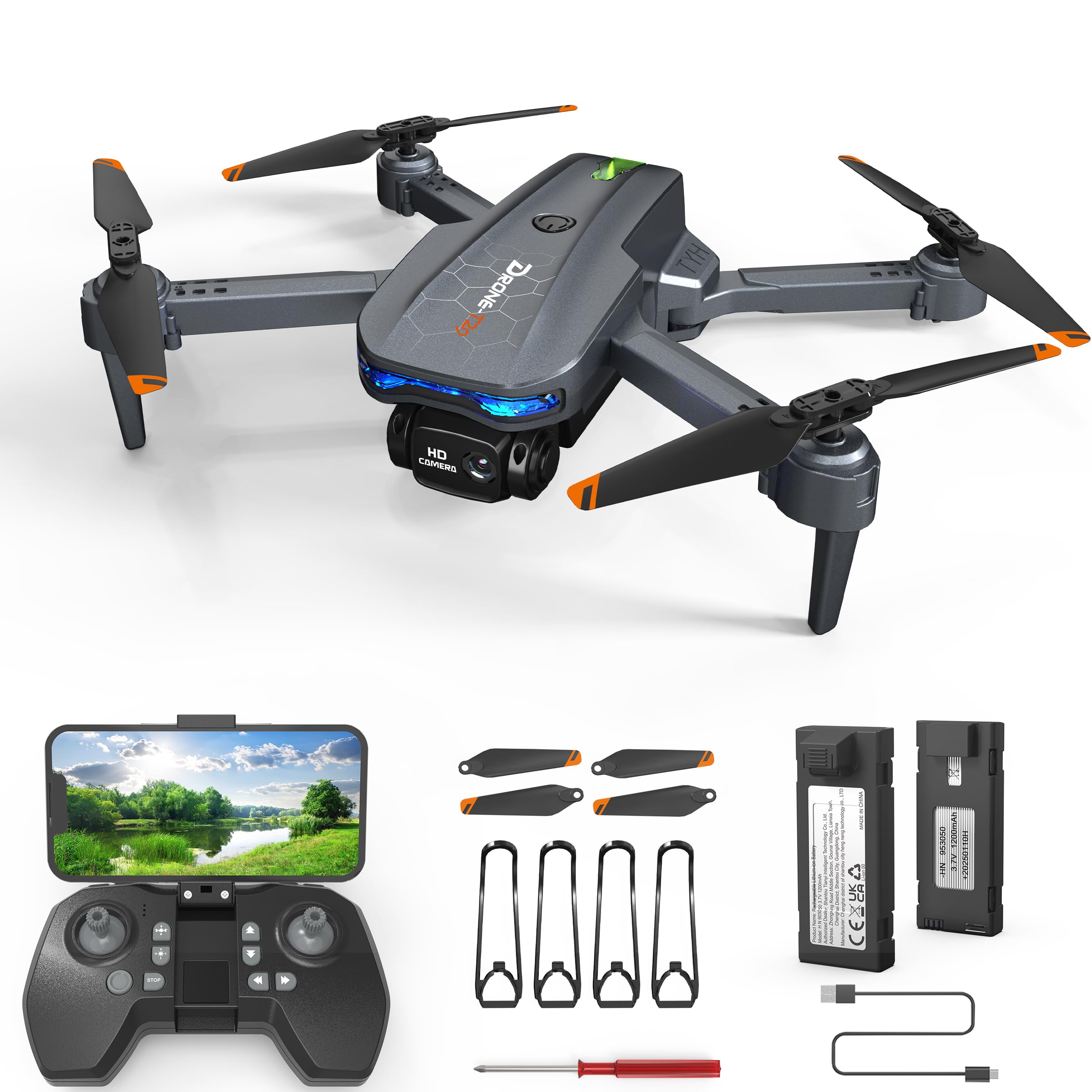
Image: The FERIETELF T29 Drone with its arms unfolded, ready for flight. The propellers are visible at the end of each arm.
2. Installing Propeller Guards
For beginner pilots, it is recommended to install the propeller guards. Attach each guard to the corresponding motor arm by snapping it into place.
3 ڈرون کی بیٹری چارج ہو رہی ہے۔
Connect the drone battery to the USB charging cable. Plug the USB cable into a 5V/1A USB adapter (not included). The indicator light on the cable will show charging status. A full charge typically takes 60-90 minutes.
- چارجنگ انڈیکیٹر: Red light ON during charging, OFF when fully charged.
اہم: Always use the provided charging cable. Do not leave batteries unattended while charging. Disconnect once fully charged.
4. ڈرون بیٹری انسٹال کرنا
Insert the fully charged battery into the battery compartment on the back of the drone until it clicks securely into place.
5. ریموٹ کنٹرولر بیٹریاں انسٹال کرنا
Open the battery cover on the back of the remote controller. Insert 3 x AAA batteries (not included) according to the polarity markings. Close the battery cover.
آپریٹنگ ہدایات
1. پاور آن اور جوڑی بنانا
- ڈرون کو فلیٹ ، سطح کی سطح پر رکھیں۔
- ڈرون پر پاور بٹن کو دبائیں اور پکڑے رکھیں جب تک کہ اشارے کی روشنی نہ چمکے۔
- Turn on the remote controller. The indicator light on the remote will flash.
- Push the left joystick (throttle) up to the maximum position, then pull it down to the minimum position. The drone and remote lights will become solid, indicating successful pairing.
2. Calibrating the Gyroscope
After pairing, place the drone on a flat surface. Push both joysticks down and to the right simultaneously for 2-3 seconds. The drone lights will flash rapidly and then become solid, indicating successful calibration.
3. Connecting to WiFi FPV (First Person View)
- Download the "FERIETELF Drone" app from your smartphone's app store (iOS/Android).
- ڈرون آن کریں۔
- Go to your smartphone's WiFi settings and connect to the network named "FERIETELF-T29-XXXXXX".
- Open the FERIETELF Drone app. You should see the live video feed from the drone's camera.
4. ٹیک آف اور لینڈنگ
- ایک کلیدی ٹیک آف: Press the One-Key Take-off button on the remote controller. The drone will automatically ascend to a certain height and hover.
- دستی ٹیک آف: Push both joysticks down and outwards to start the propellers. Then, gently push the left joystick (throttle) upwards to ascend.
- ایک کلیدی لینڈنگ: Press the One-Key Landing button. The drone will slowly descend and land automatically.
- دستی لینڈنگ: Gently pull the left joystick (throttle) downwards to descend. Once landed, pull both joysticks down and inwards to stop the propellers.
5. بنیادی فلائٹ کنٹرولز
| Joystick/Button | فنکشن |
|---|---|
| بائیں جوائس اسٹک (اوپر/نیچے) | Ascend / Descend (Throttle) |
| بائیں جوائس اسٹک (بائیں/دائیں) | Rotate Left / Rotate Right (Yaw) |
| Right Joystick (Up/Down) | Fly Forward / Fly Backward (Pitch) |
| دائیں جوائس اسٹک (بائیں/دائیں) | Fly Left / Fly Right (Roll) |
| ٹرم بٹن | Adjust drone drift (forward/backward, left/right) |
6. وائس کنٹرول
With the app connected, activate voice control. Speak commands such as "Take off", "Land", "Forward", "Backward", "Left", "Right". Ensure you are in a quiet environment for best results.
7. اشارہ کنٹرول
In the app, enable gesture control. Perform specific hand gestures in front of the drone's camera to trigger actions:
- "V" Gesture: تصویر کھینچو۔
- ہتھیلی کا اشارہ: ویڈیو ریکارڈنگ شروع/بند کریں۔
اچھی روشنی اور صاف کو یقینی بنائیں view of your hand for accurate gesture recognition.
8. ہیڈ لیس موڈ
Press the Headless Mode button on the remote. In this mode, the drone's orientation is relative to the pilot, making it easier to control regardless of which way the drone is facing. Press again to exit.
9. رفتار ایڈجسٹمنٹ
Press the Speed button to cycle through different speed modes (low, medium, high). Adjust according to your skill level and flying environment.
دیکھ بھال
- صفائی: Use a soft, dry cloth to clean the drone and remote controller. Do not use water or solvents.
- پروپیلر معائنہ: Regularly check propellers for damage (cracks, bends). Replace damaged propellers immediately using the provided screwdriver and spare parts.
- بیٹری کی دیکھ بھال:
- بیٹریوں کو ٹھنڈی، خشک جگہ پر اسٹور کریں۔
- بیٹریاں زیادہ چارج یا زیادہ ڈسچارج نہ کریں۔
- If not used for an extended period, charge batteries to about 50% capacity.
- ذخیرہ: When not in use, fold the drone and store it in its carrying case to protect it from dust and damage. Remove batteries from the remote controller if storing for long periods.
خرابی کا سراغ لگانا
| مسئلہ | ممکنہ وجہ | حل |
|---|---|---|
| ڈرون ریموٹ کا جواب نہیں دیتا۔ | Not paired; low battery (drone/remote). | Re-pair drone and remote. Charge drone battery. Replace remote batteries. |
| ڈرون پرواز کے دوران اڑتا ہے۔ | Gyroscope not calibrated; uneven surface at take-off; wind interference. | Recalibrate gyroscope on a flat surface. Use trim buttons to adjust. Fly in calm conditions. |
| پروپیلر نہیں گھومتے ہیں۔ | Drone not powered on; propellers obstructed; motor issue. | Ensure drone is on. Check for obstructions. Contact support if motors are faulty. |
| کوئی FPV ویڈیو فیڈ نہیں۔ | Not connected to drone's WiFi; app not open; weak signal. | Verify WiFi connection. Restart app. Move closer to drone. |
| مختصر پرواز کا وقت۔ | بیٹری مکمل طور پر چارج نہیں ہے؛ پرانی بیٹری؛ جارحانہ پرواز. | Ensure full charge. Consider replacing old batteries. Fly more conservatively. |
وضاحتیں
- ماڈل: TY29
- برانڈ: FERIETELF
- طول و عرض (انفولڈ): 30.5 x 25.4 x 4.8 سینٹی میٹر (12 x 10 x 1.9 انچ)
- وزن: 185 گرام
- کیمرہ: 1080P HD
- کنیکٹوٹی: وائی فائی ایف پی وی
- کنٹرول کی خصوصیات: Voice Control, Gesture Control, Headless Mode, One-Key Take-off/Landing
- بیٹریاں: 2 x Lithium Ion (P76 type, included)
- ریموٹ کنٹرولر بیٹریاں: 3 x AAA (شامل نہیں)
- مینوفیکچرر: SHANTOU TIANYI INTELLIGENT TECHNOLOGY CO.,LTD.
وارنٹی کی معلومات
This product comes with a standard manufacturer's warranty. For specific details regarding warranty coverage, duration, and claims process, please refer to the warranty card included in your product packaging or contact FERIETELF customer support directly. Keep your proof of purchase for warranty validation.
کسٹمر سپورٹ
If you encounter any issues or have questions not covered in this manual, please contact FERIETELF customer support. For the most up-to-date contact information, please visit the official FERIETELF webسائٹ یا آپ کے پروڈکٹ کی پیکیجنگ میں فراہم کردہ رابطے کی تفصیلات سے رجوع کریں۔
آن لائن وسائل: For additional tips, FAQs, and video tutorials, please visit the official FERIETELF support page.