
تعارف
Thank you for choosing the HARDELL 180W Corded Rotary Tool and 618-Piece Accessory Kit. This versatile tool is designed for a wide range of applications, including carving, sanding, polishing, cutting, and drilling. This manual provides essential information for safe and effective operation, setup, maintenance, and troubleshooting to ensure optimal performance and longevity of your tool.
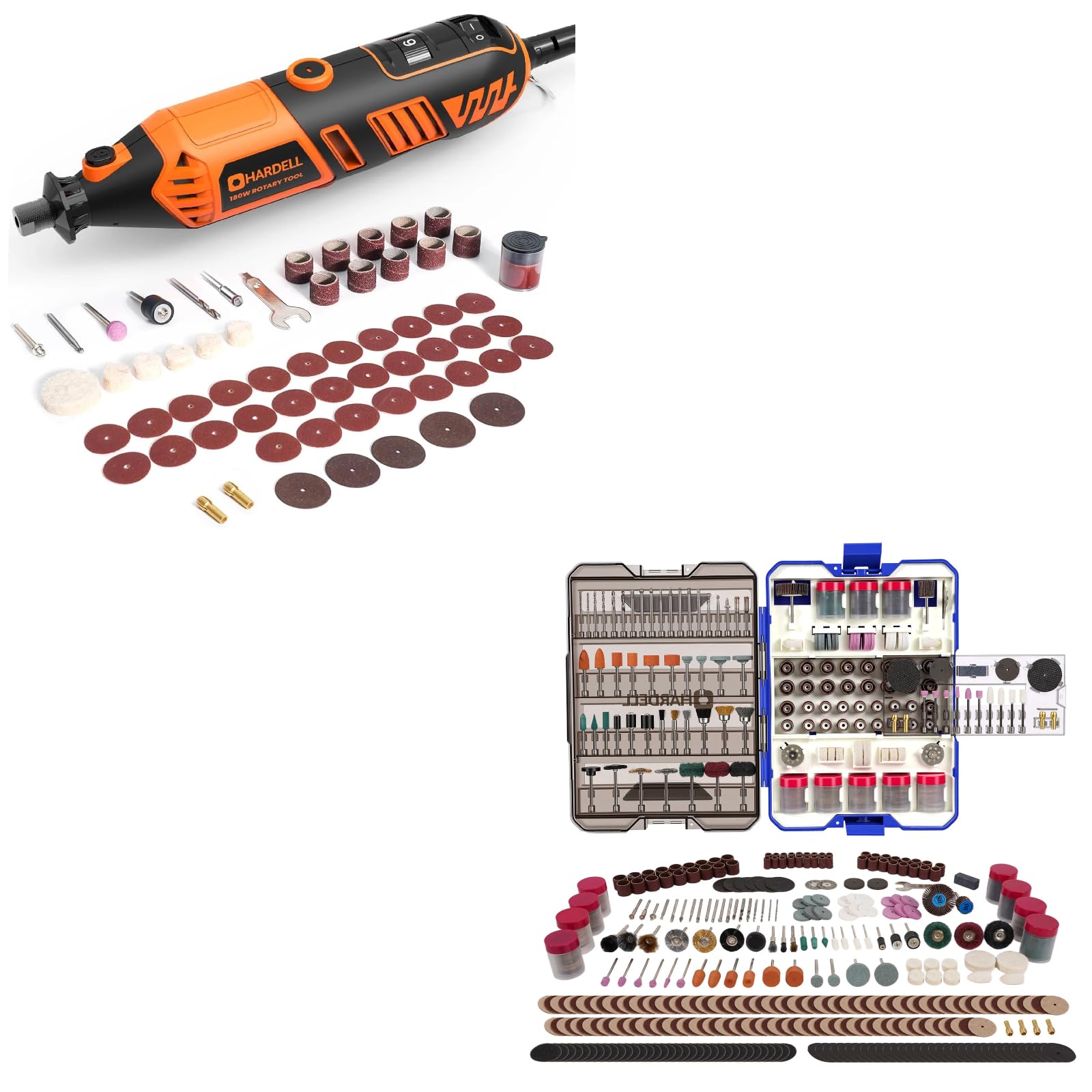
Image: The HARDELL 180W Corded Rotary Tool displayed with various accessories like sanding bands, cutting discs, and polishing wheels.
اہم حفاظتی ہدایات
آگ، برقی جھٹکا، اور ذاتی چوٹ کے خطرے کو کم کرنے کے لیے برقی آلات کا استعمال کرتے وقت ہمیشہ بنیادی حفاظتی احتیاطی تدابیر پر عمل کریں۔
- تمام ہدایات پڑھیں: استعمال کرنے سے پہلے ٹول کے آپریشن اور حفاظتی رہنما خطوط سے خود کو واقف کر لیں۔
- آنکھوں کی حفاظت پہنیں: سائیڈ شیلڈز کے ساتھ ہمیشہ حفاظتی چشمے یا حفاظتی شیشے پہنیں۔
- سماعت کا تحفظ پہنیں: Use earplugs or earmuffs during extended operation.
- محفوظ ورک پیس: ہمیشہ clamp یا بصورت دیگر آپریشن کے دوران نقل و حرکت کو روکنے کے لئے ورک پیس کو محفوظ کریں۔
- کام کی جگہ کو صاف رکھیں: بے ترتیبی والے علاقے حادثات کو دعوت دیتے ہیں۔
- حادثاتی طور پر شروع ہونے سے بچیں: Ensure the switch is in the OFF position before plugging in the tool.
- حد سے تجاوز نہ کریں: ہر وقت مناسب فٹنگ اور توازن برقرار رکھیں۔
- بجلی منقطع کریں: Always unplug the tool before changing accessories, making adjustments, or performing maintenance.
- Use correct accessories: Only use accessories designed for this rotary tool and ensure they are properly installed.
- بیکار ٹولز اسٹور کریں: جب استعمال میں نہ ہوں تو، ٹولز کو بچوں کی پہنچ سے دور، خشک، اونچی، یا بند جگہ پر رکھنا چاہیے۔
پیکیج کے مشمولات
پیک کھولنے پر، براہ کرم تصدیق کریں کہ نیچے دی گئی تمام اشیاء موجود ہیں اور بغیر کسی نقصان کے:
- HARDELL 180W Corded Rotary Tool
- 618-Piece Rotary Tool Accessories Kit (in storage case)
- Four Collets (1/16", 3/32", 1/8" x2)
- Wrench for collet changes
- صارف دستی

Image: The comprehensive 618-piece accessory kit, neatly organized in a transparent, pull-out storage case.
پروڈکٹ ختمview
Familiarize yourself with the components of your HARDELL Rotary Tool:

تصویر: ایک تفصیلی view of the rotary tool highlighting its key features: ON/OFF switch, 6-speed fine adjustment gear, spindle lock button, replaceable carbon brushes, and replaceable chuck design.
- آن/آف سوئچ: Controls power to the tool.
- 6-Speed Fine Adjustment Speed Gear: Dial for selecting desired RPM.
- سپنڈل لاک: Button to lock the spindle for accessory changes.
- متبادل کاربن برش: Access point for brush replacement.
- Replaceable Chuck Design: Front end where collets and accessories are inserted.
سیٹ اپ
لوازمات منسلک کرنا
Always ensure the tool is unplugged before changing accessories.
- Select the correct collet: Choose a collet that matches the shank size of the accessory you intend to use (1/16", 3/32", or 1/8").
- Insert collet: Unscrew the collet nut and insert the appropriate collet into the chuck.
- Insert accessory: Insert the shank of the desired accessory into the collet. Ensure it is inserted as far as possible without bottoming out.
- Lock spindle: سپنڈل لاک بٹن کو دبائیں اور تھامیں۔
- Tighten collet nut: While holding the spindle lock, use the provided wrench to firmly tighten the collet nut. Do not overtighten.

Image: A display of different collet sizes (1/16", 3/32", 1/8") and various rotary tool bits, demonstrating their universal fit for different rotary tool brands.
آپریٹنگ ہدایات
پاورنگ آن/آف
- To turn the tool ON, slide the ON/OFF switch to the "I" position.
- To turn the tool OFF, slide the ON/OFF switch to the "O" position.
رفتار ایڈجسٹمنٹ
The HARDELL Rotary Tool features a 6-speed adjustment dial, allowing you to select the optimal RPM for your task and material.

Image: A user operating the rotary tool, with an overlay illustrating the 6-speed settings and their corresponding RPM ranges: 1 (8000 RPM) to 6 (35000 RPM).
- رفتار 1: 8000 RPM (Lowest speed, suitable for delicate work or polishing)
- رفتار 2: 15000 RPM
- رفتار 3: 20000 RPM
- رفتار 4: 25000 RPM
- رفتار 5: 30000 RPM
- رفتار 6: 35000 RPM (Highest speed, suitable for aggressive material removal or cutting)
Rotate the speed adjustment dial to the desired setting before starting the tool. Always test on a scrap piece of material to ensure the chosen speed is appropriate for your application.
عام استعمال کی تجاویز
- Apply light pressure; let the tool do the work. Excessive pressure can cause the motor to overheat or the accessory to break.
- Move the tool smoothly and consistently across the workpiece.
- For best results, use the appropriate accessory for each task.
دیکھ بھال
Regular maintenance ensures the longevity and optimal performance of your rotary tool. Always unplug the tool before performing any maintenance.
صفائی
- ہر استعمال کے بعد، ٹول کو صاف کرکے صاف کریں، ڈیamp کپڑا
- وینٹیلیشن کے سوراخوں سے دھول اور ملبہ صاف کرنے کے لیے نرم برش یا کمپریسڈ ہوا کا استعمال کریں۔
- سخت کیمیکلز یا کھرچنے والے کلینر استعمال نہ کریں۔
کاربن برش کی تبدیلی
The carbon brushes are wear items and will need periodic replacement. Refer to the "Product Overview" section for the location of the replaceable carbon brushes.
- ٹول کو پاور سورس سے ان پلگ کریں۔
- موٹر ہاؤسنگ کے اطراف میں برش کیپس تلاش کریں۔
- Unscrew the brush caps using a flathead screwdriver or the provided wrench.
- پرانے کاربن برش کو ہٹا دیں۔
- Insert new carbon brushes, ensuring they are oriented correctly.
- Screw the brush caps back on firmly.
لوازمات کا ذخیرہ
The 618-piece accessory kit comes in a compact case with a pull-out design and hidden handle for organized storage and easy transport.

Image: The 618-piece rotary tool accessories kit case, showcasing its pull-out design, portable handle, and neatly compartmentalized storage, suitable for wall mounting or on-the-go projects.
- Always return accessories to their designated compartments after use to prevent loss and damage.
- Store the accessory case in a dry environment to protect contents from moisture.
خرابی کا سراغ لگانا
If you encounter issues with your HARDELL Rotary Tool, refer to the following common problems and solutions:
| مسئلہ | ممکنہ وجہ | حل |
|---|---|---|
| ٹول شروع نہیں ہوتا ہے۔ | No power supply; ON/OFF switch not engaged; Worn carbon brushes. | Check power outlet and cord; Ensure switch is in "I" position; Replace carbon brushes. |
| Tool loses power or runs intermittently | Loose power connection; Overheating; Worn carbon brushes. | Check connections; Allow tool to cool down; Replace carbon brushes. |
| ضرورت سے زیادہ کمپن یا شور | Accessory not properly seated or bent; Damaged accessory. | Ensure accessory is fully inserted and collet nut is tightened; Replace damaged accessory. |
| Accessory slips in collet | Collet nut not tight enough; Incorrect collet size. | Tighten collet nut firmly; Use the correct collet size for the accessory shank. |
If the problem persists after attempting these solutions, please contact HARDELL customer support.
وضاحتیں
Key technical specifications for the HARDELL 180W Corded Rotary Tool:
- طاقت: 180W
- رفتار کی ترتیبات: 6-اسپیڈ ایڈجسٹمنٹ
- بغیر لوڈ کی رفتار: 8,000 - 35,000 RPM
- کولٹ سائز: 1/16" (1.6mm), 3/32" (2.3mm), 1/8" (3.2mm)
- Accessory Count: 618 ٹکڑے

تصویر: ایک اندرونی view of the rotary tool's motor, emphasizing its 180W high power and maximum speed of 35000 RPM.
وارنٹی اور سپورٹ
HARDELL products are manufactured to high-quality standards. For warranty information, technical support, or to inquire about replacement parts, please refer to the contact information provided with your purchase or visit the official HARDELL webسائٹ وارنٹی کے دعووں کے لیے براہ کرم اپنی خریداری کا ثبوت اپنے پاس رکھیں۔