
1. تعارف
Thank you for choosing the HLDIRECT 55 Inch Gaming Desk. This desk is designed to enhance your gaming and work experience with its versatile features, including a built-in power outlet, LED lighting, ample storage, and a foldable tabletop. This manual provides detailed instructions for assembly, operation, and maintenance to ensure safe and optimal use of your new desk.
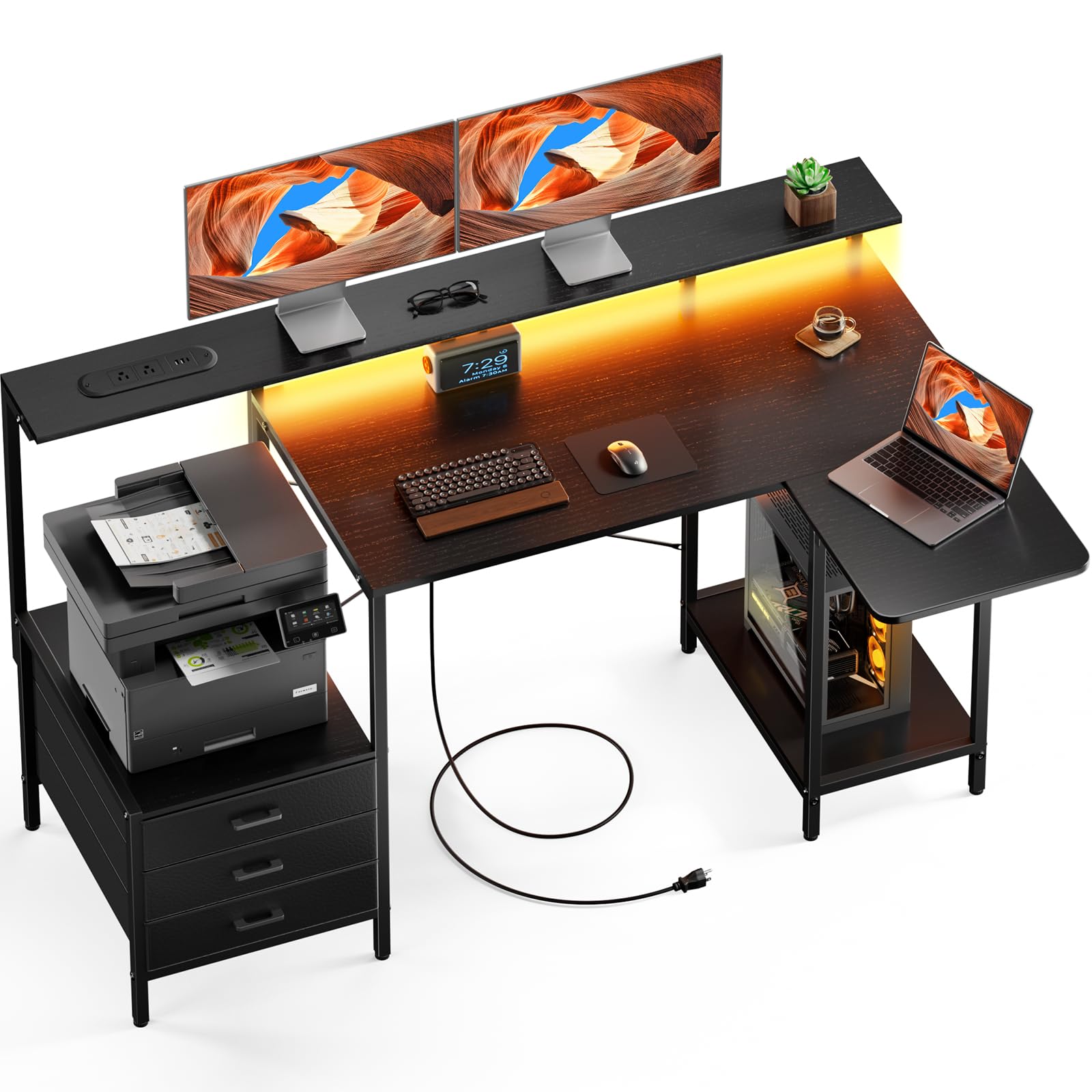
Figure 1: HLDIRECT 55 Inch Gaming Desk (Black)
2. حفاظتی معلومات
براہ کرم اسمبلی اور استعمال سے پہلے تمام حفاظتی ہدایات کو پڑھیں اور سمجھیں۔ ان ہدایات پر عمل کرنے میں ناکامی کے نتیجے میں مصنوعات کو چوٹ یا نقصان پہنچ سکتا ہے۔
- Always assemble the desk on a stable, flat, and clean surface to prevent scratching or damage.
- Do not use the foldable tabletop in its extended position unless properly secured. Ensure all locking mechanisms are engaged.
- This desk is heavy (approximately 20 pounds). Exercise caution during assembly and moving. It may tip over if not used or assembled correctly.
- Do not exceed the maximum weight recommendation of 22 pounds for the monitor stand or any individual shelf.
- اسمبلی کے دوران بچوں اور پالتو جانوروں کو دور رکھیں۔ چھوٹے حصے دم گھٹنے کا خطرہ ہو سکتے ہیں۔
- اس بات کو یقینی بنائیں کہ استعمال سے پہلے تمام پیچ اور فاسٹنرز کو محفوظ طریقے سے سخت کیا گیا ہے۔ وقتا فوقتا چیک کریں اور ضرورت کے مطابق دوبارہ سخت کریں۔
- گرم اشیاء کو بغیر تحفظ کے براہ راست ڈیسک کی سطح پر نہ رکھیں۔
- Keep liquids away from electrical components (power outlets, LED lights).
3. سیٹ اپ اور اسمبلی
The HLDIRECT Gaming Desk requires assembly. All necessary components and a detailed instruction manual are included. Follow the steps carefully.
3.1 پیکیج کے مشمولات
Before starting, verify that all parts are present and undamaged. Refer to the included parts list in your physical manual. If any parts are missing or damaged, please contact customer support.

Figure 2: Desk Dimensions and Key Components
- Desk panels (main desktop, monitor stand, foldable tabletop, shelves)
- دھاتی فریم کے اجزاء (ٹانگیں، سپورٹ بار)
- 3 فیبرک دراز
- Power outlet unit with USB and Type-C ports
- ایل ای ڈی روشنی کی پٹی
- سایڈست پاؤں
- اسمبلی ہارڈویئر (پیچ، بولٹ، ایلن رنچ)
- ہدایت نامہ
3.2 اسمبلی کے مراحل
- ٹانگیں جوڑیں: Securely attach the desk legs to the main frame components using the provided screws. Tighten using the included tool.
- Connect Desktop: Fasten the main desktop panel to the assembled frame using bolts.
- دراز سلائیڈز انسٹال کریں: Insert the drawer slides into the designated side panels for the fabric drawers.
- اسٹوریج شیلف جمع کریں: Construct and attach the storage shelves according to the diagrams in the manual.
- مانیٹر اسٹینڈ انسٹال کریں: Secure the monitor stand to the main desktop.
- پاور آؤٹ لیٹ کو مربوط کریں: Connect the power outlet unit and LED light strip following the provided wiring diagram. Ensure all connections are firm.
- Attach Foldable Tabletop: Mount the foldable tabletop to the main desk structure, ensuring the locking mechanism operates smoothly.
- پاؤں کو ایڈجسٹ کریں: Level the desk on any surface using the adjustable feet to ensure stability.
Note: All components are clearly labeled. Refer to the step-by-step guide in your physical instruction manual for detailed diagrams.
4. آپریٹنگ ہدایات
Your HLDIRECT Gaming Desk offers several features designed for convenience and functionality.
4.1 Built-in Power Outlet

Figure 3: Built-in Power Outlet
The desk is equipped with a power strip featuring:
- 2 AC آؤٹ لیٹس (120V/12A)
- 2 USB-A پورٹس (5V/2A)
- 1 USB-C Port (5V/2A)
To use, plug the desk's main power cord (59 inches long) into a wall outlet. You can then charge multiple devices simultaneously. Ensure devices are compatible with the provided voltagای اور موجودہ.
4.2 ایل ای ڈی لائٹ پٹی۔

Figure 4: LED Light Strip in Operation
The integrated RGB LED light strip offers multiple lighting effects to create an immersive atmosphere. Connect the LED strip to the power outlet unit as per assembly instructions. Control the lighting effects, colors, and dynamic modes using the dedicated controller or a compatible smartphone application (if applicable, refer to the LED light strip's specific instructions for app details).
4.3 Foldable Tabletop

Figure 5: Foldable Tabletop Extended

Figure 6: Foldable Tabletop Mechanism
The foldable tabletop allows the desk to switch between L-shape and straight configurations. To extend the tabletop, lift the panel until it locks into place. To fold it back, press the release button (as shown in Figure 6) and gently lower the panel. Ensure the tabletop is securely locked in either position before placing items on it.
4.4 اسٹوریج کی خصوصیات

تصویر 7: Ampلی اسٹوریج کی جگہ
The desk provides extensive storage options:
- مانیٹر اسٹینڈ: An ergonomically designed stand to reduce eye strain and neck/shoulder pressure.
- اسٹوریج شیلف: Ideal for printers, books, Bluetooth speakers, or other essentials.
- PC Tower Storage: A dedicated load-bearing base to securely store your computer tower.
- 3 فیبرک دراز: For organizing smaller items and keeping your workspace tidy.
5 دیکھ بھال
Proper maintenance will extend the life of your HLDIRECT Gaming Desk.
- صفائی: میز کی سطح کو نرم سے صاف کریں، ڈیamp کپڑا سخت کیمیکلز یا کھرچنے والے کلینر سے پرہیز کریں جو ختم کو نقصان پہنچا سکتے ہیں۔
- دھول: Regularly dust the desk and its components to prevent buildup, especially around electrical ports and LED lights.
- بندھن: وقتاً فوقتاً تمام پیچ اور بولٹ چیک کریں تاکہ یہ یقینی بنایا جا سکے کہ وہ سخت ہیں۔ استحکام برقرار رکھنے کے لیے اگر ضروری ہو تو دوبارہ سخت کریں۔
- سایڈست پاؤں: Ensure the adjustable feet are properly set to keep the desk level and prevent wobbling.
- برقی اجزاء: Keep the power outlet and LED light strip free from dust and moisture. Do not attempt to repair electrical components yourself.
6 خرابیوں کا سراغ لگانا
اگر آپ کو اپنی میز کے ساتھ مسائل کا سامنا کرنا پڑتا ہے، تو درج ذیل عام مسائل اور حل کا حوالہ دیں۔
- ڈیسک لرز رہا ہے:
- Ensure all assembly screws are tightened. Adjust the leveling feet on the bottom of the desk legs to compensate for uneven floors.
- Power outlets are not working:
- Check if the desk's main power cord is securely plugged into a functional wall outlet. Verify that the wall outlet itself is receiving power. Ensure all internal connections for the power strip are secure.
- LED lights are not turning on:
- Confirm the LED light strip is properly connected to the power outlet unit. Check the power supply to the desk. If using an app, ensure Bluetooth/Wi-Fi connection is active and the app is functioning correctly.
- Foldable tabletop does not lock or fold smoothly:
- Inspect the locking mechanism for any obstructions or damage. Ensure it is properly aligned. Apply a small amount of silicone lubricant if movement is stiff.
اگر ان حلوں سے مسئلہ حل نہیں ہوتا ہے، تو براہ کرم کسٹمر سپورٹ سے رابطہ کریں۔
7. وضاحتیں
| برانڈ | HLDIRECT |
| ماڈل نمبر | 120414 |
| Overall Dimensions (L-shape) | Approx. 55"L x 19.7"D x 34"H |
| Main Desktop Height | 29.1"H |
| رنگ | سیاہ |
| مواد | Metal (frame), High-density Particleboard (top) |
| درازوں کی تعداد | 3 (fabric) |
| پاور آؤٹ لیٹ | 2 AC Outlets (120V/12A), 2 USB-A Ports (5V/2A), 1 USB-C Port (5V/2A) |
| پاور کورڈ کی لمبائی | 59 انچ |
| خصوصی خصوصیات | Foldable Tabletop, LED Lights, Monitor Stand, Storage Shelves, PC Tower Storage |
| شے کا وزن | 20 پاؤنڈز |
| زیادہ سے زیادہ وزن کی سفارش | 22 Pounds (for monitor stand/shelves) |
| اسمبلی کی ضرورت ہے۔ | جی ہاں |
8. وارنٹی اور سپورٹ
Your HLDIRECT Gaming Desk comes with a ایک سال کی وارنٹی خریداری کی تاریخ سے، مینوفیکچرنگ نقائص کا احاطہ.
If you receive a damaged product, encounter any missing parts, or experience issues not covered in the troubleshooting section, please do not hesitate to contact HLDIRECT customer support at any time. We are committed to providing assistance and ensuring your satisfaction.
For warranty claims or support, please refer to the contact information provided in your product packaging or visit the official HLDIRECT webسائٹ