
1. پروڈکٹ ختمview
The Keenso F4 V3S PLUS Brushless ESC Stack is a high-performance 4-in-1 controller designed for FPV drones and RC airplanes. This integrated unit combines a flight controller and a 45A Electronic Speed Controller (ESC) into a compact design, simplifying installation and wiring.
اہم خصوصیات میں شامل ہیں:
- High Performance 45A ESC: Integrates four 45A ESCs for efficient power management and simplified setup.
- Anti-Jamming & Fast Response: Supports various throttle modes including Oneshot, Multishot, and Dshot for rapid signal processing and interference resistance.
- Powerful BLHeli_S Firmware: Facilitates easy ESC parameter configuration, firmware updates, and compatibility with Cleanflight and Betaflight firmware.
- پریمیم دستکاری: Constructed with industrial-grade LDO and high-resistance MOS for enhanced durability, strong load capacity, and high-temperature resilience.
- بہتر فعالیت: Equipped with a gyroscope and barometer for superior control and flight stability.
2. پیکیج کے مشمولات
تصدیق کریں کہ نیچے دی گئی تمام اشیاء آپ کے پیکیج میں شامل ہیں:
- 1 x 4-in-1 ESC (Electronic Speed Controller)
- 1 ایکس فلائٹ کنٹرولر
- 1 x Capacitance (Capacitor)
- 3 x Connecting Wires (various types)
- 2 x Accessories (unspecified, typically connectors or small parts)
- 8 ایکس ڈیamping پیڈ
- 4 ایکس گری دار میوے

تصویر 2.1: ختمview تمام شامل اجزاء میں سے۔

تصویر 2.2: تفصیلی view of the ESC and Flight Controller boards with accompanying parts.

Image 2.3: Components laid out for inspection.
3. تکنیکی تفصیلات
3.1. 4-in-1 ESC Parameters
| پیرامیٹر | قدر |
|---|---|
| ESC Size | Approx. 42x41mm / 1.7x1.6in |
| سوراخ کا فاصلہ | Approx. 30.5x30.5mm / 1.2x1.2in |
| مسلسل کرنٹ | 45A |
| برسٹ کرنٹ | 50A (10S) |
| پروسیسر | EFM8BB21F16G |
| فرم ویئر | BLS J H 30 7 |
| Drive Signal Support | DShot300/600, Multshot, Oneshot, PMW |
| ان پٹ جلدtage | 7.4 to 22.2V (2 to 6S LiPo) |
| ESC Weight | تقریبا 12 گرام / 0.4 اوز |
3.2. Flight Controller Parameters
| پیرامیٹر | قدر |
|---|---|
| کنٹرولر سائز | Approx. 36x36mm / 1.4x1.4in |
| بڑھتے ہوئے سوراخ کا فاصلہ۔ | Approx. 30.5x30.5mm / 1.2x1.2in |
| ایم سی یو | F405 |
| معاون افعال | Drag and drop OSD via Betaflight configuration, SBUS, PPM, Spketrum ports, Micro storage card black box |
| جائروسکوپ | شامل |
| بیرومیٹر | BMP280 |
| بی ای سی آؤٹ پٹ | 5V/3A، 9V/3A |
| کنٹرولر وزن | تقریبا 7 گرام / 0.2 اوز |
3.3. عمومی مصنوعات کی معلومات
- برانڈ: کینسو
- ماڈل کا نام: Keensox6h89r54l1
- مواد: الیکٹرانک جزو
- درخواست: FPV UAV, RC Airplanes
4. سیٹ اپ اور انسٹالیشن
Proper installation is crucial for the performance and safety of your FPV drone or RC airplane. Always refer to the specific wiring diagrams for your frame and components.
4.1. پری انسٹالیشن چیک
- Ensure your workspace is clean and static-free.
- تصدیق کریں کہ تمام اجزاء موجود ہیں اور ان کو نقصان نہیں پہنچا۔
- Gather necessary tools: soldering iron, solder, flux, wire cutters, heat shrink tubing, multimeter.
4.2. Mounting the ESC Stack
- ڈی کو منسلک کریں۔amping pads to the mounting holes on your frame.
- Carefully place the 4-in-1 ESC board onto the damping pads, aligning the mounting holes.
- Place the flight controller board on top of the ESC, ensuring proper orientation and alignment.
- Secure the stack using the provided nuts or standoffs, ensuring not to overtighten.
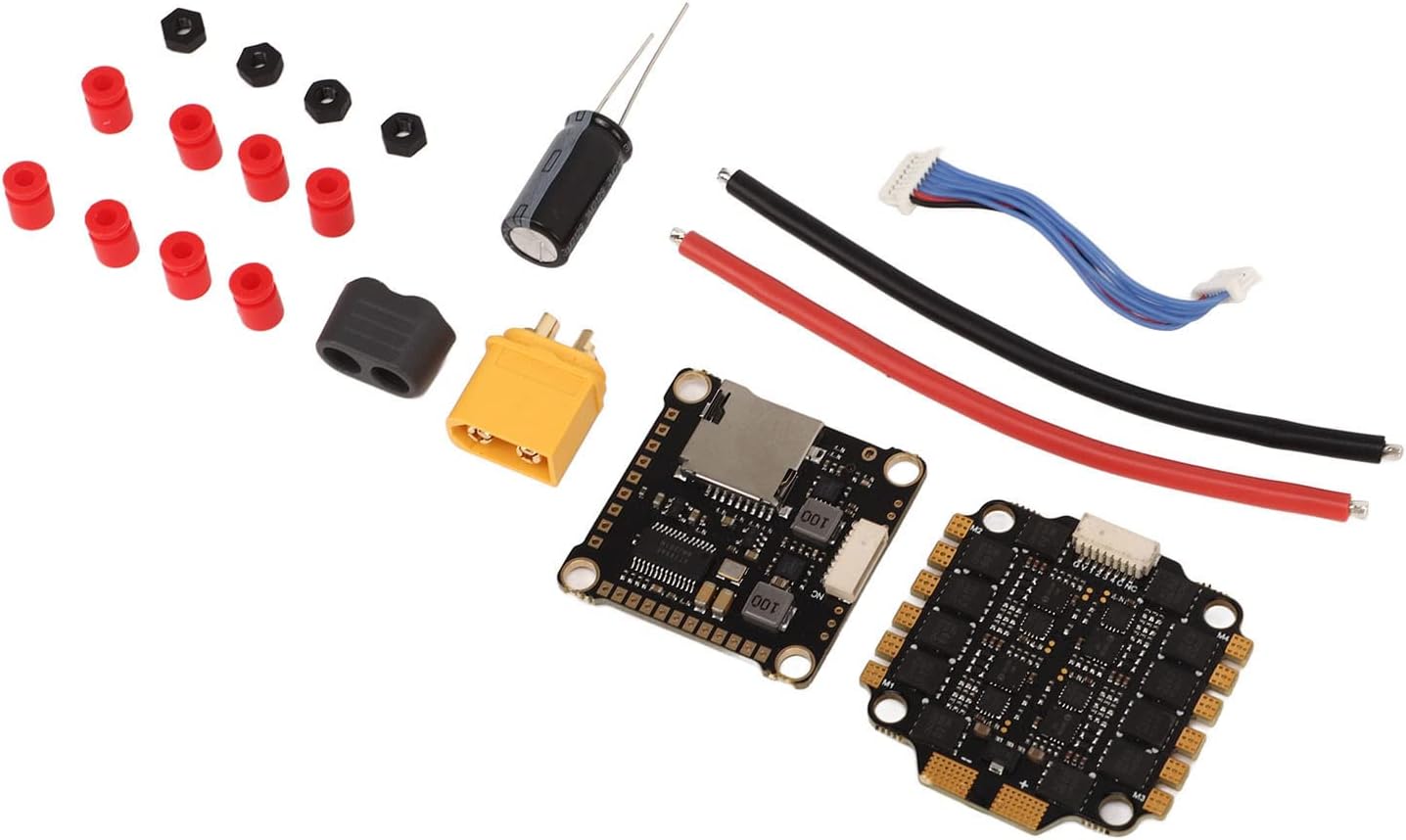
تصویر 4.1: تفصیلی view of the ESC and Flight Controller boards, highlighting mounting points.
4.3. وائرنگ کنکشن
Connect the ESC stack to your drone's power distribution board (PDB) or direct battery connection, motors, receiver, and other peripherals. Always double-check polarity before powering on.
- پاور ان پٹ: Solder the main battery leads (red for positive, black for negative) to the designated pads on the 4-in-1 ESC. Ensure the capacitor is soldered across the main battery pads for voltage spike suppression.
- موٹر کنکشن: Solder the three motor wires from each motor to the corresponding motor pads on the ESC. The order of wires may need adjustment in software for correct motor direction.
- Flight Controller to ESC: Use the provided connecting wire harness to link the flight controller to the 4-in-1 ESC. This typically carries telemetry, current sensing, and motor control signals.
- وصول کنندہ کنکشن: Connect your receiver (SBUS, PPM, or Spektrum) to the appropriate UART port on the flight controller. Refer to the flight controller's pinout diagram.
- Other Peripherals: Connect FPV camera, video transmitter (VTX), GPS, or other accessories to the designated pads/ports on the flight controller, paying attention to voltage requirements (5V/9V BEC outputs are available).
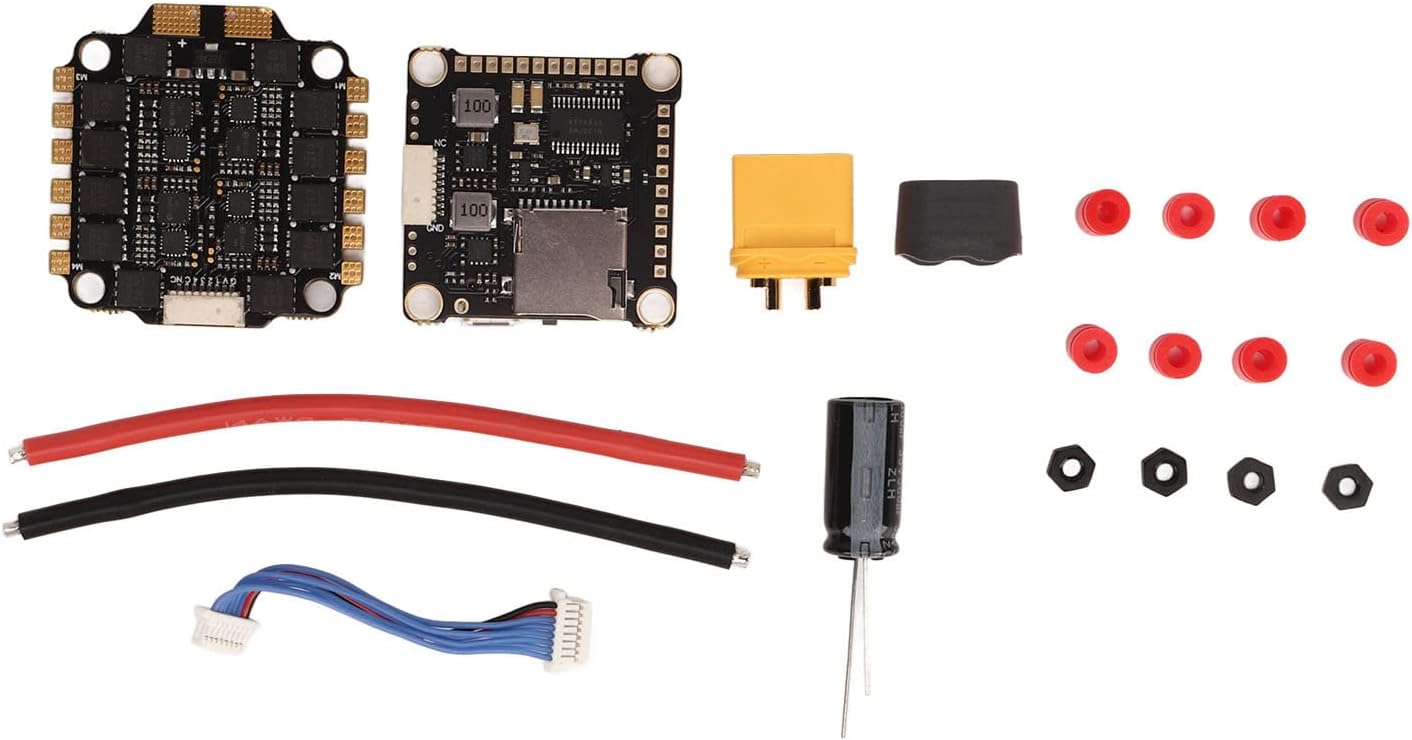
Image 4.2: Connection points on the ESC and Flight Controller.

Image 4.3: Included connecting wires.

Image 4.4: Included capacitor for power filtering.
4.4 فرم ویئر کنفیگریشن
The flight controller supports Betaflight and Cleanflight firmware. The ESCs utilize BLHeli_S firmware.
- فلائٹ کنٹرولر: Connect the flight controller to your computer via USB. Use the Betaflight Configurator or Cleanflight Configurator software to flash the latest firmware and configure settings such as PID tuning, motor output, receiver protocols, and OSD.
- ESCs: Use the BLHeliSuite software (accessible through Betaflight/Cleanflight passthrough) to configure ESC settings, calibrate motors, reverse motor direction if needed, and update BLHeli_S firmware.
5. آپریٹنگ ہدایات
Once installed and configured, the Keenso F4 V3S PLUS ESC Stack is ready for operation.
5.1. پری فلائٹ چیکس
- یقینی بنائیں کہ تمام کنکشن محفوظ ہیں اور شارٹس سے پاک ہیں۔
- Verify propeller direction and tightness.
- بیٹری والیوم چیک کریں۔tagای اور چارج لیول۔
- Confirm radio control link and arming switch functionality.
5.2. Powering On and Arming
- Connect the flight battery to the ESC stack. You should hear a series of beeps indicating successful initialization.
- ڈرون کو سطح کی سطح پر رکھیں۔
- Arm the motors using your configured arming switch on your radio transmitter. The motors will typically spin slowly or make a distinct sound to indicate they are armed.
5.3. Throttle Modes
The ESC supports various throttle protocols for precise motor control:
- DShot300/600: Digital protocol offering high resolution and noise immunity. Recommended for optimal performance.
- ملٹی شاٹ: Analog protocol, faster than Oneshot.
- Oneshot125: Analog protocol, faster than standard PWM.
- پی ڈبلیو ایم: Standard analog protocol, generally not recommended for FPV drones due to latency.
Select the desired throttle mode in your flight controller software (e.g., Betaflight Configurator).
6 دیکھ بھال
Regular maintenance helps ensure the longevity and reliability of your ESC stack.
- بصری معائنہ: Periodically check for any signs of physical damage, loose connections, or burnt components.
- صفائی: بورڈز کو دھول، گندگی اور ملبے سے پاک رکھیں۔ کمپریسڈ ہوا یا نرم برش کا استعمال کریں۔ الیکٹرانکس پر براہ راست مائع استعمال کرنے سے گریز کریں۔
- فرم ویئر اپ ڈیٹس: Regularly check for and apply the latest firmware updates for both the flight controller (Betaflight/Cleanflight) and ESCs (BLHeli_S) to benefit from performance improvements and bug fixes.
- حرارت کا انتظام: Ensure adequate airflow around the ESC stack, especially during intense flight, to prevent overheating.
7 خرابیوں کا سراغ لگانا
یہ سیکشن عام مسائل کو حل کرتا ہے جن کا آپ کو سامنا ہو سکتا ہے۔
7.1. No Power / No Initialization Beeps
- بیٹری چیک کریں: یقینی بنائیں کہ بیٹری چارج ہے اور مناسب طریقے سے منسلک ہے۔
- پولارٹی چیک کریں: Verify that the battery leads are connected with correct polarity to the ESC. Reverse polarity can cause severe damage.
- سولڈرنگ کا معائنہ کریں: Look for cold solder joints or bridges on the main power pads.
7.2. Motors Not Spinning / Incorrect Direction
- مسلح کرنا: Ensure the flight controller is armed.
- موٹر کنکشن: Verify all motor wires are securely soldered to the ESC.
- BLHeli_S Configuration: Use BLHeliSuite to check motor direction and calibrate ESCs. Motor direction can be reversed in the software.
- Throttle Protocol: Confirm the correct DShot/Multishot/Oneshot protocol is selected in Betaflight/Cleanflight.
7.3. Unstable Flight / Jittery Motors
- PID Tuning: Adjust PID settings in Betaflight/Cleanflight.
- Damping Pads: Ensure the ESC stack is properly mounted on damping pads to reduce vibrations.
- پروپیلرز: Check for damaged or unbalanced propellers.
- Capacitor: Verify the capacitor is correctly installed across the main power leads to filter electrical noise.
7.4. USB Connection Issues
- یو ایس بی کیبل: Try a different USB cable, ensuring it is a data-capable cable.
- ڈرائیورز: Install necessary drivers (e.g., STM32 Virtual COM Port Driver, Zadig for DFU mode) for your flight controller.
- کنفیگریٹر: Ensure you are using the correct version of Betaflight/Cleanflight Configurator.
8. وارنٹی اور سپورٹ
For warranty information and technical support, please refer to the official Keenso webسائٹ یا اپنے خوردہ فروش سے رابطہ کریں۔ کسی بھی وارنٹی دعووں کے لیے اپنی خریداری کا ثبوت رکھیں۔
This product has no known safety hazards to users when installed and operated correctly.