
OLIXIS 1411BK2-HJ3Nsun
OLIXIS Office Desk Chair Instruction Manual
Model: 1411BK2-HJ3Nsun
تعارف
Thank you for choosing the OLIXIS Office Desk Chair. This manual provides detailed instructions for the assembly, operation, maintenance, and troubleshooting of your new chair. Please read this manual thoroughly before assembly and use to ensure proper function and safety.
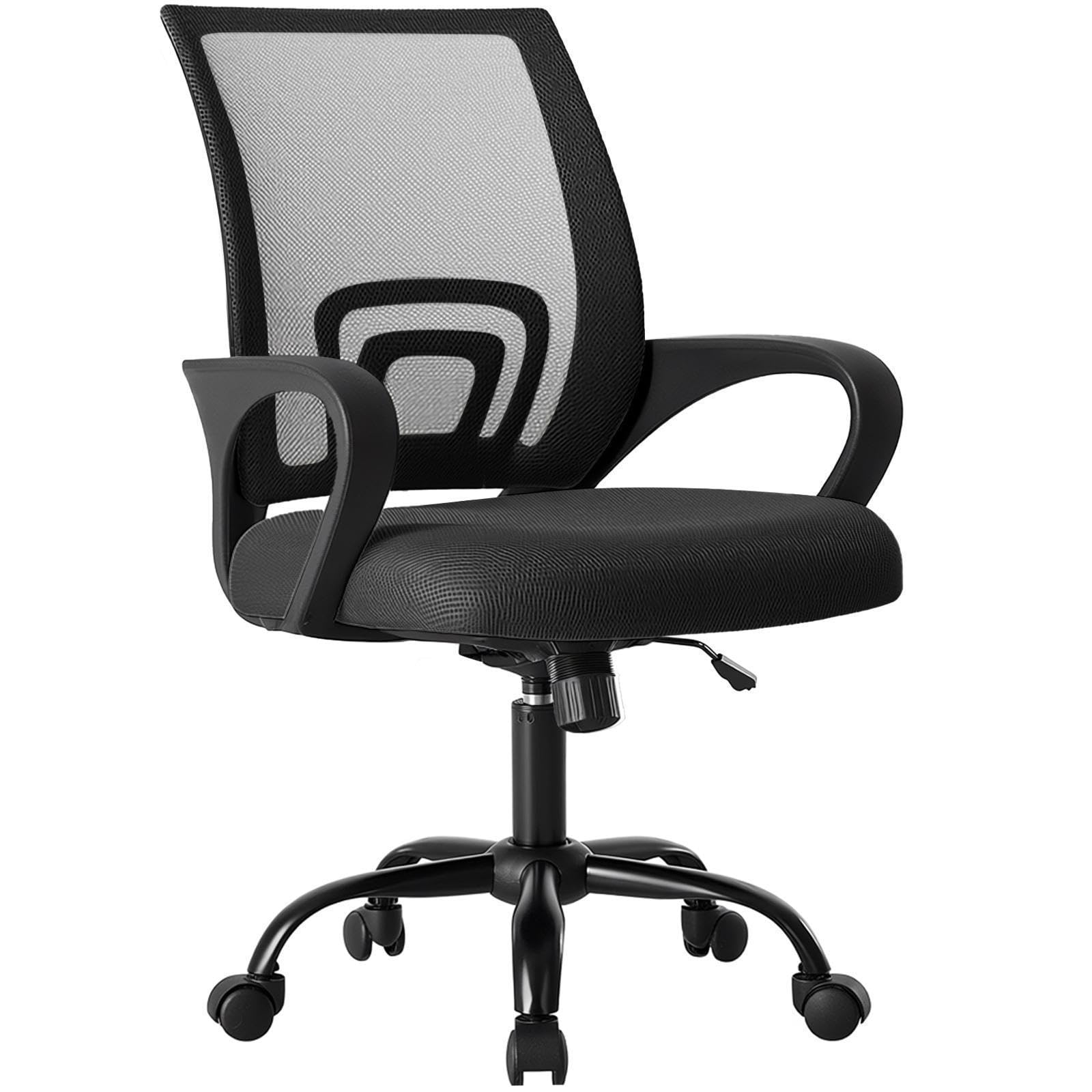
Figure 1: OLIXIS Office Desk Chair (Model 1411BK2-HJ3Nsun)
حفاظتی معلومات
- اسمبلی کی ہدایات پر ہمیشہ احتیاط سے عمل کریں۔
- کرسی پر کھڑے نہ ہوں۔
- اگر کوئی پرزہ غائب، خراب، یا پہنا ہوا ہو تو کرسی کا استعمال نہ کریں۔
- Ensure all bolts and screws are tightened before use. Periodically check and re-tighten as necessary.
- زیادہ سے زیادہ وزن کی گنجائش 250 پاؤنڈ (113.4 کلوگرام) سے تجاوز نہ کریں۔
- ایڈجسٹمنٹ کے دوران بچوں کو حرکت پذیر حصوں سے دور رکھیں۔
- ٹپنگ کو روکنے کے لئے ایک سطح کی سطح پر کرسی کا استعمال کریں.
پیکیج کے مشمولات
Before beginning assembly, ensure all components are present and undamaged. If any parts are missing or damaged, please contact customer support.
- پشت (1)
- سیٹ کشن (1)
- Armrests (2, fixed to seat)
- گیس لفٹ سلنڈر (1)
- بیس (1)
- کاسٹر (5)
- میکانزم پلیٹ (1)
- Screws and Allen Wrench (1 set)

Figure 2: Product dimensions and components overview.
سیٹ اپ اور اسمبلی
Follow these steps to assemble your OLIXIS Office Desk Chair. It is recommended to assemble the chair on a soft, clean surface to prevent damage.
- بیس سے کاسٹر منسلک کریں: کرسی کی بنیاد کی ہر ٹانگ کے آخر میں سوراخوں میں پانچ کاسٹروں میں سے ہر ایک داخل کریں۔ مضبوطی سے دبائیں جب تک کہ وہ جگہ پر کلک نہ کریں۔
- گیس لفٹ ڈالیں: گیس لفٹ سلنڈر کو جمع شدہ بیس کے درمیانی سوراخ میں رکھیں۔
- سیٹ کے ساتھ میکانزم پلیٹ منسلک کریں: میکانزم پلیٹ کو سیٹ کشن کے نیچے سکرو ہولز کے ساتھ سیدھ میں رکھیں۔ یقینی بنائیں کہ میکانزم پلیٹ کا اگلا حصہ سیٹ کے سامنے والا ہے۔ فراہم کردہ ایلن رنچ کا استعمال کرتے ہوئے پیچ کے ساتھ محفوظ کریں.
- بیکریسٹ کو سیٹ کے ساتھ جوڑیں: Align the backrest with the designated attachment points on the seat cushion (usually at the rear). Secure with screws.
- سیٹ اسمبلی کو گیس لفٹ سے جوڑیں: اسمبل شدہ سیٹ اور بیکریسٹ کو احتیاط سے گیس لفٹ سلنڈر پر رکھیں، اس بات کو یقینی بناتے ہوئے کہ میکانزم پلیٹ کا مرکزی سوراخ گیس لفٹ کے اوپری حصے کے ساتھ سیدھ میں ہو۔ محفوظ کرنے کے لیے مضبوطی سے نیچے دبائیں۔
کرسی استعمال کرنے سے پہلے تصدیق کریں کہ تمام کنکشن محفوظ ہیں۔
آپریٹنگ ہدایات
Your OLIXIS Office Desk Chair offers several adjustment features for personalized comfort.
1۔ اونچائی کی ایڈجسٹمنٹ
نشست کی اونچائی کو ایڈجسٹ کرنے کے لیے:
- بڑھانا: While seated, lift the lever located on the right side of the chair. The seat will rise. Release the lever at the desired height.
- کم کرنا: While seated, lift the lever located on the right side of the chair. Apply slight body weight to lower the seat. Release the lever at the desired height.
The seat height is adjustable from 14.7 inches to 17.7 inches.
2. Rocking Mode and Tilt Tension
The chair features a rocking mode with adjustable tilt tension.
- Engage/Disengage Rocking Mode: Pull the same lever used for height adjustment outwards to enable rocking. Push it inwards to lock the chair in an upright position (90 degrees).
- جھکاؤ کے تناؤ کو ایڈجسٹ کریں: Rotate the round knob located underneath the seat, at the front of the mechanism plate. Turn clockwise to increase tension (making it harder to recline) or counter-clockwise to decrease tension (making it easier to recline).
The rocking range is approximately 90 to 120 degrees.

Figure 3: Height adjustment and rocking mode controls.
3. 360° Swivel and Casters
The chair is designed with a 360-degree swivel function and smooth-rolling casters for easy movement within your workspace.
- کنڈا: The seat can freely rotate 360 degrees.
- کاسٹر: The silent casters are designed to move smoothly on various floor types, including carpets, without causing scratches.
4. Lumbar Support and Fixed Armrests
The chair features an ergonomic mid-back design with integrated lumbar support and fixed armrests for comfort and stability.
- لمبر سپورٹ: The contoured backrest provides support to the natural curve of your spine.
- Fixed Armrests: The armrests are designed to provide stable support and are not adjustable.

Figure 4: Ergonomic features including back support, lumbar support, and fixed armrests.
5. Storage Back
A convenient storage space is integrated into the back of the chair, suitable for holding items like books, newspapers, or tablets.
دیکھ بھال
باقاعدگی سے دیکھ بھال آپ کی کرسی کی زندگی اور ظاہری شکل کو طول دینے میں مدد کرتی ہے۔
- صفائی: اشتہار کے ساتھ صاف کریں۔amp کپڑا سخت کیمیکلز یا کھرچنے والے کلینر سے پرہیز کریں۔
- میش بیک: Gently vacuum the mesh backrest to remove dust and debris. For stains, dab with a mild soap solution and a soft cloth, then wipe with a clean, damp کپڑا
- کاسٹر: Periodically check casters for hair or debris that may hinder smooth movement. Clean as needed.
- ہارڈ ویئر: وقتا فوقتا تمام پیچ اور بولٹ کو چیک کریں تاکہ یہ یقینی بنایا جا سکے کہ وہ سخت ہیں۔ اگر ضروری ہو تو دوبارہ سخت کریں۔
- براہ راست سورج کی روشنی سے بچیں: Prolonged exposure to direct sunlight can fade the fabric and mesh.

Figure 5: Breathable mesh back and high-resilience foam seat construction.
خرابی کا سراغ لگانا
اگر آپ کو اپنی کرسی کے ساتھ کوئی مسئلہ درپیش ہے، تو درج ذیل عام مسائل اور حل کا حوالہ دیں:
| مسئلہ | ممکنہ وجہ | حل |
|---|---|---|
| کرسی اونچائی کو ایڈجسٹ نہیں کرتی ہے۔ | گیس لفٹ سلنڈر کی خرابی یا لیور مناسب طریقے سے منسلک نہیں ہے۔ | یقینی بنائیں کہ اونچائی ایڈجسٹمنٹ لیور مکمل طور پر منسلک ہے۔ اگر مسئلہ برقرار رہتا ہے، تو گیس لفٹ کو تبدیل کرنے کی ضرورت پڑ سکتی ہے۔ کسٹمر سپورٹ سے رابطہ کریں۔ |
| کرسی غیر مستحکم یا ڈوب رہی ہے۔ | ڈھیلا پیچ یا ناہموار فرش۔ | Check and re-tighten all assembly screws. Ensure the chair is on a flat, level surface. |
| کاسٹر آسانی سے نہیں گھومتے ہیں۔ | ملبہ (بال، لنٹ) casters میں پکڑا. | کرسی کو پلٹائیں اور احتیاط سے کیسٹر پہیوں سے کوئی ملبہ ہٹا دیں۔ |
| Chair squeaks when moving. | حصوں کے درمیان ڈھیلا کنکشن یا رگڑ۔ | Re-tighten all screws. Apply a small amount of silicone lubricant to moving parts if necessary, avoiding contact with fabric. |
وضاحتیں
| برانڈ | OLIXIS |
| ماڈل کا نام | OLIXIS Office Desk Chair |
| ماڈل نمبر | 1411BK2-HJ3Nsun |
| رنگ | سیاہ |
| مواد | Mesh (Back), Foam (Seat) |
| پروڈکٹ کے طول و عرض (D x W x H) | 60D x 57.4W x 95H سینٹی میٹر (23.6D x 22.6W x 37.4H انچ) |
| سیٹ کی اونچائی ایڈجسٹمنٹ کی حد | 14.7 انچ سے 17.7 انچ |
| شے کا وزن | 19.4 پاؤنڈ (8.8 کلوگرام) |
| زیادہ سے زیادہ وزن کی سفارش | 250 پاؤنڈ (113.4 کلوگرام) |
| بیک اسٹائل | میش بیک |
| بازو کا انداز | فکسڈ |
| خصوصی خصوصیات | Adjustable Height, Arm Rest, Back Support, Ergonomic, Rolling, Rocking Mode, Lumbar Support, Storage Back |
وارنٹی کی معلومات
OLIXIS products are manufactured to high-quality standards. For specific warranty terms and conditions, please refer to the warranty card included with your purchase or visit the official OLIXIS webسائٹ کسی بھی وارنٹی دعووں کے لیے خریداری کے ثبوت کے طور پر اپنی خریداری کی رسید رکھیں۔
کسٹمر سپورٹ
If you have any questions, require assistance with assembly, or need troubleshooting help that is not covered in this manual, please contact OLIXIS customer service. You can typically find contact information on the product packaging or the official OLIXIS webسائٹ
We are committed to providing you with the best possible experience with your OLIXIS Office Desk Chair.
Ask a question about this manual
Ask about setup, troubleshooting, compatibility, parts, safety, or missing instructions. Manuals+ will review the question and use this page’s manual context to help answer it.