
1. تعارف
خریداری کے لیے آپ کا شکریہasing the Audizio Laredo Bluetooth Turntable. This manual provides essential information for the safe and correct operation of your device. Please read it thoroughly before use and keep it for future reference.
اہم خصوصیات:
- Integrated HiFi speakers with 160W total power output.
- Bidirectional Bluetooth for wireless audio streaming (in and out).
- High-quality Audio Technica cartridge for precise playback.
- Supports 7, 10, and 12-inch vinyl records at 33 and 45 RPM.
- Adjustable counterweight on the aluminum tonearm.
- RCA Line Out for external ampلائفائر / مقررین
- AUX Input for connecting external audio sources.
- Elegant bamboo finish.
باکس میں کیا ہے:
- Audizio Laredo Turntable Unit
- ہدایت نامہ
- پاور اڈاپٹر
- 45 RPM Adapter for singles
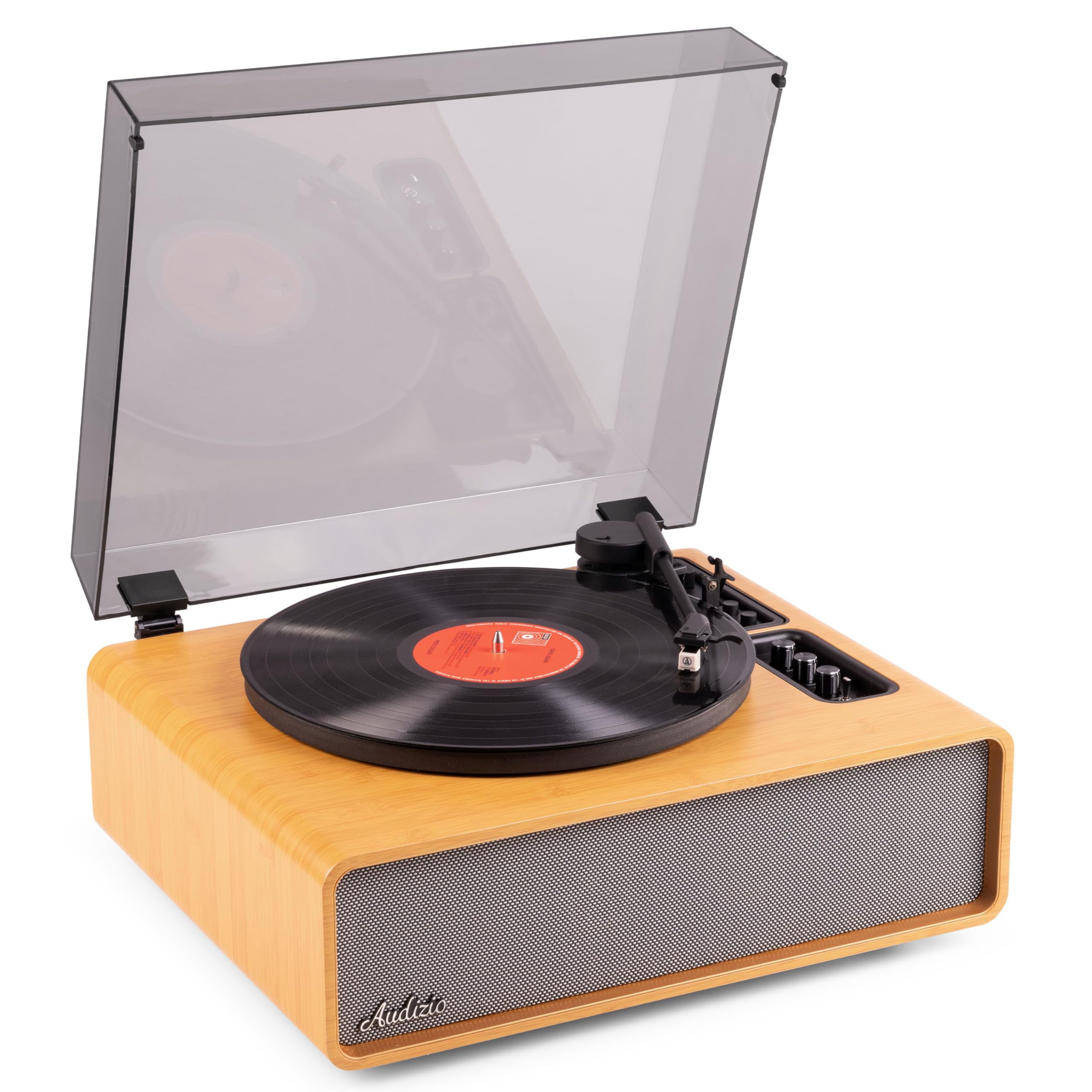
Figure 1.1: Audizio Laredo Turntable, overall view.
2. حفاظتی ہدایات
Please read and follow these safety instructions carefully to prevent damage to the unit and ensure your safety.
- آگ یا بجلی کے جھٹکے سے بچنے کے لیے یونٹ کو بارش یا نمی کے سامنے نہ رکھیں۔
- سی کو نہ کھولیں۔asinجی اندر کوئی صارف کے قابل خدمت حصے نہیں ہیں۔ تمام خدمات کو اہل اہلکاروں سے رجوع کریں۔
- Place the unit on a stable, level surface to prevent it from falling.
- یونٹ کو براہ راست سورج کی روشنی، گرمی کے ذرائع اور ضرورت سے زیادہ دھول سے دور رکھیں۔
- یونٹ کے ارد گرد مناسب وینٹیلیشن کو یقینی بنائیں. وینٹیلیشن کے سوراخوں کو مسدود نہ کریں۔
- صرف فراہم کردہ پاور اڈاپٹر استعمال کریں۔
- بجلی کے طوفان کے دوران یا طویل عرصے تک غیر استعمال ہونے پر یونٹ کو ان پلگ کریں۔
3. پروڈکٹ ختمview
Familiarize yourself with the components and controls of your Audizio Laredo turntable.
اہم اجزاء:
- تھالی: Supports the vinyl record.
- ٹون آرم: کارتوس اور اسٹائلس رکھتا ہے۔
- Cartridge & Stylus: Reads the grooves of the record. (Audio Technica ATN-3600)
- دھول کا احاطہ: تھالی اور ٹونآرم کو دھول سے بچاتا ہے۔
- مربوط اسپیکر: براہ راست آڈیو پلے بیک کے لیے۔
- کنٹرول پینل: For power, volume, tone, and mode selection.
- پیچھے کنکشن: RCA Line Out, AUX In, Power Input.

تصویر 3.1: اوپر view of the turntable with key components visible.

Figure 3.2: Control Panel for volume, bass, and treble adjustments.

Figure 3.3: Audio Technica ATN-3600 Cartridge and Stylus.

Figure 3.4: Tonearm base with speed and auto-stop controls.

Figure 3.5: Rear connection panel.
4. سیٹ اپ
4.1 پیک کھولنا
- اس کی پیکیجنگ سے ٹرن ٹیبل کو احتیاط سے ہٹا دیں۔
- Remove all protective materials, including the stylus guard.
- مستقبل کی نقل و حمل یا اسٹوریج کے لیے پیکیجنگ کو برقرار رکھیں۔
4.2 جگہ کا تعین
- Place the turntable on a stable, level surface to prevent vibrations and ensure proper playback.
- Avoid placing the unit near strong magnetic fields, heat sources, or areas with high humidity.
4.3 ڈسٹ کور کی تنصیب
- Align the hinges of the dust cover with the slots on the back of the turntable.
- Gently push down until the cover is securely in place.
- The dust cover can be removed for playback if desired.

Figure 4.1: Turntable with dust cover.
4.4 پاور کنکشن
- Connect the power adapter to the DC IN port on the rear of the turntable.
- Plug the adapter into a suitable wall outlet (220V).
4.5 ٹونآرم اور کارٹریج سیٹ اپ
- The Audio Technica cartridge is pre-installed.
- The tonearm features an adjustable counterweight. Refer to the detailed instructions in the included manual for precise counterweight adjustment to optimize tracking force.
5. آپریٹنگ ہدایات
5.1 ریکارڈ چلانا
- Place a vinyl record on the platter. If playing a 7-inch single, use the included 45 RPM adapter.
- Select the appropriate speed (33 or 45 RPM) using the speed selector switch near the tonearm base.
- کیونگ لیور کا استعمال کرتے ہوئے ٹونآرم کو آہستہ سے اٹھا لیں۔
- ٹون آرم کو ریکارڈ کے مطلوبہ ٹریک پر رکھیں۔
- کیونگ لیور کا استعمال کرتے ہوئے ٹونآرم کو آہستہ آہستہ کم کریں۔ سٹائلس ریکارڈ کے ساتھ رابطہ کرے گا، اور پلے بیک شروع ہو جائے گا۔
- ریکارڈ کے اختتام پر، آٹو اسٹاپ فنکشن خود بخود پلیٹر کی گردش کو روک دے گا۔ ٹونآرم کو اٹھائیں اور اسے اس کے آرام پر لوٹائیں۔

Figure 5.1: Playing a vinyl record.
5.2 Bluetooth Operation (Bidirectional)
The Laredo turntable supports both Bluetooth input (receiving audio from a device) and Bluetooth output (sending audio to a Bluetooth speaker/headphones).
Bluetooth Input (BT IN):
- Press the MODE/POWER button to select Bluetooth mode. The LED indicator will flash.
- On your smartphone or tablet, enable Bluetooth and search for 'Audizio Laredo'.
- Select the turntable to pair. Once connected, the LED will glow solid.
- You can now stream audio from your device to the turntable's integrated speakers.
Bluetooth Output (BT OUT):
- یقینی بنائیں کہ آپ کا بلوٹوتھ ہیڈ فون یا اسپیکر پیئرنگ موڈ میں ہیں۔
- Set the BT OUT switch (located near the tonearm base) to 'ON'.
- The turntable will automatically search for and connect to the nearest Bluetooth audio device.
- Once connected, the audio from your vinyl record will be transmitted to your Bluetooth device.

Figure 5.2: Bidirectional Bluetooth functionality.
5.3 AUX ان پٹ
- Connect an external audio device (e.g., MP3 player, CD player) to the AUX IN port on the rear of the turntable using a 3.5mm audio cable.
- Press the MODE/POWER button to select AUX mode.
- Audio from the external device will play through the turntable's speakers.
5.4 RCA لائن آؤٹ
- To connect the turntable to an external amplifier or powered speakers, use an RCA cable (not included) to connect the LINE OUT ports on the rear of the turntable to the corresponding input on your audio system.
- Ensure the 'Speaker ON/OFF' switch on the rear is set to 'OFF' if you only want sound from external speakers.
5.5 Volume and Tone Control
- Use the VOLUME knob on the control panel to adjust the overall playback volume.
- Adjust the BASS and TREBLE knobs to fine-tune the audio output to your preference.
6 دیکھ بھال
6.1 یونٹ کی صفائی
- Wipe the dust cover and cabinet with a soft, dry cloth.
- کھرچنے والے کلینر، موم یا سالوینٹس کا استعمال نہ کریں۔
- For the platter, use a slightly damp کپڑے اور اچھی طرح خشک.
6.2 Stylus Care and Replacement
- The stylus is a delicate component. Handle it with care.
- Clean the stylus regularly using a soft brush designed for stylus cleaning, brushing from back to front.
- A stylus typically lasts for approximately 300-500 hours of playback. If you notice a decrease in sound quality or increased skipping, it may be time to replace the stylus.
- Replacement styli (e.g., Audio Technica ATN-3600L or compatible) can be purchased from authorized dealers. Refer to the detailed instructions provided with the replacement stylus for installation.
7 خرابیوں کا سراغ لگانا
If you encounter issues with your turntable, please consult the following table before contacting support.
| مسئلہ | ممکنہ وجہ | حل |
|---|---|---|
| کوئی طاقت نہیں۔ | Power adapter not connected; Power outlet not working. | یقینی بنائیں کہ پاور اڈاپٹر یونٹ اور ورکنگ آؤٹ لیٹ سے محفوظ طریقے سے جڑا ہوا ہے۔ |
| اسپیکر سے کوئی آواز نہیں۔ | Volume too low; Speaker ON/OFF switch is OFF; Incorrect mode selected. | Increase volume; Set 'Speaker ON/OFF' switch to ON; Select correct input mode (Phono, BT IN, AUX). |
| Skipping records | Record is dirty or damaged; Stylus is worn or dirty; Turntable not level; Tracking force incorrect. | Clean record; Clean or replace stylus; Place turntable on a level surface; Adjust tonearm counterweight. |
| بلوٹوتھ جوڑا بنانے کے مسائل | Device too far; Turntable not in pairing mode; Interference. | Ensure devices are within range; Re-enter pairing mode; Turn off other Bluetooth devices. |
| آواز کا بگاڑ | Volume too high; Stylus worn; Record damaged. | Reduce volume; Replace stylus; Try a different record. |
8. وضاحتیں
Technical specifications for the Audizio Laredo Turntable.
| فیچر | تفصیلات |
|---|---|
| ماڈل کا نام | Laredo (101.537) |
| طول و عرض (L x W x H) | 43.2 x 43.2 x 21 سینٹی میٹر (17 x 17 x 8.3 انچ) |
| پروڈکٹ کا وزن | 7.65 کلوگرام (16.86 پونڈ) |
| مواد | Wood (Bamboo finish) |
| گردش کی رفتار | 33 RPM، 45 RPM |
| کارٹریج کی قسم | Audio Technica (ATN-3600) |
| موٹر کی قسم | بیلٹ ڈرائیو |
| سگنل کی شکل | اینالاگ |
| انٹیگریٹڈ اسپیکر | Yes, 160W total output |
| بلوٹوتھ ورژن | 5.4 (Bidirectional) |
| کنیکٹوٹی | Bluetooth (In/Out), RCA Line Out, AUX In |
| طاقت کا منبع | وائرڈ الیکٹرک |
| والیومtage | 220 وولٹ |
| ہم آہنگ آلات | Speakers, Headphones, Smartphone, Tablet |
9. وارنٹی اور سپورٹ
9.1 وارنٹی کی معلومات
This Audizio Laredo Turntable comes with a 2 سال کی وارنٹی from the date of purchase. This warranty covers manufacturing defects and faults under normal use. It does not cover damage caused by misuse, accidents, unauthorized modifications, or normal wear and tear (e.g., stylus wear).
وارنٹی کے دعووں کے لیے براہ کرم اپنی خریداری کا ثبوت اپنے پاس رکھیں۔
9.2 کسٹمر سپورٹ
If you have any questions, require technical assistance, or need to make a warranty claim, please contact your retailer or visit the official Audizio webمعاون وسائل اور رابطہ کی معلومات کے لیے سائٹ۔
Official Audizio Webسائٹ: www.audizio.com