
NIIMBOT D11H
NIIMBOT D11H Label Maker Instruction Manual
ماڈل: D11H
تعارف
Thank you for choosing the NIIMBOT D11H Label Maker. This portable thermal label printer is designed for efficient and clear label printing for various organizational needs in home, office, and small business environments. This manual provides detailed instructions for setup, operation, and maintenance to ensure optimal performance of your device.

Image: A user operating the NIIMBOT D11H label maker with a smartphone, demonstrating its compact size and app-based functionality. The image highlights the device's portability and ease of use for creating various labels.
باکس میں کیا ہے۔
براہ کرم ان باکسنگ پر پیکیج کے مواد کو چیک کریں:
- NIIMBOT D11H Label Maker
- 3 Rolls of Label Tapes (14x30mm clear, 14x40mm white, 12x40mm green)
- Extra 6 Rolls of Mixed Label Paper (White 0.47" x 1.57", Clear 0.47" x 4.29", 0.55" x 1.18")
- USB چارجنگ کیبل (Type-C)
- صارف دستی (یہ دستاویز)

Image: A collection of NIIMBOT label rolls in different sizes and colors, illustrating the variety of labels included with the D11H label maker.
پروڈکٹ ختمview
The NIIMBOT D11H is a compact, portable thermal label printer. It features a 300 DPI print resolution for clear text and graphics, a 1500mAh battery, and a Type-C USB port for charging. It connects via Bluetooth to your mobile device for label design and printing.

Image: A visual comparison between the NIIMBOT D11 and D11H models, highlighting the D11H's improved specifications such as 1500mAh battery, 300dpi resolution, Type-C USB, and 50mm/s printing speed.
سیٹ اپ
1. ڈیوائس کو چارج کرنا
Before first use, fully charge the label maker. Connect the provided USB Type-C cable to the charging port on the device and to a standard USB power adapter (not included).
- چارجنگ انڈیکیٹر لائٹ چارجنگ سٹیٹس دکھائے گی۔
- مکمل چارج ہونے میں عام طور پر تقریباً 2-3 گھنٹے لگتے ہیں۔
2. Installing Label Rolls
- Open the label compartment cover by sliding it open or pressing the release button (refer to device diagram if available).
- Insert the label roll with the printing surface facing upwards, ensuring the labels feed smoothly into the printer mechanism.
- Close the compartment cover firmly until it clicks into place.
- Ensure a small portion of the label tape extends out of the printer's output slot.
3. ایپ ڈاؤن لوڈ اور بلوٹوتھ کنکشن
- ایپ ڈاؤن لوڈ کریں: تلاش کریں۔ "NIIMBOT" or "NIIM" in your mobile app store (iOS App Store or Google Play Store) and download the official application.
- Turn On the Label Maker: پاور بٹن کو دبائے رکھیں جب تک کہ اشارے کی روشنی آن نہ ہو جائے۔
- بلوٹوتھ کو فعال کریں: یقینی بنائیں کہ آپ کے موبائل آلہ پر بلوٹوتھ فعال ہے۔
- ایپ کے ذریعے جڑیں: Open the NIIMBOT app. The app will automatically search for nearby NIIMBOT devices. Select your D11H from the list to pair. Note: Do not pair directly through your phone's Bluetooth settings; connect only via the NIIMBOT app.
- Once connected, the app will display the device status.
آپریٹنگ ہدایات
1. پاور آن/آف
- پاور آن: Press and hold the power button for approximately 2 seconds. The indicator light will illuminate.
- بجلی بند: پاور بٹن کو تقریباً 2 سیکنڈ تک دبائے رکھیں جب تک کہ اشارے کی روشنی بند نہ ہوجائے۔
2 لیبل بنانا اور ان میں ترمیم کرنا
Use the NIIMBOT app to design your labels:
- Open the NIIMBOT app and ensure your D11H is connected.
- Select a template or create a new label from scratch.
- The app offers various features including text, symbols, logos, barcodes, QR codes, images, and time stamps.
- Customize font, size, alignment, and other label properties.
- The D11H supports automatic calibration, meaning the first label will not be wasted during printing.

Image: An illustration showing the NIIMBOT D11H's self-calibration feature, which automatically rewinds the first label to prevent waste, ensuring efficient use of label paper.
3. پرنٹنگ لیبلز
- After designing your label in the app, tap the "Print" button.
- Confirm the number of copies and other print settings.
- The label maker will print the labels. The D11H prints at a speed of 50mm/s.
- سیرت شدہ کنارے کے ساتھ پرنٹ شدہ لیبل کو پھاڑ دیں۔
Note: This label maker produces monochrome printouts, meaning it only prints in black text.

تصویر: ایک قریبی اپ view of the NIIMBOT D11H printing a label, emphasizing its 300 dpi high-resolution thermal printing capability for clear and sharp text.
دیکھ بھال
1. پرنٹ ہیڈ کو صاف کرنا
- صاف کرنے سے پہلے یقینی بنائیں کہ آلہ بند ہے۔
- لیبل کا ٹوکری کھولیں۔
- پرنٹ ہیڈ کو روئی کے جھاڑو سے ہلکے سے صاف کریں۔ampisopropyl الکحل کے ساتھ ختم.
- Allow the print head to dry completely before closing the cover and powering on the device.
2. ذخیرہ
- لیبل بنانے والے کو ٹھنڈی، خشک جگہ پر براہ راست سورج کی روشنی اور انتہائی درجہ حرارت سے دور رکھیں۔
- Remove label rolls if the device will not be used for an extended period.
خرابی کا سراغ لگانا
| مسئلہ | ممکنہ وجہ | حل |
|---|---|---|
| آلہ آن نہیں ہوگا۔ | کم بیٹری؛ ڈیوائس کی خرابی۔ | Charge the device; Contact customer support if issue persists. |
| بلوٹوتھ کے ذریعے مربوط نہیں ہو سکتا | Bluetooth not enabled; Incorrect pairing method; App issue | Ensure Bluetooth is on; Connect via NIIMBOT app only; Restart app and device. |
| ناقص پرنٹ کوالٹی | Dirty print head; Incorrect label orientation; Low battery | Clean the print head; Reinstall label roll correctly; Charge the device. |
| Labels not feeding | Label roll incorrectly installed; Empty roll; Jammed mechanism | Reinstall label roll; Replace with new roll; Check for obstructions. |
| پہلا لیبل ضائع ہو گیا۔ | Automatic calibration not functioning | Ensure the app and firmware are updated. The D11H model is designed to prevent this. |
وضاحتیں
- ماڈل: NIIMBOT D11H
- پرنٹ ریزولوشن: 300 ڈی پی آئی
- پرنٹنگ ٹیکنالوجی: تھرمل پرنٹنگ
- کنیکٹوٹی: بلوٹوتھ
- بیٹری کی صلاحیت: 1500mAh
- چارجنگ پورٹ: USB ٹائپ سی
- پرنٹنگ کی رفتار: 50mm/s
- تعاون یافتہ OS: iOS, Android (via NIIMBOT App)
- پرنٹ رنگین: Monochrome (Black text only)
- خودکار انشانکن: Supported (no first label waste)
ایپلی کیشنز
The NIIMBOT D11H label maker is suitable for a wide range of labeling tasks:
- ہوم تنظیم: Labeling kitchen containers, storage boxes, pantry items.
- آفس کا استعمال: آرگنائزنگ files, folders, stationery, cables.
- چھوٹے کاروبار: Product labeling, price tags, inventory management, jewelry labels.
- ذاتی استعمال: Labeling cosmetics, medicine, gifts, school supplies.

Image: Demonstrates various uses of the NIIMBOT D11H labels, including organizing kitchen items, setting reminders for medication, and labeling office supplies.
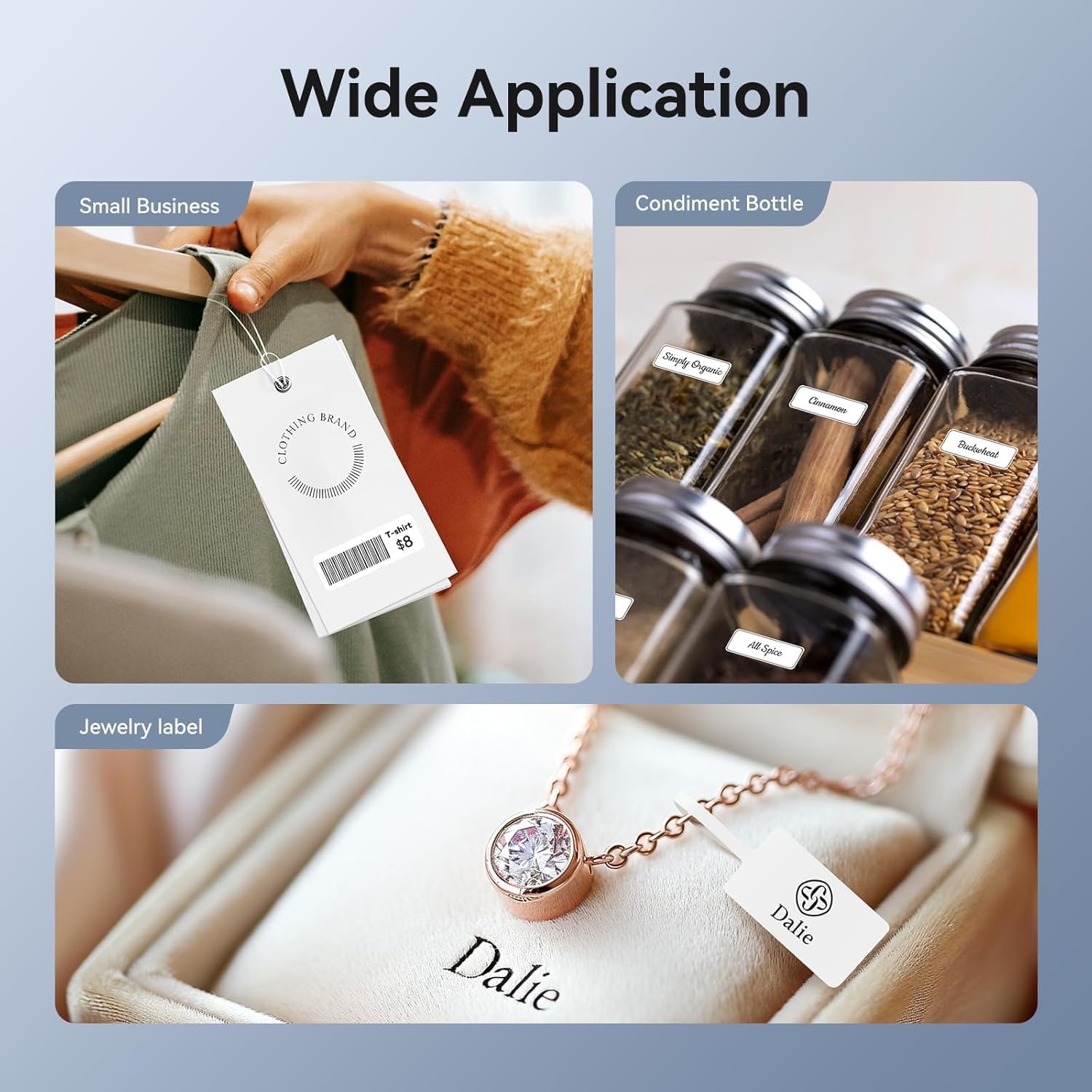
Image: Shows the versatility of the NIIMBOT D11H for small business applications, such as creating price tags for clothing, labeling condiment bottles, and making elegant jewelry labels.

تصویر: ایک کولاج شوasing diverse labeling applications for the NIIMBOT D11H, covering kitchen organization, office filing, cosmetic storage, gift personalization, stationery identification, and medicine management.
وارنٹی اور سپورٹ
NIIMBOT products typically come with a standard manufacturer's warranty. Please refer to the warranty card included in your package or visit the official NIIMBOT webمخصوص وارنٹی شرائط و ضوابط کے لیے سائٹ۔
For technical support, troubleshooting assistance, or warranty claims, please contact NIIMBOT customer service through their official website or the contact information provided in your product packaging. When contacting support, please have your product model (D11H) and purchase details ready.
Ask a question about this manual
Ask about setup, troubleshooting, compatibility, parts, safety, or missing instructions. Manuals+ will review the question and use this page’s manual context to help answer it.