
1. اہم نوٹس
Please carefully check the store name and ensure you are purchasing products sold by "LUZHAN." We have received customer feedback stating that products received did not match the description and were of poor quality. Upon investigation, we found that these customers did not purchase the products from us. To prevent such incidents from happening again in the future and to avoid unnecessary misunderstandings, please carefully verify the store name LUZHAN.

Image: Important notice to verify seller name LUZHAN for authentic products.
2. ختمview
The XIAOMI POCO X8 Pro Max 5G is a high-performance smartphone designed for advanced users. It features a powerful Mediatek Dimensity 9500s processor, a vibrant 1.5K 120Hz AMOLED display, a large 8500mAh battery with 100W HyperCharge, and a 50 MP Light Fusion 600 camera system with OIS. This manual provides essential information for setting up and operating your device.

تصویر: سامنے اور پیچھے view of the POCO X8 Pro Max 5G smartphone.
ویڈیو: ایک اوورview of the POCO X8 Pro Series, highlighting key features and design.
3. سیٹ اپ
3.1 باکس میں کیا ہے۔
- XIAOMI POCO X8 Pro Max 5G Smartphone
- چارجر
- اسکرین پروٹیکٹر (پہلے سے لاگو یا شامل)
3.2 ابتدائی ڈیوائس سیٹ اپ
- پاور آن: Press and hold the power button located on the side of the device until the XIAOMI logo appears.
- زبان اور علاقہ: اپنی پسند کی زبان اور علاقہ منتخب کرنے کے لیے آن اسکرین پرامپٹس پر عمل کریں۔
- Wi-Fi سے جڑیں: Select your Wi-Fi network and enter the password to connect to the internet. This is necessary for initial setup and software updates.
- گوگل اکاؤنٹ: اپنے Google اکاؤنٹ کے ساتھ سائن ان کریں یا ایک نیا بنائیں۔ یہ گوگل پلے اسٹور اور دیگر گوگل سروسز تک رسائی کے لیے ضروری ہے۔
- ڈیٹا کی منتقلی: If you are upgrading from another device, you may have the option to transfer your data (apps, photos, contacts) during this stage.
- سیکورٹی سیٹ اپ: Set up your preferred security method, such as a PIN, pattern, password, or fingerprint. The device supports an ultrasonic fingerprint sensor.
- مکمل سیٹ اپ: سیٹ اپ کے عمل کو حتمی شکل دینے کے لیے باقی ماندہ اشارے پر عمل کریں۔
3.3 SIM Card and eSIM Setup
The POCO X8 Pro Max 5G supports physical SIM cards and eSIM functionality.
- Physical SIM: Use the provided SIM ejector tool to open the SIM tray. Insert your Nano-SIM card(s) into the tray, ensuring proper orientation. Close the tray securely.
- eSIM: For eSIM activation, navigate to Settings > Network & internet > SIMs and follow the instructions to add an eSIM profile provided by your carrier.
4. آپریٹنگ ہدایات
4.1 ڈسپلے کی خصوصیات
Your device features a 6.83-inch 1.5K ultra-bright AMOLED display with a 120Hz refresh rate for smooth visuals and a 24x super resolution touch for enhanced responsiveness. It also includes eye protection features and Corning Gorilla Glass 7i for durability.
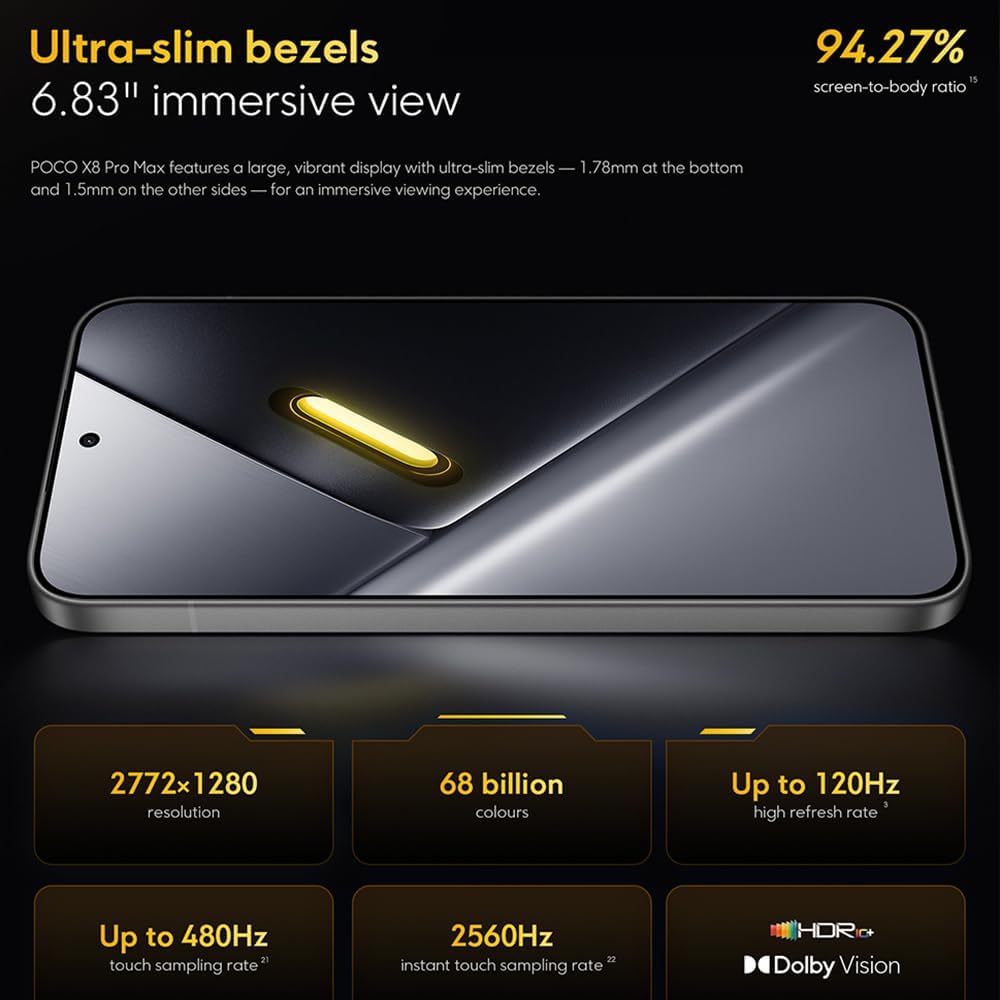
Image: The 6.83-inch 1.5K ultra-bright AMOLED display with minimal bezels.
4.2 کارکردگی
Powered by the Mediatek Dimensity 9500s chipset (3nm, 4+4 All Big Core architecture, NPU890 AI processor), the POCO X8 Pro Max 5G delivers high performance. The POCO 3D IceLoop cooling system ensures efficient heat dissipation, maintaining optimal performance during intensive tasks like gaming.

Image: Diagram illustrating the Mediatek Dimensity 9500s flagship platform.

Image: Illustration of the 5800mm² ultra-large LHP area for cooling.
4.3 کیمرا سسٹم
The device features a 50 MP Light Fusion 600 main camera with OIS (Optical Image Stabilization) and an 8 MP ultra-wide camera. It supports portrait mode with bokeh + HDR and dynamic video-to-still conversion.

Image: Close-up of the 50 MP main camera and 8 MP ultra-wide camera system.
4.4 بیٹری اور چارجنگ
Equipped with a massive 8500 mAh (typical) battery, the POCO X8 Pro Max 5G offers extended usage. It supports 100W HyperCharge, allowing for rapid recharging. A 16% ultra-high carbon-silicon content contributes to its high energy density.

Image: Illustration highlighting the massive 8500mAh battery capacity.

Image: Visual representation of the 100W HyperCharge technology.
4.5 آڈیو
The device features symmetrical dual stereo speakers (1115F) for a balanced and immersive audio experience.
4.6 سافٹ ویئر
The POCO X8 Pro Max 5G comes with Xiaomi HyperOS 3 installed, offering an optimized and user-friendly interface based on Android 16.
5 دیکھ بھال
5.1 اپنے آلے کو صاف کرنا
- اسکرین اور بیک پینل کو صاف کرنے کے لیے نرم، لنٹ فری کپڑا استعمال کریں۔
- سخت کیمیکلز، کھرچنے والے مواد، یا ایروسول سپرے کے استعمال سے پرہیز کریں۔
- ضدی smudges کے لئے، تھوڑا سا dampur پانی کے ساتھ کپڑا یا الیکٹرانکس کے لیے ڈیزائن کیا گیا سکرین کلینر۔
5.2 دھول اور پانی کی مزاحمت
The device is certified for IP68 dust and water resistance. This means it can withstand immersion in up to 2 meters of water for 30 minutes under specific laboratory conditions. However, water and dust resistance may deteriorate over time with normal wear and tear. The warranty does not cover liquid damage. Avoid exposing the device to hot water, saltwater, or other liquids.

Image: Visual representation of the IP68 dust and water resistance.
5.3 سافٹ ویئر اپ ڈیٹس
باقاعدگی سے سافٹ ویئر اپ ڈیٹس کو چیک کریں اور انسٹال کریں تاکہ یہ یقینی بنایا جا سکے کہ آپ کے آلے میں تازہ ترین خصوصیات، سیکیورٹی پیچ اور کارکردگی میں بہتری ہے۔ آپ کو عام طور پر یہ اختیار مل سکتا ہے۔ سیٹنگز > فون کے بارے میں > سسٹم اپ ڈیٹ.
6 خرابیوں کا سراغ لگانا
6.1 عام مسائل اور حل
- ڈیوائس آن نہیں ہو رہی ہے: یقینی بنائیں کہ بیٹری چارج ہے۔ ڈیوائس کو چارجر سے جوڑیں اور اسے دوبارہ آن کرنے کی کوشش کرنے سے پہلے چند منٹ انتظار کریں۔
- اسکرین غیر جوابدہ: ڈیوائس کو دوبارہ شروع کرنے کی کوشش کریں جب تک کہ یہ دوبارہ شروع نہ ہو تب تک پاور بٹن کو لمبے عرصے تک (مثلاً 10-15 سیکنڈ) تک دبائے رکھیں۔
- ایپس کریش ہو رہی ہیں: پریشانی والے ایپ کے کیشے کو صاف کریں (ترتیبات > ایپس > [ایپ کا نام] > اسٹوریج > کیشے صاف کریں۔) یا ایپ کو دوبارہ انسٹال کریں۔ یقینی بنائیں کہ آپ کا آلہ سافٹ ویئر اپ ٹو ڈیٹ ہے۔
- خراب بیٹری کی زندگی: Check background app usage, reduce screen brightness, disable unnecessary features like GPS or Bluetooth when not in use, and ensure your software is updated.
- نیٹ ورک کنیکٹیویٹی کے مسائل: Restart your device. Check if your SIM card is properly inserted. Toggle Airplane Mode on and off. Reset network settings (سیٹنگز > سسٹم > ری سیٹ آپشنز > Wi-Fi، موبائل اور بلوٹوتھ کو ری سیٹ کریں۔).
6.2 فیکٹری ری سیٹ
If you encounter persistent issues, a factory reset may be necessary. انتباہ: یہ آپ کے آلے پر موجود تمام ڈیٹا کو مٹا دے گا۔ آگے بڑھنے سے پہلے اہم ڈیٹا کا بیک اپ لیں۔ پر جائیں۔ ترتیبات > سسٹم > ری سیٹ کے اختیارات > تمام ڈیٹا مٹائیں (فیکٹری ری سیٹ) اور اسکرین پر دی گئی ہدایات پر عمل کریں۔
7. وضاحتیں
| فیچر | تفصیلات |
|---|---|
| برانڈ | XIAOMI |
| ماڈل کا نام | POCO X8 Pro Max 5G |
| آپریٹنگ سسٹم | Android 16 (with Xiaomi HyperOS 3) |
| میموری ذخیرہ کرنے کی صلاحیت | 512 جی بی |
| اسکرین کا سائز | 6.83 انچ |
| ڈسپلے کی قسم | AMOLED, 1.5K, 120Hz refresh rate |
| سیلولر ٹیکنالوجی | 5G |
| رنگ | Noir (سیاہ) |
| کنیکٹر کی قسم | USB قسم C |
| بائیو میٹرک سیکیورٹی | Fingerprint Recognition (Ultrasonic) |
| بیٹری کی صلاحیت | 8500 mAh (لتیم پولیمر) |
| چارج ہو رہا ہے۔ | 100W ہائپر چارج |
| مین کیمرہ | 50 MP Light Fusion 600 with OIS |
| الٹرا وائیڈ کیمرہ | 8 MP |
| پروسیسر | Mediatek Dimensity 9500s |
| دھول اور پانی کی مزاحمت | آئی پی 68 |
| ماڈل کا سال | 2025 |
| اصل ملک | چین |
8. وارنٹی اور سپورٹ
For detailed warranty information and customer support, please refer to the warranty card included with your product or visit the official XIAOMI webسائٹ وارنٹی کے دعووں کے لیے اپنی خریداری کا ثبوت رکھیں۔
Online resources and FAQs may also be available on the XIAOMI support portal.