1. تعارف
The Extech SDL200 is a versatile four-channel thermometer and data logger designed for precise temperature measurement and recording. It supports six types of thermocouples (J, K, E, T, R, S) and two channels for RTD (Pt100Ohm) probes, allowing for a wide range of applications. This device can display individual channel readings (T1, T2, T3, T4) or differential readings (T1-T2). It features an offset adjustment for relative measurements and can store up to 99 readings manually, with an extensive capacity of 20 million readings via a 2GB SD memory card. All recorded data is time-stamped and saved in an Excel-compatible format for easy transfer and analysis on a PC. The SDL200 also includes user-programmable sampling rates, Min/Max recording, Data Hold, Auto Power Off, and a built-in PC interface.
2. حفاظتی معلومات
Please read and understand all safety instructions before operating the Extech SDL200. Failure to follow these instructions may result in injury or damage to the device.
- Do not operate the device if it appears damaged or if the insulation is compromised.
- Ensure proper probe connection before taking measurements.
- ڈیوائس کو انتہائی درجہ حرارت، نمی، یا براہ راست سورج کی روشنی کے سامنے لانے سے گریز کریں۔
- Use only specified battery types and ensure correct polarity during installation.
- Keep the device clean and dry. Refer to the maintenance section for cleaning instructions.
- ڈیوائس کی مرمت یا ترمیم کرنے کی کوشش نہ کریں۔ تمام خدمات کو اہل اہلکاروں سے رجوع کریں۔
3. پیکیج کے مشمولات
تصدیق کریں کہ پیک کھولنے پر تمام اشیاء موجود ہیں:
- Extech SDL200 Four-Channel Thermometer SD Logger unit
- 6 اے اے بیٹریاں
- Four general purpose Type K bead wire temperature probes
- SD memory card (2GB)
- مشکل لے جانے والا کیس

تصویر 3.1: Extech SDL200 unit with four Type K thermocouple probes inserted into the top ports. The display shows temperature readings for T1, T2, T3, and T4.

تصویر 3.2: The retail packaging box for the Extech SDL200, displaying the brand logo, model name, and UPC code (0793950432105).
4. پروڈکٹ ختمview
The SDL200 features a clear digital display and intuitive button layout for easy operation. The top of the device includes four input ports for thermocouple probes. The side of the device houses connectivity ports for power and PC interface, along with RTD probe inputs.

تصویر 4.1: طرف view of the Extech SDL200, illustrating the DC 9V power input, RS232 serial port for PC connection, and two RTD (PT100Ohm) probe input ports labeled PT1 and PT2, protected by a rubber flap.

تصویر 4.2: A set of four yellow Type K bead wire temperature probes with standard mini-connectors, alongside a larger clamp-style temperature probe, demonstrating the variety of probes that can be used with the device.
5. سیٹ اپ
5.1. بیٹری کی تنصیب
- ڈیوائس کے عقبی حصے میں بیٹری کے ٹوکری کا احاطہ کھولیں۔
- Insert six (6) AA batteries, ensuring correct polarity as indicated inside the compartment.
- بیٹری کے کمپارٹمنٹ کور کو محفوظ طریقے سے بند کریں۔
5.2. تحقیقات کنکشن
- For thermocouple probes (Type J, K, E, T, R, S), connect them to the four input jacks located at the top of the meter. Ensure the correct thermocouple type is selected in the device settings if applicable.
- For RTD (Pt100Ohm) probes, connect them to the PT1 and PT2 ports on the side of the device (refer to Figure 4.1).
5.3 SD کارڈ داخل کرنا
- Locate the SD card slot, typically on the side or bottom of the device.
- Insert the provided 2GB SD memory card into the slot until it clicks into place.
- ہٹانے کے لیے، کارڈ کو آہستہ سے اندر کی طرف دھکیلیں جب تک کہ یہ نکل نہ جائے۔
6. آپریٹنگ ہدایات
6.1. پاور آن/آف
دبائیں پاور آلہ کو آن یا آف کرنے کے لیے بٹن۔
6.2 بنیادی درجہ حرارت کی پیمائش
- Connect the desired temperature probes.
- Power on the device. The display will show real-time temperature readings for the connected channels (T1, T2, T3, T4).
- دبائیں T1-T2 button to switch between individual channel display and differential temperature (T1-T2) display.
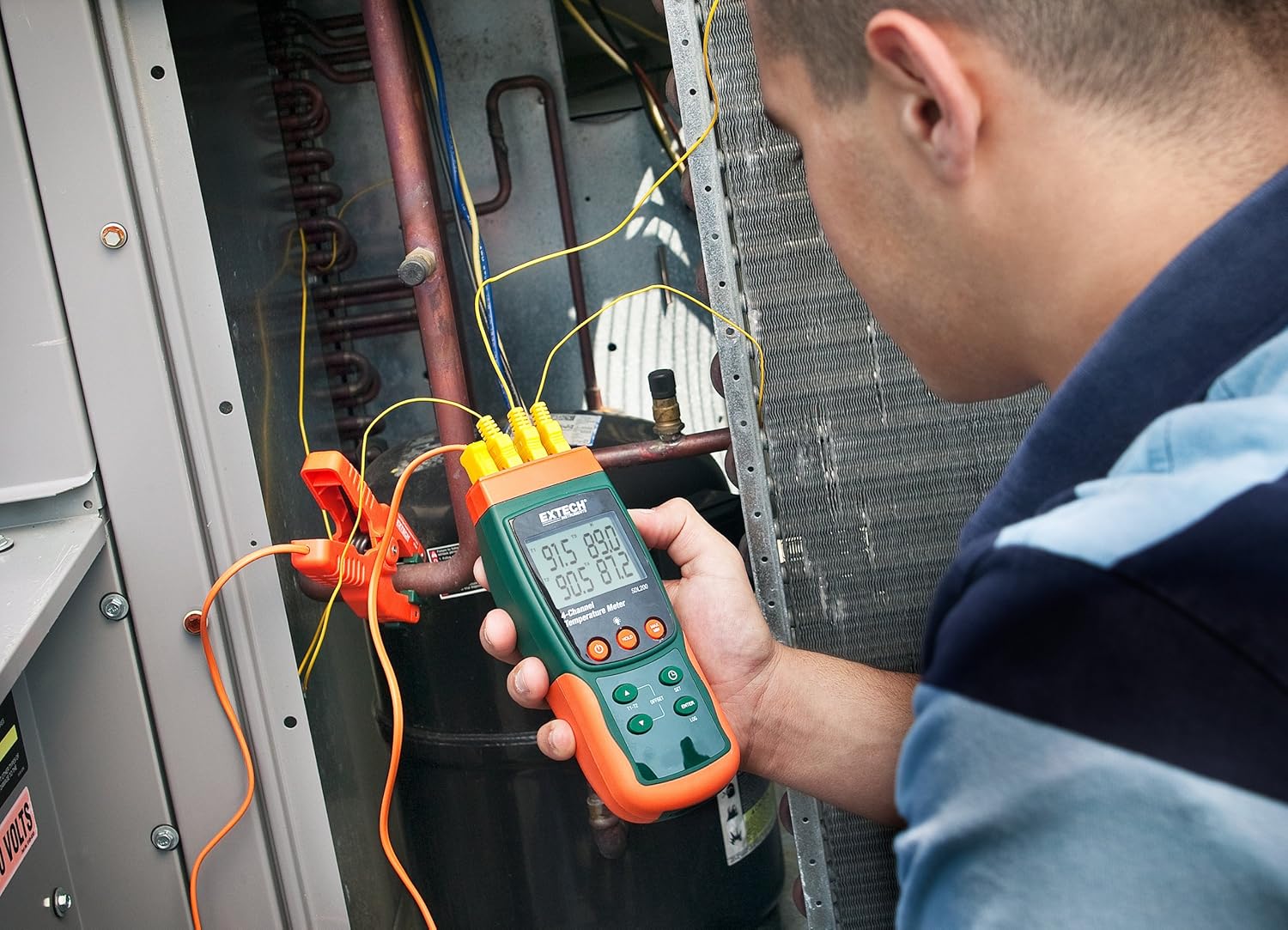
تصویر 6.1: A technician utilizing the Extech SDL200 to monitor multiple temperature points on an HVAC system, demonstrating its application in industrial and scientific settings.
6.3. ڈیٹا لاگنگ
The SDL200 can record temperature data to the SD card with a real date and time stamp.
- ایس سیٹ کریں۔ampزبان کی شرح: استعمال کریں۔ سیٹ button to access settings and adjust the sampلنگ کی شرح (1 سے 3600 سیکنڈ)۔
- لاگنگ شروع کریں: دبائیں LOG button to begin recording data to the SD card. A logging indicator will appear on the display.
- Stop Logging: دبائیں LOG ڈیٹا ریکارڈنگ کو روکنے کے لیے دوبارہ بٹن۔
- ڈیٹا کی منتقلی: Remove the SD card and insert it into a computer to access the data, which is saved in Excel (.xls) format.
6.4. Min/Max and Data Hold
- کم سے کم/زیادہ سے زیادہ: دبائیں MAX/MIN button to display the maximum or minimum recorded temperature since the function was activated. Press again to cycle through Max, Min, and current readings.
- ڈیٹا ہولڈ: دبائیں پکڑو button to freeze the current readings on the display. Press again to release.
6.5. Offset Adjustment
استعمال کریں۔ آفسیٹ button to perform a zero function for relative measurements. Consult the full manual for detailed calibration procedures.
6.6. آٹو پاور آف
The device features an Auto Power Off function to conserve battery life. This can typically be disabled or adjusted in the settings menu if continuous operation is required.
6.7 پی سی انٹرفیس
The built-in RS232 PC interface allows for real-time data streaming and advanced control using compatible software (sold separately or available for download from Extech's website). Connect the device to your PC using an appropriate RS232 cable.
7 دیکھ بھال
7.1. صفائی
آلے کو نرم سے صاف کریں، ڈیamp cloth. Do not use abrasive cleaners or solvents. Ensure the device is dry before storage or further use.
7.2 بیٹری کی تبدیلی
جب ڈسپلے پر بیٹری کا کم اشارے ظاہر ہو تو بیٹریاں تبدیل کریں۔ بیٹری کی تنصیب کی ہدایات کے لیے سیکشن 5.1 سے رجوع کریں۔
7.3. ذخیرہ
When not in use for extended periods, remove the batteries and store the device in its hard carrying case in a cool, dry place.
8 خرابیوں کا سراغ لگانا
- ڈیوائس آن نہیں ہے: بیٹری کی تنصیب کو چیک کریں اور یقینی بنائیں کہ بیٹریاں ختم نہیں ہوئی ہیں۔ اگر ضروری ہو تو تبدیل کریں۔
- غلط درجہ حرارت کی ریڈنگ: Verify probe connections are secure and that the correct probe type is selected (if applicable). Ensure probes are not damaged.
- Data logging not working: Check if the SD card is properly inserted and has sufficient free space. Ensure the logging function is activated.
- پی سی کنکشن کے مسائل: Verify the RS232 cable connection and ensure the correct drivers and software are installed on your PC.
9. وضاحتیں
| فیچر | تفصیلات |
|---|---|
| برانڈ | Extech |
| ماڈل کا نام | SDL200 |
| خصوصی خصوصیت | 4-Channel Datalogging |
| ڈسپلے کی قسم | ڈیجیٹل |
| کنیکٹوٹی ٹیکنالوجی | USB (via RS232 interface) |
| طاقت کا منبع | بیٹری سے چلنے والی (6 AA بیٹریاں شامل ہیں) |
| اوپری درجہ حرارت کی درجہ بندی | 2732 ڈگری فارن ہائیٹ |
| رسپانس ٹائم | 1 سیکنڈ |
| Datalogging Capacity | 20M readings via 2G memory card |
| Sampلنگ ریٹ | 1 to 3600 seconds (user programmable) |
| تھرموکوپل کی اقسام | J, K, E, T, R, S (4-channel) |
| RTD تحقیقات | Pt100Ohm (2-channel) |
| شامل اجزاء | Batteries, Bead wire temperature probes, memory card, case |
| شے کا وزن | 1.1 پاؤنڈ |
| آئٹم کی لمبائی | 7.2 انچ |
| بیرونی مواد | پولی کاربونیٹ (PC) |
| تفصیلات میٹ | CE |
10. وارنٹی اور سپورٹ
Extech products are designed for reliability and performance. For warranty information, technical support, or service inquiries, please refer to the official Extech webسائٹ یا ان کے کسٹمر سروس ڈیپارٹمنٹ سے رابطہ کریں۔ وارنٹی دعووں کے لیے خریداری کے ثبوت کے طور پر اپنی خریداری کی رسید رکھیں۔
اضافی وسائل کے لیے، ملاحظہ کریں۔ Extech Store on Amazon.


