1. تعارف
The Antec TruePower TPQ-1200 is a high-performance 1200-watt power supply designed for demanding computer systems. It features an 80 PLUS Silver certification, indicating high energy efficiency, and provides stable power delivery through its six +12V rails. This manual provides essential information for the safe installation, operation, and maintenance of your TPQ-1200 power supply.
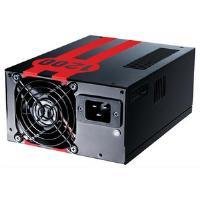
Image 1.1: The Antec TruePower TPQ-1200 Power Supply unit, showcasing its design and modular connectors.
2. حفاظتی معلومات
Please read and understand all safety instructions before installing or operating the power supply. Failure to do so may result in personal injury or damage to your equipment.
- Always disconnect the power cord from the wall outlet before installing, removing, or cleaning the power supply.
- یہ پاور سپلائی صرف پرسنل کمپیوٹرز میں استعمال کے لیے بنائی گئی ہے۔ اسے کسی اور مقصد کے لیے استعمال نہ کریں۔
- بجلی کی فراہمی نہ کھولیں casinجی اعلی والیومtages اندر موجود ہیں، اور صارف کے قابل خدمت حصے نہیں ہیں۔ سی کھولناasing وارنٹی کو کالعدم کردے گا۔
- اپنے کمپیوٹر سسٹم کی مناسب بنیاد کو یقینی بنائیں۔
- Avoid operating the power supply in high humidity or extreme temperature environments.
- Keep the power supply away from liquids and sources of heat.
3. پیکیج کے مشمولات
تصدیق کریں کہ آپ کے پیکیج میں درج ذیل آئٹمز ہیں:
- Antec TruePower TPQ-1200 Power Supply Unit
- Modular Cable Set (PCIe, SATA, Molex, Floppy)
- AC پاور کورڈ
- بڑھتے ہوئے پیچ
- صارف دستی (یہ دستاویز)
If any items are missing or damaged, please contact your retailer or Antec customer support.
4 خصوصیات
The Antec TruePower TPQ-1200 power supply offers advanced features for reliable and efficient performance:
- 1200 واٹ مسلسل طاقت: فراہم کرتا ہے۔ ample power for high-end gaming and workstation systems.
- 80 PLUS Silver Certified: گرمی کی پیداوار اور آپریٹنگ اخراجات کو کم کرتے ہوئے، 88 فیصد تک کارکردگی حاصل کرتا ہے۔
- Six +12V Rails: Delivers stable and clean power to critical components.
- اعلی درجے کی کیبل مینجمنٹ: Semi-modular design allows for cleaner builds and improved airflow.
- PowerCache High Performance Capacitors: Enhances stability and transient response.
- Ultra-Quiet Pulse Width Modulation (PWM) Fan: Provides efficient cooling with minimal noise.
- Industrial Grade Protection Circuitry: اوور کرنٹ پروٹیکشن (او سی پی)، اوور والیوم پر مشتمل ہے۔tagای پروٹیکشن (او وی پی) ، زیر جلد۔tage Protection (UVP), Short Circuit Protection (SCP), Over Power Protection (OPP), and Over Temperature Protection (OTP).
5. سیٹ اپ اور انسٹالیشن
Follow these steps carefully to install your Antec TruePower TPQ-1200 power supply.
5.1 قبل از تنصیب چیک لسٹ۔
- Ensure your computer case supports an ATX power supply.
- ضروری اوزار جمع کریں: فلپس ہیڈ سکریو ڈرایور۔
- Unplug your computer from the wall outlet and discharge any residual power by pressing the power button.
5.2 بجلی کی فراہمی کو بڑھانا
- Carefully place the power supply into the designated PSU bay in your computer case. Ensure the fan is oriented correctly (typically facing down for bottom-mounted PSUs, or according to case design for top-mounted).
- بجلی کی فراہمی پر سکرو کے سوراخوں کو کیس کے ساتھ سیدھ میں رکھیں۔
- Secure the power supply using the provided mounting screws. Do not overtighten.
5.3 پاور کیبلز کو جوڑنا
Connect the necessary cables to your motherboard and components. The TPQ-1200 features both fixed and modular cables.
- 24-Pin ATX Motherboard Power: Connect the main 24-pin connector to the corresponding port on your motherboard. Ensure it clicks into place.
- 8-Pin EPS12V (CPU) Power: Connect the 8-pin (or 4+4 pin) EPS12V connector to the CPU power port on your motherboard.
- PCIe (Graphics Card) Power: For graphics cards requiring additional power, connect the appropriate 6-pin or 6+2 pin PCIe modular cables from the power supply to your graphics card(s).
- سیٹا پاور: Connect SATA modular cables to your SATA hard drives, SSDs, and optical drives.
- Molex (Peripheral) Power: Use Molex modular cables for older peripherals or case fans that require this connector type.
- کیبل مینجمنٹ: Route cables neatly behind the motherboard tray or in other designated areas of your case to improve airflow and aesthetics.
5.4 ابتدائی پاور آن
- یقینی بنائیں کہ تمام کنکشن محفوظ ہیں۔
- Connect the AC power cord to the power supply and then to a grounded wall outlet.
- Flip the power switch on the back of the power supply to the 'ON' (I) position.
- اپنے کمپیوٹر پر پاور۔
6. آپریٹنگ ہدایات
The Antec TruePower TPQ-1200 is designed for continuous operation within its specified limits. Ensure adequate ventilation around your computer case to prevent overheating. The intelligent PWM fan will adjust its speed based on the power supply's temperature to maintain optimal cooling and noise levels.
Always shut down your computer properly through the operating system before turning off the power supply switch or unplugging the AC cord.
7 دیکھ بھال
باقاعدگی سے دیکھ بھال آپ کی بجلی کی فراہمی کی لمبی عمر اور بہترین کارکردگی کو یقینی بنانے میں مدد کرتی ہے۔
- دھول کی صفائی: Periodically (e.g., every 6-12 months), disconnect the power supply from the wall outlet and use compressed air to gently clean dust from the fan grille and ventilation openings. Do not open the power supply casing.
- کیبل معائنہ: Occasionally check all power cable connections to ensure they are secure and free from damage.
8 خرابیوں کا سراغ لگانا
If you encounter issues with your power supply, refer to the following troubleshooting guide:
| مسئلہ | ممکنہ وجہ | حل |
|---|---|---|
| کمپیوٹر آن نہیں ہوتا۔ | AC power cord not connected or loose. Power supply switch is OFF. Faulty power supply. | Ensure AC cord is firmly connected. Flip PSU switch to 'ON' (I). Test with another power supply if possible. |
| سسٹم پاور آن لیکن فوری طور پر بند ہو جاتا ہے۔ | Overload, short circuit, or overheating. | Check for short circuits (e.g., loose screws). Ensure adequate ventilation. Disconnect non-essential components to check for overload. |
| سسٹم کی عدم استحکام یا بے ترتیب ریبوٹس۔ | Insufficient power, faulty component, or power supply issue. | Verify all power connectors are secure. Ensure total system wattage does not exceed PSU capacity. Test components individually if possible. |
| PSU سے تیز پنکھے کا شور۔ | Dust accumulation, fan malfunction, or high load. | Clean dust from the fan grille. If noise persists and is excessive, contact support. |
If troubleshooting steps do not resolve the issue, contact Antec customer support for further assistance.
9. وضاحتیں
Detailed technical specifications for the Antec TruePower TPQ-1200 power supply:
- ماڈل کا نام: TruePower TPQ-1200
- آؤٹ پٹ واٹtage: 1200 واٹ
- فارم فیکٹر: ATX12V
- کنیکٹر کی قسم: اے ٹی ایکس
- کارکردگی: 80 PLUS Silver Certified
- کولنگ کا طریقہ: Air (PWM Fan)
- مداحوں کی تعداد: 1
- ہم آہنگ آلات: پرسنل کمپیوٹر
- آئٹم کا وزن: 4.96 پاؤنڈ (2.25 کلوگرام)
- پیکیج کے طول و عرض: 12.91 x 9.84 x 5.59 انچ (32.8 x 25 x 14.2 سینٹی میٹر)
- تاریخ پہلی دستیابی: 17 اپریل 2012
10. وارنٹی اور سپورٹ
For warranty information and technical support, please refer to the official Antec webسائٹ یا ان کی کسٹمر سروس سے براہ راست رابطہ کریں۔ وارنٹی کی شرائط و ضوابط خطے اور خریداری کی تاریخ کے لحاظ سے مختلف ہو سکتے ہیں۔
Antec Official Webسائٹ: www.antec.com


